This post contains affiliate links. We may earn a commission if you click on them and make a purchase. It’s at no extra cost to you and helps us run this site. Thanks for your support!
Each one of these Adobe InDesign templates went through a full review on WE AND THE COLOR first. Each one earned its spot because it survived real editing, not just a polished preview screenshot.
Design hiring moved to laptops and video calls, not printed booklets. Job seekers, agencies, and product teams all need files that hold up on a screen and export cleanly to PDF. That shift is exactly why these Adobe InDesign templates matter right now. A marketplace scroll won’t tell you which ones actually survive real editing, real deadlines, and real client feedback. We already did that part.
What Actually Separates a Great Adobe InDesign Template From a Waste of Money?
Most “best templates” roundups repeat marketing copy from a product listing. That’s not useful, and it’s not honest. So before we get to the five picks, here’s the framework we used to judge every Adobe InDesign template on this list. We call it the Template Trust Score, and it looks at three things a preview image can never show you.
The Three Pillars of the Template Trust Score
Style Architecture asks whether the file uses real InDesign paragraph and character styles, or just manually formatted text boxes pretending to be a system. A template with strong Style Architecture lets you change one style and watch every matching element update at once. A weak one makes you fix each text frame by hand.
Format Discipline asks whether the file’s page size, resolution, and color mode actually match how people will use it. A pitch deck built at native 1920 by 1080 pixels has strong Format Discipline. A print catalog set up in CMYK with proper bleed has it too. A resume built for US Letter and sold to an international audience does not.

Placeholder Honesty asks how clearly a listing tells you what’s included and what isn’t. Nearly every Adobe InDesign template on Adobe Stock uses placeholder photography that isn’t part of the download. The good ones say so plainly. The weaker ones let the preview do the talking and leave you to find out later.
Each template gets a score out of five on all three pillars, for a total out of fifteen. Nothing here is pulled from a spec sheet. Every score reflects actual time spent inside InDesign, swapping content, breaking things on purpose, and seeing what held.
The 5 Best Adobe InDesign Templates We Tested This Year
These five cover the documents most creative professionals actually need: a pitch deck, a resume, two kinds of portfolio, and a product catalog. They’re not ranked by popularity. They’re ranked by Trust Score, highest first, based on what happened when we actually opened the files.
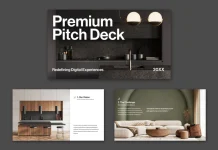
1. Strategic Pitch Deck Template by RedGiant — Trust Score: 14/15

This is one of the strongest Adobe InDesign templates for pitch decks we’ve tested this year. It’s built at native 1920 by 1080 pixels across 22 predesigned pages, covering everything from the cover and market opportunity through financials, ask, and CTA. The visual language leans into what we’d call editorial minimalism: bold structural type, black-and-white photography used as texture, and whitespace that actually does work instead of just sitting there.
The Style Architecture is excellent. Paragraph styles are set up properly, so a text override pushes new copy into the right size and weight automatically. We also tested InDesign’s interactive features directly on this file, adding page transitions and button states for an interactive PDF export. Nothing broke, because the layer structure stays clean instead of getting tangled. Format Discipline scores just as high. The 1920-by-1080 canvas reads clearly on a 27-inch monitor and a 13-inch laptop alike, which is exactly what a pitch deck needs today.
The only ding: the photography is placeholder-only, and there’s no built-in slide for a competitive landscape matrix, a gap worth knowing about before you buy. Still, for a Series A deck or a high-stakes agency pitch, this is one of the best Adobe InDesign templates available right now.
2. A4 Resume and Cover Letter Set by GraphyPix — Trust Score: 14/15

If you’re job hunting outside the US, this Adobe InDesign resume template solves a problem most competitors ignore. It’s built natively in A4, not stretched or cropped from a US Letter file, and it ships in CMYK color mode from the start. We printed a test copy at a local shop instead of just trusting a home inkjet, and the margins held at exactly 15mm with no color drift.
Style Architecture is where this template really shines. Every heading and body line runs through linked paragraph and character styles, so a single swatch change cascades the entire color scheme across both the resume and its matching cover letter in seconds. We tested three alternate palettes, including a conservative black-and-white version, and every swap took under five minutes. The layout itself uses what we’d describe as an Asymmetric Anchor Layout: a fixed-width contact column next to a flexible experience column that absorbs whatever content you throw at it.
The cover letter deserves a specific mention. It shares the same typography, accent color, and photo placement as the resume, so the pair reads as one cohesive application instead of two mismatched documents. For creative professionals applying internationally, this is genuinely one of the better Adobe InDesign templates for the job.
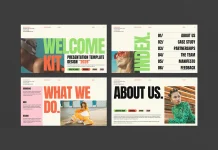
3. Screen-First Portfolio Layout by RedGiant — Trust Score: 12/15

Most InDesign portfolio templates are still built around A4 or US Letter, which makes no sense when nearly every review happens on a screen. This one fixes that with a native 1920 by 1080 canvas across 12 pages, built for UI/UX designers, product designers, and branding professionals specifically.
The template runs on three distinct layout modes we’d call the Anchor Spread, the Evidence Grid, and the Split Narrative, each handling a different pacing job across the deck. That variation matters more than it sounds. It stops a 12-page portfolio from feeling like the same slide copied twelve times. A consistent navigation strip across every page, showing a date field, a URL, and a page number, also helps a viewer stay oriented, something we’d call a Persistent Context Strip.
Where it loses points: the large display type on anchor pages doesn’t auto-scale, so longer headlines need manual tracking adjustments. There’s also a small typo on the closing page worth fixing before you present. Neither is a dealbreaker, but they’re the kind of detail a preview screenshot won’t show you. For product and UI/UX designers who live on screen, it still earns its place among the best Adobe InDesign templates for portfolios.
4. Furniture and Product Catalog Template by Tom Sarraipo — Trust Score: 14/15

Catalog design gets overlooked in most “best templates” conversations, which is a mistake, because a bad catalog quietly undermines an entire product line. This A4 Adobe InDesign catalog template avoids that trap. It’s built for furniture, interior, and product brands, and it runs in CMYK from the ground up, with proper bleed settings, crop marks, and ICC color profile support baked in.
Style Architecture here is genuinely impressive. Master pages control headers and footers with precision, so updating one element updates every linked page instantly. Swap the primary typeface in the paragraph styles panel, and every headline and caption updates at once. We replaced an entire spread of placeholder content in under eight minutes during testing, which tells you how well the underlying grid was built. Format Discipline is equally strong, thanks to the CMYK setup and proper prepress support most templates skip entirely.
What makes this catalog template stand out structurally is a pattern we’d call Contextual Proximity: each product appears first in a lifestyle photo, then again in a clean, clinical item card. That two-step sequence builds desire before it delivers specs, and it’s baked into the layout instead of left up to you. For furniture, interior, and lifestyle brands, this is one of the most complete Adobe InDesign templates on the market right now.
5. Graphic Design Portfolio Presentation Template by E-Type — Trust Score: 11/15

This 18-page Adobe InDesign template targets a specific, very real problem: designers burning hours building portfolio decks from a blank page when a solid structure already exists. Built in 1920 at 1080 pixels, it covers a cover, index, about, skills, credentials, three project case study spreads, achievements, and a contact page.
We replaced every placeholder image, header, and paragraph to see how the grid handled real pressure. The column structure held, and text frames resized cleanly around longer job titles and multi-line descriptions. Where this template asks more of you is what we call the Placeholder Fidelity Threshold, meaning the real gap between how polished the preview looks and how much sourcing work remains once you own the file. The listing states plainly that preview photography isn’t included, but it still catches first-time buyers off guard, based on how often the question comes up in comments.
Extremely tall or vertical images also need manual frame fitting, since the grid favors landscape and square compositions. Budget four to six hours for a full customization pass, plus more time for sourcing photography. Even with those caveats, it remains a genuinely useful pick among Adobe InDesign templates for graphic design students and working professionals rebuilding an outdated portfolio.
How the 5 Best Adobe InDesign Templates Compare
| Template | Designer | Format & Size | Color Mode | Best For | Trust Score |
|---|---|---|---|---|---|
| Strategic Pitch Deck | RedGiant | 22 pages, 1920×1080px | RGB, screen-native | Fundraising and agency pitches | 14/15 |
| A4 Resume & Cover Letter | GraphyPix | A4 (210×297mm) | CMYK, print-ready | International job applications | 14/15 |
| Screen-First Portfolio Layout | RedGiant | 12 pages, 1920×1080px | RGB, screen-native | UI/UX and product designers | 12/15 |
| Furniture & Product Catalog | Tom Sarraipo | A4 (210×297mm) | CMYK, print-ready | Furniture, interior, product brands | 14/15 |
| Graphic Design Portfolio | E-Type | 18 pages, 1920×1080px | RGB, screen-native | Design students and job seekers | 11/15 |
Which of These Adobe InDesign Templates Should You Actually Download?
The right pick depends entirely on what you need to send out next week, not on which template scored highest overall. Here’s how we’d match each one to a real situation.
If you’re raising a seed or Series A round, the RedGiant pitch deck is the obvious choice. Its narrative structure already maps to what investors expect, so you’re populating a framework instead of inventing one under deadline pressure. If you’re applying to design jobs outside the US, the GraphyPix resume and cover letter set removes a formatting headache most candidates don’t even know they have.
UI/UX designers and product designers presenting case studies should look at the RedGiant portfolio layout first, since its three layout modes were built with that exact content type in mind. Furniture, interior, and product brands need the Tom Sarraipo catalog template, full stop, because nothing else on this list handles CMYK prepress as cleanly. And design students or anyone rebuilding a portfolio from scratch will get the fastest start from the E-Type template, as long as they budget real time for sourcing their own photography.
Where Adobe InDesign Templates Are Headed Next
Based on everything we tested this year, a few patterns are becoming hard to ignore, and each one points to where Adobe InDesign templates go next.
First, editorial minimalism is replacing gradient-heavy, icon-cluttered pitch decks. Experienced investors and creative directors have built up a strong resistance to templated visual noise, and they reward restraint instead. We expect editorial-style Adobe InDesign templates to dominate high-stakes presentations by 2027.
Second, A4-native resume templates will keep gaining ground over US Letter defaults. Remote and international hiring only grows from here, and a resume that prints cleanly anywhere removes a real point of friction for recruiters reviewing candidates across borders.
Third, widescreen, 1920 by 1080 portfolio layouts are becoming the default for UX and product design hiring, not a niche option. Screen-first review is already standard practice, and the tooling is finally catching up to that reality.
Fourth, catalog design is moving toward what we’d call Adaptive Format Systems: single templates built to output cleanly across print, digital flipbook, and interactive PDF at once. Brands are launching more collections per season across more channels, and a catalog template that only does one format well will start to feel outdated fast.
Frequently Asked Questions About Adobe InDesign Templates
What software do I need to open an Adobe InDesign template?
You need Adobe InDesign itself, available through an Adobe Creative Cloud subscription. Adobe InDesign templates are native .indd files, so they won’t open correctly in PowerPoint, Word, Canva, or Keynote without a conversion step.
Are Adobe InDesign templates beginner-friendly?
Most of them are, provided you have basic InDesign familiarity with text editing, image relinking, and paragraph styles. The templates on this list all use proper style systems, which lowers the skill barrier considerably compared to manually formatted files.
Do Adobe InDesign templates include the photos shown in the preview?
Almost never. Preview photography on Adobe Stock listings is placeholder-only in nearly every case, including all five templates covered here. Budget time to source or shoot your own images before you start customizing.
What’s the difference between an A4 and a 1920×1080 Adobe InDesign template?
A4 templates are built for print output and CMYK color, at 210 by 297 millimeters. A 1920 by 1080 template is built natively for screens, using RGB color and widescreen proportions that avoid letterboxing on laptops and presentation displays.
How long does it take to customize a professional Adobe InDesign template?
Based on our testing, expect anywhere from thirty minutes for a simple resume swap to four or six hours for a full portfolio rebuild, not counting the time it takes to source your own photography.
Can I convert an Adobe InDesign template to PowerPoint or Canva?
Not directly. InDesign files use a different frame and style system than PowerPoint or Canva, so a proper conversion usually means rebuilding the layout by hand or exporting flattened images instead of an editable file.
Are Adobe Stock’s Adobe InDesign templates worth the cost?
The five templates in this roundup all scored well on our Template Trust Score, which suggests real value for the price when a template uses proper style systems and matches its stated format. Weaker templates, built with manually formatted text and mismatched color modes, are a much harder sell.
These five Adobe InDesign templates earned their place through actual editing sessions, not marketing copy. If you need a pitch deck, a resume, a portfolio, or a catalog this year, start here instead of scrolling through another endless marketplace grid.
Feel free to find other professional graphic design templates here at WE AND THE COLOR.
Subscribe to our newsletter!