This post contains affiliate links. We may earn a commission if you click on them and make a purchase. It’s at no extra cost to you and helps us run this site. Thanks for your support!
I really think that many catalog templates set the bar low. They’re stiff, generic, and scream “I used a free download.” This one by Tom Sarraipo is different. The moment I opened this catalog template in InDesign, I understood what it was trying to do—and it does it exceptionally well. It’s an A4 furniture, interior, and product catalog template built for designers who care about details. More importantly, it’s built for clients who need results fast, without sacrificing quality.
Right now, visual content is how brands compete. A catalog isn’t just a product list anymore. It’s a brand argument. Therefore, the template you choose either elevates your pitch or quietly undermines it. This one elevates it.
Please note that this template requires Adobe InDesign installed on your computer. Whether you use Mac or PC, the latest version is available on the Adobe Creative Cloud website—take a look here.
What Exactly Makes This Adobe InDesign Catalog Template Stand Out?
Let me be direct. I spent several sessions testing this template across different use cases—furniture collections, interior design lookbooks, and product line presentations. Each time, the structure held up. The layout logic is clean and consistent throughout all pages.
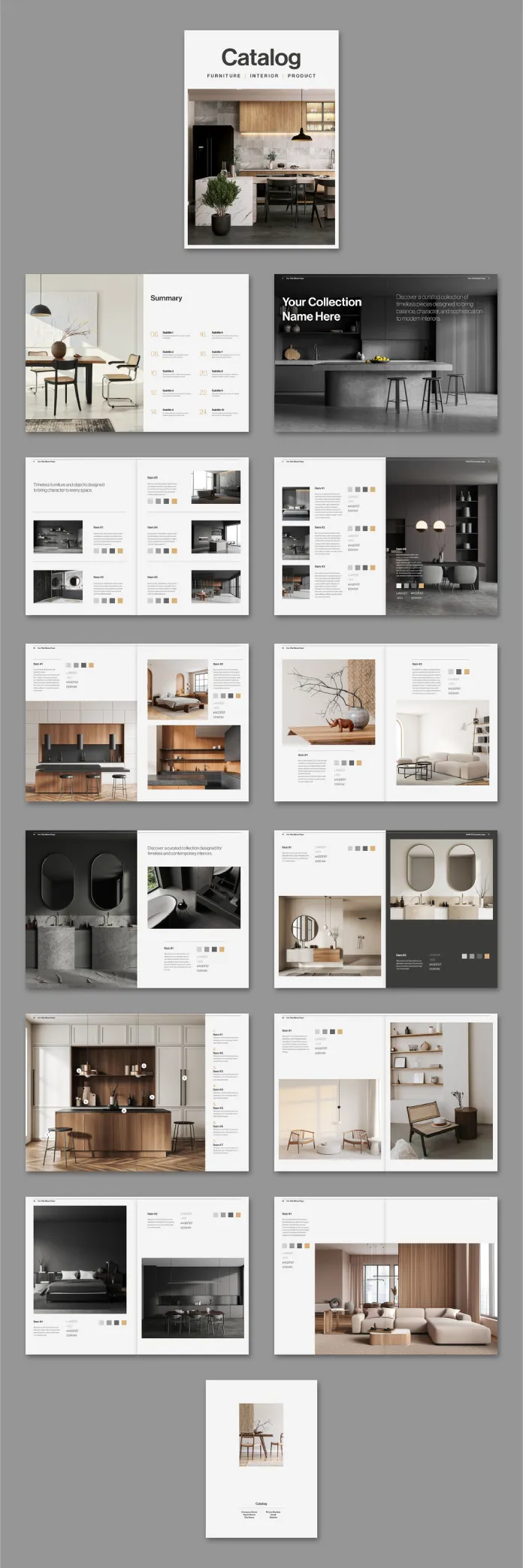
The template comes with a striking cover page. It features a bold “Catalog” headline with a subtitle line reading “Furniture | Interior | Product.” Below that sits a large, full-bleed hero image placeholder. The hierarchy is clear, and the visual weight is perfectly balanced between the type and the image.

Furthermore, there’s a thoughtfully designed summary spread. It uses a clean grid to display sample images alongside color swatches. This structure allows buyers to scan an entire collection at a glance. That’s smart editorial design—and it works.
The Page-by-Page Structure: A Closer Look
Every spread in this InDesign catalog template follows what I’d call a “Modular Clarity Framework.” Each page section has a defined visual role. Some pages lead with full-page photography. Others split the space between imagery and detailed item cards. Still others introduce collection openers with large headline type and descriptive copy blocks.
This variation prevents visual fatigue. As a result, readers stay engaged page after page. The item cards themselves display product names, item codes, brief descriptions, and color palette swatches. That level of specificity makes this template genuinely functional for real product catalogs—not just decorative mockups.
Additionally, the typography uses a clean sans-serif system throughout. Headings are large and confident. Body copy is airy and readable. No clutter. No decorative excess. Just clear, purposeful type hierarchy.
Why Adobe InDesign Is the Right Tool for Professional Catalog Design
You could technically design a catalog in Canva or even PowerPoint. But you’d feel the limits almost immediately. Adobe InDesign was built specifically for multi-page documents at a professional production level. There’s a fundamental difference between a tool that accommodates layout and one that was engineered for it.
InDesign handles master pages with precision. So when you update a header or footer on a master page, every linked page updates instantly. That alone saves hours on a 20-page catalog project. Moreover, paragraph styles and character styles let you reformat entire documents in seconds. Change one style, and all instances update simultaneously.
CMYK Color Mode and Print-Ready Output
This catalog template for Adobe InDesign works in CMYK color mode. That’s not a minor detail—it’s critical. RGB colors look great on screen but shift when printed. CMYK ensures that what you see in InDesign closely matches what comes off a professional press. Consequently, this template is ideal for commercial printing, trade show materials, and premium client-facing publications.
InDesign also supports bleed settings, crop marks, and ICC color profiles. Together, these features make prepress preparation straightforward. You’re not adapting a screen-design tool for print. You’re working in the right environment from the start.
The Placeholder Logic: Swap Content in Minutes
Every image in the template is a placeholder. Every text block is placeholder copy. However, this isn’t a limitation—it’s the entire point. InDesign’s linked image system means you simply right-click any image frame and relink it to your own photo. Your image snaps into the exact frame, cropped and positioned according to the template’s layout intent.
Text replacement is equally direct. Click a text frame, select all, and type your own content. The paragraph styles automatically apply your brand’s formatting if you’ve set them up. For teams working fast on tight deadlines, this workflow is a genuine advantage. In my own testing, I replaced all placeholder content on a full spread in under eight minutes.
Adobe InDesign Catalog Template for Furniture and Interior Brands: A Specific Fit
Not every template is a good match for every industry. This one, however, reads as if it was designed specifically with furniture and interior design clients in mind. The restrained color palette—warm neutrals, deep charcoals, soft creams—mirrors the aesthetic language of premium home goods brands. Nothing clashes with the product photography you’d typically present in this space.
The spreads that showcase individual items follow a principle I’d name “Contextual Proximity.” Each item appears within a lifestyle image first, then reappears in a more clinical item card format. This two-step presentation strategy builds desire before it delivers information. That’s sound sales psychology embedded directly into the layout.
Collection Opener Pages and Editorial Flow
Several pages in the template function as collection openers. These spreads introduce a new product group with a large left-column headline, a brief introductory paragraph, and a dominant image. The visual pacing this creates is similar to a well-edited magazine. Each chapter begins with a breath of open space before the detailed product grids follow.
Furthermore, the color swatch system is integrated directly into the product cards. Each item shows small square swatches representing available finishes or materials. For furniture and interior products, this is essential information. The template includes this natively, which saves significant design time when building real client presentations.
Customization Depth: How Far Can You Push This Template?
I tested the customization range extensively. The short answer: further than most comparable templates allow. Because this customizable InDesign catalog template uses a properly structured style system, rebranding the entire document to match a client’s identity takes minimal effort.
Swap the primary typeface in the paragraph styles panel, and every headline and body text instance updates at once. Adjust the color swatches in the swatches panel, and any design elements using those swatches update globally. Add or remove pages using InDesign’s page panel, and the master page formatting applies automatically.
Scaling the Template for Larger Projects
The template ships as a defined page structure, but expanding it is logical and clean. Because the layout uses consistent column grids and baseline grids, adding new spreads that match the existing visual language is straightforward. You simply duplicate a spread that matches the layout type you need—product grid, collection opener, or full-bleed feature—and replace the content.
This scalability matters for agencies and studios managing multiple catalog versions for a single client. Consequently, the template functions not just as a single-use document but as a reusable design system. That’s a meaningful distinction when you’re pricing a project or scoping a deliverable timeline.
The “Structured Simplicity” Principle Behind the Design
After working through this template carefully, I’d describe its core design philosophy as “Structured Simplicity.” This means every visual decision creates clarity rather than decoration. Nothing appears on the page without a functional reason. The white space isn’t empty space—it’s intentional breathing room that makes the products feel more valuable.
This philosophy aligns directly with how premium brands present physical goods. Think of how high-end furniture showrooms use space. There’s room around each piece. Nothing crowds anything else. The template replicates that spatial logic in a two-dimensional layout. As a result, even placeholder content looks considered and intentional.
Typography as a Silent Brand Signal
The type choices reinforce this philosophy. The sans-serif hierarchy moves from large, bold display type down to small, quiet caption text without any jarring jumps in scale or weight. Each level serves a specific reading distance. Headlines grab attention from across the room. Body copy rewards close reading. Captions provide supporting data without competing for attention.
This typographic discipline is harder to achieve from scratch than it looks. Therefore, inheriting a well-built type system through a template like this one gives designers a significant head start. You’re not solving hierarchy from zero—you’re refining an already-functional system for your specific content.
Professional InDesign Catalog Template: Who Should Use This?
The honest answer covers a broad range of users. Freelance graphic designers working with furniture or interior brands will find the template delivers client-ready quality on a short timeline. In-house creative teams at product companies can use it to maintain visual consistency across multiple seasonal catalogs. Marketing agencies managing brand identities for home goods retailers will appreciate the structured customization system.
Additionally, photographers and stylists building portfolio presentations can adapt the template to showcase editorial projects. The layout supports large imagery with equal confidence as it supports product-focused grid spreads. That flexibility makes it useful beyond its stated category.
What You Should Know Before You Start
You’ll need an active Adobe Creative Cloud subscription with InDesign installed. The template is designed for InDesign, so it won’t open natively in other applications without conversion. Basic InDesign knowledge—text editing, image relinking, style application—is sufficient to work through the template efficiently. You don’t need advanced scripting or production expertise.
For print output, set up your bleed and slug settings according to your print vendor’s specifications before exporting. The template uses CMYK color mode, so your PDF export settings should target print-ready output rather than screen or web profiles. Most professional printers will accept a PDF/X-1a or PDF/X-4 export from InDesign without issue.
Predictions: Where Catalog Design Is Heading Next
Template-based catalog design is moving toward what I’d call “Adaptive Format Systems.” Rather than single fixed-format documents, brands will increasingly need templates that adapt across print, digital flipbook, and interactive PDF formats simultaneously. InDesign already supports multi-format output, and templates built within InDesign’s structure are well-positioned for this shift.
Furthermore, the demand for fast customization without quality loss will only increase. Brands are moving faster, launching more collections per season, and presenting to more channels at once. A well-structured professional catalog template for InDesign like this one becomes more valuable, not less, as production timelines compress.
My prediction: templates that combine editorial sophistication with a genuinely modular structure will become the standard expectation for design assets in the premium product space. This template is already operating at that level.
My Final Verdict: Is This Adobe InDesign Catalog Template Worth It?
Yes—without reservation. The template does what great design assets should do: it removes friction without removing control. You get a publication-quality starting point that respects your professional judgment rather than constraining it. The layout is smart, the structure is solid, and the aesthetic is genuinely competitive with high-budget agency work.
Tom Sarraipo has built something that sits at the intersection of editorial quality and practical usability. That’s a narrow target, and this template hits it. Whether you’re presenting a furniture collection to a retailer, building a lookbook for an interior design firm, or pitching a product line to a wholesale buyer, this template gives your content the visual authority it deserves.
Frequently Asked Questions
What software do I need to use this catalog template?
You need Adobe InDesign, which is available through an Adobe Creative Cloud subscription. The template is designed specifically for InDesign and works best in a current version of the software. Basic InDesign skills are sufficient to work through the template and replace all placeholder content with your own.
Is this Adobe InDesign catalog template suitable for professional printing?
Yes. The template uses CMYK color mode, which is the standard for commercial and professional offset printing. This ensures accurate color reproduction when printed by professional vendors. You can export a print-ready PDF directly from InDesign using PDF/X-1a or PDF/X-4 export presets.
Can I change the fonts and colors in this InDesign catalog template?
Absolutely. The template uses InDesign’s paragraph and character style system. You can update the primary typeface across all pages by editing a single style. Color swatches stored in the swatches panel can be globally updated as well. This makes full rebranding of the template fast and consistent.
What page size does this catalog template use?
The template is designed in A4 format, which is the standard European and international page size measuring 210 × 297 mm. This size works well for both professional offset printing and digital PDF distribution.
Are all images and texts in the template replaceable?
Yes. Every image in the template is a placeholder placed within InDesign image frames. You can relink any frame to your own photography through InDesign’s Links panel or by right-clicking the frame and selecting the relink option. All text blocks are also fully editable placeholders that you replace with your own content.
Is this template suitable for industries other than furniture and interiors?
Yes. While the template’s visual language suits furniture, interior design, and lifestyle product brands particularly well, its clean grid structure and modular layout adapt to other product categories effectively. Fashion accessories, home goods, lighting, and architectural materials are all strong secondary use cases.
How many pages does this InDesign catalog template include?
The template includes multiple spreads covering a cover page, summary page, collection openers, product grid pages, and a back cover. The exact page count is visible in the InDesign pages panel after opening the file. Adding or removing pages is straightforward thanks to the master page system.
Do I need advanced InDesign skills to use this template?
No. Intermediate-level InDesign knowledge covering text editing, image relinking, and style application is sufficient. The template’s structure is clean and logical, which makes navigation straightforward even for users who don’t work in InDesign daily. No scripting, data merge configuration, or advanced production knowledge is required.
Can this template be used for digital catalog distribution as well?
Yes. InDesign supports interactive PDF export with hyperlinks and page transitions, as well as standard screen-optimized PDF output. If you’re distributing the catalog digitally—as a downloadable PDF or an online flipbook—simply adjust the export settings in InDesign’s export dialog to target screen resolution and RGB color output for digital versions.
Who designed this Adobe InDesign catalog template?
This template was designed by Tom Sarraipo. It reflects a deliberate editorial design sensibility focused on clean layout structure, strong typographic hierarchy, and a restrained aesthetic appropriate for premium product presentation.
Take a look at WE AND THE COLOR’s Templates category for more.