This post contains affiliate links. We may earn a commission if you click on them and make a purchase. It’s at no extra cost to you and helps us run this site. Thanks for your support!
RedGiant’s NEO brand guidelines presentation template addresses a problem I think many studios ignore until a client sends back a stretched logo. Designers love creating visual identities. However, they hate documenting them. As a result, a freelancer guesses, and the brand starts to drift.
RedGiant, an Adobe Stock contributor, designed this customizable Adobe InDesign layout to close that gap. The NEO brand guidelines presentation template ships with 26 predesigned slides at 1920 × 1080 px. Still, it stays light. I opened every page, and I have opinions.
Brand documents have left the print shelf. Teams share them in chat threads and attach them to pitch decks. Therefore, a 16:9 deck fits real habits better than an A4 manual. Is your current brand document still a Word file with a pasted logo?
Please note that this template requires Adobe InDesign to be installed on your computer. Whether you use Mac or PC, the latest version is available on the Adobe Creative Cloud website—take a look here.
What Is the NEO Brand Guidelines Presentation Template?
The NEO brand guidelines presentation template is an editable Adobe InDesign layout that documents a brand identity across 26 slides. It measures 1920 × 1080 px, the Full HD frame, so exported PDFs fill a modern screen. The look stays uniform and minimal.

In plain terms, a brand guidelines presentation template gives every brand rule a fixed place to live. Everything here is customizable. You can delete pages you don’t need and duplicate the ones you do. Besides that, the preview photos are placeholders, so your own graphics and text drop in quickly.
How Does the NEO Brand Guidelines Presentation Template Organize Its 26 Slides?
I sorted the pages into four groups. The grouping shows what the designer cares about.
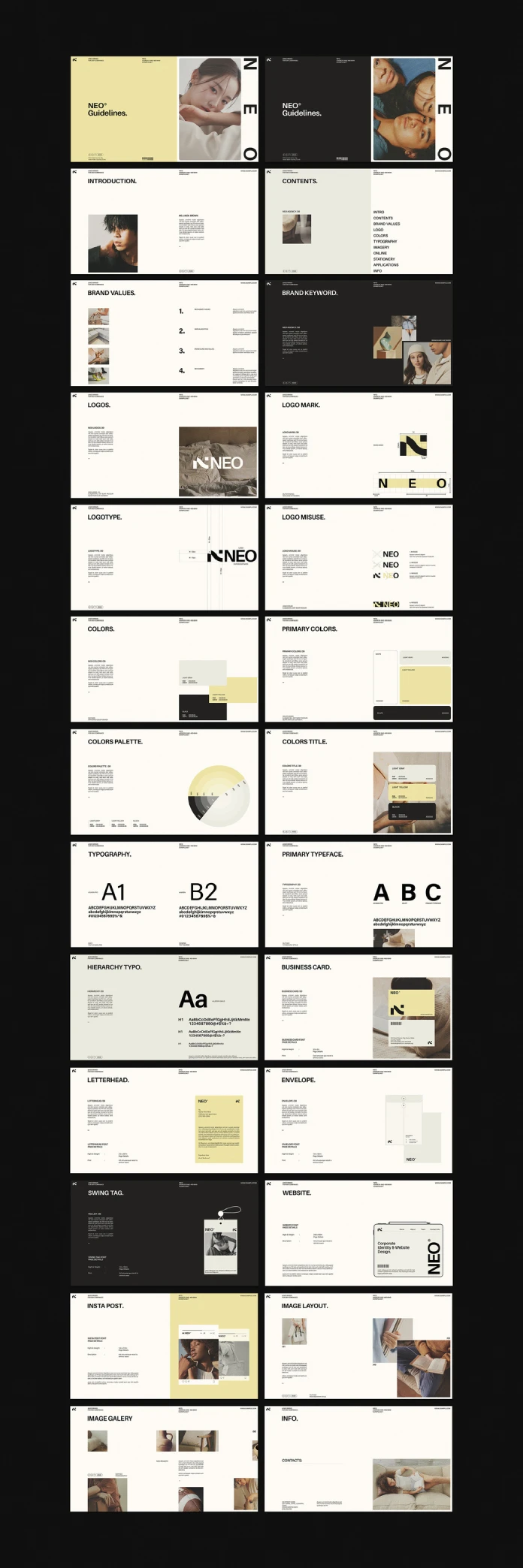
Six Slides Open the Document
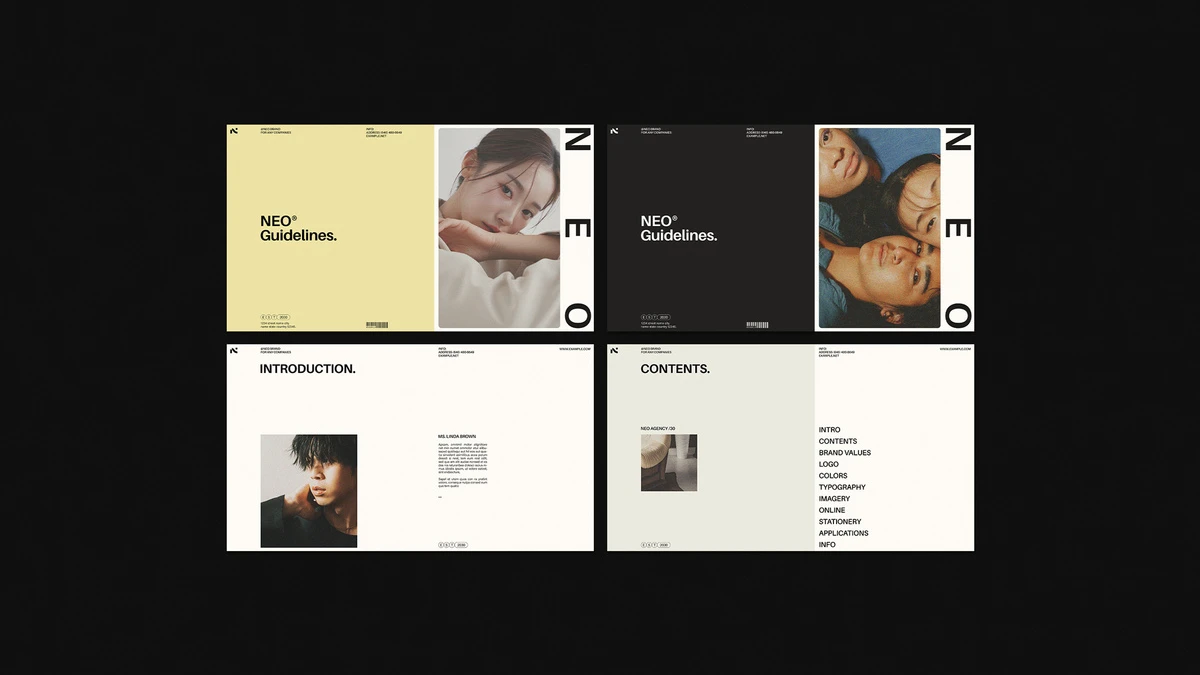
Two covers start the file. One is light yellow, and the other is near black. Both carry the oversized vertical NEO lettering along the right edge. Next come the introduction, contents, brand values, and brand keyword pages.
The contents page lists eleven entries, from Intro to Info. The brand values page uses four numbered rows. I like that restraint. After all, most brands can’t defend more than four values.
Eleven Slides Carry the Rules
This block does the heavy lifting. Four slides cover the logo. They are Logos, Logo Mark, Logotype, and Logo Misuse.
The Logo Mark page draws measurement lines around the symbol. The Logotype page marks clear space around the wordmark. The Logo Misuse page shows four numbered mistakes, each crossed out. I would keep all of it. Misuse pages end more arguments than any other slide.
Four color slides follow. They define white, light gray, light yellow, and black. A circular chart on the Colors Palette page maps tonal steps. Meanwhile, the Colors Title page places the swatches over photography.
Three typography slides finish the block. Two placeholder typefaces, labeled A1 and B2, open the section. A hierarchy page then sets heading levels. Replace the labels with your real fonts.
Six Slides Prove the Brand in Use
Here the NEO brand guidelines presentation template earns its keep. Business card, letterhead, envelope, swing tag, website, and Instagram post each get a mockup page. Each page also carries a small block for size and print details.
Two image slides and an info page close the deck. Image Layout and Image Gallery show how photos sit on the grid. The Info page holds contact details.
The Rule-to-Proof Ratio Explains Why This Deck Works
I use a simple metric to judge any guidelines deck. I call it the Rule-to-Proof Ratio. It divides rule slides by proof slides. A rule slide states a standard. A proof slide shows that standard in a real application.
The NEO brand guidelines presentation template scores 11 to 6, or roughly 1.8 to 1. My rule of thumb says a healthy deck sits between 1.5 and 2.5. Above 2.5, readers drown in specs. Below 1.5, the deck turns into a mood board.
The Handoff Test adds a second check. A freelancer who never met you should set a business card from the deck alone. NEO’s business card slide passes once you fill in its detail block.
Then comes Guideline Debt. I define it as the hidden cost of every brand decision you made but never wrote down. It grows with each new hire and each new vendor. A template can’t erase it. Yet 26 labeled slots make every missing decision visible.
When a client emails a request for the logo on a dark background, a studio that wrote its rules into a deck like this can answer in one reply with a page number, while a studio without one spends the afternoon rebuilding the argument from memory.
How Do You Customize the NEO Brand Guidelines Presentation Template in InDesign?
Work in this order. It saves rework.
- Open the NEO brand guidelines presentation template and replace the logo on the Logo Mark and Logotype pages.
- Add your swatches to InDesign and recolor the four color slides.
- Apply your real fonts to the typography slides.
- Swap the placeholder photos and mockups for your own.
- Delete slides you don’t need, and duplicate the layouts you do.
- Add hyperlinks from the contents page, then export the PDF.
InDesign adds interactive features such as hyperlinks and bookmarks. Link the contents entries to their slides first. That single step makes the PDF behave like a small website. As a result, clients jump straight to the logo rules instead of scrolling.
Where Does the Template Fall Short?
No tool earns a free pass. This one has gaps.
The contents list skips tone of voice. It also has no icon or motion slides. For a modern identity, those gaps matter.
The palette leans toward fashion and lifestyle brands. A light yellow beside black suits a boutique. It may feel odd for a bank. Likewise, the body text blocks look small at 1920 px, so plan on larger sizes if clients read on phones.
Because the deck follows a fixed 16:9 frame at 1920 by 1080 pixels, anyone who wants a printed A4 manual for a trade show must rebuild each page and check every image crop again, which cancels a good part of the time the template saves.
Of course, you can fix every item above in InDesign. Still, buyers should know about them before downloading.
What Will Brand Guidelines Look Like by 2028?
I predict that most small studios will deliver guidelines as interactive PDFs with live links. Static decks will feel as dated as emailing a logo in a Word file.
I also expect AI tools to read these decks. Clear page titles such as Logo Misuse and Colors Palette work as retrieval labels. So the plain page names in the NEO brand guidelines presentation template are a quiet advantage. Label your slides for humans first and machines second.
My thesis is simple. The best guidelines deck in 2028 will be the one a stranger can use without calling you.
NEO Brand Guidelines Presentation Template at a Glance
| Feature | Detail |
|---|---|
| Designer | RedGiant, Adobe Stock contributor |
| Format | Customizable Adobe InDesign layout |
| Size | 1920 × 1080 px (16:9, Full HD) |
| Pages | 26 predesigned slides |
| Export | PDF for on-screen presentation |
| Style | Uniform, modern, minimalist |
| Editing | Delete, add, or duplicate any page |
| Interactivity | Interactive features through InDesign |
| Images | Preview photos are placeholders |
| Rule-to-Proof Ratio | 11 rule slides to 6 proof slides (about 1.8 to 1) |
| Best for | Freelancers, small studios, and in-house teams |
| Weak spots | No tone of voice, icon, or motion slides; screen-first format |
Q&A
What is the NEO brand guidelines presentation template?
It is an editable Adobe InDesign layout by RedGiant with 26 predesigned slides at 1920 × 1080 px. It documents logo, color, typography, and brand applications.
Which software do I need to edit the NEO brand guidelines presentation template?
You need Adobe InDesign. Once you finish, you can export a PDF that opens on any screen.
How many slides does it include?
It includes 26. You can delete pages you don’t need and duplicate the ones you do.
Can I add interactive features?
Yes. Adobe InDesign lets you add interactive features, such as hyperlinks, to the guidelines before you export.
Do the preview photos come with the layout?
No. The photos in the previews are placeholders. Add your own graphics, images, and text to the slides.
Who should use a minimalist brand guidelines template like this?
Freelancers and small studios benefit most. They need a clear brand book fast, and this layout gives them one.
Can I print the guidelines?
Yes, but plan the work. The layout is 1920 by 1080 pixels in landscape, while A4 measures 210 by 297 millimeters in portrait.
Browse WE AND THE COLOR’s Templates, Graphic Design, and Branding categories for more.
Subscribe to our newsletter!