This post contains affiliate links. We may earn a commission if you click on them and make a purchase. It’s at no extra cost to you and helps us run this site. Thanks for your support!
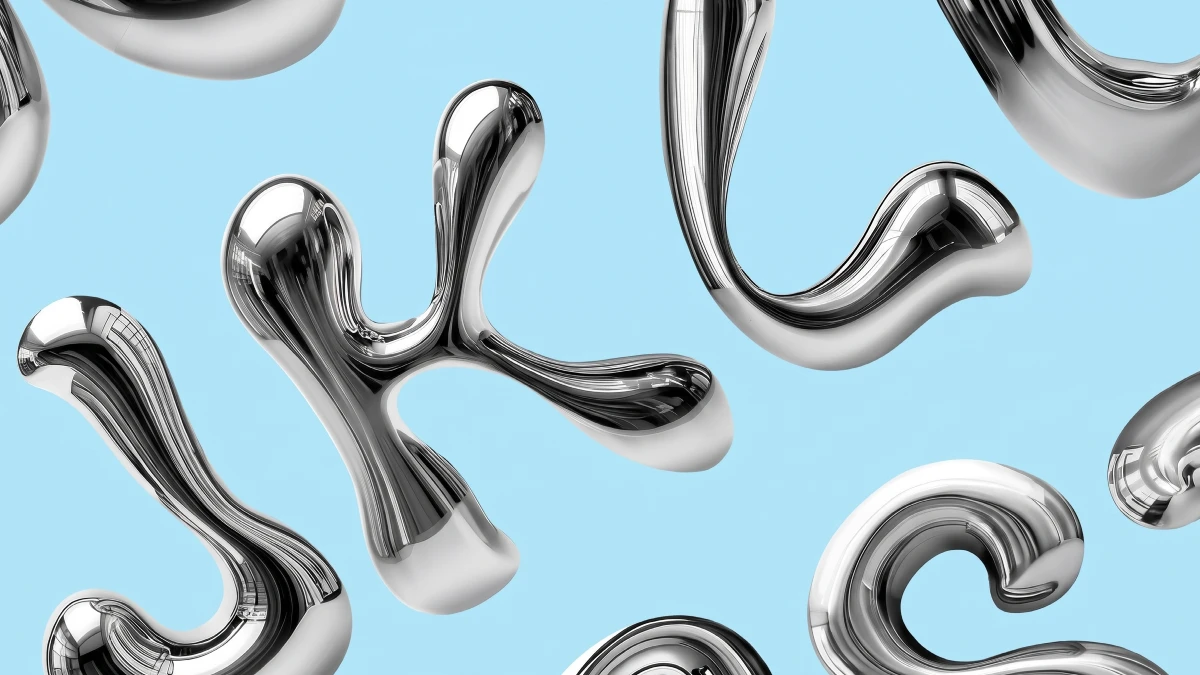
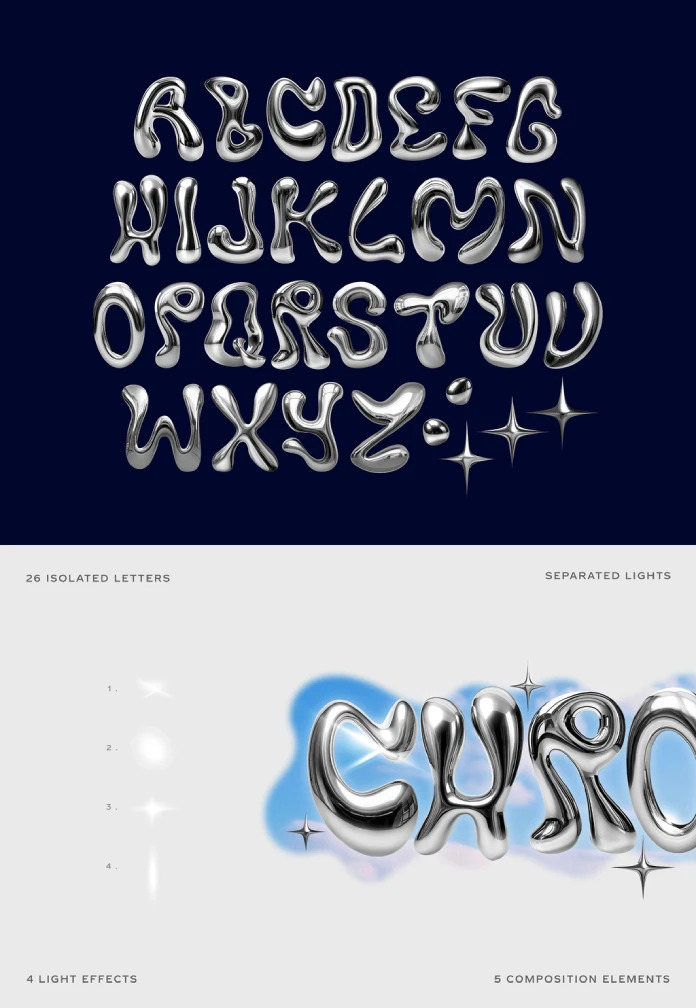
Liquid chrome Photoshop letters look effortless in a preview image, but they often look different once you open the PSD and try to spell your own headline. And the renewed interest makes sense because the Y2K liquid metal effect has returned to album covers and sneaker campaigns, and it now signals a slightly absurd, hopeful future. Avelina Studio leans into that mood with a cheeky label, Y3K, and a blobby alphabet that looks poured instead of drawn.
Here is my position up front. This set excels at short titles and struggles with anything people must read quickly. Both facts are fine, as long as you plan for them.
Please note that this PSD file requires Adobe Photoshop. The latest version can be downloaded from the Adobe Creative Cloud website; visit this link.
What Are Liquid Chrome Photoshop Letters, Exactly?
Liquid chrome Photoshop letters are pre-rendered letterforms with a mirror-metal finish that arrive as layered PSD graphics instead of an installable font. You cannot type with them. You place, rotate, and arrange them like photographs.
That distinction shapes everything else. A font gives you a keyboard, kerning, and endless repeats of the same letter. Artwork gives you exactly what the artist rendered, and nothing more. The chrome text effect in this set comes baked into each letter, so you never fight with layer styles or gradient maps.

Designers often search for “chrome text effect Photoshop” and end up with a tutorial that takes an hour. Pre-rendered artwork skips that hour. In return, you accept the limits of whatever the studio drew.
What Is Inside the Avelina Studio Y3K Set?
The product page lists a clear set of contents. The numbers are worth reading closely, because they decide what you can build.
| Feature | Detail | What it means in practice |
|---|---|---|
| Letters | 26 isolated uppercase letters, A to Z | One artwork per letter, no duplicates |
| Format | PSD graphics, not fonts | No typing, no kerning table |
| Resolution | 7000 × 5500 pixels (about 38.5 megapixels) | Roughly 23.3 × 18.3 inches at 300 ppi |
| Light effects | 4 separated lights | Flares and glints you place yourself |
| Composition elements | 5 extras, including sparkle shapes | Quick polish for covers and posters |
| Best use | Short titles, covers, posters, social graphics | Weak for body copy or long words |
Why the 7000 × 5500 Canvas Matters
The canvas ratio is 14:11, which sits close to a landscape print format. That gives you room for large posters. It also lets you crop deep into a single letter for a macro-style detail shot.
Scaling down is easy. Scaling up is where chrome fails, because reflections turn soft and the illusion collapses. So start with the largest size you might need.
What the Set Does Not Include
The preview shows no numerals and no punctuation. The cover title spells “Y3K,” yet the listing mentions only letters A to Z. A rotated letter probably stands in for the 3. Check this before you plan a numbered title.
How Do You Build a Title With Liquid Chrome Photoshop Letters?
The workflow is simple. The craft lives in the decisions you make before you drag anything. I use a four-step routine for any chrome lettering project.
- Create a master canvas. Choose the final size first. For web graphics, 3000 × 2000 pixels is plenty.
- Convert each letter to a Smart Object. This lets you resize without destroying the source pixels.
- Rotate every letter slightly. A tilt of two to six degrees breaks the stiff, typed look.
- Add the lights last. If a light layer arrives on black, try the Screen blend mode.
Each step takes minutes. Together, they turn separate objects into one believable word.
Where Do Liquid Chrome Photoshop Letters Break Down?
Every pre-rendered letter set has a weak spot. This one has three, and I named them so you can spot them quickly.
Reflection Debt
Reflection debt is the visual cost you pay when you reuse or mirror a chrome letter. The set contains one artwork per letter. Words with repeats, such as “LOOP” or “SUMMER,” force you to duplicate.
Duplicates carry identical highlights. Viewers spot that faster than you expect. Flipping a copy horizontally reverses the light direction, which contradicts the sky behind it. So pick words with unique letters whenever you can. “CHROME” works well because each letter appears once.
The Blob Legibility Threshold
The blob legibility threshold is the point where a letter’s mass swallows its own counter. The counter is the enclosed space inside letters such as R, Q, and G. In the preview, those three carry the heaviest curl. Their openings shrink to narrow slits.
At a large size, that looks wonderful. At thumbnail size, an R can read as a lumpy P. Would a stranger scrolling past your post decode it in half a second? If not, shorten the word or enlarge the type.
Sky Dependency
Sky dependency describes chrome’s need for a bright, varied environment to look like metal. The product images prove this. The letters over a blue sky and a glassy city look convincing. Against a flat dark field, they behave more like gray plastic.
Chrome reflects its surroundings. Give it a boring background, and it reflects boredom.
The Pour Test: A Four-Question Check Before You Commit
I run every chrome title through the same checklist. I call it the pour test because liquid metal punishes careless planning.
- Letter count: Can you say the word in under five letters?
- Repeats: Does any letter appear twice?
- Reading distance: Will a viewer read this at phone size?
- Sky: Does the background give the chrome something to reflect?
Two failures mean you should rethink the word. Three failures mean you should use a different tool.
Is the Y2K Liquid Metal Effect Still Worth Using?
I think yes, but with a strict budget. Chrome works as a headline tool and fails as a paragraph tool. A single chrome word on a clean background feels confident. Five chrome words on one poster feel like a ringtone ad from 2003.
Consider the contrast too. A glossy, ultra-smooth metal letter looks sharper beside rough grain or plain sans-serif text. Pair these letters with quiet typography, and they gain authority.
Here is my forecast. Within two years, I expect static chrome lettering to become the first frame of animated loops. Designers will export a title, add a moving light pass, and post it as a short clip. Sets that include separated lights, like this one, will have a head start.
Long-Tail Uses That Fit This Set
Several practical uses suit this alphabet well. Album and playlist covers benefit from the glossy contrast. Event posters and YouTube thumbnails work when the word stays short. Y2K aesthetic graphic design projects, such as zine covers, fit the mood without extra effort. Many designers also search for “3D chrome lettering for posters” and “metallic text PSD for thumbnails.” This set answers both searches, with the caveats above.
My Verdict on These Liquid Chrome Photoshop Letters
The rendering quality is high. Reflections look dense and varied, and the shapes feel confident. The weak point is flexibility, because one artwork per letter limits your vocabulary.
I would buy this set for cover art and short hero titles. I would skip it for anything that needs long words or numerals. Choose your words first, then choose your letters.
Frequently Asked Questions About Liquid Chrome Photoshop Letters
Are these liquid chrome Photoshop letters a font?
No. They are 26 isolated PSD graphics. You cannot type with them, so you arrange each letter by hand.
What resolution do the letters use?
The template uses 7000 × 5500 pixels. That equals about 38.5 megapixels, or roughly 23.3 × 18.3 inches at 300 ppi.
Can I use the same letter twice in one word?
You can duplicate a letter, but the identical reflections show quickly. Rotate it or crop the layout to hide the repeat.
Do the letters include numbers or punctuation?
The listing mentions only A to Z. Check the full file contents before you plan a title with numerals.
How do I use chrome letters in Photoshop for a poster?
Place each letter as a Smart Object, rotate it slightly, and arrange the word on a bright background. Then add the light effects with the Screen blend mode.
What is the best background for chrome lettering?
Choose a bright, varied scene such as a sky or a glossy cityscape. Chrome needs something to reflect, or it looks flat.
Will chrome lettering stay popular?
Style cycles move fast, yet the Y2K liquid metal effect keeps returning in new forms. I expect it to shift toward motion graphics next.
Don’t hesitate to find other cool graphics in the templates section here at WE AND THE COLOR.
Subscribe to our newsletter!