This post contains affiliate links. We may earn a commission if you click on them and make a purchase. It’s at no extra cost to you and helps us run this site. Thanks for your support!
This roundup covers 20 sets of designer graphics that WE AND THE COLOR has reviewed. Also, all of them are fully editable vector graphics for print and web. Some are shape libraries, while others are posters. A few are logo kits.
Today, AI image tools produce polished artwork in seconds. However, most of that output you get as flat pixels. But real designers still need paths and live type. Hence, well-built designer graphics solve exactly that problem. I sorted the sets by use case. Two tools explain how I judge them. I define both next.
Please note that to edit the vector files, you will need professional graphic design software like Adobe Illustrator installed on your computer. You can get the latest version from the Adobe Creative Cloud website. Just have a look here.
What Makes Designer Graphics Professional?
Professional designer graphics stay editable after the first export. That is my working definition, and I apply it strictly. Marketing pages overuse the phrase “fully customizable.” Therefore, I replace it with four conditions.
- Every shape stays a vector path.
- Live type carries all labels and numbers.
- Any color remaps in a single step.
- Each icon sits in its own group.
I call this the Fully Editable Standard. In practice, a set passes only when all four conditions hold. Many cheap templates outline their type or flatten their icons into compound paths. As a result, those files fail on the first revision.

I also grade how far a set goes. I call that grade Edit Depth. Level 1 means you can recolor. Level 2 means you can ungroup and recombine parts. And level 3 means stroke weights and type stay live.
Few sets reach Level 3. Petr’s infographic set does, because its labels are live type. Vanzyst’s utilitarian kit does too, since it offers editable stroke weights and editable text in PDF, AI, and EPS files. Nowshinz Shoma’s logo marks sit at Level 2, because the AI files expose every anchor point.
Geometric Designer Graphics Built From Modules
Geometric designer graphics work like a parts bin. You take one form and scale it. Then you combine it with another. Therefore, modular construction matters more here than polish.
Oleg R. and the Chromatic Momentum Framework

Oleg R.’s abstract geometric vector shapes are the loudest of the 20. More than 70 forms sit on a pure black background. The palette uses electric cyan, vivid magenta, solar yellow, and plasma red. It’s a native .AI file.
The set rests on what I call Chromatic Momentum. The term describes gradient transitions that simulate movement inside a static shape. For example, a warm-to-cool gradient that follows a spiral’s axis makes the spiral appear to spin. In addition, Oleg R. applies the idea across the whole set.
Editing is simple. Open Edit > Edit Colors > Recolor Artwork and remap the palette in one pass. Modular units such as rounded rectangles and tapered strokes also ungroup. Therefore, the set lands at Edit Depth Level 2.
My verdict is blunt. This set works best for motion projects, because spirals and radial bursts already imply rotation.
More Shape Sets Worth Opening
Two other libraries deserve a look. Vanzyst’s 120 abstract geometric vector shapes give you more volume than Oleg R. delivers. Leo Alexandre’s Geometrica 2 offers editable geometric vector graphics in a second release. Meanwhile, the abstract geometric graphics for posters and covers by Normform aim at layout work directly.
Logo Marks and Badges as Designer Graphics
Nowshinz Shoma’s 104 Logo Marks

Nowshinz Shoma’s 104 geometric logo marks arrive in four formats. First, you get AI for Illustrator CC and EPS for CS6. Additionally, the PNG and SVG files come in black and white. Therefore, the set works in older print workflows and in browsers.
The review defines Scalable Semiotics as a symbol’s ability to keep its meaning at any size or medium. The 16×16 pixel favicon is the hardest test for that idea. At that size, a detailed illustration disappears, while a circle or square survives.
The license deserves a line. The review notes that a standard license covers client projects. However, selling the files as a collection requires the Extended Commercial License.
Monozen 2, Vintage Badges and a Free Starter Kit
Three more logo sets fill different gaps. Kloroform’s Monozen 2 offers geometric, line-based vector graphics for icons and logos. DesignCoach’s vintage logo badges deliver fully editable outdoor-retro designs. Finally, Amito Vectors’s 30 customizable vector logo templates are available as a free download.
Free is a useful price for a test. Therefore, run the four conditions on one template before you commit to a paid kit.
Poster Designer Graphics With a Point of View
Poster templates carry more opinion than shape packs do. Instead of staying neutral, each one commits to an era. Four sets here show how far that commitment goes.

The Swiss-style poster template by Blackcatstudio draws on 1950s geometry and runs in Adobe Illustrator. The Bauhaus vector posters reach back even further. Rawpixel’s psychedelic poster templates also target Illustrator. Meanwhile, the brutalism and postmodern graphics by Adobe Stock contributor max_776 pull in the direction of those two art movements.
My view is simple. First, a poster template earns its place by how little you must change. Second, grid-based Swiss and Bauhaus layouts survive new headlines better than ornate ones do. Therefore, I would start with those when a deadline looms.
Texture and Pattern Designer Graphics
RISO Shapes and the Risograph Look

Leila Divine’s RISO Shapes contains 72 geometric shapes with a built-in risograph texture. The package also holds 12 tileable backgrounds, 12 patterns, and six pre-designed square cards. Additionally, files come as AI, EPS, and PNG.
Risograph printing emerged in Japan in the mid-1980s. A machine burns a master stencil and pushes soy-based ink through it, one color at a time. In addition, misaligned layers and visible grain give each print its character. Consequently, the set translates that look into scalable files.
Texture raises a fair editing question. Therefore, I would test a palette swap on one shape before building a full poster.
Bloomicon and the Sets That Resist a Category
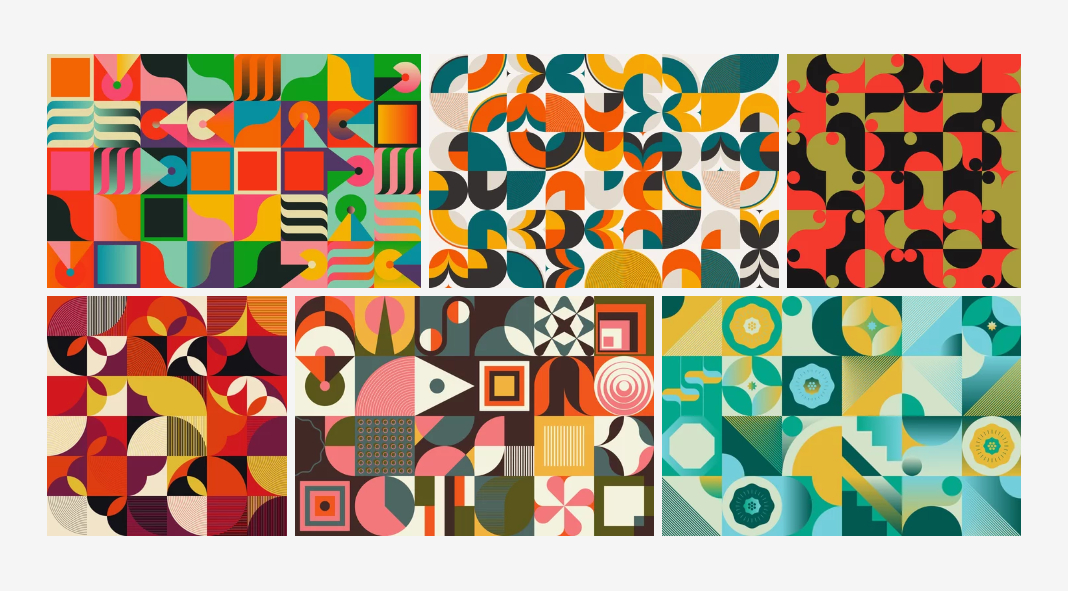
Bloomicon’s colorful background patterns draw on mid-century minimalism, pop art, Swiss design, and the Bauhaus. In total, the review counts more than a hundred patterns. They repeat without visible seams, so they suit wallpapers and textiles as well as web backgrounds.
Three more sets resist a clean category. Kloroform’s Greydient 3 continues a numbered series. Likewise, Daryna’s abstract vector graphics sit on Adobe Stock. Finally, Softulka’s 230 vector graphics set aims at general creative work.
Utility Designer Graphics for Data and Diagrams
Petr’s Business Infographic Set and the Palette Lock
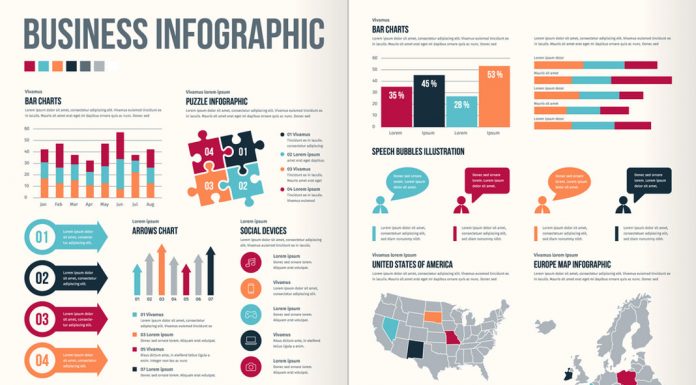
Petr’s Business Infographic Set beats most infographic templates I have used. The reason is almost boring. It obeys one rule, which I call the Palette Lock. A Palette Lock restricts every module to one small group of colors.
Petr locks in seven swatches. Specifically, they are crimson, teal, orange, navy, slate gray, light gray, and white. Gradients never touch the set. As a result, a bar chart and a timeline pin look like relatives.
The timelines carry the set. The horizontal version places eight milestones on alternating sides of a center line. That layout solves caption collision with geometry alone. Also, the vertical version reuses the same eight years, so you can flip orientation without rewriting a caption.
However, the set has weak spots. The continent silhouettes read as decoration instead of data. The people pictogram splits figures into men and women, with sample values of 36 and 28. For that reason, I would rebuild that module. Besides, the sample years end at 2018, so update them first.
I edit the set in four passes, in this order: data, geometry, color, and type. I call that the Four-Pass Edit. The order matters because numbers decide shapes. I downloaded the set again and rebuilt several modules this way.
Vanzyst’s 200 Utilitarian Graphics

Vanzyst’s 200 utilitarian graphics cover diagrams, charts, abstract shapes, lines, and scribbles. First, stroke weights stay editable. Second, text stays live in the PDF, AI, and EPS files. The kit also includes 200 separate SVG files, so it works in Canva and Figma.
Raster files are included as PNG and JPG at 5000×5000 pixels and 300 dpi. You can buy the kit on Creative Market or YouWorkForThem.
Utilitarian differs from minimalist. Minimalism removes elements for elegance, while utilitarian design justifies each element by function. That difference explains why this kit ships with live stroke weights. For more data-driven work, the older review of Tartila’s editable vector charts and infographics belongs on the same shelf.
Designer Graphics at a Glance
| Set | Creator | What the review confirms | Category |
|---|---|---|---|
| Abstract geometric vector shapes | Oleg R. | 70+ neon shapes on black, .AI file, Adobe Stock | Shapes |
| 120 abstract geometric vector shapes | Vanzyst | 120 shapes | Shapes |
| Geometrica 2 | Leo Alexandre | Editable geometric vector graphics | Shapes |
| Abstract geometric graphics for posters and covers | Normform | Geometric graphics for posters and covers | Shapes |
| 104 geometric logo marks | Nowshinz Shoma | AI, EPS, PNG, and SVG, Creative Market | Logo |
| Monozen 2 | Kloroform | Line-based graphics for icons and logos | Logo |
| Vintage logo badges | DesignCoach | Fully editable outdoor-retro badges | Logo |
| 30 vector logo templates | Amito Vectors | 30 customizable templates, free download | Logo |
| Swiss-style poster template | Blackcatstudio | 1950s-inspired layout for Adobe Illustrator | Poster |
| Bauhaus vector posters | craftlove | Bauhaus-style vector posters | Poster |
| Psychedelic poster templates | Rawpixel | Poster templates for Adobe Illustrator | Poster |
| Brutalism and postmodern graphics | max_776 | Vector graphics inspired by two art movements | Poster |
| RISO Shapes | Leila Divine | 72 textured shapes, 12 backgrounds, 12 patterns, six cards | Texture |
| Colorful background patterns | Bloomicon | More than 100 repeating patterns, Adobe Stock | Pattern |
| Greydient 3 | Kloroform | Third release in a numbered series | Mixed |
| Abstract vector graphics | Daryna | Abstract graphics on Adobe Stock | Mixed |
| 230 vector graphics | Softulka | 230 graphics for general creative work | Mixed |
| Business Infographic Set | Petr | 40 designs, seven swatches, live type, Adobe Stock | Data |
| 200 utilitarian graphics | Vanzyst | Editable stroke weights, live text, 200 SVG files | Data |
| Editable vector charts and infographics | Tartila | Charts and infographics | Data |
Where Designer Graphics Go Next
Two predictions follow. I will stand by both.
Prediction one. By the end of this decade, marketplaces will list palette count and live-type status beside file count. Brand teams need sets that recolor in one pass. Therefore, a visible Palette Lock will become a selling point.
Prediction two. AI chart generators will export editable vector output. Designers will then compare that output against kits such as Petr’s. A generated chart that arrives as a flat image will lose to a template with live paths.
Frequently Asked Questions About Designer Graphics
What are designer graphics?
Designer graphics are vector assets that designers edit directly. They stay as paths and keep live type. They also recolor in one step. Examples include shape libraries, logo marks, poster templates, and infographic kits.
Which software opens these vector files?
Adobe Illustrator is the safest choice because most designers build their sets there. However, the Nowshinz Shoma review lists EPS and SVG support in Inkscape, Affinity Designer, and CorelDRAW.
Which file formats should designer graphics include?
Look for AI to edit and EPS for older print workflows. Next, SVG covers the web, and PNG gives a quick preview. For example, the Nowshinz Shoma logo marks ship all four. Likewise, Vanzyst’s utilitarian kit adds 200 separate SVG files.
Can I use these designer graphics commercially?
That depends on each license. The Nowshinz Shoma review says a standard license covers client projects. However, reselling the files as a collection requires the Extended Commercial License. Read the license on the marketplace page before you publish. I am not a lawyer.
How do I recolor designer graphics in Illustrator?
Select the artwork and open Edit > Edit Colors > Recolor Artwork. Remap each color, then click OK. Afterward, check text contrast. WCAG 2.1 AA asks for at least 4.5:1 for small text and 3:1 for large text.
How can I test designer graphics before I buy?
Run the Fully Editable Standard on a single module. Then check the paths, the type, the recolor, and the groups. The free set of 30 logo templates makes a cheap practice file.
Which set has the most graphics?
The 230 vector graphics set holds the largest count in this roundup. Vanzyst’s utilitarian kit follows with 200 graphics.
Which set should I open first?
Open the horizontal timeline in Petr’s infographic set. If all eight badges land in place, the rest of the set will behave.
Browse WE AND THE COLOR’s Graphic Design and Templates category for more.
Subscribe to our newsletter!