This post contains affiliate links. We may earn a commission if you click on them and make a purchase. It’s at no extra cost to you and helps us run this site. Thanks for your support!
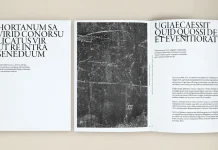
ARCHITEC by Designcy Studio is the stronger architecture portfolio template for working studios. PixWork’s template is the safer pick for students and job seekers. I will defend both claims below, and some of you will disagree.
I featured both on WE AND THE COLOR. My PixWork write-up ran in February 2025. My ARCHITEC review followed in July 2026. Both run on Adobe InDesign and sell through Adobe Stock. Each uses a 1920 x 1080 px canvas. Yet they behave like two different tools.
Portfolio reviews happen on screens now. Studios pitch over screen shares, and hiring managers open files on laptops. A screen-native architecture portfolio template stops being a bonus. It becomes the baseline. So the real question is fit.
Please note that both templates require Adobe InDesign to be installed on your computer. Whether you use Mac or PC, the latest version is available on the Adobe Creative Cloud website—take a look here.
Which Architecture Portfolio Template Wins: ARCHITEC or PixWork?
Choose ARCHITEC when you present a studio to clients. PixWork fits better when you present yourself to an employer. That is the short answer, and it holds in most cases.

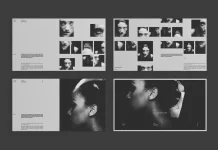
ARCHITEC documents 18 pages across five functional zones. Its project pages carry a details panel for type, size, location, and completion year. PixWork lists an index, project pages, layout variety, a portfolio section, and a thank-you page. It never states a page count.
I call this difference Reader-First Sequencing. A template practices it when its page order matches the person who reads the file. ARCHITEC orders pages for a client. PixWork orders them for a recruiter.
What Do These Two Architecture Portfolio Templates Share?
More than you would guess. Architects are the primary audience for each. PixWork also names graphic and interior design projects. ARCHITEC extends to interior design firms and urban planning teams.
Every element stays editable in InDesign. All images and text are placeholders. So neither template ships with real project photography, and you own the whole content job.
The 16:9 Canvas Is Now Table Stakes
A 1920 x 1080 px canvas matches screens and projectors. Vertical A4 layouts crop wide building photography badly. A widescreen frame gives a facade room to run.
I would not buy a print-first architecture portfolio template for screen work in 2026. Both of these templates agree with me.
Where ARCHITEC Pulls Ahead

The Frame Discipline Principle
In my review, I named the Frame Discipline Principle. It says a grid should enforce consistent crop ratios, whatever photos you drop in. I ran four project sets through ARCHITEC to test it. The page rhythm held each time.
Loose frames sound flexible. They fail once fifteen photos of mixed ratios collide. Tight frames force a decision early, and that decision protects the layout.
The Proportional Trust Threshold
The second idea is the Proportional Trust Threshold. A template crosses it when its data tables share grid logic with its image frames. ARCHITEC’s awards table uses the same column proportions as its image grids. That single decision makes 18 pages read as one system.
PixWork’s write-up mentions no data pages. So I cannot say whether it crosses the threshold. I can say its feature list gives it no chance to prove it.
Credibility Pages for Studios
ARCHITEC ships team profiles, a testimonials spread, an awards table, and a contact page. Those pages turn a portfolio review into a follow-up meeting. For a studio, they matter more than a fourth project spread.
Where ARCHITEC Falls Short
ARCHITEC has two flaws. Its team portrait frames use a fixed portrait ratio, so mixed headshots need cropping first. Every cover variation also leans dark. I would pay for a light cover option.
Where PixWork Holds Its Ground

PixWork’s architecture portfolio template wins on one point. It tells you how to build a story. Its listing calls this a narrative structure, and I agree with the intent.
Its project pages leave room for key details and the design process. That second item matters for applicants. Employers hire designers, not renderings, and process pages show how you think.
Built for Job Seekers
PixWork names students seeking internships and graduates chasing a first job. It also names experienced architects seeking new roles. ARCHITEC’s audience list starts with studios and freelancers who pitch clients.
That difference decides most purchases.
The Thank-You Page Problem
PixWork ends on a thank-you page. I find it the weakest page choice in either template. Unless you add contact details yourself, it gives an employer nothing to act on. ARCHITEC ends on a contact page instead.
What Is the Spec Transparency Gap in Architecture Portfolio Templates?
The Spec Transparency Gap is the distance between a listing’s promises and what you can verify before paying. A small gap means you know the page count and the canvas in advance. You also know the page types.
My own PixWork write-up has a large gap. It gives a canvas size and five features. It gives no page count. That omission is mine, so check the Adobe Stock listing before you buy.
Within two years, buyers will filter architecture portfolio templates by page count and page type. Listings that hide both will lose clicks.
Pitch Portfolio or Application Portfolio?
A Pitch Portfolio persuades a client to hire a studio. It leans on credibility pages such as awards and testimonials. An Application Portfolio persuades an employer to hire a person. It leans on projects and process.
ARCHITEC builds a pitch portfolio out of the box. PixWork builds an application portfolio. You can bend either one, but bending costs hours.
Which InDesign Architecture Portfolio Template Fits Your Situation?
Architecture Students and Graduates
Pick PixWork. As an architecture portfolio template for job applications, its structure follows the way applicants tell their story. Add your own contact page at the end, and cut the thank-you page down to a single line.
Small Studios and Freelance Architects
Pick ARCHITEC. In my review, I estimated that it cuts a portfolio build from a week to an afternoon. That estimate assumes a studio without design staff. The details panel also settles layout questions before you ask them.
Interior and Graphic Designers
Either template works, with one caveat. PixWork names graphic design projects directly. ARCHITEC’s write-up names interior design firms and urban planners instead.
Studios with In-House Designers
Skip both. A team that owns InDesign skills should build a system around its own photography. Templates make sense when nobody has the time.
Ready to test one yourself? Download ARCHITEC on Adobe Stock or get PixWork’s solution on Adobe Stock. Both need Adobe InDesign on Mac or PC.
How Do You Stress-Test an InDesign Portfolio Template Before You Commit?
Run what I call the Ratio Collision Test. It takes ten minutes and costs nothing.
Place a wide panorama and a tall detail shot on the same project spread. Then add a square drone image. Watch what the frames do. A good grid forces you to crop with intent. A weak grid lets every image settle at a different size.
Next, paste a real project description into the text frame. Real briefs run longer than placeholder Latin. If the details panel breaks, it will break in front of a client too.
Finally, export a PDF and read it on a phone. Small labels die there quickly.
ARCHITEC held up under my four-set version of this routine. My PixWork write-up reports no such test, so run it yourself before you buy.
What Comes Next for Architecture Portfolio Templates?
I expect two changes. First, data pages will become the selling point. Awards tables, project details, and timelines separate serious templates from pretty ones.
Second, listings will split by reader. Sellers will label templates as Pitch or Application, because buyers already choose that way.
Photography will follow. Wide, horizontal compositions will beat vertical hero shots, since the canvas rewards width.
Architecture Portfolio Template Comparison at a Glance
| Category | ARCHITEC (Designcy Studio) | PixWork Architecture Portfolio |
|---|---|---|
| Software | Adobe InDesign | Adobe InDesign |
| Canvas | 1920 x 1080 px | 1920 x 1080 px |
| Page count | 18 pages | Not stated in my write-up; check Adobe Stock |
| Content | Placeholder images and text | Placeholder images and text |
| Structure | Five zones: cover and contents, studio introduction, project showcase, team and awards, contact | Index, project pages, layout options, portfolio section, thank-you page |
| Named audience | Studios, interior designers, urban planners, freelance architects | Students, graduates, experienced architects, graphic and interior designers |
| Data pages | Awards table and project details panel | None listed |
| Final page | Contact | Thank you |
| Known limits | Fixed portrait ratio on team frames; dark covers only | Page count and data pages unconfirmed |
| Portfolio type | Pitch Portfolio | Application Portfolio |
| Best for | Client pitches | Job and internship applications |
| Covered on WE AND THE COLOR | July 2026 | February 2025 |
Frequently Asked Questions About Architecture Portfolio Templates
Which architecture portfolio template is better, ARCHITEC or PixWork?
ARCHITEC is better for studios that pitch clients. PixWork is better for students and job seekers. Neither wins for every reader.
Do both templates need Adobe InDesign?
Yes. Both are InDesign files, so Illustrator, Photoshop, and Canva will not open them properly.
What size are the two templates?
Both use a 1920 x 1080 px screen format. That ratio suits projectors and laptop screens.
How many pages does each template include?
ARCHITEC includes 18 predesigned pages. My PixWork write-up does not state a page count, so check the Adobe Stock listing.
Can I print these templates?
Both are screen formats. Printing means adapting the pages, and the ARCHITEC review recommends digital delivery.
What is Reader-First Sequencing?
Reader-First Sequencing is the practice of ordering portfolio pages for the person who reads them. Clients need credibility pages early. Employers need projects and process early.
Do the templates include real photography?
No. Both ship with placeholders only, so you supply every photo and every line of text.
Don’t hesitate to browse WE AND THE COLOR’s Templates category for more.
Subscribe to our newsletter!