This post contains affiliate links. We may earn a commission if you click on them and make a purchase. It’s at no extra cost to you and helps us run this site. Thanks for your support!
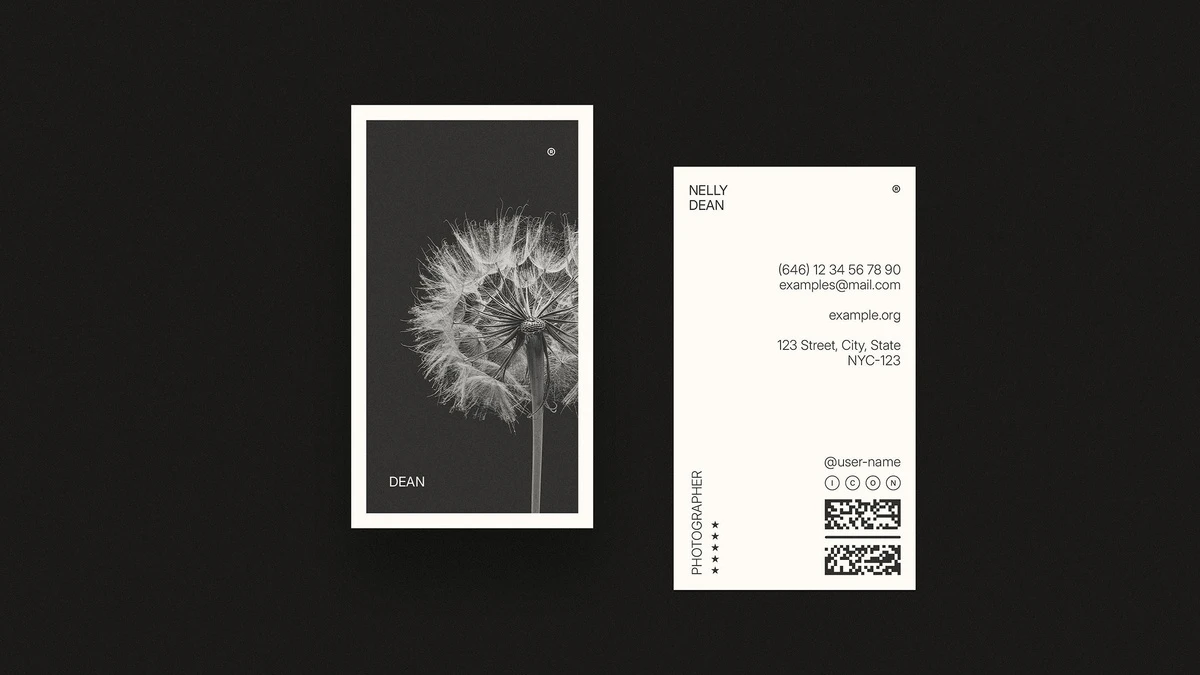
I discovered this new vertical business card design template from Adobe Stock contributor RedGiant just recently, and the first thing I noticed had nothing to do with the dandelion or the lotus on the front. It was the back.
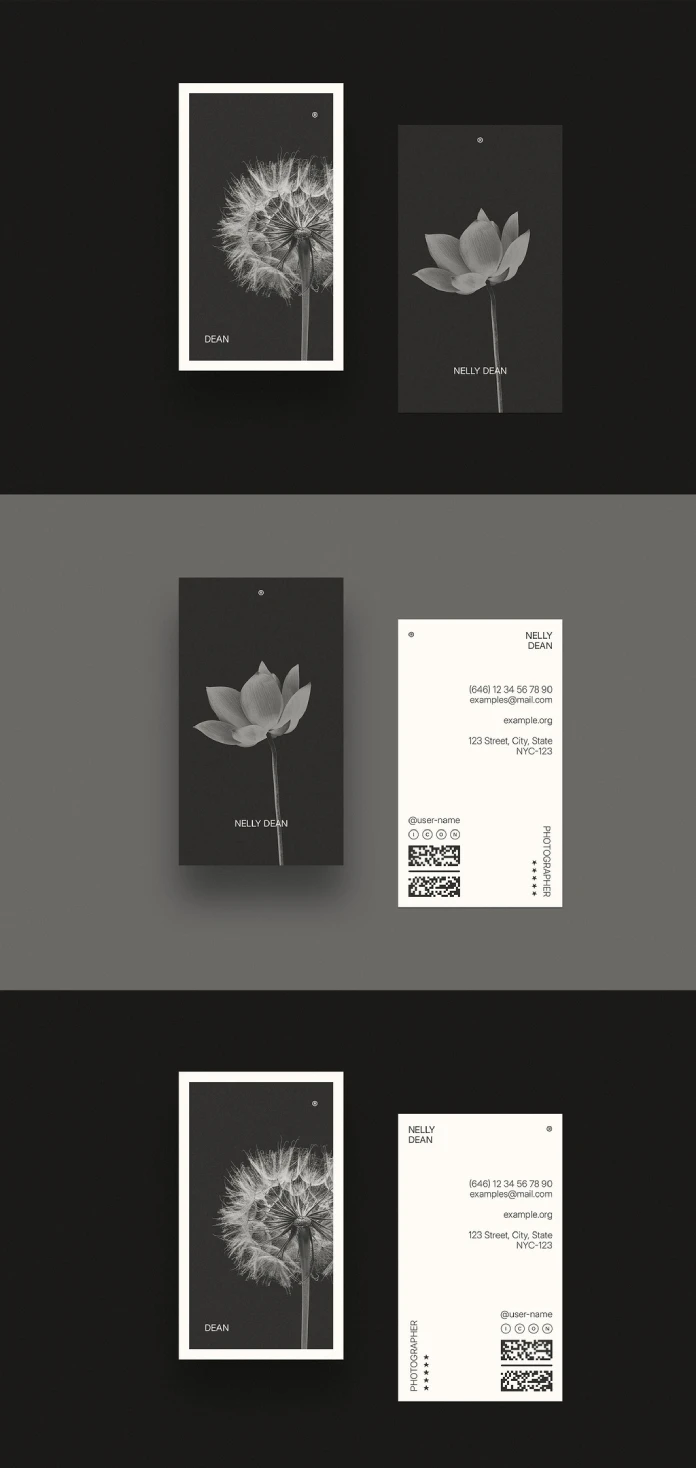
Honestly, there are so many business card design templates on Adobe Stock that treat the reverse side as a dumping ground for a phone number and a logo mark. This one treats it as a second composition with its own hierarchy, its own grid, and its own job to do. That is rare enough to write about. The file is available as an InDesign document, designed to the standard 2 × 3.5 inch vertical format and set up in CMYK, which means it is meant for print rather than screen. It comes with two design options, both built around close-up black-and-white flower photography shot against a near-black backdrop. One uses a dandelion seed head; the other, a lotus. Neither image matters as much as the structure underneath it, and that structure is what I want to walk through.
Please note that this template requires Adobe InDesign to be installed on your computer. Whether you use Mac or PC, the latest version is available on the Adobe Creative Cloud website—take a look here.
What Makes This Vertical Business Card Design Template Worth a Closer Look?
It solves a problem that shows up constantly in business card design: the back side either gets ignored or gets overloaded. This template avoids both traps by splitting information across a deliberate vertical grid instead of centering everything out of habit. The name sits in one corner, rotated profession text runs along the left edge, two QR code blocks sit near the bottom, and a row of small social icons breaks up what would otherwise be a wall of contact details. Every element has a lane. Nothing competes for the same visual weight.
That rotated category label, set vertically along the card’s left margin, is a small decision that does a lot of work. It reads as a job title tag without needing its own box or divider line. On the preview, it says “Photographer,” paired with a small star rating treatment next to it. Neither is functional data. Both are placeholder styling you would swap for your own title, but the pattern itself, title plus a short credibility marker, is reusable for almost any service-based profession: consultants, architects, florists, tattoo artists, anyone who wants their card to signal expertise at a glance rather than through a paragraph of credentials.

First Look: Two Design Options, One Shared Logic
The dandelion version sits inside a thin cream-colored mat frame against solid black, giving it a gallery-print feel. The lotus version drops the frame entirely and lets the flower bleed closer to the card’s edges, which reads slightly warmer and less formal. Both fronts carry nothing but a name and a small registered-trademark glyph in the corner. That restraint is the real design decision here, not the flower photography itself.
Here is the detail worth flagging for anyone who has not bought a template like this before. What you receive is the InDesign file, not the glossy photographed mockup showing the card standing on a studio table with a soft shadow behind it. That mockup is Adobe Stock’s presentation layer. It’s not part of what lands in your download. Confusing the two is the single most common mistake I see first-time template buyers make, and it is worth saying plainly before anyone pays for this one expecting a rendered scene file.
The Front Side: What the Photography Is Actually Doing
Both flower photographs function as placeholders, not fixed brand assets. Swap the dandelion for a product shot, a portrait, or a texture, and the layout holds because the image sits inside a locked frame with generous negative space around the type. That is the mark of a template built by someone who has actually handed files to clients before. A business card design that only looks good with its sample image is not a template. It is a finished poster pretending to be reusable.
I want to name something here, because it is the kind of judgment call that separates a usable file from a demo screenshot. Call it the Replacement Image Tolerance test, a framework I use at WE AND THE COLOR to evaluate photo-driven templates: how far can you push a substitute image, in tone, contrast, and subject, before the layout stops working? This template scores well. Because the photography sits in a contained frame rather than running full-bleed with text layered directly on top, a brighter or busier replacement image will not swallow the name or the contact block the way full-bleed photo cards so often do.
The Back Side Is Where This Template Earns Its Price
Flip to page two of the InDesign file and the layout gets genuinely interesting. Name and title sit at the top, address and digital contact details sit in the middle, and two QR codes anchor the bottom alongside social handle icons. In one color option, the name sits top-right against a cream background; in the other, it shifts top-left with a small registered mark in the corner instead. That is not a cosmetic swap. Repositioning the anchor point changes how the eye enters the card, and both versions still read correctly within about two seconds, which is the real benchmark for a card someone glances at once before pocketing it.
I evaluate business card backs against what I call the Two-Surface Legibility Test, an editorial framework, not an industry standard, that asks a simple question: does the back of the card work as a standalone composition if someone never looks at the front? Plenty of templates fail this immediately because the back is just a logo and a phone number floating in empty space. This one passes. The vertical “Photographer” tag, the star marks, and the layered contact information give the back enough visual structure to function on its own, which matters more than people think, since the back is what most people actually read after a handshake.
Typography and Color: Reading the File Without Guessing
The type is a tracked-out, uppercase grotesque sans-serif, the kind of clean geometric family that reads as neutral rather than trendy, which is exactly right for a template meant to outlast whatever font is fashionable this quarter. Nothing about the typography draws attention to itself, and that restraint is intentional. A business card is not a poster. It gets read for three seconds in low light at a conference table, and type that behaves at small sizes under bad lighting beats type that looks clever on a laptop screen.
Color stays almost entirely monochrome: black, off-white or cream, and the grayscale flower photography. That single decision does more for the template’s versatility than any layout choice. A near-black-and-cream palette never clashes with a logo, never fights a brand’s existing colors, and reproduces predictably in CMYK printing, where saturated colors often shift more than designers expect. If you have ever gotten business cards back from a print run looking noticeably different from the screen proof, you already understand why a restrained palette like this one is the safer bet.
Who This Vertical Business Card Design Template Actually Fits
Photographers are the obvious audience, given the sample copy on the preview, but the structure transfers cleanly to anyone selling a service built on craft and reputation rather than volume: independent architects, florists, tattoo artists, interior stylists, even boutique law practices that want to look less corporate than a standard horizontal card. It fits less well for anyone needing a crowded card with multiple phone lines, several job titles, or a dense logo lockup. The grid is built for restraint, and forcing extra information into it will undo the exact quality that makes it worth buying in the first place.
A small aside, because it is the kind of detail an editor notices and a casual buyer would not: the placeholder name on the second design, Nelly Dean, is also the name of the housekeeper and narrator in Emily Brontë’s “Wuthering Heights.” Whether that is a deliberate nod from the contributor or pure coincidence, I cannot say. It is the kind of small, specific detail that makes a template feel designed by a person rather than generated by a pattern, and it is the sort of thing worth noticing before you overwrite it with your own name.
Where It Falls Short
No template is without trade-offs, and this one has two worth naming. First, the monochrome, photography-led front will not suit brands that rely on a specific color identity; swapping in a colored logo against the near-black background can read as an afterthought rather than a deliberate choice. Second, the vertical format itself is still a harder sell at in-person networking events, where most card holders, wallets, and Rolodex-style displays are built around the standard horizontal orientation. A vertical card photographs beautifully for a portfolio site. It occasionally gets folded or misfiled in a stack of horizontal ones.
How to Customize This Template in InDesign
Once the file is open, start with the paragraph and character styles rather than clicking directly into text frames. Adjusting the style definitions keeps both design options consistent if you decide to customize one and not the other. Replace the photography using the Content Grabber, the small ring that appears when you hover over a placed image, so the frame and its crop stay locked while the picture changes underneath it. Regenerate both QR codes before sending the file to print; the ones in the preview are sample data and will not resolve to anything useful. Finally, check the document’s bleed and trim settings against your printer’s specifications before export, since CMYK print vendors vary slightly in how much bleed they require around a vertical card this size.
A Prediction Worth Stating Plainly
Vertical business card design will keep gaining ground over the next few years, not because it looks more modern, but because QR codes and digital contact handoffs reward a taller card with more room for structured data at the bottom. A horizontal card forces QR codes into a cramped corner. A vertical one gives them an entire zone, as this template proves. Expect more Adobe Stock contributors to follow that logic rather than treating vertical orientation as a stylistic choice.
Quick Specs
| Detail | Specification |
|---|---|
| Format | Adobe InDesign (.indd) |
| Dimensions | 2 x 3.5 inches, vertical orientation |
| Color mode | CMYK, print-ready |
| Design options | 2 (dandelion and lotus photography) |
| Imagery | Black and white floral photography, fully replaceable |
| Contributor | RedGiant |
| Marketplace | Adobe Stock |
| Best suited for | Photographers, architects, florists, independent creatives |
| Less suited for | Dense, multi-line corporate contact layouts |
Frequently Asked Questions
Is this vertical business card design template editable in InDesign?
Yes. The file opens as a standard InDesign document with editable text frames, paragraph styles, and placed images that can be swapped through the Content Grabber without rebuilding the layout.
Does this business card design template come in CMYK?
Yes. The template is built in CMYK color mode, which makes it ready for professional print without a color-mode conversion step.
Can I replace the flower photography with my own images?
Yes. The dandelion and lotus photographs are placeholder imagery. Because they sit inside a locked frame with consistent margins, most replacement images, including busier or brighter ones, will hold the layout without further adjustment.
What size is this vertical business card template?
It is built to 2 x 3.5 inches, the standard vertical business card dimension used across most US print vendors.
Do I need Adobe InDesign to use this file?
Yes. The template is distributed as an .indd file, which requires Adobe InDesign to open and edit. It is not compatible with Illustrator, Photoshop, or Canva without conversion.
Is the realistic mockup photo included in the download?
No. The photographed scene showing the card on a table is Adobe Stock’s marketing presentation for the listing. The actual download is the InDesign source file.
Browse WE AND THE COLOR’s Templates category for more.
Subscribe to our newsletter!