This post contains affiliate links. We may earn a commission if you click on them and make a purchase. It’s at no extra cost to you and helps us run this site. Thanks for your support!
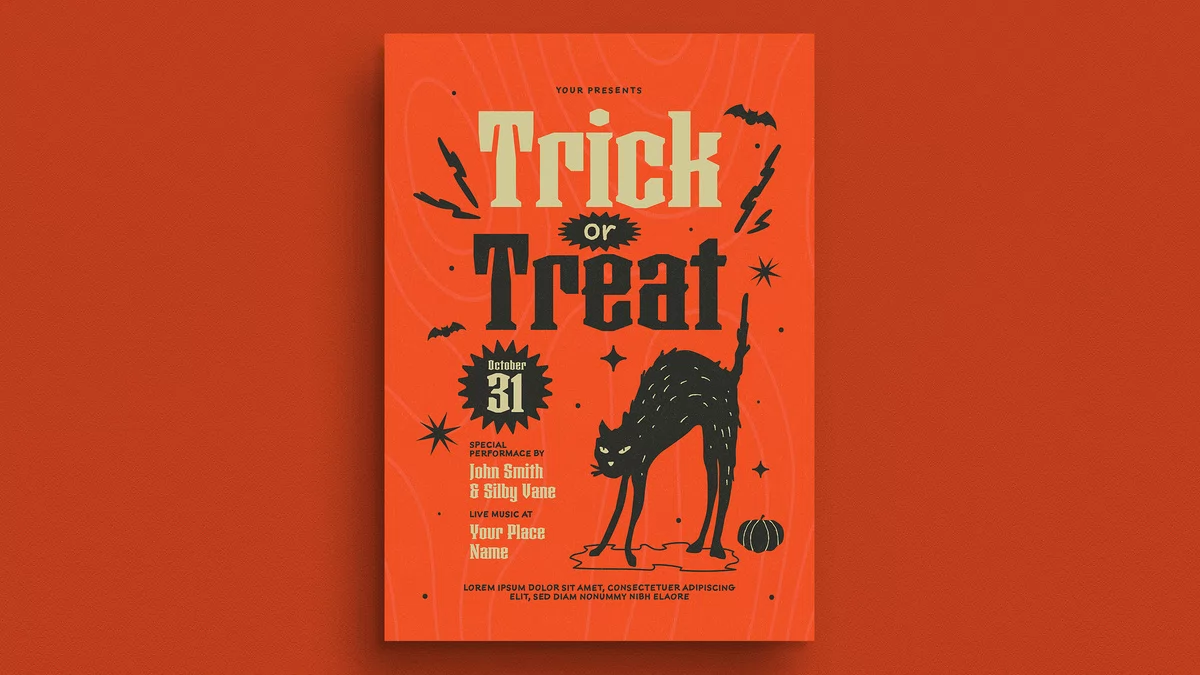
This retro Halloween flyer makes one decision most templates avoid. It lets a single black cat carry the whole poster. Guuver, an Adobe Stock contributor, designed the A4 layout as an editable vector file with CMYK colors. I opened it in Adobe Illustrator and tried to break it. Mostly, it held up.
Halloween flyers usually fail through volume. Ten pumpkins, six ghosts, and a fog gradient fight for attention. This one uses a hissing cat, a few bats, and a lot of orange. Does restraint sell a party better than clutter? After a week with the file, I say yes.
Please note that this vector template requires Adobe Illustrator to be installed on your computer. You can get the latest version from the Adobe Creative Cloud website. Just have a look here.
What makes a retro Halloween flyer different from a standard party flyer?
A retro Halloween flyer borrows from mid-century print. Think flat color, chunky display type, and simple spot illustration. It looks printed, not rendered. That matters on a crowded corkboard, where glossy gradients vanish.
I define the style with a term of my own: the Two-Ink Rule. A retro flyer should read as if two inks ran on one colored stock. Here, charcoal and cream sit on a burnt orange field. Everything else is tint or texture.

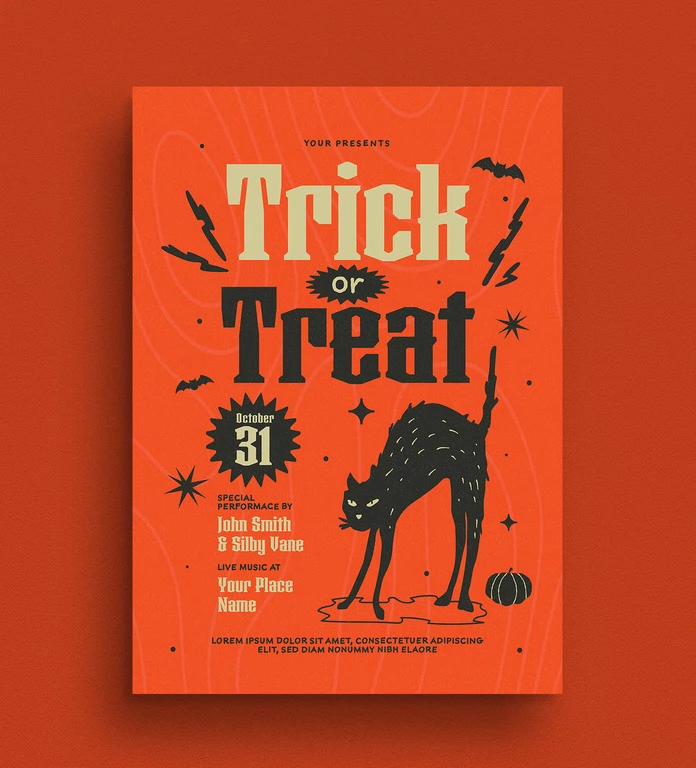
This flyer follows the rule almost perfectly. The cream “Trick” and the charcoal “Treat” split the headline by ink. The cat and the date badge reuse the same pair. Consequently, the poster feels cohesive from ten feet away.
The cat is the headline’s equal.
The arched cat has raised fur, narrowed eyes, and a tail that points straight up. It stands on a loose puddle shape. That puddle grounds the figure. Without it, the cat would float.
I think the cat is the best asset in the file. It is also the reason this Halloween flyer template stands out from stock rivals. Most templates settle for a silhouette. This cat has an attitude.
How does the typography hold up at poster size?
The headline uses a heavy, slab-leaning display face with cut corners. It sits in two lines, and the word “or” lives in a spiky black starburst between them. That badge is a clever fix. It stops the small word from disappearing.
Still, I have one complaint. The “Trick” line in cream has less contrast against orange than the charcoal “Treat” line. On a cheap office printer, the top line turned soft. Therefore, I recommend darkening the cream by about ten percent before you print.
The supporting text is small but sensible.
The information stack is modest. A small cream script names the performers. A second block names the venue. Below that, a line of capitals handles the address and details. Furthermore, the date sits in its own burst badge, so nobody misses October 31.
The preview shows placeholder copy, including “Your Presents” at the top and a lorem ipsum footer. Replace those first. I almost forgot the top line, which would have been embarrassing.
Is this vector flyer actually easy to edit in Adobe Illustrator?
Yes, with small caveats. The file is a true vector flyer, so every shape scales without blur. I enlarged the cat to poster size and saw no pixel edges. The grain, however, behaves differently from the shapes.
Here is the workflow I used to edit this Illustrator flyer template:
- Open the file and check the Layers panel before touching anything.
- Unlock the text layers and replace each placeholder block.
- Swap the performer names, venue, and footer copy.
- Check fonts. Install any missing ones, or outline them.
- Export a press-ready PDF with bleed.
Color mode and print setup
The document uses CMYK, which suits printing. That choice saves you a conversion step. On the other hand, social posts need RGB. Convert a copy for Instagram, and expect the orange to shift slightly on screen.
The A4 size (210 × 297 mm) fits most European printers. American users should check the margins on US Letter. The artboard is slightly taller, so crop the contour lines, not the cat.
Which details separate this retro trick-or-treat flyer from its competitors?
I compared the design against typical Halloween party flyer templates on stock sites. Three details stood out.
The topographic background
Faint contour lines wander behind the type in a lighter orange. They add depth without adding a color. I like this move a lot. It gives the poster a printed, almost screen-printed feel.
The scatter of small shapes
Lightning bolts frame the headline. Bats sit in two corners. Four-point sparkles and dots fill the gaps. Because they stay small, they never compete with the cat. Yet they keep the empty areas alive.
The tiny pumpkin
One small pumpkin sits beside the cat’s back leg. Only one. That single pumpkin is a joke on the genre, and I enjoyed it.
What are the weak points of this Halloween party flyer template?
No design is perfect. First, the performer block is cramped. Two names plus a venue squeeze into the lower left. A longer lineup will force you to resize the cat or the date badge.
Second, the layout favors a single event. A multi-stage party needs more room for schedules. This flyer sells a mood, not a program. Accept that, or choose another file.
Third, the grain texture may bloat the file. Simplify it before sending the design to a copy shop. Otherwise, the preview will crawl.
Summary table: The retro Halloween flyer at a glance.
| Attribute | Detail | My verdict |
|---|---|---|
| Designer | Guuver (Adobe Stock contributor) | Confident, consistent style |
| Format | Editable vector, Illustrator-ready | Scales cleanly |
| Page size | A4 (210 × 297 mm) | Check margins for US Letter |
| Color mode | CMYK | Print-ready, convert for social |
| Palette | Burnt orange, charcoal, cream | Follows the Two-Ink Rule |
| Hero element | Arched black cat | Best asset in the file |
| Weak spot | Cream headline contrast, tight info block | Fixable in minutes |
Where is retro Halloween design heading next?
I expect three shifts. First, flat two-ink layouts will spread because social feeds punish visual noise. Second, the hand-cut display type will replace thin sans fonts on event posters. Third, designers will treat grain as a standard layer, not a special effect.
I also predict that single-mascot flyers will go viral more often than crowded ones. A lone cat is easy to remember, easy to meme, and easy to screenshot. Will your next poster dare to show only one character?
Who should download this Halloween flyer vector?
This file suits school fundraisers, bar nights, neighborhood block parties, and small music venues. It also suits freelancers who need a fast base. You can finish a customized version in under an hour.
Skip it if you need a corporate look. The cat has too much personality for a conference mixer.
FAQ: Retro Halloween flyer template
Can I edit this retro Halloween flyer in Adobe Illustrator?
Yes. Guuver built it as a vector file for professional design software such as Adobe Illustrator. Shapes, colors, and text stay editable.
What size is the flyer?
The flyer uses A4, which measures 210 × 297 mm. For US Letter, adjust the artboard and trim the background lines.
Is the file ready for print?
The color mode is CMYK, so yes. Add bleed in your export settings and replace all placeholder copy first.
Can I change the colors?
Yes. The design uses a limited palette, so global swatches make recoloring quick. Keep strong contrast between the cream and the orange.
Does a trick-or-treat flyer work for adult parties?
It does. The retro look and the live music block signal a social event, not a children’s candy run.
What should I replace first?
Start with the top line, which reads “Your Presents” in the preview. I nearly shipped my test version with it still in place.
Browse WE AND THE COLOR’s Templates category for more.
Subscribe to our newsletter!