This post contains affiliate links. We may earn a commission if you click on them and make a purchase. It’s at no extra cost to you and helps us run this site. Thanks for your support!
This InDesign portfolio and resume presentation template gets the hardest decision right. It puts all 20 slides on one grid and then stays out of your way. I went through every page, and the restraint shows on each one.
Clients and hiring managers often open portfolios on a laptop screen before they read your email. However, many designers still send A4 documents that force readers to pinch and scroll, and I think that a minimalist grid-based InDesign template at 1920×1080 px closes that gap.
RedGiant, an Adobe Stock contributor, built this file for screens. So the pages fill a monitor edge to edge. Besides, this InDesign portfolio and resume presentation template exports as a PDF deck for pitches and job applications.
Please note that this template requires Adobe InDesign to be installed on your computer. Whether you use Mac or PC, the latest version is available on the Adobe Creative Cloud website—take a look here.
What Is an InDesign Portfolio and Resume Presentation Template?
An InDesign portfolio and resume presentation template is a set of pre-built pages sized for screens instead of paper. RedGiant’s version measures 1920×1080 px and holds 20 pages. Every page follows the same grid.

You can change every element on all 20 pages. You can also add, duplicate, or delete as many pages as you need. The preview photos are for display only, so the download does not include them. You bring your own images, graphics, and text.
Readers who search for an InDesign template for portfolio presentation usually want a ready layout system. A blank canvas does not help them. This file delivers that system, though a system only helps if you respect it.
How the Grid Holds 20 Slides Together
The grid is the real product here. Headlines usually hang from the top edge, and a few drop to a bottom corner for tension. Images snap to column widths. Small text blocks line up beneath them. As a result, the file reads like one publication.
The Anchor Strip
Inside this InDesign portfolio and resume presentation template, I call the repeating furniture the Anchor Strip. It is a thin header line with a studio label and an issue stamp, plus an arrow in a bottom corner.
The Anchor Strip is the fixed header and corner marker that repeats on every slide and keeps a grid-based deck recognizable. It works like a master page. Also, it gives the deck a magazine feel. Swap the studio label for your name, and the strip becomes your signature.
Why One Grid Beats Twenty Layouts
A single grid cuts decision time. You never wonder where a caption goes. Instead, you ask which column it belongs to. For a solo designer, that speed matters more than variety. Besides, consistent margins make weak photos look intentional.
What Do the 20 Pages Contain?
Pages 1 to 4 Set the Frame
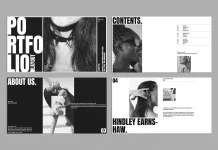
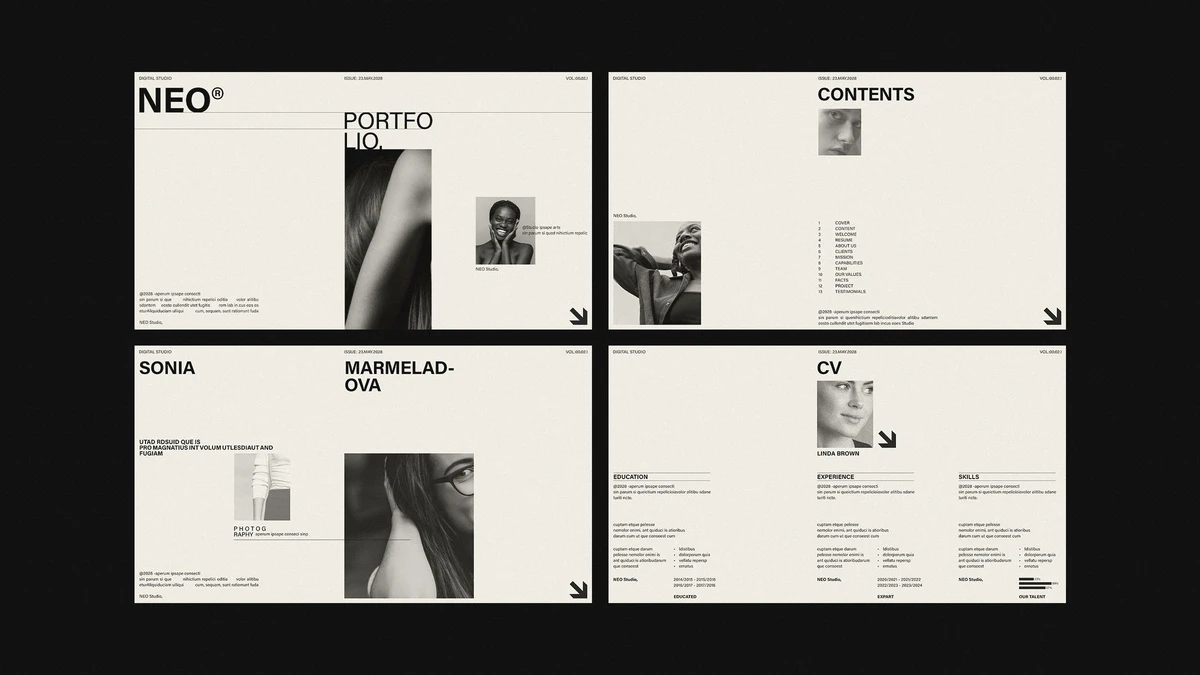
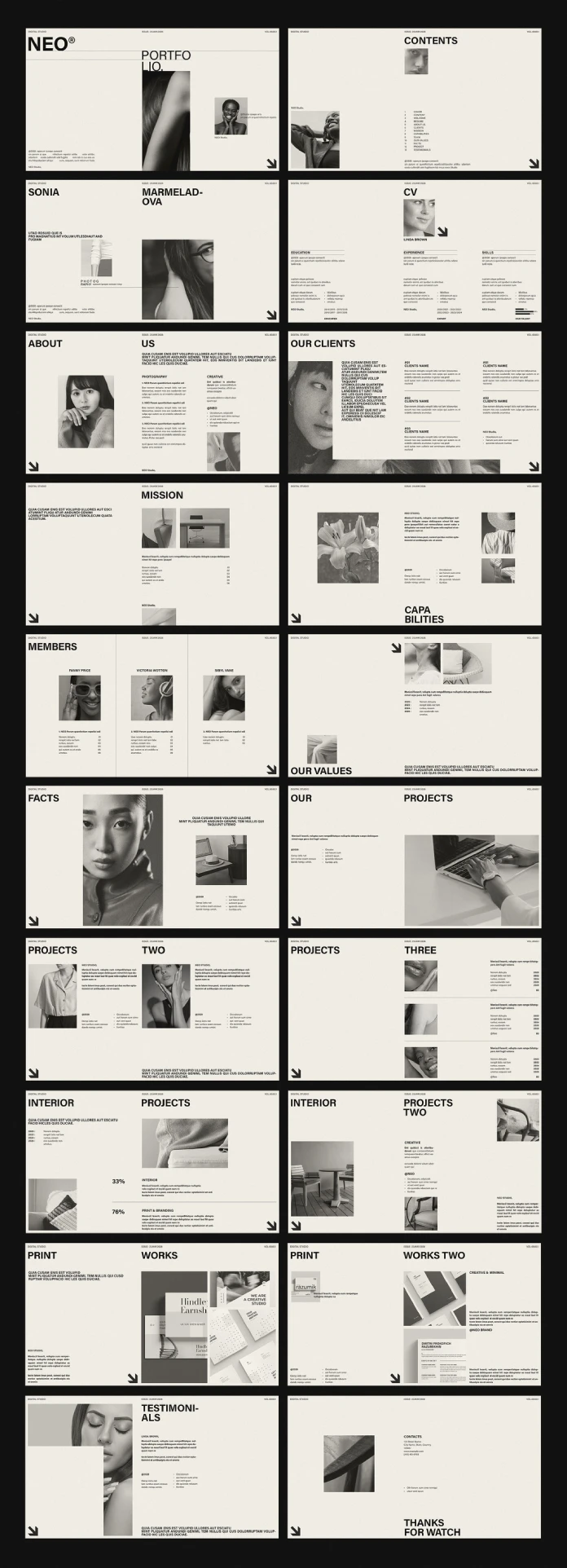
The cover pairs a heavy NEO® wordmark with a large portrait. Next comes a contents page with 13 numbered entries for 20 pages. Then a name page lets one oversized name carry the layout. Finally, the CV page splits into three columns for education, experience and skills.
Pages 5 to 11 Tell the Studio Story
About, Clients, Mission, Capabilities, Members, Values, and Facts fill this block. The Clients page overlaps a white text panel across a photo, which adds depth without any effects. The Members page uses three columns split by thin vertical rules.
For a solo portfolio, I would cut Members and Facts without a second thought. Agency furniture does not belong in a personal deck.
Pages 12 to 18 Show the Work
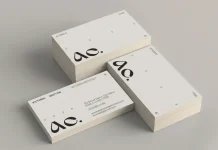
Three Projects pages, two Interior pages, and two Print Works pages carry the portfolio itself. The first Interior page holds two large figures, 33% and 76%, above a thin rule. I would steal that page for case-study results. Meanwhile, the Print Works pages show stationery and business card mockups.
Pages 19 and 20 Close the Deck
Testimonials uses one portrait with a quote block. The final page carries contact details and a large sign-off. Both pages keep the same strip and the same margins.
Where This Template Falls Short
Headlines Break Mid-Word
Several headlines break mid-word in the preview. The cover splits “Portfolio” into “Portfo” and “lio.” Capabilities becomes “Capa” and “bilities.” Testimonials breaks after “Testimoni.” Your own words will change those breaks, so you must fix each headline by hand.
The Body Text Runs Small
The body copy looks tiny against the large headlines. On a laptop, it reads fine. On a projector in a meeting room, it will disappear. Raise the body size before you present, and test the deck from the back of the room.
The Closing Slide Typo
The last page reads “Thanks for watch.” It should say “Thanks for watching.” Fix it first, because a typo costs a design portfolio more than it costs any other document. But you can write anything you want there.
Placeholder Debt
I call this cost Placeholder Debt. It is the editing time between opening a template and publishing your first honest slide. Image pages carry low debt. Heading pages carry high debt, because every new word shifts the line breaks. Overall, this InDesign portfolio and resume presentation template charges a fair price.
How to Turn the InDesign Portfolio and Resume Presentation Template Into Your Own Deck
The file needs six steps before it represents you.
- Open the file and check Find Font for missing typefaces.
- Replace the studio label in the Anchor Strip with your name.
- Delete the pages you do not need, then update the contents page.
- Place your own photos, since the download does not include the preview images.
- Rewrite the headlines first, then check every line break.
- Export as Adobe PDF (Interactive) for screens, or as JPEG for other slide tools.
The Six-Slide Cut
The Six-Slide Cut is a resume-first deck made of a cover, a CV, two projects, one testimonial, and one contact page. For a resume, I recommend this cut of the InDesign portfolio and resume presentation template. Keep pages 1, 4, 12, 13, 19, and 20. Recruiters scan fast, so six slides respect their time.
Choose Photos That Match the Page
The preview uses desaturated portraits and product shots on a warm off-white page. Keep your imagery in that range. Saturated photos will fight the quiet layout. Alternatively, convert your images to grayscale before you place them.
Where This Template Works Best
Photographers and small studios will get the most from this InDesign portfolio and resume presentation template. Freelance designers who need a quick resume slide deck also fit well. Students can build a clean portfolio PDF for applications.
I would skip it for brands that need color. The layout assumes quiet imagery, and loud images break it.
Where Grid-Based InDesign Decks Go Next
I expect screen-first portfolios to replace A4 attachments for most junior hires. Reviewers compare many files each day. Therefore, they will reward decks that open full screen and read in seconds.
I also expect AI-generated imagery to flood portfolios. As a result, the grid will matter more than the pictures. A designer who controls spacing will stand out from one who only controls prompts.
Template makers will answer with more grid systems and fewer decorative layouts. This InDesign portfolio and resume presentation template already points in that direction.
InDesign Portfolio and Resume Presentation Template at a Glance
| Feature | Detail |
|---|---|
| Creator | RedGiant, Adobe Stock contributor |
| Format | Adobe InDesign template |
| Page size | 1920×1080 px, made for screen presentations |
| Pages | 20 predesigned pages |
| Layout | One uniform grid on every page |
| Editing | Fully customizable; add, duplicate or delete pages |
| Images | Preview photos are for display only and not included |
| Best for | Portfolios, resumes, studio decks and pitches |
| Main strength | Consistent grid and repeating Anchor Strip |
| Main weaknesses | Mid-word headline breaks, small body text, closing slide typo |
| Fastest resume route | The Six-Slide Cut (pages 1, 4, 12, 13, 19, 20) |
Frequently Asked Questions About the InDesign Portfolio and Resume Presentation Template
What size is the InDesign portfolio and resume presentation template?
The InDesign portfolio and resume presentation template measures 1920×1080 px. That 16:9 format fills most monitors and projectors.
How many pages does it include?
It includes 20 predesigned pages. You can add, duplicate, or delete as many pages as you want.
Are the photos from the preview included?
No. The preview photos are for display only. You add your own images, graphics, and text.
Can I use it as a resume?
Yes. This InDesign portfolio and resume presentation template has a dedicated CV page. For a short resume deck, keep pages 1, 4, 12, 13, 19, and 20.
How do I present the finished deck?
Export it as an Adobe PDF (Interactive) from InDesign. Then open the file in a PDF viewer and switch to full-screen mode.
What is the Anchor Strip?
The Anchor Strip is the fixed header line and corner arrow that repeat on every slide. It keeps the whole deck recognizable.
Does the template fit non-designers?
Yes, if they know basic InDesign editing. The grid guides placement, so beginners make fewer layout mistakes.
Don’t hesitate to find other useful graphic design templates here at WE AND THE COLOR.
Subscribe to our newsletter!