This post contains affiliate links. We may earn a commission if you click on them and make a purchase. It’s at no extra cost to you and helps us run this site. Thanks for your support!
Honestly, annual reports often die in their second week. Someone skims the chairman’s letter, shrugs, and files the PDF. A good InDesign annual report template has to prevent that from page one.
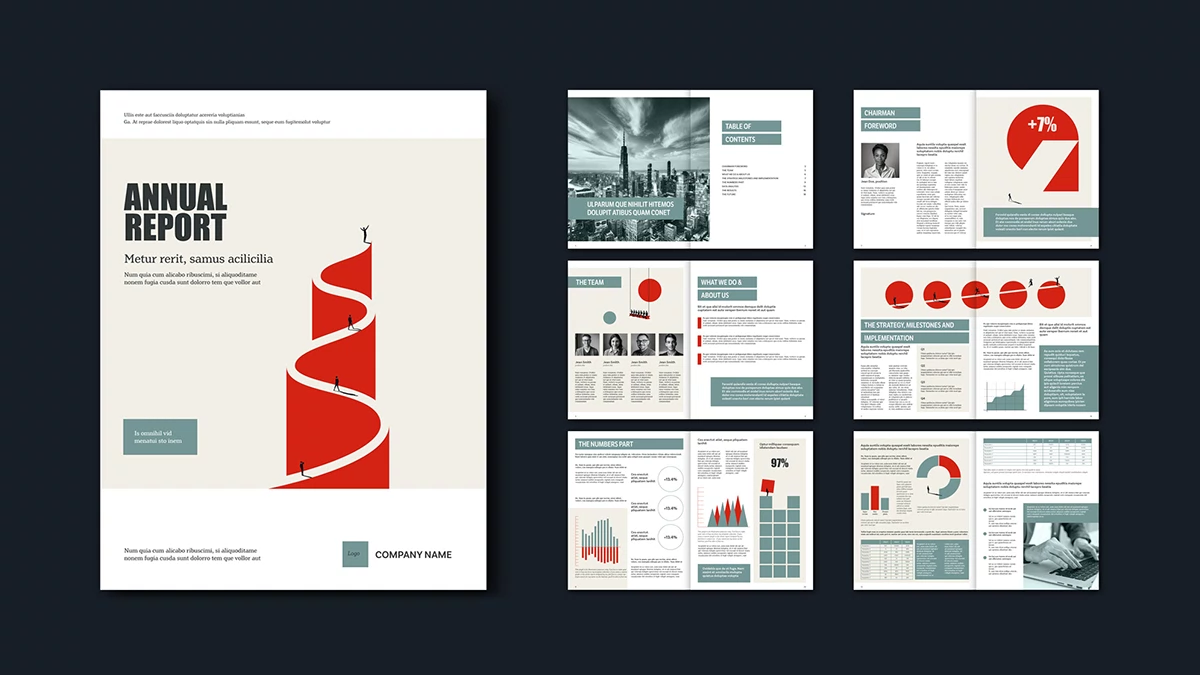
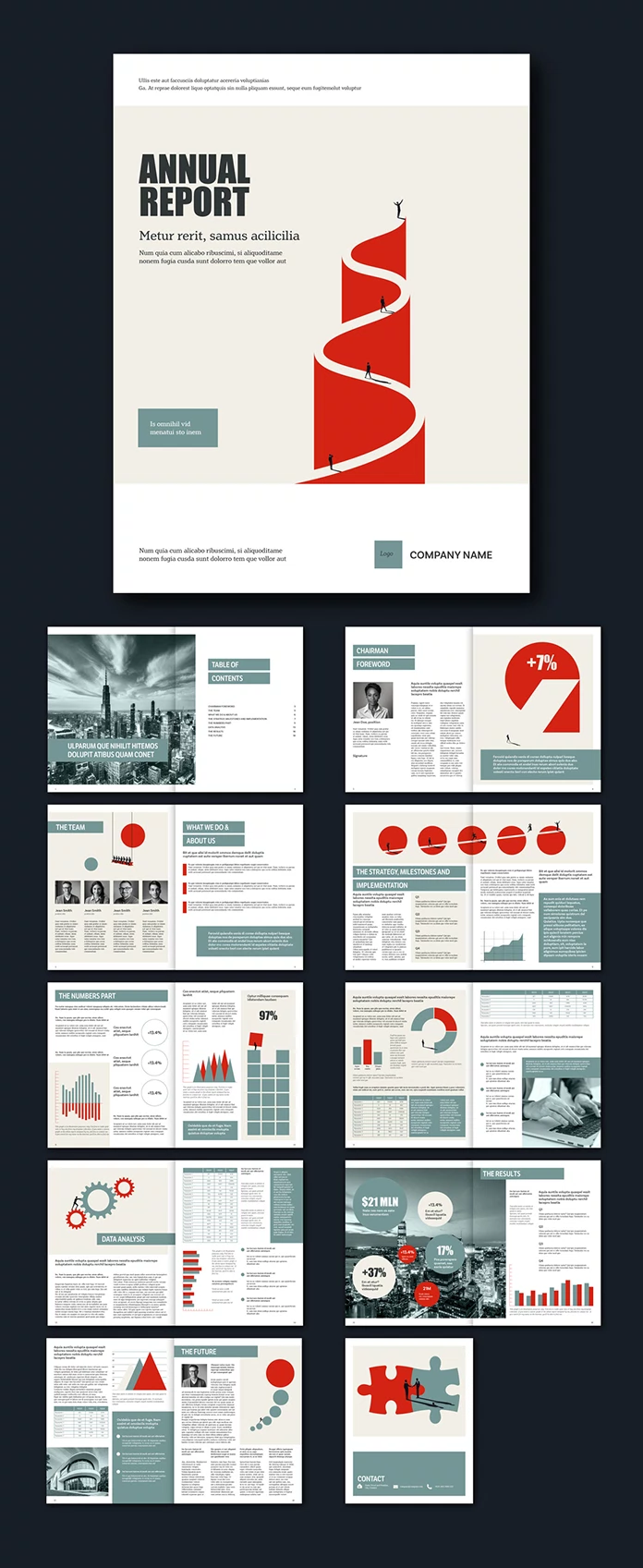
Jozef Micic, a graphic designer and Adobe Stock contributor, designed one that tries hard, and I really like it. His cover shows a red road spiraling up a tower. Tiny figures climb it. I think it beats any stock photo on a business cover. This InDesign annual report template comes in US Letter (8.5 x 11 in) and A4. Both versions hold 20 pages. I went through every spread. Designers usually get annual report jobs late, and budgets stay small. Therefore, a ready-made grid saves days. I also expect illustrated reports to replace stock-photo reports soon, because generic photos have lost their value.
Please note that this template requires Adobe InDesign to be installed on your computer. Whether you use Mac or PC, the latest version is available on the Adobe Creative Cloud website—take a look here.
What Makes This InDesign Annual Report Template Different From the Usual Corporate Layout?
Restraint, mainly. The palette runs on a hot red and a dusty sage over warm cream. Charcoal handles the type.
Every photo runs in grayscale. As a result, the red does all the talking.

Annual report brochures often scatter five or six accent colors across their charts. Micic refuses to do that. Consequently, every chart looks like it belongs to the same company.
Here is my definition. Minimalist annual report design limits its palette and lets one accent color carry the data. This InDesign annual report template follows that rule on all 20 pages.
I find that rule more useful than any layout trick. Because red appears only near numbers, readers learn to look there first. That rule also makes the InDesign annual report template easy to rebrand.
How Does the 20-Page InDesign Annual Report Template Structure Your Story?
Cover, Contents, and Chairman’s Foreword
The cover of this InDesign annual report template pairs a heavy condensed headline with a serif subtitle. Together they read like a newspaper masthead. A sage box and a logo slot sit at the bottom.
Next comes the table of contents. A grayscale skyline photo fills the left page, and the list sits on the right. Then the chairman’s foreword follows, with a portrait and a large red wedge reading +7%.
I like that the foreword page carries a number. Chairman letters usually bury results in paragraph six. Here, the figure leads.
Team, Company Story, and Strategy
The team page in this InDesign annual report template offers four portrait slots with names and titles. Next, the “What We Do & About Us” spread uses small red markers to flag key statements. The strategy spread then shows five red circles with a figure walking across them. Below, four blocks, Q1 through Q4, hold your milestones.
That quarterly structure forces discipline. You write one clear paragraph per quarter, and nothing more.
Numbers, Results, Future, and Contact
The middle of the book carries the data. Bar charts, ring callouts, tables, and a gear illustration fill those spreads. The results spread places oversized figures like $21 MLN and +37% over a dark skyline photo. After that, the future section pairs a rising triangle chart with a portrait. The InDesign annual report template ends on a puzzle illustration and a contact block.
How Good Are the Minimalist Infographics and Illustrations?
Charts, Rings, and Oversized Numbers
The charts include vertical bars, a donut, a spike chart, and a square grid that shows 97%. Large circles hold figures such as +13.4% and 17%. Each chart in this InDesign annual report template uses red and sage only.
Big numbers do the real work. A single +37% in a circle reads faster than a paragraph. However, the preview values are placeholders. Rebuild each chart from your own data, and check every proportion.
One warning. Do not repeat the same chart type on consecutive spreads. Variety keeps readers moving.
Illustrations With a Point of View
The illustrations carry the personality. Climbers scale a red spiral. A figure works among red gears. Two silhouettes shake hands across a puzzle. Each scene uses small black figures with long shadows.
My thesis is simple. Tiny human figures give abstract numbers a human scale. A revenue chart feels less cold when a silhouette stands next to it. Icons label data, but silhouettes tell a story.
The weakest part is the tables. In the preview, the type looks small and dense. I would enlarge the figures before printing.
How Do You Customize This InDesign Annual Report Template?
Customization takes little effort. Every text block and image in the preview is placeholder content. This is the order I would follow.
- Pick US Letter or A4, then open the matching InDesign annual report template file.
- Replace the placeholder text with your own copy.
- Swap in your images. Convert them to grayscale first to keep the palette intact.
- Open the Pages panel to add, delete, or duplicate pages.
- Rebuild the charts and number callouts with your real figures.
- Change the red and sage to your brand colors if you need to.
- Export a print PDF. The CMYK color mode makes the file print-ready.
Everything stays editable. As a result, a 12-page report and a 30-page report both work with this InDesign annual report template.
Who Should Use This Annual Report Brochure Template?
Small and mid-sized companies get the most from it. Nonprofits and startups fit well too. Large listed companies with dense financial statements will need more table space.
Freelancers can also reuse the structure for investor updates and impact reports. Because the grid stays consistent, an InDesign annual report template like this one speeds up repeat jobs.
Where Will Annual Report Design Go Next?
I see two shifts coming. First, illustration will replace stock photography in annual reports, because readers distrust generic imagery. Second, a single hero number will open most reports, just as the foreword here does.
Answer engines will also quote reports that state results plainly. Therefore, write one clear sentence per result. A well-built InDesign annual report template gives you the space to do that.
Quick Facts: InDesign Annual Report Template at a Glance
| Feature | Details |
|---|---|
| Product | InDesign annual report template |
| Designer | Jozef Micic, graphic designer and Adobe Stock contributor |
| Sizes | US Letter (8.5 x 11 in) and A4 |
| Pages | 20 predesigned pages per size, fully customizable |
| Color mode | CMYK, print-ready |
| Palette | Red, sage, cream, charcoal, grayscale photos |
| Graphics | Minimalist infographics and illustrations |
| Preview content | All text and images are placeholders |
| Best for | Small and mid-sized companies, startups, nonprofits |
| Weak spot | Small, dense table type |
Frequently Asked Questions
What is an InDesign annual report template?
An InDesign annual report template is a pre-built Adobe InDesign layout for company reports. It includes pages, grids, and graphics that you fill with your own content.
What sizes does this template come in?
Jozef Micic designed it in US Letter (8.5 x 11 in) and A4. Each size of the InDesign annual report template has 20 pages.
Is the template print-ready?
Yes. The CMYK color mode makes this InDesign annual report template print-ready.
Can I add or delete pages?
Yes. You can add, delete, or duplicate as many pages as you need in the InDesign brochure template.
Are the infographics and illustrations editable?
Yes. Every graphic in the InDesign file stays customizable. The minimalist infographics and illustrations are included.
Do the preview images and text come with it?
No. The InDesign annual report template shows preview content only. Add your own images and text.
Which companies suit this annual report brochure template?
Small businesses, startups, and nonprofits suit it best. A minimalist InDesign annual report template works less well for dense financial statements.
Browse WE AND THE COLOR’s Templates category for more, or take a look at our selection of the 86 best InDesign templates for 2027.
Subscribe to our newsletter!