This post contains affiliate links. We may earn a commission if you click on them and make a purchase. It’s at no extra cost to you and helps us run this site. Thanks for your support!
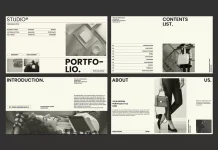
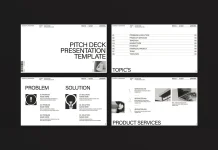
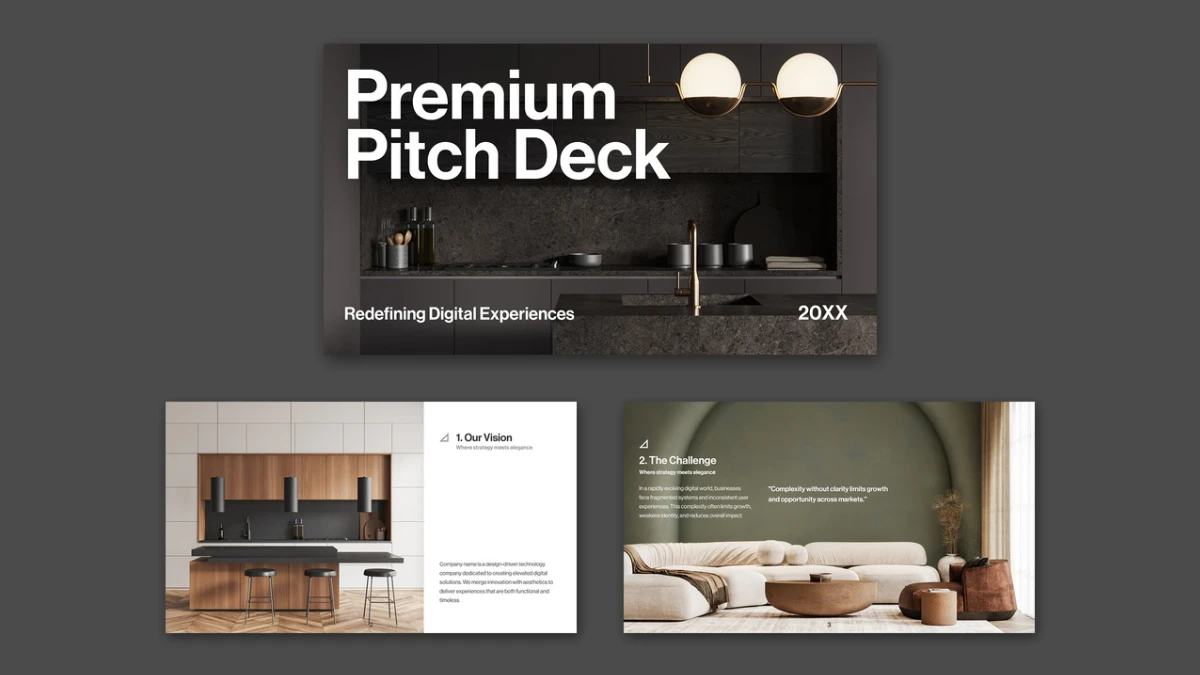
This InDesign pitch deck template is a layout skeleton wearing very expensive photography. And yes, I like this skeleton. Swiss-born graphic designer and Adobe Stock contributor Tom Sarraipo built the file at 1920 x 1080 px. It holds 17 predesigned, fully customizable pages. However, the preview photos serve as display only, and the download leaves them out.
I worked through this InDesign pitch deck template page by page, because pitch decks fail in small details. Founders blame the story. Often the grid caused the damage. So this review checks structure first and mood second. You get a verdict and two original ideas for judging any presentation template.
Please note that this template requires Adobe InDesign to be installed on your computer. Whether you use Mac or PC, the latest version is available on the Adobe Creative Cloud website—take a look here.
Is this InDesign pitch deck template worth downloading from Adobe Stock?
Yes, if your business sells visual work. No, if your funding round depends on dense financial tables. This InDesign pitch deck template favors images and short statements over numbers. That bias suits design studios. It frustrates analysts.
Here is my thesis. An InDesign pitch deck template earns its price when it removes layout decisions without removing authorship. This InDesign pitch deck template mostly succeeds. Its 14 numbered sections follow the classic investor sequence, so you start with a story instead of a blank page.

Definition: An InDesign pitch deck template is a pre-built Adobe InDesign file with slide-sized pages and ready frames for content. Studios and startups use an InDesign pitch deck template to pitch on screen.
What does this InDesign pitch deck template include?
Format and file basics
The page size measures 1920 x 1080 px, a 16:9 ratio. That matches full HD screens and most video-call sharing windows. Therefore you can present the exported PDF without cropping. Print works, but the format of this InDesign pitch deck template fights you there.
You need an Adobe Stock license to download the file. You also need InDesign to edit it. Because the InDesign pitch deck template ships without photos, budget time for image sourcing. I spent more time there than on any layout fix.
The 17-page sequence
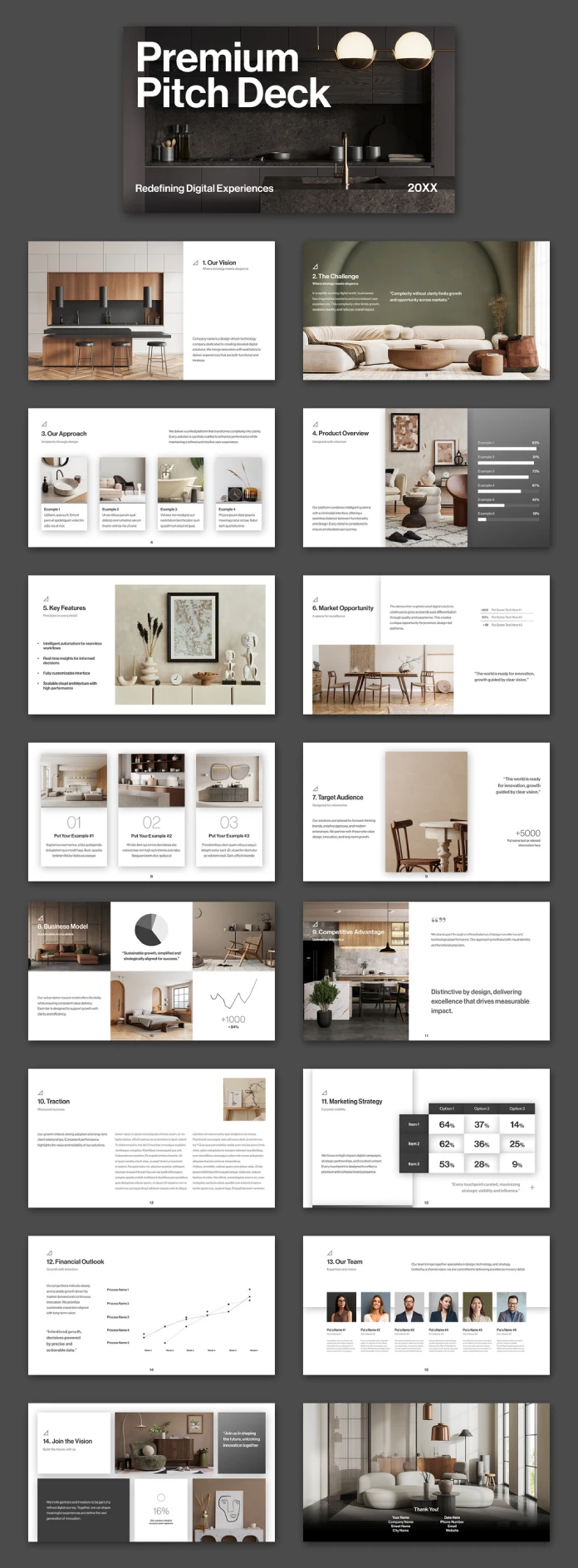
The cover of this InDesign pitch deck template sets the tone with a heavy two-line title and a short tagline. Fourteen numbered sections follow. One unnumbered page sits after Market Opportunity. It holds three columns labeled 01, 02, and 03. The closing page carries contact placeholders.
| Page | Section | Main content |
|---|---|---|
| 1 | Cover | Two-line title, tagline, year placeholder |
| 2 | Our Vision | Photo and short company statement |
| 3 | The Challenge | Full-bleed photo and pull quote |
| 4 | Our Approach | Four image cards |
| 5 | Product Overview | Photo and six horizontal bars |
| 6 | Key Features | Photo and four bullet points |
| 7 | Market Opportunity | Stat list, photo, and quote |
| 8 | Unnumbered page | Three photo columns, numbered 01 to 03 |
| 9 | Target Audience | Photo, quote, and one large stat |
| 10 | Business Model | Photo grid, pie chart, line chart |
| 11 | Competitive Advantage | Photo and one bold statement |
| 12 | Traction | Two text columns and a small photo |
| 13 | Marketing Strategy | 3 x 3 percentage table |
| 14 | Financial Outlook | Line chart with five process labels |
| 15 | Our Team | Six portraits with captions |
| 16 | Join the Vision | Photo collage and call to action |
| 17 | Thank You | Full-bleed photo and contact block |
Notice the numbering. Vision carries the label 1 but sits on page 2. Target Audience carries the label 7 and sits on page 9. The unnumbered page causes the final shift. Fix the labels before you export, or your audience will count wrong.
How do the typography and grid behave?
The type reads as a neo-grotesque in the Helvetica tradition. It stays clean and neutral, so it keeps out of the photography’s way. On the cover, the bold title sits tight across two lines. It dominates the page.
Then the hierarchy collapses. Section titles on interior pages sit far smaller than the cover title. Slide two whispers after a cover that shouts. I would enlarge every section title by roughly a third. Another editor may call that heavy-handed. I stand by it.
Body copy in this InDesign pitch deck template worries me more. In the preview, paragraph text looks tiny, especially on Traction and Our Team. Presentation rooms punish small type. Therefore, test every page at projector distance before you commit. Enlarge the text until the back row can read it.
The grid of this InDesign pitch deck template works. Most pages split into a clear text zone and a clear image zone. White pages dominate, while dark gray panels and one olive-green photo page add rhythm. Because the layouts stay simple, an InDesign pitch deck template like this one survives heavy content swaps.
What is the Photo Dependency Ratio of this InDesign pitch deck template?
I use the Photo Dependency Ratio (PDR) to judge presentation templates. It measures the share of pages that carry a photograph in the preview. I count 15 of 17 pages here, so the PDR is 88 percent. Only Marketing Strategy and Financial Outlook carry no photo.
The number matters because the download omits every photo. At an 88 percent PDR, your image choices decide the look of nearly the whole deck. Treat the preview as a mood board, not a promise. Do you own enough strong photography to fill 15 pages?
My rule of thumb follows. Above 80 percent, budget for image sourcing before you buy. Between 50 and 80 percent, expect moderate sourcing work. Below 50 percent, the layout carries itself. This InDesign pitch deck template sits at the top of that scale.
Ghost Stat Risk: the second test
The Ghost Stat Risk describes sample numbers that look so plausible that they survive into published decks. This InDesign pitch deck template contains several. Examples include +5000 on Target Audience and 16% on Join the Vision. Search the file for plus signs and percent signs before you export.
Not every placeholder deceives. Labels like Put Your Example #1 and Process Name 1 announce themselves as fake. I prefer them over invented figures. Honest slots protect your credibility.
Where do the data slides help, and where do they break?
Four pages handle numbers. Product Overview shows six horizontal bars, with sample values from 93 percent down to 18 percent. Business Model combines a pie chart and a line chart. Marketing Strategy offers a 3 x 3 table of percentages. Financial Outlook uses a line chart with five process labels across six weeks.
The bars and the table in this InDesign pitch deck template look good. The numbers sit large, and the spacing gives them room. Yet the pie chart on Business Model is tiny. It reads as an icon. Real data will need more room.
Financial Outlook disappoints me most in this InDesign pitch deck template. One line chart with five labels and no y-axis values cannot carry a funding ask. Investors will request the model behind it. Build that model separately, and use this page only as a headline.
Also check whether each chart is a native InDesign object or a placed drawing. That detail decides how easily you can edit real figures. Test it before you promise a client a quick turnaround with this InDesign pitch deck template.
How do you customize this InDesign pitch deck template for investors?
Customizing an InDesign pitch deck template works best in a fixed order. Each step below prevents rework in the next one.
- Set your brand first. Change the colors and swap the small triangle mark for your logo before you touch the copy.
- Source your photos. Prepare images at least 1920 px wide for full-bleed pages such as The Challenge and Thank You.
- Rewrite the section titles. Replace labels like Our Vision with claims. Investors skim headlines first.
- Fix the numbering. Align every section label with its page number.
- Hunt the ghost stats. Replace every sample figure with a real number or delete it.
- Export for screen. Choose File, Export, then Adobe PDF (Interactive). Enable full-screen mode and page transitions if you want them.
Which section title would you rewrite first? I started with The Challenge, because the sample quote there sounds like every deck I have seen. A sharper claim costs five minutes and changes the whole page.
How do you present this InDesign pitch deck template on screen?
You have three practical ways to show an InDesign pitch deck template. Each suits a different room.
Full-screen interactive PDF
Export an Interactive PDF and open it in Adobe Acrobat. Press Ctrl+L on Windows or Cmd+L on a Mac to enter full-screen mode. This route keeps fonts and layout intact.
Image sequence in Keynote or PowerPoint
Export each page as a JPEG or PNG and place the images on slides. You lose live text, but you gain speaker notes. Choose this route if your client insists on a slide app.
Shared PDF in a video call
Share your screen with the PDF in full-screen mode. The 16:9 format fills the window without bars. Send the file afterward, so investors can zoom into the small type.
Who should use this InDesign pitch deck template?
Best fit: an InDesign pitch deck template for an interior design studio
Interior studios and product-design firms will feel at home with this InDesign pitch deck template. The sample photography shows warm wood and soft textiles. The copy reads like a startup pitch, but the pictures read like a furniture catalog. That mismatch works for studios.
Branding agencies can also use this InDesign pitch deck template for a client-facing credentials deck. The Our Team page offers six portrait slots with short captions. That layout gives a small studio a credible team page quickly.
Weak fit: data-heavy investor rounds
A fintech founder will fight this InDesign pitch deck template. The data slides stay thin, and the mood leans toward lifestyle. Choose a template built around tables if numbers lead your story.
How does it compare with other pitch deck routes?
| Route | Setup time | Design control | Weak spot |
|---|---|---|---|
| This InDesign pitch deck template | Moderate; photos required | Full, down to the grid | Thin data slides |
| Default PowerPoint or Keynote theme | Fast | Limited by the theme | Generic look |
| Canva pitch deck template | Fast | Moderate | Less typographic control |
| Custom deck from a studio | Slow | Complete | Cost |
The comparison shows a clear trade. An InDesign pitch deck template costs more setup time than a slide app. In return, you gain typographic control that Keynote and PowerPoint rarely match.
What will InDesign pitch deck templates look like in 2027?
I expect four shifts in InDesign pitch deck template design. Each one follows from the weaknesses above.
- Sellers will ship previews with stock-free placeholder frames, because buyers will start asking for the Photo Dependency Ratio.
- Template makers will label every sample figure with 00% or XX, which cuts Ghost Stat Risk.
- Pitch decks will shrink toward 12 pages. A 17-page InDesign pitch deck template already invites trimming.
- Designers will export interactive PDFs more often, because PDFs embed fonts and avoid file problems in live slide apps.
Summary: InDesign pitch deck template at a glance
| Attribute | Detail |
|---|---|
| Product | Premium InDesign pitch deck template |
| Designer | Tom Sarraipo, Swiss-born graphic designer and Adobe Stock contributor |
| Source | Adobe Stock |
| Format | 1920 x 1080 px, 16:9 |
| Pages | 17 predesigned, fully customizable pages |
| Photos | Preview only, not included in the download |
| Photo Dependency Ratio | 88 percent (15 of 17 pages) |
| Best for | Interior, product, and branding studios |
| Weak spots | Financial Outlook, small pie chart, numbering drift, small body text |
| Verdict | Buy it if you already own the photography |
Common questions about the InDesign pitch deck template:
What is an InDesign pitch deck template?
An InDesign pitch deck template is a pre-built Adobe InDesign file with slide-sized pages and ready content frames. You replace the sample text and images with your own.
What size is this InDesign pitch deck template?
The InDesign pitch deck template measures 1920 x 1080 px. That is a 16:9 ratio, which fits full HD screens.
How many pages does the InDesign pitch deck template have?
The InDesign pitch deck template has 17 predesigned pages. Every page accepts full customization.
Does the InDesign pitch deck template include the photos?
No. The photos in the preview are for display only. You must supply your own images.
Can I use this InDesign pitch deck template for investor presentations?
Yes, but it suits visual businesses best. The data slides need extra work for finance-heavy pitches.
How do I present the finished deck on screen?
Export an Interactive PDF from InDesign and open it in Acrobat. Then press Ctrl+L or Cmd+L for full-screen mode.
Which page of the InDesign pitch deck template needs the biggest image?
The Thank You page, page 17, needs a full-bleed image at 1920 x 1080 px.
Check out WE AND THE COLOR’s Templates category for more. In addition, we made a handpicked selection of the 86 best InDesign templates for 2027.
Subscribe to our newsletter!