This post contains affiliate links. We may earn a commission if you click on them and make a purchase. It’s at no extra cost to you and helps us run this site. Thanks for your support!
Oh yes, these vector graphics don’t whisper. They announce.
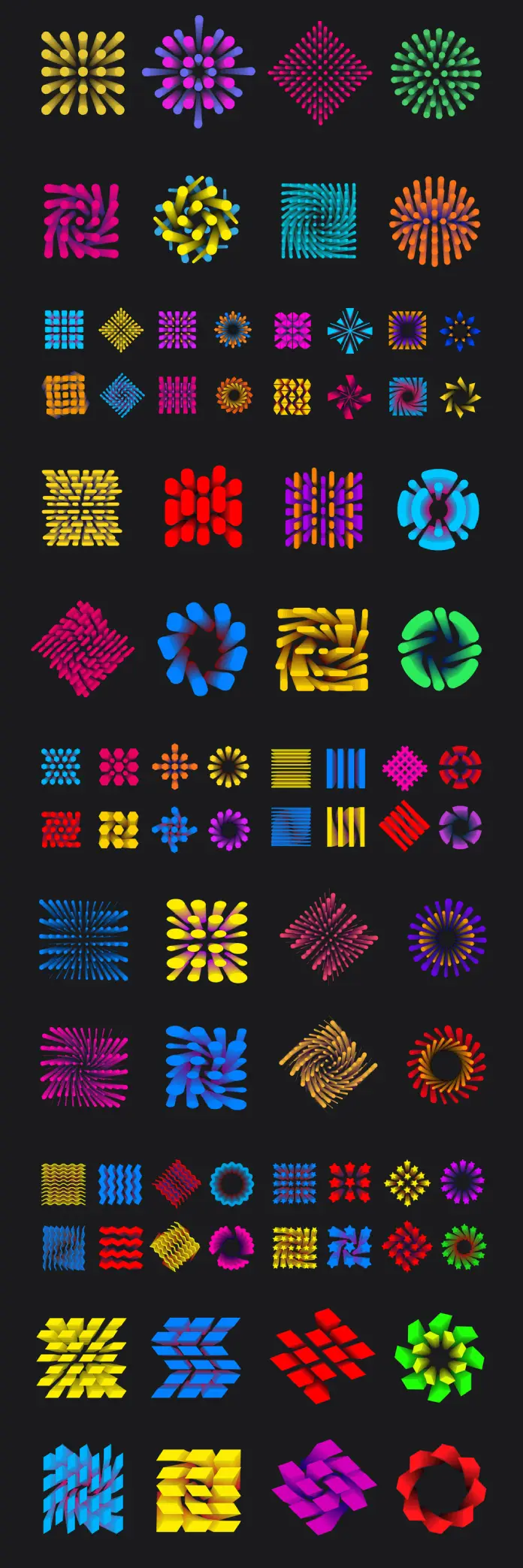
Graphic designer and Adobe Stock contributor Oleg R. has released a set of abstract geometric vector shapes that command immediate attention. Against a deep black background, dozens of bold, vivid forms pulse with chromatic energy. Spirals, grids, radial bursts, and interlocking modules — each one built with mathematical precision and saturated color. The result is a collection that sits squarely at the intersection of computational geometry, motion design, and visual identity.
Design tools have improved dramatically in recent years. Still, truly original, ready-to-use geometric vector shapes remain rare in most stock libraries. Most collections lean decorative or generic. This set does something different: it functions as raw creative infrastructure.
Please note that to edit these templates, you need professional graphic design software like Adobe Illustrator installed on your computer. You can get the latest version from the Adobe Creative Cloud website. Just have a look here.
What Makes These Geometric Vector Shapes Stand Out?
The first thing you notice is the color strategy. These aren’t pastel accents or muted gradients. Instead, the shapes deploy saturated neons — electric cyan, vivid magenta, solar yellow, and plasma red — directly against pure black. The contrast is extreme and completely intentional.

Each shape uses what I’d call Chromatic Momentum: the way gradient transitions within a single form create a sense of motion or rotation. A flat spiral appears to spin. A grid of rounded rectangles seems to vibrate. Furthermore, this optical illusion adds enormous visual weight without adding actual complexity.
The collection organizes itself into several visual families. Radial burst forms explode outward from a central point. Interlocking grid structures build tension through repetition. Rotational modules — think pinwheel logic — generate motion from symmetry. Additionally, wave and chevron patterns offer rhythmic, directional energy.
The Chromatic Momentum Framework
Chromatic Momentum describes how gradient-driven color transitions inside geometric vector shapes simulate movement in static compositions. Specifically, when a warm-to-cool gradient follows a spiral’s rotational axis, your brain interprets depth and spin. This isn’t new to physics, but it remains underused in commercial vector design.
Oleg R. applies this framework consistently across the entire set. Consequently, every shape in the collection feels alive — even at thumbnail size. That’s a hard quality to engineer, and harder still to maintain across 70+ distinct forms.
How Can Designers Use These Abstract Geometric Vector Shapes?
Honestly, the versatility here is the real story. These geometric vector shapes work across an unusually wide range of applications. Consider the following use cases.
Brand Identity and Logo Design
Many of these forms read directly as logomarks. The rotational symmetry, strong silhouettes, and confident color choices translate cleanly to identity work. A designer building a brand for a tech startup, a music label, or a creative agency could adapt any of these shapes as a primary mark. Moreover, because they’re fully vector, they scale from a favicon to a billboard without any quality loss whatsoever.
Motion Graphics and Video Content
These shapes were practically born for animation. The radial bursts and spiral forms have built-in directional logic — they already suggest rotation or expansion. Additionally, the flat black background makes compositing trivial in tools like After Effects or Premiere Pro. Drop one of these geometric vector shapes into a timeline, add a rotation keyframe, and you have an instant kinetic element.
Editorial and Social Media Design
Attention spans are short. Consequently, editorial designers increasingly rely on bold, immediate visual signals. These geometric vector shapes deliver exactly that. Use them as hero graphics, section dividers, or thumbnail anchors. They work on any screen size and translate well to both light and dark interface contexts.
Packaging and Print
The high-contrast palette and geometric precision make these shapes ideal for packaging design. Furthermore, they hold up under print conditions where subtler gradients would wash out or band. Any product targeting a younger, design-conscious consumer benefits from this kind of saturated, confident visual language.
Editing Geometric Vector Shapes in Adobe Illustrator
Every shape in this collection is fully editable in Adobe Illustrator via the native .AI file format. This matters more than it might seem. You aren’t just purchasing visual assets — you’re acquiring fully modifiable design infrastructure.
Working with the .AI File Format
Adobe Illustrator’s .AI format preserves every vector path, anchor point, and gradient definition in its native state. Therefore, when you open these geometric vector shapes in Illustrator, you have complete control over every element. No rasterization, no quality loss, no locked layers.
Here’s what you can actually do:
Recolor entire shapes instantly. Use Illustrator’s Recolor Artwork feature (Edit > Edit Colors > Recolor Artwork) to swap the entire color palette in seconds. You can shift from neon to pastel, from analogous to complementary, or map everything to a specific brand color system.
Isolate and recombine individual elements. Most of these forms consist of repeated modular units — rounded rectangles, oval segments, tapered strokes. Ungroup any shape and extract individual components to build entirely new compositions.
Scale without limits. Because these are resolution-independent geometric vector shapes, they render perfectly at any size. Resize a radial burst from 50px to 5,000px — the math handles everything.
Apply custom gradient overlays. The existing gradients are fully editable via Illustrator’s Gradient panel. Adjust angle, color stops, or opacity to match any project’s requirements. Additionally, you can layer gradient meshes for more complex chromatic transitions.
Export to any format. From SVG for web use to high-resolution PNG for print, Illustrator exports these geometric vector shapes to whatever format your workflow demands.
Non-Destructive Editing Strategies
Always work on duplicated layers. Keep the original shapes locked on a base layer and edit copies above. This preserves your options and gives you a reliable fallback at every stage. Furthermore, save custom color palettes as Illustrator swatches so you can apply your brand system consistently across multiple shapes within the same collection.
The Visual Language of This Collection: A Critical Perspective
Let me be direct. This collection belongs to a specific design moment. We’re in an era where bold chromatic geometry signals digital fluency, creative confidence, and technological energy. From cryptocurrency brands to AI product launches to streaming platform identities, this visual language appears everywhere.
But Oleg R.’s set avoids the generic trap. Many collections in this space lean on simple duotone gradients and minimal forms. This collection instead commits to visual complexity — the kind that rewards closer inspection. Specifically, the nested layering within each shape, the precise gradient control, and the sheer variety of form logic elevate it well above typical stock offerings.
Radial Burst Geometry: A Design Taxonomy
The radial forms in this collection deserve specific attention. I’d classify them into three distinct sub-types:
Dot-Matrix Radials — circular arrangements of rounded points, creating floral or starburst impressions through negative space and repetition.
Stroke-Based Radials — tapered lines radiating from a center point, producing intense optical weight at the core and elegant attenuation at the outer edges.
Modular Arc Radials — curved segment units arranged in rotational symmetry, suggesting mechanical or biological systems simultaneously.
Each subtype communicates differently. Therefore, designers should select based on the emotional register their project requires — organic versus mechanical, delicate versus forceful.
Why Geometric Vector Shapes are so Popular in 2026?
Visual culture moves in cycles. Right now, we’re witnessing a full turn back toward strong form, saturated color, and geometric clarity. After years of organic shapes, watercolor textures, and “authentic” imperfection aesthetics, designers and brands are returning to mathematical precision.
Several forces drive this. First, OLED and HDR screens make saturated colors more viable than ever before. Consequently, what once looked garish on older displays now appears vivid and electric on modern hardware. Second, the rise of motion-forward design — driven by social media, streaming, and app interfaces — rewards shapes that already suggest movement. Third, AI-generated imagery has flooded the market with organic, photorealistic content. Bold geometric vector shapes now serve as a clear counterpoint: unambiguously human-designed, mathematically intentional, and immediately legible.
Prediction: Chromatic Geometry Will Define Brand Identity Through 2030
Here’s my thesis: saturated geometric visual systems will become the primary visual language of high-growth digital brands through the end of this decade. The reason is functional, not merely aesthetic. Bold geometric vector shapes communicate instantly across language barriers, cultural contexts, and screen sizes. Moreover, they transfer seamlessly from digital to physical applications — from app icons to merchandise to environmental graphics.
Brands that adopt chromatic geometry now will establish visual primacy before the trend fully saturates. Consequently, this Adobe Stock collection isn’t just useful today — it’s a forward-looking design investment.
What Designers Actually Search For
Designers searching for abstract vector art for motion graphics, bold geometric shapes for brand identity design, editable vector shapes with gradients for Illustrator, or neon geometric vector elements for dark background compositions will find this collection directly relevant. Additionally, those looking for geometric icon sets for tech branding or colorful abstract vector shapes for social media content will recognize its immediate applicability.
These aren’t abstract tags — they’re real use cases built into the visual DNA of this collection. Every form answers a practical design problem while simultaneously raising the aesthetic bar.
FAQ: Geometric Vector Shapes by Oleg R. on Adobe Stock
What file format does this collection come in?
The collection is available as an Adobe Illustrator (.AI) file. Additionally, the listing may include compatible formats like EPS or SVG, depending on the contributor’s upload. Always check the specific file details on Adobe Stock before downloading.
Do I need Adobe Illustrator to edit these geometric vector shapes?
Adobe Illustrator is the recommended tool, as it offers complete editing capability for Adobe Illustrator files. However, other vector-compatible applications, such as Affinity Designer or CorelDRAW, can open and edit these files with minor feature limitations.
Can I use these shapes for commercial projects?
Yes, with an appropriate Adobe Stock license. Standard licenses cover most commercial uses, including advertising, branding, and digital media. An Extended license covers items for resale or distribution. Always review the specific license terms on Adobe Stock for your use case.
How do I change the colors of these geometric vector shapes in Illustrator?
Use the Recolor Artwork feature under Edit > Edit Colors > Recolor Artwork for fast global palette changes. Alternatively, select individual gradient stops in the Gradient panel and adjust them manually. Both approaches give you complete control over the chromatic output.
Are these shapes suitable for logo design?
Absolutely. Their clean silhouettes, scalable vector format, and strong visual identity make them excellent starting points for logomark development. Always ensure you modify and customize any stock asset sufficiently to create a unique, ownable identity for your client.
Can I animate these geometric vector shapes?
Yes. Export individual shapes as SVG for web-based CSS or JavaScript animation. Alternatively, import the .AI file directly into Adobe After Effects for motion graphics work. The rotational and radial structures are particularly well-suited to spin, scale, and reveal animations.
What industries benefit most from these designs?
Technology, music, entertainment, gaming, sports, and fashion brands benefit most immediately from this visual language. However, the geometric precision and bold palette also work well for healthcare innovation brands, fintech companies, and creative agencies seeking high-impact visual identity systems.
Take a look at WE AND THE COLOR’s Templates category for more.