This post contains affiliate links. We may earn a commission if you click on them and make a purchase. It’s at no extra cost to you and helps us run this site. Thanks for your support!
I downloaded the Iris template from Evgeny Studio after three separate WATC readers asked me the same question within a few days of each other. Does this thing actually hold up, or is it another Creative Market listing dressed up with stock screenshots? So I bought it, opened it in both InDesign and Canva, and spent a weekend finding out.
Brand guideline documents used to be a luxury only agencies bothered to build. Now every freelance designer, every two-person studio, and every founder with a Canva login is expected to hand over a proper brand book. That expectation didn’t come from nowhere. Clients see polished PDFs everywhere: on LinkedIn, in Dribbble shots, and inside every branding process carousel on Instagram. So they now assume a real brand guidelines PDF presentation template is part of the deal, not an upsell.
For an optimal workflow and truly professional editing and customization capabilities, I recommend using Adobe InDesign. Whether Mac or PC, the latest version is available on the Adobe Creative Cloud website—take a look here.

What Is the Iris Brand Guidelines PDF Presentation Template, Exactly?
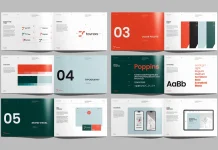
Iris is a 42-page layout set built for two very different audiences at once. Designers who live in Adobe InDesign get INDD and IDML files, opening from CS4 all the way through the current Creative Cloud release. Everyone else, including account managers, founders, and clients who will never install InDesign, gets a linked Canva file that mirrors the same 42 layouts.
The canvas size sits at 1920 by 1080 pixels, a widescreen presentation ratio rather than a print page. That detail matters. It tells you exactly how this brand guidelines PDF presentation template wants to be used. Treat it as a screen-first deck that also exports cleanly to a print-ready PDF at 300 DPI in RGB. You are not building a bound book here. You are building a deck that happens to convert into a proper PDF.

Every layout runs on character, paragraph, and object styles rather than manually formatted text boxes, at least where Evgeny Studio actually built it that way. More on that in a minute. Fonts are free, and the download links to them directly instead of making you hunt them down. Photography and mockups are not included, which the listing states plainly, so budget time for your own imagery or a stock subscription.
Why I Actually Opened Every File Instead of Trusting the Listing Copy
I have been running WE AND THE COLOR since 2010, and in that time I have watched plenty of template listings promise things the actual ZIP file never delivers. “One-click color change” is the kind of phrase that sounds great on a sales page and falls apart the moment you test it on page 34 of 42. Most “reviews” of this template just summarize the Creative Market description back to you. I tested Iris instead, the same way I test anything before recommending it to a paying client.
That means opening every page, not just the cover and the color palette spread. It means checking whether the InDesign version and the Canva version actually match, because they often don’t. And it means being honest when something works exactly as advertised, because that happens too, and readers deserve to know when a template earns its price tag.
The Five Checks I Run on Every Brand Guidelines Template
Over the years testing templates for WATC, I built a short list of checks. They tell me more about a brand guidelines PDF presentation template than any marketing bullet point ever could. None of these are industry-standard terms. I made them up for my own workflow, and I’m naming them here purely as editorial shorthand, not as anything Evgeny Studio, Adobe, or Canva would recognize.
The Style-Sheet Depth Test
I click into a random block of body text on page 20. Then I check whether it’s tied to a real paragraph style or just formatted by hand. Iris passes this on most spreads. Headlines, captions, and body copy are genuinely styled, so changing a font once at the master style level updates the whole document. A handful of caption boxes on the application mockup pages were locally overridden, a minor ding rather than a dealbreaker.
The Cross-App Parity Score
This check measures how close the Canva file actually sits to the InDesign file. Spacing, type scale, and layout order matched closely across both versions when I compared them page by page. Canva’s font substitutions moved a few line breaks on a couple of dense typography spreads, which is a Canva limitation more than an Evgeny Studio one.
The 42-Page Completeness Curve
Page count alone tells you nothing. What matters is whether the pages map to sections a brand guidelines document actually needs, meaning logo usage, clear space, color, typography, imagery, and application. Iris covers all of those categories, with enough repetition inside each one that you’re not stuck stretching four pages of color rules into one crowded spread.
The One-Click Color Claim, Tested
Evgeny Studio’s listing promises one-click color changes. In InDesign, that claim holds up once you understand it means swapping swatches in the color panel, not literally clicking once on the whole document. Do that, and every element tied to those swatches updates together. The claim is accurate, just not quite as magic as the phrase implies.
The Deliverable Ratio
I weigh what you get against what you pay, per page, per format. At roughly twenty dollars for a personal license, you get two full editable formats and 42 pages built on real styles. That combination puts Iris well ahead of templates charging similar money for half the page count and no Canva version at all.
What’s Actually Packed Into Those 42 Pages
Here’s the honest structure once you strip away the marketing language. The first several spreads cover brand story, mission, and positioning. These are the kind of pages that give a client something to read before they reach the visual rules. From there, Iris moves into logo construction, clear space, minimum sizing, and misuse examples, exactly where most cheap templates cut corners, and this one doesn’t.
Color and typography each get a full section, with room for primary, secondary, and accent palettes. The type hierarchy goes beyond just headline and body copy. The back third handles application: business cards, social templates, packaging mockups, and a digital section covering web and app previews. That range is what separates a real brand guidelines PDF presentation template from a glorified color palette PDF with a nice cover.
Iris Brand Guidelines Template at a Glance
| Spec | Detail |
|---|---|
| Total layouts | 42 unique pages |
| Software | Adobe InDesign (CS4 through CC) and Canva |
| Files included | INDD, IDML, Canva link, help file |
| Canvas size | 1920 x 1080px, widescreen |
| Color mode | RGB, print-ready |
| Resolution | 300 DPI |
| Editability | Character, paragraph, and object styles |
| Fonts | Free fonts, download links included |
| Photography and mockups | Not included |
| Platform | Mac and Windows |
| Support | Lifetime support from Evgeny Studio |
Canva or InDesign: Which File Should You Actually Open First?
Open InDesign first if you already know the software and want full control over styles, grids, and print output. You’ll get cleaner results on dense typography pages. Exporting a press-ready PDF takes seconds once your styles are set.
Open Canva first if the brand guidelines document needs to go straight to a client for their own edits later. The same goes if nobody on your team owns an InDesign license. You’ll trade some typographic precision for speed and accessibility, and for plenty of small studio workflows, that trade is worth making.
Where the Iris Template Falls Short
No template is perfect, and pretending otherwise helps nobody. The CS4 compatibility claim feels more like legacy marketing than a real selling point at this stage, since almost nobody still runs InDesign that old in a professional setting. A few application mockup pages rely on generic device frames rather than anything distinctive. Don’t expect those spreads to carry your portfolio on their own.
The biggest gap is photography. Zero images ship with the download, which the listing states clearly, so budget either your own shoot or a stock subscription before you start filling pages. Skip that step, and even the best-styled brand guidelines template will look half finished.
Who This Template Actually Works For
Freelancers and small studios that build a brand guidelines PDF presentation template for clients on a regular basis get the most out of Iris. The per-page cost drops fast once you reuse the file across projects. In-house design teams need a fast, presentable deck for stakeholder sign-off, and the Canva version handles that well. It’s especially useful when non-designers need to make small text edits without opening InDesign.
Skip it if you need a printed, bound brand manual with heavy typographic customization beyond what paragraph styles handle well. The same goes if your brand identity leans experimental in ways a widescreen deck format won’t showcase properly.
Where Brand Guidelines Templates Are Headed Next
Dual-format templates like Iris point at where this category is going. Clients no longer accept a single locked PDF as the end of the branding process. So templates that hand over an editable Canva file alongside the professional InDesign source will keep gaining ground over InDesign-only sets. My prediction: within a couple of years, InDesign-only brand guidelines listings on Creative Market will read as a limitation, not a professional standard. That’s the same way desktop-only tools started sounding outdated once mobile-first design took over everything else.
That doesn’t mean InDesign disappears. It means the software stops being the only gate between a finished brand book and the client who actually needs to use it.
Frequently Asked Questions About the Iris Brand Guidelines Template
Is the Iris brand guidelines PDF presentation template good for beginners?
Yes, especially the Canva version. The style groundwork is already built, so beginners can focus on swapping colors, fonts, and copy instead of building layouts from a blank page.
Does the Iris template include stock photography?
No. Photography and mockups are excluded from the download and shown for preview purposes only, so plan your own imagery in advance.
Can I export the finished file as a PDF?
Yes. Both InDesign and Canva export to PDF, and the InDesign version is print-ready at 300 DPI in RGB for clean output.
How many pages does the Iris brand guidelines template include?
Forty-two unique layout pages, covering brand story, logo usage, color, typography, and application sections like stationery and digital design.
Is the Canva version as fully editable as the InDesign file?
Mostly, yes. Layout order and spacing carry over closely, though Canva’s font substitution can move a few line breaks on dense typography spreads.
Where can I buy the Iris brand guidelines template?
It’s sold through Evgeny Studio’s shop on Creative Market, alongside the studio’s other brand guidelines and presentation templates.
Browse WE AND THE COLOR’s Branding, Graphic Design, and Templates categories for more.
Subscribe to our newsletter!