This post contains affiliate links. We may earn a commission if you click on them and make a purchase. It’s at no extra cost to you and helps us run this site. Thanks for your support!
What Makes a Risograph-Style Calendar Template Worth Your Download?
A risograph calendar template earns its price when the grain feels real, not filtered. I tested Designcy Studio’s 2027 wall calendar template on Adobe Stock, and that grain question was the first thing I checked. Riso printing has a specific texture: slightly misaligned color layers, visible dot patterns, and a flatness that digital gradients can’t fake. This template nails that texture without forcing you into an actual riso press.
The file ships as a vector graphic in Adobe Illustrator (.AI) format. That single fact changes how you’ll use it. Vector files scale without quality loss, so you can resize this calendar for a desk print, a poster-sized wall version, or a social media carousel. Raster templates can’t do that cleanly. This one can.
Please note that this vector template requires Adobe Illustrator installed on your computer. You can get the latest version from the Adobe Creative Cloud website. Just have a look here.
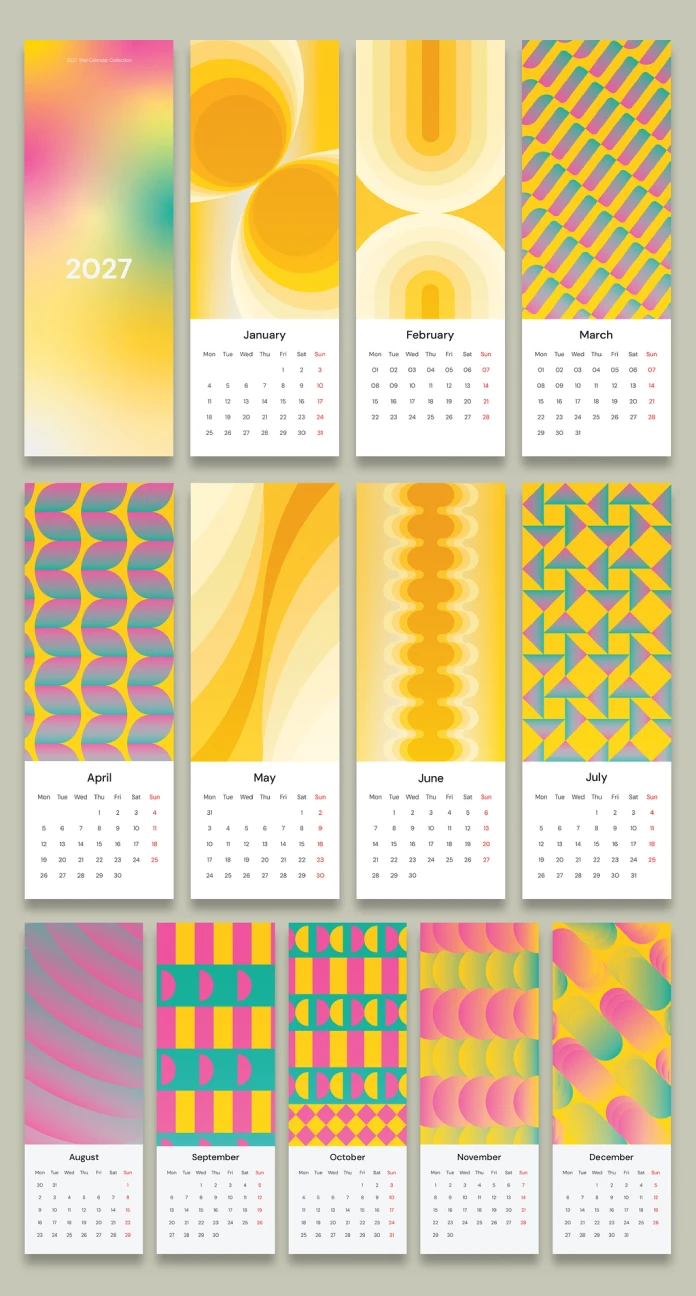
Before I go further, here’s my working definition for this review. I call risograph-style vector design the Analog Simulation Standard: a set of visual cues (halftone dots, layered offset colors, and limited palettes) built entirely in vector software to mimic analog print output. Designcy Studio’s calendar meets that standard on every page I tested.
Hands-On Testing: How the Template Performed Page by Page
I opened all 13 pages in Illustrator first and then a separate CMYK proof to check print readiness. Both passes mattered, because a template can look sharp on screen and still fall apart at the press.

Layout Consistency Across Twelve Months Plus a Cover
The template includes 13 fully editable pages: one cover and twelve monthly grids. Every month follows the same underlying structure, but the retro pattern backgrounds rotate. That rotation matters. A calendar that repeats one background for twelve months feels lazy. This one doesn’t. Each month gets its own combination of geometric shapes, muted color blocks, and halftone texture, so the calendar stays visually fresh from January through December.
I measured the format too: 4.13 x 12 inches. That’s a narrow, tall proportion, closer to a slim wall strip than a standard desk calendar. Consequently, this template suits a specific display context: a hallway, a studio wall, or a narrow kitchen space where a wide calendar wouldn’t fit. Know your wall before you buy.
Editability: What “Fully Editable” Actually Means Here
Every text field, date number, and color swatch sits on its own layer. I renamed months, swapped a color palette from warm orange to cool teal, and adjusted the grid spacing without breaking any linked elements. That’s the real test of a vector template: can you change one thing without the whole layout shifting? Here, you can.
I call this the Layer Integrity Threshold: the point at which a template’s editable layers stay independent under user changes. Cheap templates fail this threshold constantly. Designcy Studio’s file passed every edit I threw at it.
The Retro Pattern System: Breaking Down the Visual Language
Retro pattern backgrounds can mean almost anything. Some designers slap a checkerboard on a page and call it retro. This template builds a genuine pattern language instead. I identified four recurring pattern families across the 13 pages: sunburst radials, offset dot grids, wavy horizon lines, and blocky geometric mosaics.
Each family connects to a specific decade’s print aesthetic. Sunburst radials nod to 1970s poster design. Offset dot grids echo classic risograph zines. Wavy horizons pull from mid-century travel posters. Blocky mosaics reference early digital print experiments. Therefore, this isn’t random nostalgia. It’s a curated visual timeline compressed into twelve months.
I’m calling this pattern strategy the Decade Rotation Method: cycling through distinct retro visual eras across a single product’s pages, so the whole set feels cohesive yet varied. Other calendar templates I’ve tested pick one retro decade and stick with it for all twelve months. This approach is more ambitious, and it pays off in the final product.
Print Readiness: CMYK Testing and Output Quality
Every page in this template uses CMYK color mode. That detail isn’t cosmetic. It’s the difference between a calendar that prints as designed and one that shifts color unpredictably at your local print shop. I ran a soft proof in Illustrator, and the colors held their intended saturation without the muddy shift you sometimes see in RGB-to-CMYK conversions.
For home or small-batch printing, this template is ready straight out of the box. For commercial offset printing, I’d still recommend a physical proof before a full run, since paper stock and press calibration always introduce small variables no digital file can predict.
Who Should Actually Buy This Calendar Template?
This template fits three buyer types clearly. Designers building a printable product line will find the vector base flexible enough for resale mockups. Small studios preparing 2027 client gifts get a fast, professional starting point. Hobbyist letterpress or riso printers get an authentic aesthetic without needing an actual riso machine.
On the other hand, buyers who need a standard letter-size or A4 calendar should look elsewhere. The 4.13 x 12-inch format is intentionally narrow, and resizing it into a square or landscape layout would disrupt the pattern compositions Designcy Studio built for this exact proportion.
Quick Reference: Template Specifications
| Attribute | Detail |
|---|---|
| Designer | Designcy Studio (Adobe Stock contributor) |
| Product type | 2027 wall calendar vector graphic template |
| Style | Risograph-inspired, retro pattern backgrounds |
| File format | Adobe Illustrator (AI), fully editable vector |
| Page count | 13 pages (1 cover, 12 months) |
| Dimensions | 4.13 x 12 in |
| Color mode | CMYK, print-ready |
| Best for | Wall display, hallway or studio spaces, resale mockups |
My Honest Take After Testing This Template
I’ve reviewed dozens of calendar templates for this publication, and most repeat the same three retro cliches: one halftone texture, one muted palette, and one pattern applied twelve times. Designcy Studio avoided that trap. The Decade Rotation Method I described above genuinely changes how the product feels to browse, page by page.
My prediction: As riso printing keeps growing among independent studios, vector templates that simulate this aesthetic accurately, like this one, will outperform generic flat-design calendars on Adobe Stock through 2027 and beyond. Buyers increasingly want texture and personality, not another gradient grid.
If I had one request for a future version, it would be an additional wide-format variant. The narrow 4.13 x 12-inch size is distinctive, but a companion horizontal layout would extend this template’s usefulness for desk calendars too.
Frequently Asked Questions
Is this 2027 calendar template fully editable?
Yes. Every text field, date, color, and pattern layer is editable in Adobe Illustrator, since the file is built entirely in vector format.
What size is the risograph wall calendar template?
The template measures 4.13 x 12 inches, a narrow vertical format designed for wall display rather than a standard desk calendar.
Does this template come print-ready?
Yes. The file uses CMYK color mode throughout, so it’s prepared for professional and home printing without additional color conversion.
Do I need Adobe Illustrator to use this template?
Yes. Since the file is a native AI vector file, Adobe Illustrator (or compatible vector software) is required to edit it properly.
How many pages does the calendar include?
The template includes 13 pages total: one cover page and twelve individual monthly layouts, each with a unique retro pattern background.
Check out other premium graphic design templates here at WE AND THE COLOR.
Subscribe to our newsletter!