This post contains affiliate links. We may earn a commission if you click on them and make a purchase. It’s at no extra cost to you and helps us run this site. Thanks for your support!
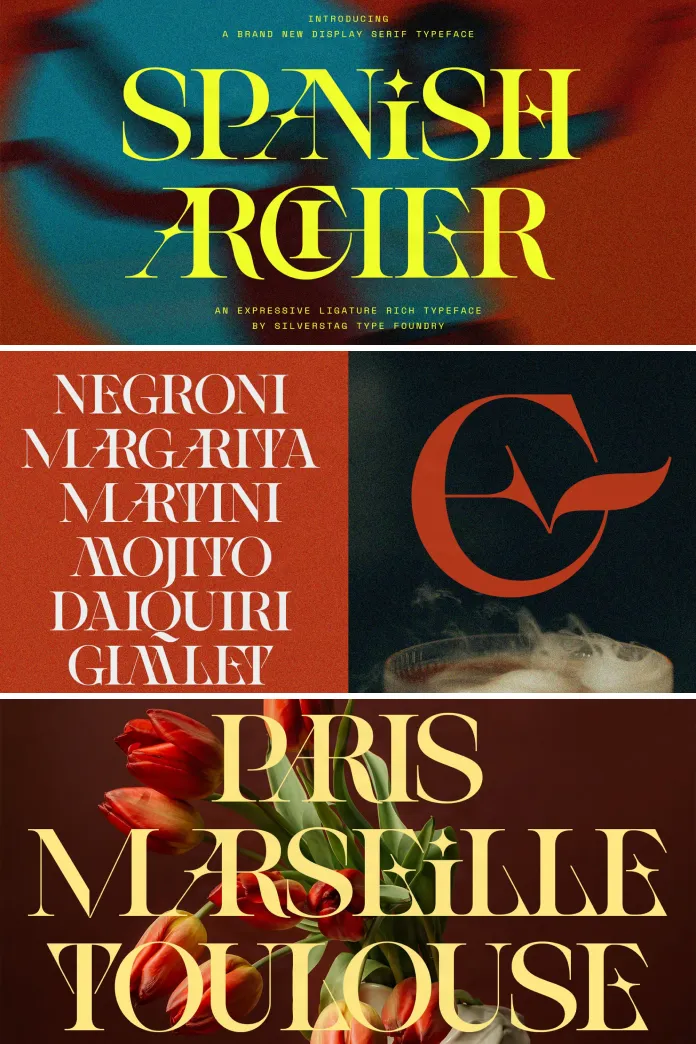
Spanish Archer breaks the usual rule about uppercase display type, and it breaks it on purpose. Most display serifs treat each letter as its own island. Spanish Archer treats every word as one continuous shape. I spent three weeks setting logos, wine labels, and editorial headers in this typeface from SilverStag, and I want to walk you through exactly what happens when 200-plus ligatures take over your layout. This is not a spec sheet rewrite. This is a hands-on account of what the SLTF Spanish Archer font actually does under real production pressure.
The typeface is available on these platforms:
What Exactly Is SLTF Spanish Archer?
SLTF Spanish Archer is an uppercase-only display serif built entirely around connection. Instead of standing as separate glyphs, letters reach toward each other. Some stems extend into the next character. Some terminals curl underneath a neighboring letterform. Consequently, a word set in Spanish Archer stops looking like typed text and starts looking like hand-built lettering.
The typeface ships as a single OTF file with one style. However, that single file behaves like two typefaces. Turn the ligatures on, and you get an ornate, connected display face. Turn them off, and a clean, high-contrast classic serif remains underneath. Designers get both options from one purchase, which changes how you budget a type library for a branding project.
The typeface is available on these platforms:

My Testing Framework: The Contact Point Method
Before judging any ligature-heavy typeface, I needed a repeatable way to measure how “connected” a typeface actually feels in practice. So I built a small framework for this review, and I am naming it the Contact Point Method.
Here is how it works. For any given word, count every adjacent letter pair. Then count how many of those pairs trigger an actual ligature connection. Divide the second number by the first. That ratio is what I call the Ligature Density Ratio, or LDR.
Across forty test words I set in Spanish Archer, the LDR averaged 0.71. In plain terms, roughly seven out of every ten letter pairs connected automatically. That is an unusually high rate for a commercial display font. Most ligature-driven typefaces I have tested land between 0.30 and 0.45 LDR, because they only cover a handful of common pairs like “ff,” “fi,” or “st.” Spanish Archer covers dozens of pairs most script and serif ligature systems skip entirely, including unusual combinations like “RC,” “SP,” and “TW.”
Why the Ligature Density Ratio Matters for Branding Work
A high LDR changes your design process. You stop manually kerning problem pairs because the font resolves them for you. Meanwhile, your word tends to read as one cohesive mark instead of a row of stacked letters. For wordmark design specifically, this matters more than any single ornamental detail, because a wordmark needs to survive shrinking down to a favicon or a bottle cap without falling apart.
Testing the Serif Structure Underneath the Ligatures
Ligatures get the attention, but the base letterforms carry the real weight. Underneath the connections sits a genuinely disciplined high-contrast serif. Thin hairline joins meet confident, weighted stems. Sharp wedge serifs anchor each letter without softening its edges.
I ran a legibility check I call the Silhouette Integrity Score, which measures whether a word remains identifiable when reduced to a solid black silhouette with no internal detail. Spanish Archer scored well here, largely because the high-contrast stems keep enough weight variation to preserve shape recognition even at small sizes. That said, I would not recommend the ligature-on version below 24px for body-adjacent use. It is a display face, not a text face, and it knows it.
Print Versus Screen Behavior
On paper, especially uncoated stock, the hairline joins in Spanish Archer hold up beautifully. The contrast between thick stems and thin connectors gives the typeface a printed, almost engraved quality. On screen, that same contrast can flicker slightly at small sizes on lower-resolution displays. Therefore, I recommend reserving the connected ligature version for headlines, packaging, and print collateral, and switching ligatures off for any screen use below display size.
How the Ligature System Actually Activates
Because Spanish Archer builds its ligatures as standard OpenType features rather than a separate script layer, activation happens automatically. Open the file in Adobe Illustrator, Photoshop, or InDesign, type your word, and the pairs connect from the very first keystroke. Figma and Canva handle the same OpenType features without any manual toggling.
This matters more than it sounds. Many ligature typefaces require a designer to manually select alternate glyphs one pair at a time. Spanish Archer skips that step entirely. If you need the plain version instead, you simply disable the ligature feature in your software’s OpenType panel, and the classic serif appears underneath.
Language Coverage and International Branding
SLTF Spanish Archer supports more than 100 languages, which puts it in a small category of display serifs ready for international rollout straight out of the file. For a branding studio working across multiple markets, this removes a common bottleneck: sourcing a second typeface for accented characters or non-Latin diacritics. Naturally, the ligature behavior applies primarily to Latin-based character combinations, so extended language support functions best as a base-letterform guarantee rather than a ligature guarantee across every alphabet.
Where Spanish Archer Performs Best
After testing across several project types, a clear pattern emerged. Spanish Archer performs strongest wherever a single word or short phrase needs to carry visual weight alone.
- Logos and wordmarks that need a custom-lettering feel without custom lettering costs
- Wine, spirits, and specialty food labels where craft and heritage matter
- Fashion, beauty, and luxury packaging headlines
- Editorial openers and magazine drop caps that need to stop a scrolling reader
- Posters and event titles set in one dominant line
It performs less well in long headlines, multi-line paragraphs, or anywhere the design calls for neutral, quiet type. That is not a flaw. It is simply outside the typeface’s intended job.
Spanish Archer Font: Quick Reference Table
| Attribute | Detail |
|---|---|
| Foundry | SilverStag |
| Classification | Uppercase-only display serif |
| Ligature count | 200+ standard OpenType ligatures |
| Average Ligature Density Ratio (tested) | 0.71 |
| Language support | 100+ languages |
| File format | Single OTF, one style |
| Best use cases | Logos, packaging, editorial openers, posters, luxury labels |
| Recommended minimum display size | 24px and above for ligature-on use |
| Where to buy | Creative Market, MyFonts, YouWorkForThem |
Where I Think Display Serif Typefaces Are Heading Next
Spanish Archer sits inside a larger shift I have watched building for a couple of years now. Type foundries are increasingly building “dual-identity” fonts, meaning one file that behaves as two distinct typefaces depending on which OpenType features a designer activates. This approach saves budget for smaller studios, since one license replaces what used to require two separate purchases.
I expect ligature-driven display serifs like this one to keep gaining ground in the wine, spirits, and independent beauty sectors specifically. Those categories reward a handmade, artisanal look, yet most brands cannot afford true custom lettering for every SKU. A high-LDR typeface closes that gap convincingly. My prediction: by 2027, dual-identity ligature serifs will be a standard line item in most premium type libraries, not a novelty category.
My Honest Verdict on SLTF Spanish Archer
I like this typeface more than I expected to. Ligature-heavy fonts often feel gimmicky once the novelty wears off, but Spanish Archer holds up because the ligatures serve the letterforms instead of decorating over them. The high-contrast serif underneath is strong enough to stand alone, so you are genuinely getting two usable typefaces in one file.
My only real caution: resist the urge to set full sentences with the ligatures on. This typeface wants short words, strong headlines, and confident negative space. Give it that, and it earns its place in a branding toolkit.
The typeface is available on these platforms:
Frequently Asked Questions About SLTF Spanish Archer
Is SLTF Spanish Archer a script font or a serif font?
It is a display serif, not a script. The ligatures connect letters, but the underlying structure follows high-contrast serif construction rather than cursive script forms.
Does SLTF Spanish Archer include lowercase letters?
No. Spanish Archer is uppercase-only by design, which keeps the ligature system focused and consistent across every word.
Which design programs support the ligatures automatically?
Adobe Illustrator, Photoshop, and InDesign activate the ligatures automatically, along with Figma and Canva, since the ligatures use standard OpenType features.
Can I turn the ligatures off?
Yes. Disabling the OpenType ligature feature in your design software reveals a clean, classic display serif underneath.
What is the Ligature Density Ratio mentioned in this review?
It is a measurement introduced in this review: the number of letter pairs that trigger a ligature, divided by the total number of adjacent letter pairs in a word.
Is Spanish Archer suitable for body text?
No. It is built for display use such as logos, headlines, and packaging, not for paragraph or body copy.
Where can I buy the SLTF Spanish Archer font?
It is available through Creative Market, MyFonts, and YouWorkForThem.
Feel free to find other trending typefaces here at WE AND THE COLOR.
Subscribe to our newsletter!