This post contains affiliate links. We may earn a commission if you click on them and make a purchase. It’s at no extra cost to you and helps us run this site. Thanks for your support!
A brand guideline template only earns its price when it survives real production work. Pretty preview images mean nothing once client names and real logos get dropped in. I opened KOVE, a 58-page brand book by Prapti Design, in Canva, Adobe InDesign, and Photoshop. My goal was simple: test whether this brand guideline template holds up under actual editing pressure. This review walks through every section. It also tests the file compatibility claims and tells you exactly who should buy it.
What Is the KOVE Brand Guideline Template, Exactly?
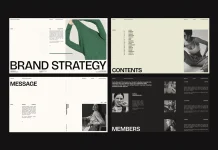
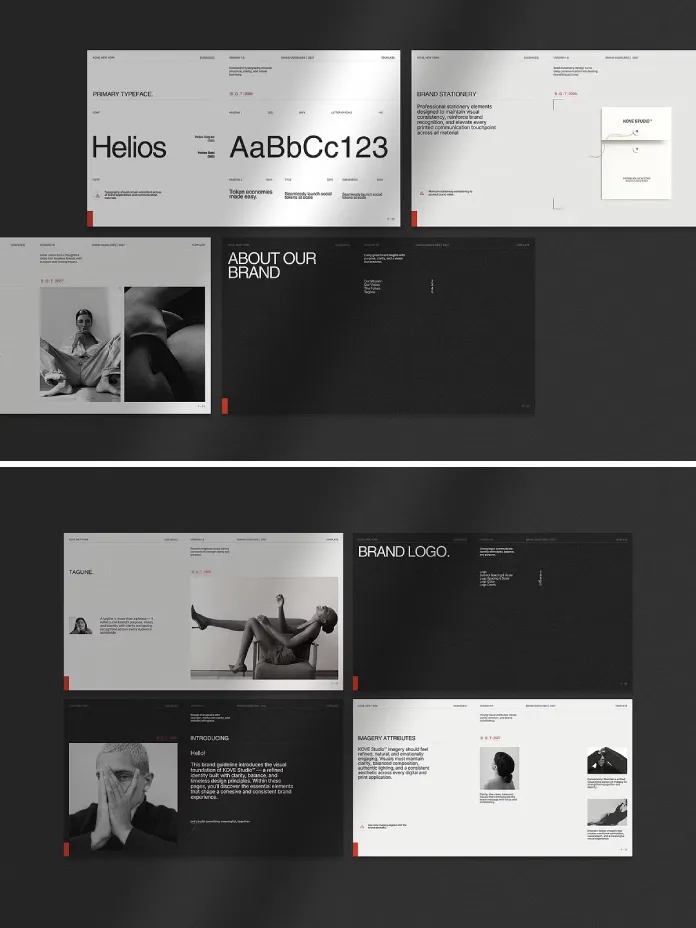
KOVE is a 58-page brand book built for designers, agencies, and small business owners. These buyers need a client-ready document fast. The file ships as a Canva template, plus native Adobe InDesign files (.INDD and .IDML), plus a Photoshop (.PSD) version. That triple-format setup is rare. Most brand guideline templates on Creative Market pick one software and stay there. KOVE instead asks a simple question. Why should your software choice limit your brand documentation?
The format is digital-first, built at 1920 x 1080 pixels in 16:9 widescreen. It is not print-ready out of the box. Agencies planning a physical, bound brand book will need to adjust page setup first. For screen-based presentations, PDF handoffs, and client calls, though, the widescreen ratio feels correct.
Why Brand Documentation Matters More in 2026
Brand consistency has become harder to maintain, not easier. Teams now publish across websites, social platforms, email, and packaging, often within the same week. Without a clear reference document, every new hire improvises. A strong brand book solves that problem before it starts.
I call this gap the Consistency Ledger problem. Every brand decision needs a permanent record, from logo clear space to a secondary color’s exact hex code. Otherwise that decision lives only in one designer’s memory. Once that person leaves the project, the brand drifts. KOVE’s 58 pages function as a Consistency Ledger. It is a single, dated, shareable source of truth. Logo rules, typography, and color codes in HEX, RGB, and CMYK all live there.

My Hands-On Test: Opening KOVE in Three Programs
I tested the same template across three environments. Most brand book reviews only publish screenshots from one program. Here is what actually happened in each.
Canva: The Fastest Path to a Finished Deck
Canva opened the file cleanly. Every layer stayed editable. Text boxes, color swatches, and photo placeholders behaved exactly as labeled. I swapped a placeholder logo for a sample wordmark in under two minutes. The layout reflowed without breaking. For freelancers without an Adobe subscription, this is the easiest route into a professional brand identity document. Canva Free technically works, though Canva Pro unlocks smoother font substitution.
Adobe InDesign: Built for Serious Production
The .INDD file opened without missing fonts once I installed the linked free font downloads. Master pages were set up correctly. Global edits to the footer or page numbers applied across all 58 pages instantly. This is the version I would hand to an in-house design team. InDesign’s paragraph and character styles make repeat edits genuinely fast.
Photoshop: Useful, But Not the First Choice
The .PSD version works, and every layer is organized and named clearly. However, Photoshop is not a natural home for text-driven, layout-heavy content. I would reserve the Photoshop file for pulling individual mockup pages instead. Think stationery or social media application slides, not the full document.
Inside the 58 Pages: A Full Touchpoint Coverage Map
I want to introduce a second framework here: the Touchpoint Coverage Map. This measures how many real brand applications a template actually documents. Page count alone tells you nothing. A file with 80 pages but only three real touchpoints scores lower than a leaner, more complete document.
KOVE’s Touchpoint Coverage Map is genuinely broad. The pages include brand overview, mission and vision, and brand voice and messaging. They also cover the full logo system, clear space rules, and misuse guidelines. Typography hierarchy, color palette documentation, and photography direction follow next. Iconography, social media applications, website previews, stationery mockups, and closing pages round it out. That is twelve distinct touchpoint categories in one download.
The Format Flexibility Index: Scoring Cross-Software Kits
Because KOVE ships in three formats, it deserves its own scoring method. I call this the Format Flexibility Index. It rates three factors. Does the layout survive the format switch? Does the type system stay intact? And does the client-facing polish hold up? KOVE scores high on all three. The InDesign and Canva versions matched almost pixel for pixel in my side-by-side comparison. The type hierarchy carried over cleanly between formats too.
The Format Flexibility Index drops slightly on one point: font licensing. The included fonts are linked as free downloads, not bundled directly. You still need internet access and a few extra minutes before your first edit. That is a minor friction point, not a real dealbreaker.
Does KOVE Cross the Client-Ready Threshold?
I use a simple test for every brand book I review: the Client-Ready Threshold. This marks the point where a document needs zero extra polish. Generic stock photography or thin content usually keeps a template below that line.
KOVE crosses the Client-Ready Threshold on structure and content depth. The included stock photos look intentional, not generic. The PDF instruction guide also removes most onboarding confusion. My only real note involves print. Because the layout is digital-only, agencies needing a printed leave-behind will still need extra prep work first.
Who Should Buy This Brand Book
These brand guidelines fit a specific set of buyers well. Freelance designers who need a fast, professional document will save real hours. Creative agencies juggling multiple client identities will appreciate the InDesign master pages. Startups without an in-house designer get a structure that forces good branding decisions, simply by filling in the blanks correctly.
It fits less well for teams that need print-ready files immediately. It also suits fewer people wanting a zero learning curve inside Photoshop specifically. Those buyers should look elsewhere or plan extra setup time before their first deadline.
KOVE Brand Guidelines: Quick Reference Table
| Feature | Details |
|---|---|
| Creator | Prapti Design |
| Page Count | 58 fully editable pages |
| Compatible Software | Canva, Adobe InDesign (.INDD/.IDML), Adobe Photoshop (.PSD) |
| Format | Digital, 16:9 widescreen, 1920 x 1080 px (not print-ready) |
| Delivery | Instant digital download with PDF file access links |
| Included Extras | Free font download links, royalty-free stock photos, PDF instruction guide |
| Touchpoint Coverage Map | 12 categories, including logo, typography, color, photography, icons, social, and web |
| Best For | Freelancers, agencies, startups, and marketing teams needing a client-ready brand book |
| Weak Point | Not print-ready without extra setup; fonts linked, not bundled |
Practical Tips Before You Customize KOVE
Download and install the linked fonts first. Do this before you touch a single layout page. This step prevents Canva or InDesign from silently substituting a fallback typeface. Next, replace the color palette early. Color changes affect other elements throughout the file. Finally, save a master copy before editing. That way, you always have a clean version to duplicate for the next client.
Final Verdict on the KOVE Brand Guidelines
KOVE earns its place among the stronger brand guideline templates available right now. It actually works across three different programs, instead of promising compatibility it cannot deliver. The Touchpoint Coverage Map is wide. The Consistency Ledger structure genuinely helps teams stay aligned. The Format Flexibility Index holds up under real testing too. If your workflow depends on print-ready files, budget extra setup time. For everyone else building a digital-first brand presentation, this template is a smart, time-saving investment.
Frequently Asked Questions About the KOVE Brand Guidelines
Is the KOVE brand guideline template print-ready?
No. KOVE is built at 1920 x 1080 pixels in 16:9 widescreen for digital presentation. Print use requires manual page setup adjustments first.
Do I need Adobe Creative Cloud to use this template?
Not necessarily. KOVE includes a Canva version that works with Canva Free or Canva Pro. The InDesign and Photoshop files serve Adobe users.
What software works best for editing the full 58-page brand book?
Canva offers the fastest edits for quick projects. Adobe InDesign suits agencies managing repeat, large-scale documentation work through master pages.
Are the fonts included in the download?
The fonts are not bundled directly. KOVE provides free font download links, so you install them separately before editing.
Who created the KOVE brand guidelines?
Prapti Design created KOVE. It is sold as a digital download through Creative Market.
Can I reuse this brand book for multiple clients?
Yes. Save a master copy before customizing. Then duplicate the file for each new client’s brand identity project.
Feel free to find other amazing graphic design templates here at WE AND THE COLOR.
Subscribe to our newsletter!