This post contains affiliate links. We may earn a commission if you click on them and make a purchase. It’s at no extra cost to you and helps us run this site. Thanks for your support!
The Dripdrop Liquid Font Set Packs Six Fonts and 43 Ink Extras Into One Loud Headline Kit.
The Dripdrop Liquid Font Set is a headline tool, and it knows that. Sam Parrett made it with real squirts of liquid ink on paper. As a result, every letter looks wet, and none of them pretend to be body text.
I have featured Sam Parrett’s fonts on WE AND THE COLOR for years, but the Dripdrop Liquid Font Set behaves differently from most of these fonts. So this time, I went through the preview sheets and the spec list line by line.
Wet gloss keeps showing up on merch and album art, and the hoodie mockup in the preview proves it. That mockup pours a galaxy texture into the letters of COSMIC FLOW. It explains the appeal of the Dripdrop Liquid Font Set better than any spec list. You get letters that already look like they drip, so you can fill them with anything.
You can download the complete set for a very low budget from:
My thesis is simple. The Dripdrop Liquid Font Set solves liquid lettering by separating shape from shine and selling both versions together. This article tests that idea against the files, the previews, and a Photoshop workflow. The names here, such as Alt Swap and Reflection Lock, are my own editorial labels. They are not industry standards.

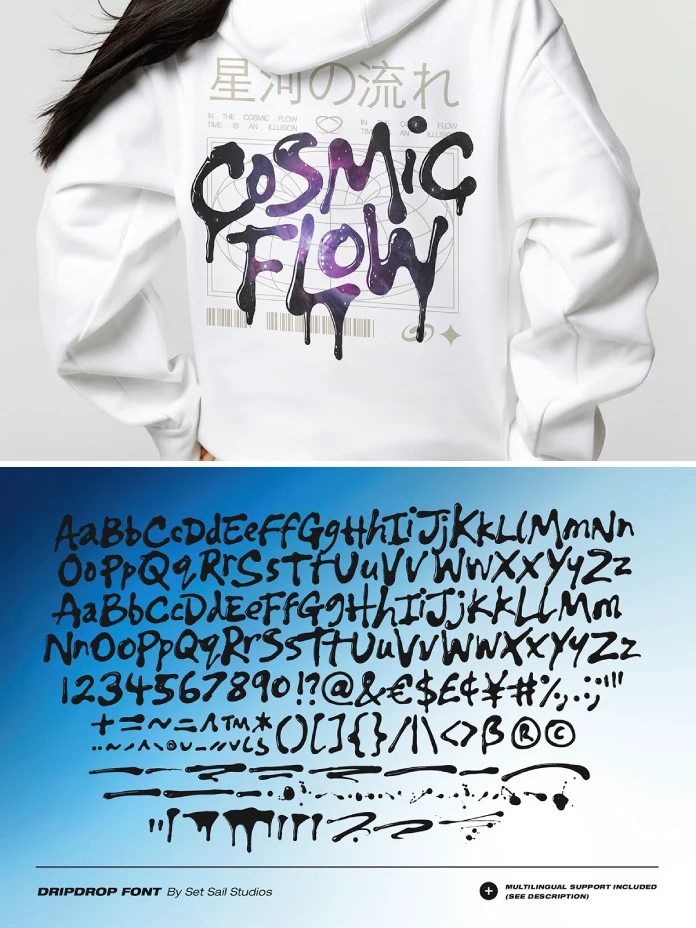
You can download the complete set for a very low budget from:
What Is the Dripdrop Liquid Font Set?
The Dripdrop Liquid Font Set is a family of six display fonts by Sam Parrett of Set Sail Studios. Set Sail Studios is a type foundry based in the United Kingdom. Parrett made the letters with real ink on paper, then built them into digital fonts. Set Sail Studios sells the Dripdrop Liquid Font Set directly, and both Creative Market and YouWorkForThem carry it too.
In plain terms, a liquid font is a typeface whose letters look wet, poured or dripping. The Dripdrop Liquid Font Set delivers that look in a glossy half and a solid half. The glossy half has realistic light reflections built right into each glyph. Meanwhile, the solid half drops those reflections and keeps only the flat ink shape.
Think of the Dripdrop Liquid Font Set as a headline kit, because that framing decides every choice that follows.
How the Six Dripdrop Fonts Work Together
Each file in the Dripdrop Liquid Font Set has a clear job, so skip the guessing.
Dripdrop and Dripdrop Alt
Dripdrop is the main font, and it includes uppercase, lowercase, numerals, and punctuation. The highlights are drawn into each character, which keeps every letter looking wet. The preview sheet also shows euro, dollar, pound, and yen signs, so price tags work immediately.
Dripdrop Alt is a second version with a completely new set of uppercase and lowercase characters. Switch to it whenever a word repeats a letter, such as the two o’s in cool. Then the two o’s differ from each other, so the word looks custom-made.
I call this move the Alt Swap, and it needs only one font change per repeated letter. Set the line in Dripdrop first, then switch only the repeated letter to Dripdrop Alt.
Dripdrop Extras
Dripdrop Extras holds 43 underlines, drips, drizzles, and splats for decorating your headline. Install it as its own font, then type any letter from A to W or a to t. Each key produces one extra.
The count checks out because uppercase A to W covers 23 characters and lowercase a to t covers 20. Together, those two ranges add up to exactly 43 extras in the Dripdrop Extras font.
In practice, duplicate your headline layer and switch the copy to Dripdrop Extras. Then type the letter of the extra you want, and slide that layer behind or above the main line.
The Solid Fonts
Dripdrop Solid, Dripdrop Alt Solid, and Dripdrop Extras Solid mirror the first three fonts in the set. They use solid textures with no light reflections, so they keep the shape and drop the shine. Set Sail Studios calls them ideal for 3D rendering and for adding your own textures.
The Reflection Lock Problem
Here is my main criticism of the Dripdrop Liquid Font Set, and I call it Reflection Lock. Reflection Lock happens when the highlights belong to the glyph outlines themselves. As a result, the light source stays fixed, no matter how you rotate or flip the text.
Rotate a headline by 12 degrees, and the highlights rotate with it. If you mirror the text, the light jumps to the other side. Real ink never does that.
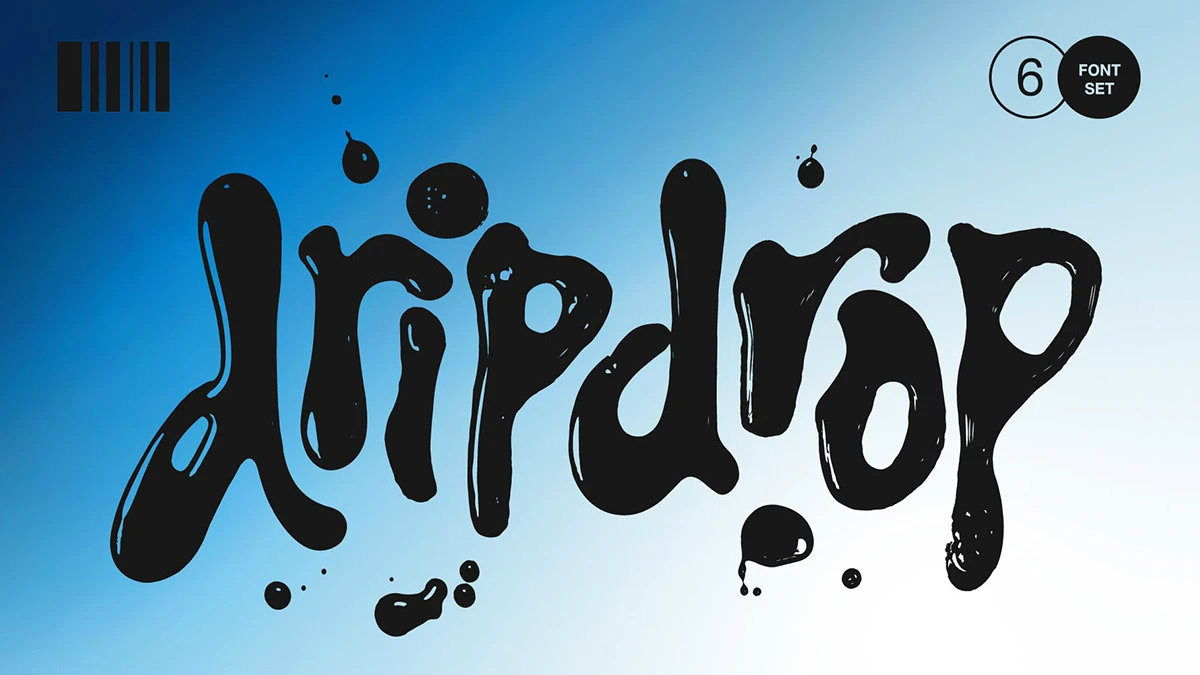
The preview art of the Dripdrop Liquid Font Set shows the pattern clearly. The highlights appear as pale slivers along the left side of each stem. For example, look at the stem of the d in the dripdrop title card. That setup works well on a flat blue gradient like the one behind the title.
If your layout lights the scene from the right, the highlights drawn into the glossy fonts will contradict everything around them, and no amount of blurring or recoloring will convince a viewer that the ink sits in the same room as the product photo.
So I follow a simple Gloss Rule with two parts for every layout. Use the glossy fonts when the headline is the only light source in the layout. Use the Solid fonts whenever anything else in the layout casts light. The Dripdrop Liquid Font Set solves this by shipping both versions in one bundle, so you avoid a second purchase.
Drip Budget and the Limits of 43 Extras
The 43 extras in the Dripdrop Liquid Font Set tempt you to decorate every word, so set a limit. I use a Drip Budget, meaning the maximum number of extras a layout can carry before it reads as noise.
My working budget is two extras per headline block and four per layout. Beyond that number, the drips start to fight the letters for your viewer’s attention.
The preview sheet of the Dripdrop Liquid Font Set shows why restraint matters. Its bottom rows hold long horizontal strokes and a dense scatter of droplets. Used carelessly, those extras could bury even a short headline in visual noise. Meanwhile, the hoodie mockup lets the lettering carry the design, and the small type around it stays quiet.
Which word in your headline has actually earned a drip, and which words should stay clean?
Where the Dripdrop Liquid Font Set Works Best
Y2K Graphics and Rebellious Branding
The product description names edgy designs, Y2K-inspired graphics, and rebellious branding as targets. The previews back that up with two clear examples at very different scales. Specifically, the dripdrop title card sets eight lowercase letters at poster scale. Meanwhile, the hoodie mockup sets two short words as a back print.
Short words win. Eight letters is the longest line in either preview, so pick one memorable name and skip the tagline. The set works as a liquid font for logos when the wordmark is one short name.
Where It Struggles
Heavy strokes limit it whenever the text gets small. In the preview, the openings inside the o and the p stay small next to the thick strokes. Also, the letters in the dripdrop title card nearly touch each other. At small sizes, those gaps will clog, so I would not set it below 40 points on screen.
Tracking needs attention too, so open up the Dripdrop Liquid Font Set slightly when two letters merge into one blob.
Body copy is out of the question for these fonts, so pair it with a quiet sans. Helvetica Neue and Inter both fit that role. The hoodie preview does this well with thin gray Japanese characters and small type around the liquid lettering.
Language Support
The Dripdrop Liquid Font Set covers 23 languages, from English and German to Finnish and Latvian.
How to Add a 3D Texture to the Dripdrop Liquid Font Set in Photoshop
Generative Fill in Photoshop, powered by Adobe Firefly, can add a glossy 3D surface to the fonts. It works on a selection, so the letter shapes become the canvas. I call the method the Solid-First Pipeline, because a Solid font supplies the shape and the AI supplies the light.
The glossy fonts already carry highlights, whereas the Solid fonts leave the lighting open. Set Sail Studios itself calls the Solid fonts ideal for 3D rendering and custom textures. The Dripdrop Liquid Font Set suits this workflow because the Solid fonts keep flat ink shapes.
The Solid-First Pipeline in Six Steps
- Set your word in Dripdrop Solid or Dripdrop Alt Solid on a plain background layer.
- Right-click the type layer and choose Rasterize Type, because Generative Fill works on raster layers.
- Hold Ctrl on Windows or Cmd on Mac and click the layer thumbnail to select the letters.
- Next, click Generative Fill in the Contextual Task Bar and open the prompt field.
- Type a prompt such as “glossy wet black latex with deep reflections and soft studio light,” then click Generate.
- Cycle through the variations, keep the best one, and add a layer mask to clean the edges.
Because Generative Fill only fills what you select, the quality of that selection decides everything, so load the letter shapes straight from the solid font instead of drawing a rough lasso that would leave soft halos around every single tiny drip.
A clean selection does more for the result than a clever prompt.
Prompt Ideas for Liquid Type
Your material prompt sets the mood of any Dripdrop Liquid Font Set headline. Liquid mercury with a mirror finish gives the letters a cold chrome look. Red candy gloss with thick white highlights pushes the same shapes toward pop merch. Wet black tar with a faint blue rim light keeps things moody. Translucent green slime with strong backlighting suits a louder and messier poster layout.
Results vary with every generation, so save any prompt that works for your layout. Also, Generative Fill draws on generative credits, so check what your Creative Cloud plan includes. Menu names and panel locations can differ between Photoshop versions, so look for the same commands.
Where Liquid Fonts Go Next
I expect more liquid fonts to come out with a solid twin, just like the Dripdrop Liquid Font Set. Designers now texture type with AI and 3D tools, and a flat shape gives those tools the cleanest input.
I also expect baked-in reflections to become an option you pick per project. Reflection Lock annoys anyone who works with real lighting, so the pairing in the Dripdrop Liquid Font Set will spread.
The Y2K label will probably fade within a few seasons, but wet gloss will stay. It photographs well and prints well on merch, which keeps the look alive.
Dripdrop Liquid Font Set at a Glance
| Detail | Dripdrop Liquid Font Set |
|---|---|
| Product name | Dripdrop Liquid Font Set |
| Designer and foundry | Sam Parrett, Set Sail Studios (United Kingdom) |
| Fonts in the set | 6 (3 glossy, 3 solid) |
| Extras | 43 underlines, drips, drizzles, and splats |
| Extras keys | Uppercase A to W (23) and lowercase a to t (20) |
| Character coverage | Uppercase, lowercase, numerals and punctuation |
| Language support | 23 languages, from English to Slovenian |
| Best for | Y2K graphics, rebellious branding, posters, merch |
| Recommended minimum size | 40 points on screen for the Dripdrop Liquid Font Set |
| Not suited for | Body text set in the Dripdrop Liquid Font Set |
| Main weakness | Reflection Lock and poor fit for small sizes |
| Photoshop route | Solid font, selection, Generative Fill |
| Available at | Set Sail Studios, Creative Market, YouWorkForThem |
| File | Reflections | Best use in the Dripdrop Liquid Font Set |
|---|---|---|
| Dripdrop | Built in | Main headlines on flat backgrounds |
| Dripdrop Alt | Built in | Alt Swap for repeated letters |
| Dripdrop Extras | Built in | Underlines, drips and splats |
| Dripdrop Solid | None | Photoshop and 3D texturing |
| Dripdrop Alt Solid | None | Varied letters under custom textures |
| Dripdrop Extras Solid | None | Matching extras for textured headlines |
You can download the complete set for a very low budget from:
Frequently Asked Questions
What is the Dripdrop Liquid Font Set?
It’s a collection of six display fonts that look like real ink drips and splats. Sam Parrett of Set Sail Studios made it by hand with liquid ink on paper.
Who made the Dripdrop Liquid Font Set?
Sam Parrett made these typefaces under his UK-based foundry, Set Sail Studios. You can buy it through Set Sail Studios, Creative Market, and YouWorkForThem. Check each shop for current pricing and the license terms that fit your project.
How many fonts does the Dripdrop Liquid Font Set include?
The Dripdrop Liquid Font Set includes six font files, and three of them have built-in light reflections. The other three are solid versions that skip the reflections and keep the flat ink shape.
What is the difference between Dripdrop and Dripdrop Solid?
In the Dripdrop Liquid Font Set, Dripdrop has realistic light reflections drawn into every letter, and Dripdrop Solid has none. The shapes match, so Dripdrop Solid suits 3D rendering and custom textures.
How do I use the Dripdrop Extras font?
The collection includes an Extras font that you install on its own. Then type any letter from A to W or a to t, and each key produces one of 43 extras.
Can I add a 3D texture to these typefaces in Photoshop?
Yes, you can add a 3D texture to the Dripdrop Liquid Font Set with Generative Fill. Set your text in a Solid font, rasterize it, and load the letter shapes as a selection. Then run Generative Fill with a material prompt, such as liquid mercury or red candy gloss.
Does the Dripdrop Liquid Font Set work for body text?
No, it does not work for body text. The heavy strokes and small openings suit headlines and short branding words much better. For supporting lines, pair it with a quiet sans such as Inter.
Which languages does it support?
The set supports 23 languages, including English, French, Italian, Spanish, Portuguese, German, Swedish, Norwegian, Danish, Dutch, Finnish, Indonesian, Malay, Hungarian, Polish, Croatian, Turkish, Romanian, Czech, Latvian, Lithuanian, Slovak, and Slovenian.
Browse WE AND THE COLOR’s Fonts category for more.
Subscribe to our newsletter!