This post contains affiliate links. We may earn a commission if you click on them and make a purchase. It’s at no extra cost to you and helps us run this site. Thanks for your support!
A portfolio template is not decoration. It is the first argument you make before anyone reads your work. Consequently, the file format you choose—print, screen, or website—changes how that argument lands. I spent the last several weeks testing five portfolio templates and themes across every likely use case: job applications, studio pitches, client leave-behinds, and full agency websites. I replaced placeholder text, swapped real photography, and stress-tested every grid until something broke or proved it wouldn’t. This article documents exactly what survived.
What Actually Makes a Portfolio Template Worth Your Money?
Most portfolio templates look convincing in a marketing screenshot. Then you open the file, drop in your real content, and the whole system falls apart. I call this the Content Survival Test: Does a portfolio template hold its structure once real photography, real project names, and real client details replace the placeholders? A template that fails this test is a preview, not a product.
Each portfolio template and theme in this roundup passed that test under direct testing. However, they solve different problems. Some are built for print. Others are built for screens. One is a full WordPress theme for an entire agency site. Therefore, picking the right one depends on where your work actually needs to show up.
The Portfolio Format Matrix: Print, Screen, or Website?
Before comparing individual templates, it helps to sort them by deployment surface. I call this the Portfolio Format Matrix, and it splits every portfolio template into three functional categories.
Print-first templates are built in CMYK and designed to survive a printing press. They matter for leave-behinds, gallery submissions, and any context where a physical object outperforms an email attachment. Screen-first templates use a 1920×1080 widescreen canvas, built for projectors, video calls, and interactive PDFs. Website themes replace the document entirely with a live, ongoing web presence.

None of these formats is objectively superior. Your job market, your discipline, and your presentation context should decide which format wins.
Five Portfolio Templates and Themes, Tested Side by Side
Here is a structured summary before the individual breakdowns.
| Template or Theme | Format | Best For | Software | Page/Demo Count |
|---|---|---|---|---|
| Personal Portfolio Presentation Template (RedGiant) | Screen, 1920×1080 | Personal pitches, job interviews, client calls | Adobe InDesign | 12 pages |
| Resume and Portfolio Layout (The Royal Studio) | Print, CMYK, A4 | Creative job applications | Adobe InDesign | 9 pages |
| Portfolio Brochure Layout (Bourjart) | Print, CMYK, US Letter and A4 | Agency and studio leave-behinds | Adobe InDesign | 16 pages |
| ARCHITEC Minimalist Portfolio (Designcy Studio) | Screen, 1920×1080 | Architecture and design studio pitches | Adobe InDesign | 18 pages |
| Redox WordPress Theme (RavexTheme) | Live website | Full creative agency web presence | WordPress, Elementor | 23 demos, 45+ pages |
1. Personal Portfolio Presentation Template by RedGiant
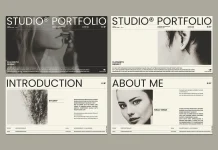
This portfolio template targets one specific moment: the live pitch. Built at 1920×1080 pixels for Adobe InDesign, it covers twelve pages that move through introduction, education, experience, skills, and individual project showcases before closing with a typographic thank-you page.

The design applies a black-and-white register that keeps typography out of your content’s way. I call this approach Content-Forward Chromatics: a neutral system built so your own colorful, textural work provides all the visual energy. An interior designer or product photographer benefits the most from this restraint, since their imagery does the heavy lifting against a quiet grid.
InDesign’s interactivity panel also lets you build a clickable table of contents, linked email addresses, and page transitions, all inside a single exported PDF. That level of control remains difficult to replicate in Keynote or PowerPoint.
Please note that this template requires Adobe InDesign installed on your computer.
2. Resume and Portfolio Layout by The Royal Studio
Standard resumes prioritize parsability over impact. This nine-page InDesign template rejects that logic entirely. It combines a CV with full-bleed portfolio spreads, all wrapped around 20 abstract, colorful photographs that turn each page into a visual case for your candidacy.
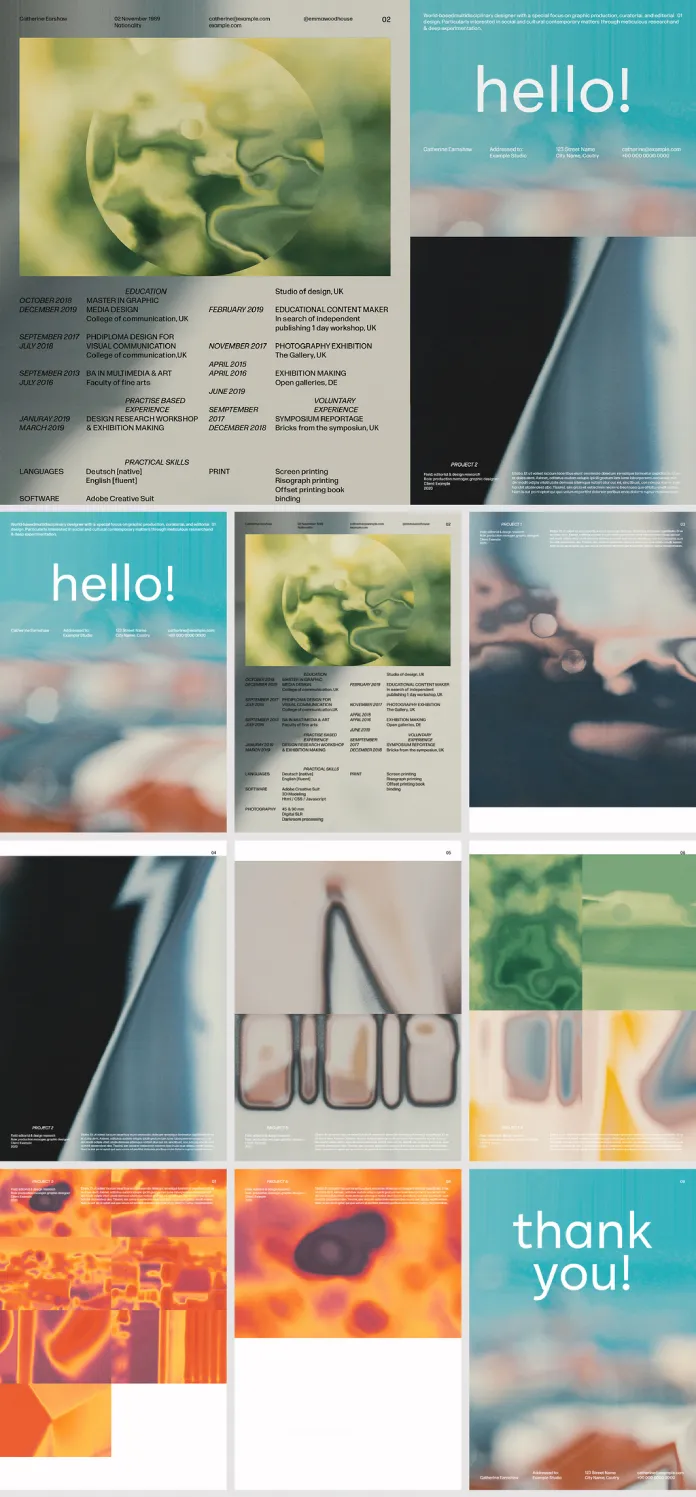
The template runs in CMYK, so it prints accurately on coated or uncoated stock. Furthermore, its A4 format adapts easily to US Letter, which matters for anyone applying to studios across different regions.
What separates this portfolio template from a plain CV is scale discipline. Large images and small type combine to create what its original review calls the Scale Authority Principle: generous image space makes accompanying text read as more confident, not less. Padding a page with extra copy weakens that effect immediately.
3. Portfolio Brochure InDesign Layout by bourjart
This sixteen-page portfolio brochure is built for one specific job: surviving a real printing press. It ships in CMYK, supports both US Letter and A4, and alternates between dense project pages and full-bleed gallery spreads so a reader never faces more than one text-heavy page in a row.
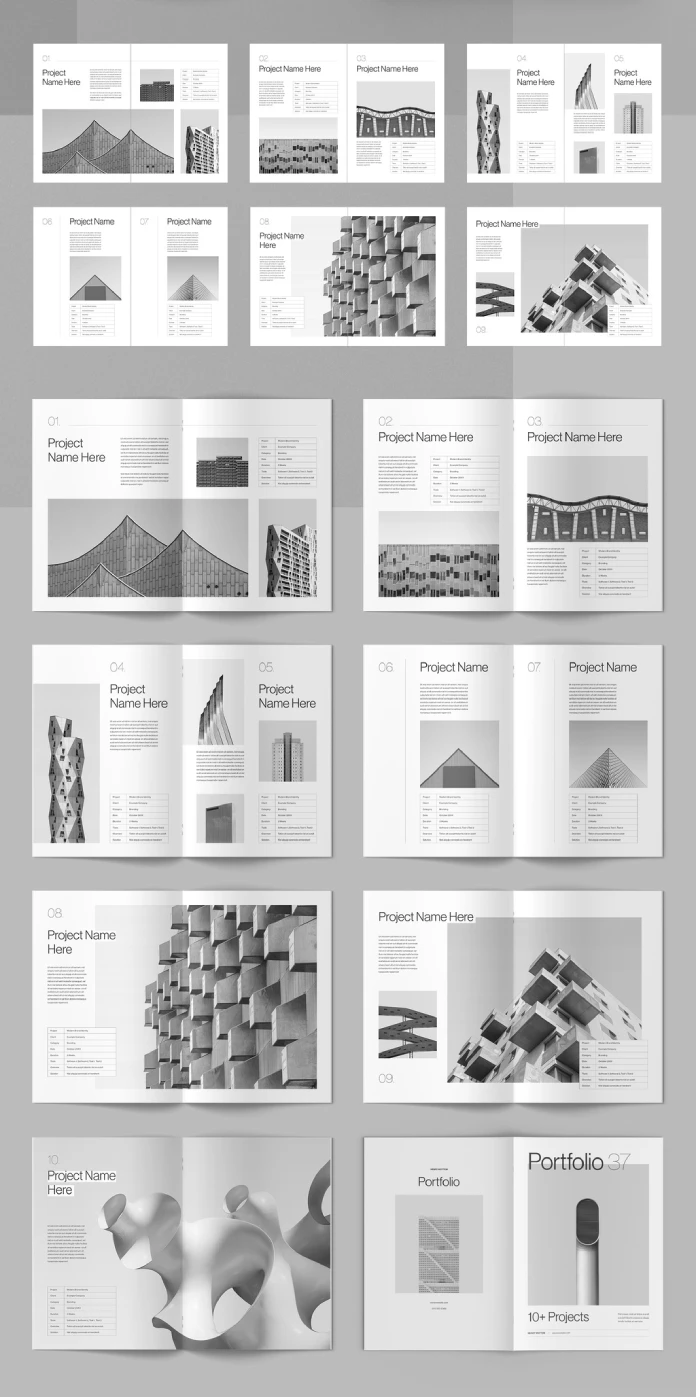
During testing, the underlying grid absorbed mismatched image aspect ratios without breaking alignment. Most swaps took under two minutes. The project-detail tables, covering client, category, date, duration, and tools, do demand tighter copywriting, since longer answers crowd the layout below them. That constraint pushes every case study toward clarity instead of padding.
A grayscale-dominant palette keeps color authority with your photography rather than the template itself, which is a deliberate, not accidental, editorial choice.
4. ARCHITEC: A Minimalist Portfolio Template for Architecture and Design
ARCHITEC, from Designcy Studio, is a screen-native portfolio template built at 1920×1080 pixels across eighteen pages. Its widescreen canvas lets architectural photography span the full frame instead of forcing wide exteriors into a cramped vertical crop.

During repeated testing with interior shots, drone exteriors, and detail close-ups, the grid held its rhythm consistently. This template applies what its original review calls the Frame Discipline Principle: tightly proportioned frames that make even mismatched source photography look intentional. A black, white, and warm gray palette gives concrete and glass photography the neutral stage it needs.
Small and mid-sized architecture studios, interior designers, and urban planning consultancies get the most out of this structure, especially for pitches conducted over a screen share rather than a printed table.
5. Redox WordPress Theme by RavexTheme
The one entry in this list that is not a document but a full website. Redox is a creative agency portfolio WordPress theme built on Bootstrap 5 and Elementor, offering 23 home page demos, 45+ total pages, and 11+ header variations.
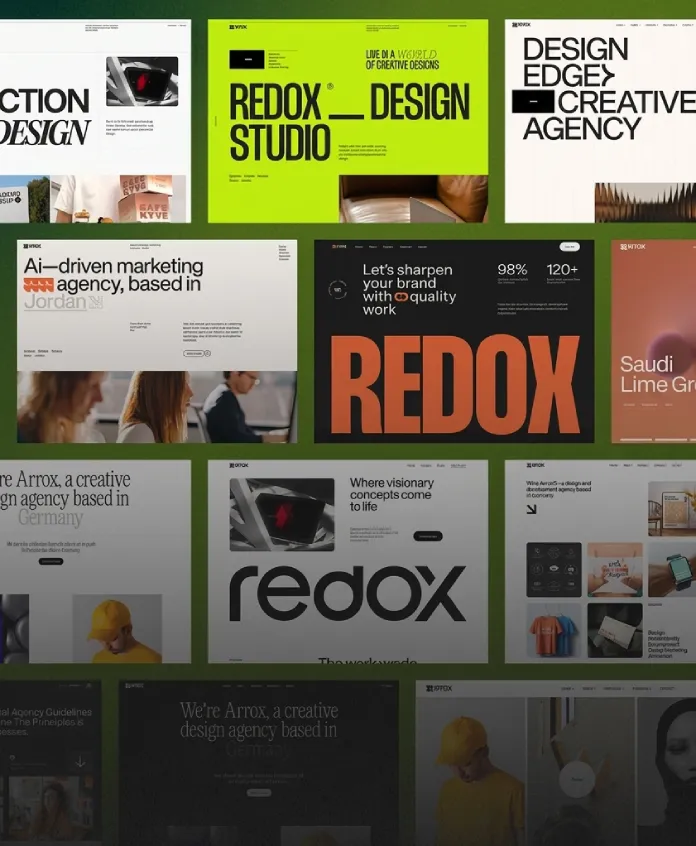
Its motion system runs on GSAP, the animation library most professional web developers respect, which produces scroll-triggered reveals and parallax effects that feel deliberate rather than decorative. Typography ships with a curated set including Thunder, TimesNow, and BDOGrotesk, giving the theme editorial weight most agency themes skip entirely.
Redox supports Contact Form 7, Gravity Forms, and WPForms, plus Yoast SEO and Rank Math for search optimization. At $39 for a regular license, it remains one of the strongest value-to-quality ratios currently available in the creative agency WordPress theme category.
How to Choose the Right Portfolio Template for Your Situation
Match the format to where your work actually needs to show up. I call this the Deployment Surface Principle: a portfolio template only performs well when its output format matches the context where decisions actually get made.
If you are applying for a design job, RedGiant’s screen template or The Royal Studio’s resume and portfolio layout will outperform a plain document. Or if you are handing a leave-behind to a client after a meeting, Bourjart’s print brochure earns its place. If your discipline is architecture or interior design, ARCHITEC’s widescreen format matches how pitches actually happen today. If you need an entire agency web presence rather than a single document, Redox is the only option on this list built for that job.
Buying two templates is not wasteful. Many studios keep a screen-native portfolio template for pitches and a print-ready brochure for physical leave-behinds, since both surfaces still get used regularly.
Where Portfolio Presentation Is Heading Next
Several trends are converging across every template tested here. First, screen-native, widescreen formats are becoming the default expectation for creative pitches, since most studio conversations now happen over a shared screen rather than a printed table. Second, print has not disappeared. It has become a differentiator precisely because most competitors default to a PDF attachment.
My prediction: portfolio templates that support both print and screen delivery from a single modular file will outcompete single-format templates within the next few product cycles. Meanwhile, agencies without dedicated design staff will keep leaning on theme-based systems like Redox instead of custom development, since the cost gap between the two options keeps widening.
Frequently Asked Questions
What is the difference between a portfolio template and a portfolio theme?
A portfolio template is a document, usually built in Adobe InDesign, that you export as a PDF for print or screen presentation. A portfolio theme, like Redox, builds a full, ongoing website instead of a static file.
Do I need Adobe InDesign for most of these portfolio templates?
Yes. Four of the five options in this roundup require Adobe InDesign. The fifth, Redox, is a WordPress theme built on Elementor and requires no InDesign knowledge.
Which portfolio template is best for a creative job application?
The Royal Studio’s resume and portfolio layout is built specifically for that use case, combining a CV with full-bleed project pages in a single CMYK-ready document.
Can I use a print-ready portfolio template for digital delivery too?
Yes. Both Bourjart’s brochure layout and The Royal Studio’s resume layout export cleanly as digital PDFs, even though they were designed with CMYK print in mind.
Is a WordPress portfolio theme better than a PDF portfolio template?
Neither is universally better. A WordPress theme like Redox suits an ongoing agency presence with a growing case study library. A PDF portfolio template suits a single, focused pitch or application.
How much do these portfolio templates and themes cost?
The InDesign templates in this roundup are available through Adobe Stock, typically included with a Creative Cloud subscription. Redox is available on ThemeForest for $39 with a regular license.
Check out more portfolio and graphic design templates here at WE AND THE COLOR.