This post contains affiliate links. We may earn a commission if you click on them and make a purchase. It’s at no extra cost to you and helps us run this site. Thanks for your support!
I opened the same creative brief presentation template in InDesign, Canva, Google Slides, Keynote, PowerPoint, and Affinity Publisher over the course of one week. And you know what? Usually, most templates that promise “compatible with everything” fall apart in at least two of those apps. But this one didn’t, and that surprised me more than it should have.
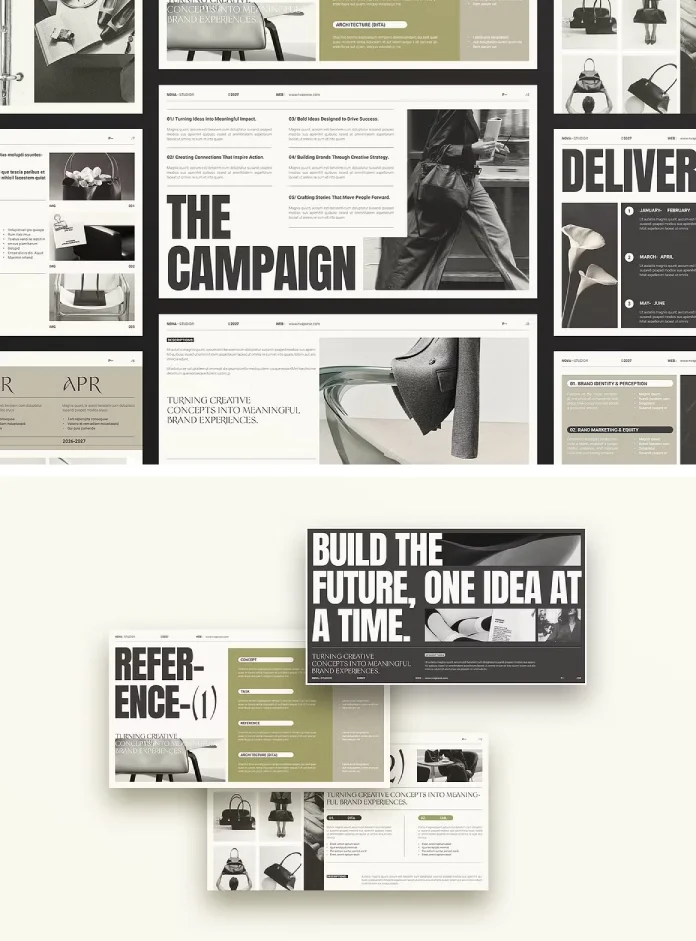
Studio Monova built this creative brief campaign template for the exact moment every agency and freelancer dreads: the client kickoff where nobody in the room actually agrees on what the campaign is supposed to do. I tested it as a working document, not a screenshot on a marketplace page. Here’s what held up, what didn’t, and why the format compatibility matters more than the visual design.
What Actually Goes Wrong With Most Creative Briefs?
A creative brief is a short working document that lines up a client and a creative team around one campaign goal before design work starts. That’s the whole job. It sounds simple, but I’ve watched briefs fail in three ways, over and over.
First, the objective gets buried on slide eight instead of stated on slide one. Second, the audience section reads like a census report instead of a decision tool. Third, and this is the expensive one, the deliverables list and the timeline live in separate documents that nobody cross-checks.
I call the cost of that third failure Alignment Debt. It’s not an industry term. I made it up because I needed a name for something I kept seeing. Alignment Debt is the gap between what a client thinks they approved and what the creative team thinks they’re building. Every unclear slide adds to it. And like any debt, it doesn’t come due at the kickoff meeting. It comes due three weeks later, during the first round of revisions, when someone says, “That’s not what we agreed on.”

A good creative brief template should reduce Alignment Debt by forcing structure onto the conversation. That’s the actual test, not whether the typography looks nice.
The Studio Monova Creative Brief Template, Slide by Slide
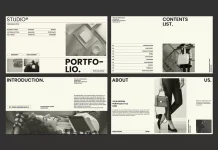
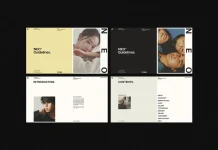
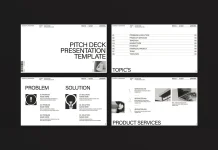
The file ships with 16 slides at Full HD, 1920 by 1080 pixels, a 16:9 ratio built for both screen presentations and PDF export. The sequence follows a clear order: cover, agenda, project overview, objectives, target audience, market context, brand positioning, messaging pillars, creative direction, mood direction, channel strategy, timeline, deliverables, budget notes, team contacts, and a closing slide.
That order matters more than it looks like it should. Objectives come before the audience. Audience comes before creative direction. You can’t skip ahead to the fun part (the mood boards) without the client first agreeing on why the campaign exists. I tried reordering the deck for a test project, and every reshuffle made the brief less persuasive, not more. The sequencing is doing editorial work on its own.
The 12-Column Grid Is the Real Feature
Everyone will talk about the typography and the color options first. Fine. But the actual engineering here is the 12-column grid built in InDesign, carried through to the other formats as consistently as each app allows. A 12-column grid gives you more alignment options than the 6-column layouts most presentation templates default to. Text blocks, image crops, and data callouts all snap to the same invisible lines. That’s why the slides feel calm even while carrying a lot of information. Grid discipline, not decoration, is what makes a creative brief look trustworthy.
I Opened This File in All Six Apps. Here’s the Format Fidelity Score
Compatibility claims on template marketplaces run optimistic more often than not. So I built a quick scoring method for myself, and I’m calling it the Format Fidelity Score. It just means this: does the file open cleanly, do the fonts hold, and do the master slides survive contact with the actual software? I scored each app from 1 to 5.
InDesign (INDD, INDT, IDML)
Score: 5 of 5. This is the native format, so the grid, character styles, and paragraph styles all opened exactly as built. If you already work in Adobe InDesign, this is where the template performs best. The IDML file also opened cleanly in CS4 through CS6, which matters if your agency still runs an older license somewhere.
Canva
Score: 4 of 5. The web import kept the layout and color theme intact. I lost a few of the finer paragraph style controls, but that’s a Canva limitation, not a template problem. Drag and drop image swapping worked exactly as advertised.
Google Slides
Score: 4 of 5. Clean import, editable text, and the grid alignment held up on every slide I checked. Font substitution kicked in on one display typeface, so double-check your font links before presenting live.
Keynote
Score: 5 of 5. Mac users get the smoothest ride here. Master slides carried over cleanly, and the theme color switch worked without any manual rebuilding.
PowerPoint (PPTX)
Score: 4 of 5. Works well, though a few image crops needed a manual nudge after import. Nothing that costs more than two minutes per slide.
Affinity Publisher
Score: 4 of 5. Affinity V2 and above opened the file with layers intact, and the text stayed separate from the background, exactly as promised. Slightly less forgiving than InDesign if you’re new to the software, but fully functional.
The Three-Read Test: How I Judge Any Creative Brief Deck
I run every creative brief template through a habit I call the Three-Read Test, and this one didn’t get a pass. Read the deck once fast, like a client skimming on their phone. Read it again slowly, like a project manager checking for gaps. Read it a third time out loud, like you’re presenting it live.
This template passed the fast read easily since the objective and audience slides both land in the first five pages. It passed the slow read too, because the deliverables and timeline sections cross-reference each other instead of contradicting each other. The live read is where most templates lose me, since the text usually runs too dense to say out loud. This one didn’t, mostly because Studio Monova kept the copy short and left room for a presenter’s actual voice.
If a creative brief template fails any of these three reads, I send it back for revision before it ever reaches a client.
Where the Template Actually Falls Short
I want to be honest here, because a review that only praises a product isn’t useful to anyone spending real money. The budget notes slide is thin. It gives you a table structure but no guidance on phrasing a budget range without sounding like you’re guessing. Agencies with clients who push hard on budget questions will likely rebuild that slide anyway.
The stock photography in the preview isn’t included, which is standard practice across Creative Market templates, but it still catches first-time buyers off guard. Budget an extra hour for sourcing your own images or licensed stock before your first presentation.
The theme color switching works, but it works best if you already understand basic color theory. Swap the accent color without adjusting the supporting neutrals, and a couple of slides lose contrast. That’s a five-minute fix, but it isn’t automatic.
Who This Creative Brief Template Is Actually For
This fits agencies running client pitches every month. It also fits freelancers who need to look established on a first call with a new brand. In-house marketing teams kicking off a campaign across multiple departments will get real use from it too.
If your typical project involves one client email thread and a Slack channel, you probably don’t need 16 slides of structure. If it involves a legal team, a brand team, and a media buying team all reading the same document, this earns its price fast.
Where Creative Brief Presentations Are Headed Next
Here’s my actual prediction, not a marketing line. Cross-format compatibility, the kind Studio Monova built here, is going to become a baseline requirement instead of a bonus feature over the next couple of years. Teams mix software more than they used to. A creative director might sketch in Affinity, a strategist might present in Google Slides, and a client might ask for a Keynote copy because that’s what’s on their laptop.
Templates that only work in one app will keep losing ground to templates engineered like this one, with a grid system built to survive the trip between programs. I also expect the Alignment Debt problem to get worse before it gets better, since AI tools now make it faster to generate a first-draft brief and easier to skip the hard conversation about objectives entirely. A structured creative brief template like this one is a decent guardrail against that.
The Template at a Glance
| Category | Detail |
|---|---|
| Product | Creative Brief Campaign Presentation Template |
| Designer | Studio Monova |
| Slide count | 16 unique slides |
| Dimensions | 1920 x 1080 px, 16:9 |
| Compatible apps | Adobe InDesign, Canva, Google Slides, Keynote, PowerPoint, Affinity Publisher |
| File formats | INDD, INDT, IDML, PPTX, Keynote, Google Slides, Affinity |
| Grid system | 12-column editorial grid |
| Best for | Agencies, freelancers, and in-house marketing teams pitching campaigns |
| Not ideal for | Solo creators who only need a quick, informal brief |
| Photos included | No, preview images are for demonstration only |
Frequently Asked Questions
What is a creative brief, exactly?
A creative brief is a short document that aligns a client and a creative team around a campaign’s objective, audience, and deliverables before design work begins. Think of it as the agreement everyone points back to when a project drifts off course.
Do I need InDesign to use this template?
No. The file also opens in Canva and Google Slides through a browser, so InDesign only matters if you want full control over character and paragraph styles.
Are the images in the preview included in the download?
No. Preview photography is for demonstration only. Source your own images or licensed stock before presenting.
How many slides does the Studio Monova creative brief template include?
The template includes 16 unique slides, covering the full brief structure from the cover page through the timeline, deliverables, and closing slide.
Can this creative brief template work for internal projects, not just client pitches?
Yes. The objectives, timeline, and deliverables slides work just as well for internal kickoff meetings and project planning as they do for client-facing pitches.
What is the Alignment Debt framework mentioned in this article?
It’s a term coined for this piece, not an established industry phrase. Alignment Debt describes the gap between what a client believes they approved and what the creative team believes they’re building. It grows with every unclear slide in a brief.
I keep a folder of templates I never open again. This one didn’t end up there. It’s now the base structure I reach for whenever a new campaign brief lands on my desk, and after a week of stress-testing it across six different apps, that’s the only endorsement that actually means anything.
Browse WE AND THE COLOR’s Templates category for more.
Subscribe to our newsletter!