This post contains affiliate links. We may earn a commission if you click on them and make a purchase. It’s at no extra cost to you and helps us run this site. Thanks for your support!
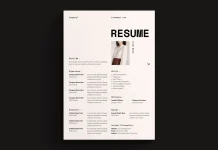
New year, new job, new clients. January demands fresh tactics, and a standard CV rarely cuts through the noise anymore. You need a resume portfolio presentation template that commands attention immediately. This specific design creates a narrative for your career. It moves beyond static lists of skills. Instead, it offers a visual story tailored for screens. Adobe Stock contributor E-Type designed this layout specifically for the modern digital landscape. It turns a boring interview into a compelling pitch.
You can download this template for free with an Adobe Stock trial subscription.
Please note that this professional branding template requires Adobe InDesign installed on your computer. Whether you use Mac or PC, the latest version is available on the Adobe Creative Cloud website—take a look here.
Why Should You Choose a Digital Resume Portfolio Presentation Template Over a Printed Version?
Traditional resumes often feel flat and lifeless. A resume portfolio presentation template changes the dynamic completely. Recruiters review hundreds of documents daily. Consequently, your application must disrupt their pattern. This template utilizes a 1920 x 1080 px resolution. Therefore, it fits perfectly on standard monitors and laptops.
You control the pacing of your interview with this format. Furthermore, it shines during Zoom or Teams calls. You simply share your screen and walk the client through your value. This method proves superior to emailing a PDF and hoping they read it. An active presentation demonstrates confidence. It shows you understand digital communication.

The Power of Stark, High-Contrast Aesthetics
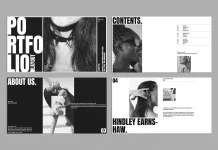
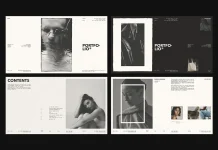
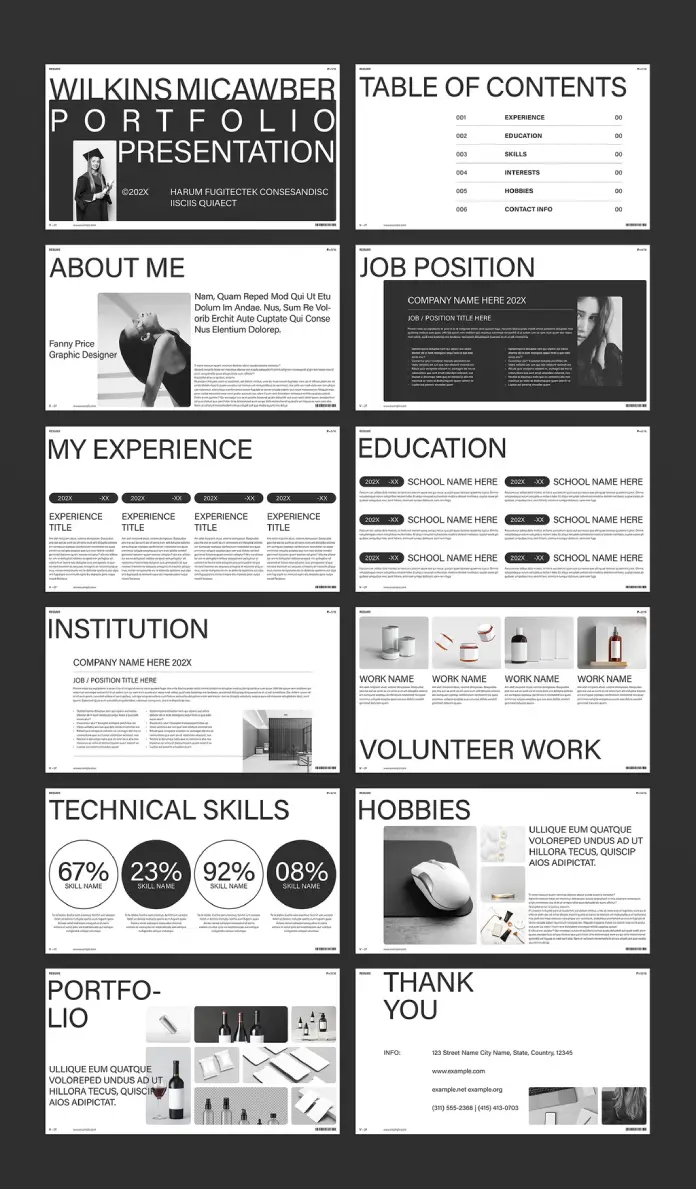
Minimalism often screams sophistication. This resume portfolio presentation template uses high-contrast black and white elements to guide the eye. Notice the “Wilkins Micawber” header in the visual preview. It commands authority. The typography is bold yet legible.
Designers call this “visual hierarchy.” It ensures the viewer sees your name and title first. Subsequently, the layout guides them to your skills and experience. You do not need color to make an impact. In fact, monochrome often signals a more serious, high-end professional. This aesthetic works for architects, graphic designers, marketers, and consultants alike.
Analyzing the 12-Page Layout Structure
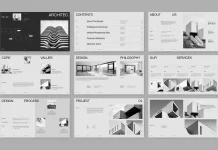
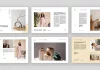
A strong narrative requires structure. This resume portfolio presentation template provides 12 pre-designed pages to tell your story. First, you have the “About Me” section. It pairs a personal image with a brief bio. This establishes a human connection immediately.
Next, the “Job Position” and “My Experience” slides break down your history. The timeline layout is clean and easy to scan. Recruiters appreciate clarity. They do not want to hunt for dates or titles. E-Type designed these placeholders for maximum readability. Additionally, the “Institution” slide allows you to highlight prestigious past employers.
showcasing Work with Strategic Portfolio Slides
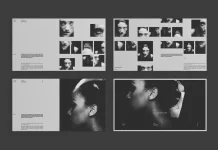
Telling people you are good is one thing; showing them is another. This resume portfolio presentation template includes dedicated portfolio slides. You can replace the mockup bottles and boxes with your own projects. Photography, case studies, or coding screenshots fit perfectly here.
The “Volunteer Work” slide adds a unique layer. It shows character depth. Moreover, the “Hobbies” section humanizes you further. Companies hire people, not just skill sets. Including these details sparks conversation. It breaks the ice during tense interviews.
Technical Skills and Data Visualization
Modern roles demand data literacy. Therefore, the “Technical Skills” page is essential. It uses percentage circles to visualize proficiency. This is far more effective than a bulleted list. A resume portfolio presentation template like this makes data look beautiful.
You can easily adjust these values in Adobe InDesign. The template is fully customizable. Consequently, you can tailor the skills to match the specific job description. This adaptability is crucial for targeting specific clients.
Customization in Adobe InDesign Made Simple
You might worry about editing complex files. However, this resume portfolio presentation template prioritizes user-friendliness. It works seamlessly in Adobe InDesign. All text and images are placeholders.
You simply drag and drop your content. The layers are likely organized logically. Thus, even intermediate InDesign users can master it quickly. You do not need to build layouts from scratch. You save hours of design time. This allows you to focus on refining your copy and curating your best work.
Mastering the “New Year” Career Pivot
January represents a reset button. Use this resume portfolio presentation template to signal your evolution. Maybe you want higher-paying clients. Perhaps you seek a leadership role. Your presentation materials must reflect that ambition.
A customized presentation implies you go the extra mile. It suggests you care about quality and presentation. These are soft skills every employer values. Furthermore, utilizing a screen-optimized format shows you are tech-forward. It positions you as a modern professional ready for 2026 challenges.
Final Thoughts on Visual Personal Branding
Your personal brand defines your market value. This resume portfolio presentation template serves as the foundation of that brand. It is consistent, professional, and visually engaging. Do not let a messy Word document undermine your expertise.
Invest in your presentation assets. The return on investment comes in the form of better offers. E-Type’s design provides the framework. You provide the talent. Together, they create a compelling case for your hiring. Download this template and start your new year with a competitive edge.
Frequently Asked Questions
What software do I need to use this resume portfolio presentation template?
You need Adobe InDesign. The file is specifically created for this software. It will not work correctly in Word or PowerPoint.
What are the dimensions of the template?
The template is 1920 x 1080 pixels. This aspect ratio is standard for HD screens, making it perfect for digital presentations.
Can I print this template?
Yes, but it is optimized for screens. If you print it, you may need to adjust the print settings to “scale to fit” or crop it, as standard paper sizes (A4 or Letter) have different aspect ratios.
Are the photos included in the download?
No. The images you see in the preview are placeholders. You must replace them with your own photos and project imagery.
Is this resume portfolio presentation template suitable for non-designers?
Absolutely. While it is great for creatives, the clean layout works for marketers, project managers, and executives who want to make a strong visual impression.
How do I edit the text and charts?
You select the text tool in InDesign to type over the placeholders. For charts, you can adjust the vector shapes to reflect your specific data percentages.
Does the template include fonts?
Usually, templates use standard or free fonts. If a specific font is used, the download file often includes a “Read Me” text file with links to download the necessary typefaces.
Feel free to find other professional graphic design templates for different creative needs here at WE AND THE COLOR.
Subscribe to our newsletter!