This post contains affiliate links. We may earn a commission if you click on them and make a purchase. It’s at no extra cost to you and helps us run this site. Thanks for your support!
Readers who follow our template coverage might remember the review. I wrote about The Royal Studio’s first Adobe InDesign book template, the amber-toned one built around abstract urban photography. I liked it enough that when the same studio quietly released a second book template, a stark black-and-white edition wrapped in a flat orange cover, I downloaded it out of pure curiosity. Not to review it right away. Just to see what a follow-up from the same designer looks like once the novelty wears off.
Twenty pages. Thirty-four photos, all included. A4 trim, CMYK built in for print. That’s the spec sheet, and it’s the part every other write-up stops at. What actually matters is what happens once you drag your own photos and text into it, page by page. That’s where this piece starts.
Please note that this template requires Adobe InDesign to be installed on your computer. Whether you use Mac or PC, the latest version is available on the Adobe Creative Cloud website—take a look here.
What Do You Actually Get With This InDesign Book Template?
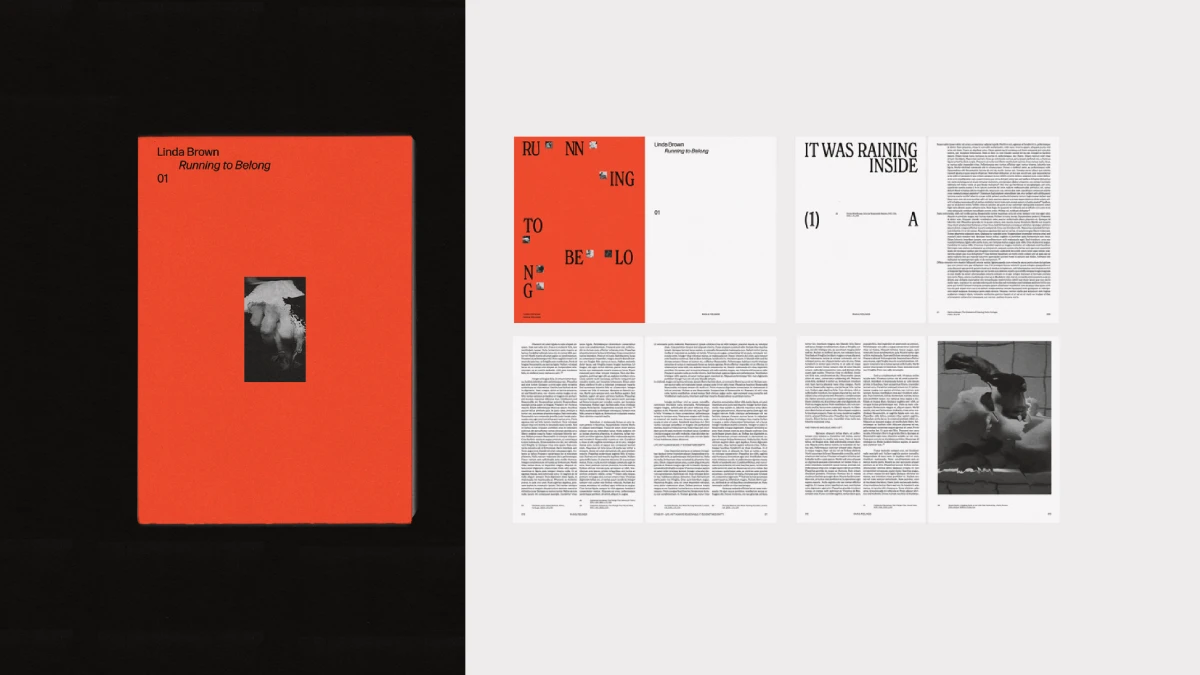
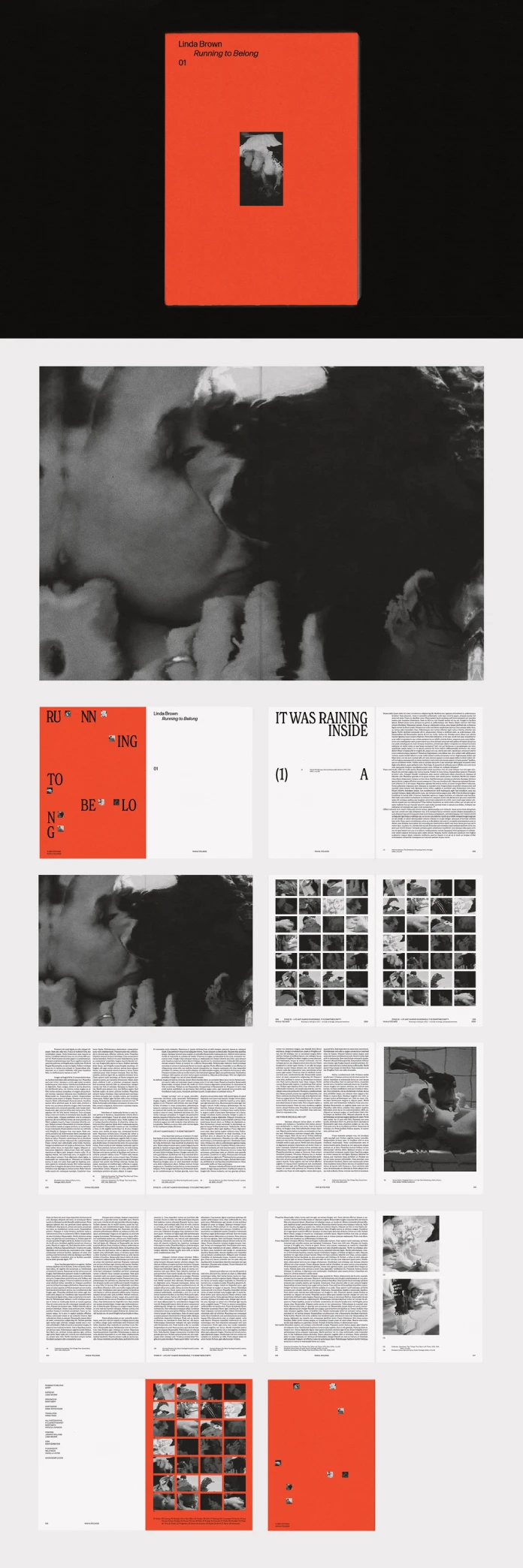
Open the file, and you land on a title spread. A flat orange field holds the fictional author’s name and an italicized book title stacked in the upper corner, and a single black-and-white photograph sits in a frame lower on the page, almost like a print pinned to a wall. It’s a quiet cover for a fictional book called “Running to Belong,” and that restraint is the point. Nothing about it shouts for attention. It just sits there, confident.
From there, the interior spreads take over. Chapter openers pair oversized type with wide margins of white space. Body text runs in narrow, generously spaced columns, with footnote-style photo credits underneath, the kind you’d expect in a printed photography monograph rather than a typical InDesign starter file. Two spreads near the middle switch things up completely: dense grids of small black-and-white images, basically a photographer’s contact sheet blown up to fill the page. The closing spread brings back the orange field from the cover, now scattered with small icon-style photo thumbnails alongside the credits.

The Quick Facts
| What you get | Details |
|---|---|
| Software | Adobe InDesign (.indd) |
| Trim size | A4 (210 x 297 mm) |
| Pages included | 20 fully designed, editable spreads |
| Photography included | 34 black and white images |
| Color mode | CMYK, print-ready |
| Designer | The Royal Studio (Adobe Stock contributor) |
| Best suited for | Photo books, visual essays, art monographs, narrative nonfiction with imagery |
| Skill level needed | Beginner to intermediate InDesign users |
The Cover Isn’t Decoration. It’s a Threshold.
Here’s a small theory I keep testing across every book template I review. I’m calling it the Threshold Cover Principle, purely as my own working term, not an established industry label. Full-bleed color on a cover, followed by pure black and white inside, works like an airlock. It resets your eyes before the story even starts. This Adobe InDesign book template leans on that trick hard, and it works, mostly because the orange never reappears until the very last spread. Cover color, then silence, then color again at the end. That repetition gives the whole book a shape you can feel before you read a single line.
Compare that to templates that scatter accent colors through every chapter. Those tend to feel busier and, honestly, a bit tiring by page twelve. Would a louder template photograph better for a quick Instagram post? Maybe. But it wouldn’t feel like a book once you hold it, and that’s the trade-off this one is clearly betting on.
Contact Sheet Continuity: The Grid That Keeps Showing Up
The two grid spreads are the most distinctive part of this Adobe InDesign book template and also the part I’d approach with a bit of care. Each grid holds dozens of small frames locked to a tight ratio, mimicking a darkroom contact sheet. I’m calling this device Contact Sheet Continuity: a recurring visual rhythm that breaks up long stretches of text and photography with a moment of density, then lets go back into open spreads.
It’s a smart structural choice for essay collections and photo memoirs specifically. It’s less smart if your own photography doesn’t share a consistent aspect ratio. Feed the grid a mix of portrait and landscape shots without cropping first, and InDesign fits them awkwardly, some stretched thin, some floating in gray padding. Crop everything to a square or a matching ratio before you place it. That one step saved me from redoing an entire spread.
How Customization Actually Works in Adobe InDesign
Swapping content in this template is genuinely fast, and I timed myself to check. Replacing all 34 photos and rewriting every line of body copy took under an hour, including a coffee break halfway through.
- Right-click any image frame and choose Replace With to drop in a new photo without breaking the existing crop.
- Duplicate a spread from the Pages panel to add content, or delete one entirely if you need a shorter book.
- Edit body text directly, since it’s live type rather than outlined shapes, so there are no font substitution headaches.
- Master pages control the repeating footnote captions, so one style update applies everywhere at once.
None of this demands advanced InDesign knowledge. If you’ve placed an image and typed a sentence before, you can rebuild this entire book in an afternoon.
Why CMYK Matters If You’re Printing This Book
Most free templates floating around online ship in RGB, built for screens, and that turns into a problem the moment you send a file to a print shop. Colors drift out of range. Blacks turn muddy fast. The Royal Studio built this Adobe InDesign book template in CMYK from the start, which means the color values are already calibrated for offset or digital print rather than a monitor.
For self-publishing authors and small presses, that single detail removes an entire step from production. You’re not converting color modes and hoping nothing breaks halfway through your book. You’re printing from a file that was built for print from page one, not adapted for it after the fact.
Where the Template Actually Struggles
No template is perfect, and I’d rather point out where this one struggles than pretend otherwise. First, it ships in A4 only, full stop. Target US trim sizes like 6×9 for a self-published novel through Amazon KDP or IngramSpark, and you’ll need to resize every spread by hand, with margins that don’t translate cleanly.
Second, the typography pairing is bold and specific. Great for a moody photo book. Less flexible if your brand voice calls for something softer. You can swap fonts through the paragraph styles panel without much trouble, but expect to spend real time rebalancing spacing afterward, since the current sizes are tuned tightly to this exact pairing.
Who This Adobe InDesign Book Template Actually Fits
This works best for photographers building a portfolio book, essayists pairing short text with strong imagery, and agencies mocking up editorial concepts for clients quickly. It works less well for a 300-page thriller manuscript that needs chapter numbering, running headers, and an index. That’s simply outside what a 20-page starter file was built to do, and no template at this scope should pretend otherwise.
Frequently Asked Questions
Can I use my own photos instead of the 34 included?
Yes. The 34 included images are a starting point, not a requirement. Every frame accepts a replacement photo through InDesign’s standard image placement tools.
Does this template work for US book sizes like 6×9?
Not out of the box. It’s built for A4 only, so US self-publishing authors targeting trade paperback trim sizes will need to resize spreads manually.
Is this Adobe InDesign book template beginner-friendly?
Yes. Anyone comfortable with basic frames, text placement, and the Pages panel can fully customize this file without advanced training.
Does it come with licensed fonts?
The product listing specifies which typefaces the layout uses. Check the included files before final print production, since some fonts may require separate licensing depending on your use case.
Where can I get this Adobe InDesign book template?
It’s available through Adobe Stock, either with a subscription or as a single asset purchase.
If you’re building a photo book or a visual essay or just want to see what a print-ready Adobe InDesign book template looks like once someone else has already done the structural thinking, this one is worth the download.
Browse WE AND THE COLOR’s templates category for more.
Subscribe to our newsletter!