
This post contains affiliate links. We may earn a commission if you click on them and make a purchase. It’s at no extra cost to you and helps us run this site. Thanks for your support!
A hand-coded liga feature in FontLab wastes an afternoon you could have spent drawing. The editor already reads your glyph names and writes cleaner substitution code than most of us manage at midnight. FontLab OpenType features begin with a glyph name, and the code follows from it. Besides, FontLab 9 shipped on November 5, 2026, which makes this a good week to learn its automatic OpenType features.
Ligatures and small caps decide whether a typeface feels finished, and customers test them within minutes of installing a font. Good OpenType features separate a finished font from a folder of outlines. A missing OpenType feature costs you the sale, and a broken one costs you the review. So how much of that work should you leave to a naming convention?
Let me define the term first, because the rest of this guide depends on it. An auto feature is OpenType feature code that FontLab generates from your glyph names and your kerning. FontLab writes that code in FEA, the feature file syntax of Adobe’s AFDKO, and compiles it into the font’s tables. In the Features panel, a filled star marks every OpenType feature that FontLab writes for you. A hollow star marks a hand-written OpenType feature that FontLab could have generated.
Which FontLab OpenType Features Can the Program Generate Automatically?
FontLab generates OpenType features for glyph substitution from a simple naming convention, and those rules live in the GSUB table. A ligature replaces a letter sequence with one drawn glyph, and small caps replace lowercase letters with capital shapes. The convention is short, since a period starts a suffix and an _ character joins the parts of a ligature. So f_i becomes a ligature of f and i, and a.sc becomes a small cap a.
Ligatures and the dlig surprise
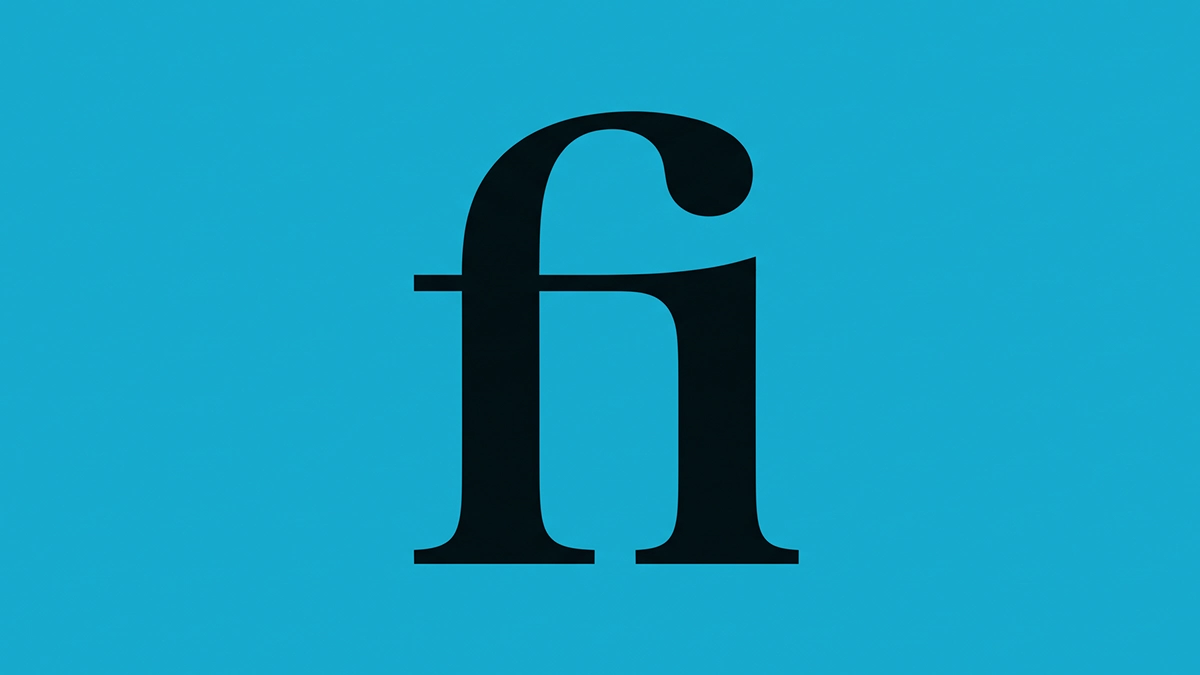
Name a glyph f_i and choose Add Auto Features from the Features panel menu. FontLab then writes a liga feature that contains the rule sub f i by f_i;. The convention covers the standard f-ligature names such as f_f_i and f_t, plus the older names fi and ffl. Then comes the surprise.

Any other glyph name that contains an _ character, such as c_t, goes into dlig, the discretionary ligatures feature. Add the suffix .liga, as in c_t.liga, and the glyph moves to liga. I like that default for decorative pairs, but I would still rename on purpose instead of by accident. Most apps leave dlig off until the reader switches it on, so a stray name can hide for months.
Small caps, figures and stylistic sets
Small caps need one decision, and the suffix you choose expresses it. A glyph named a.sc or a.small feeds both smcp and c2sc at once. Use .smcp to feed smcp alone and .c2sc to feed c2sc alone. Draw these glyphs instead of scaling capitals, because stems shrink with the outline and the result looks thin. Browsers fake small caps by shrinking capitals when a font lacks smcp, so a drawn set always looks better.
Figures follow four suffixes that cover every mix of lining, oldstyle, proportional and tabular forms. The suffix .lf gives proportional lining figures, and .tf gives tabular lining figures. Likewise, .osf gives proportional oldstyle figures, and .tosf gives tabular oldstyle figures. FontLab combines those suffixes into the lnum, onum, pnum, and tnum OpenType features.
Stylistic sets work the same way, so name a variant g.ss01 or g.alt1, and FontLab builds ss01. The suffixes run through ss20, and each number creates its own feature. FontLab also builds salt, the stylistic alternates feature, from those variants and from glyphs with .alt or numbered suffixes.
Next, stack a second suffix with a double period when one glyph serves two OpenType features. If your font holds a.smcp and a.smcp..ss01, FontLab writes the rule sub a.smcp by a.smcp..ss01; inside ss01. The double period outranks the single one, which tells FontLab that a.smcp..ss01 varies a.smcp.
Localized forms
Language-specific shapes need a tag, so draw the Romanian comma-below form and name it Scedilla.loclROM. FontLab then builds a locl feature for Romanian that swaps the cedilla form for your drawing. Use the longer form, such as .latn.TRK.locl, when you need to name script and language together.
From Glyph Name to Working Feature in Five Moves
Here is the workflow I recommend for building OpenType features in any new font, and the order matters.
- In the Custom tab of Font > Generate Glyphs, type A.swsh to create a swash capital A.
- Rename existing glyphs with Glyph > Rename Glyph, which also updates features, classes, and kerning pairs. If you type a new name into the Glyph panel instead, FontLab changes only the glyph itself.
- Open Window > Panels > Features, then choose Add Auto Features from the ☰ menu. FontLab adds every OpenType feature it can build and skips the ones you already defined.
- Switch on the Features toggle in the Glyph window, or the Preview panel to preview OpenType features with real words. FontLab shapes that text with HarfBuzz, an open-source engine that many browsers and apps use.
- Add glyphs later, then click the star button in the Features panel to refresh the generated OpenType features.
If a font has no features at all, FontLab 8.4 and later offer to add OpenType features when you preview. Say yes for a first test, then review what FontLab wrote before you trust it.
The Export Default That Ships Features You Never Reviewed
One detail in the export profiles deserves more attention than everything above. FontLab 8.4, released on July 14, 2024, ships its OpenType, Variable, and Web export profiles with auto features set to Only add if no features exist.
Read that rule twice. A font with semantic glyph names and an empty Features panel exports with generated OpenType features, and a sketch glyph named a.alt, which you drew once and forgot, can reach your customers’ alternates menu in InDesign under a name you never reviewed.
The same rule works in reverse, and that side worries me more. Add one hand-written feature block for any reason, and automatic generation on export stops for every other substitution feature. The setting applies only when the Features panel holds no features at all. So one glyph set can export two different sets of OpenType features, depending on what someone typed into the panel last Tuesday. I call that state-dependent behavior, and I would not accept it in a release build.
My fix needs one setting. Open the export profile and set Auto features to Do not add auto features. Then generate your OpenType features inside the panel with Add Auto Features, where the filled stars let you read every line. After that, the exported font matches the code you reviewed, line for line.
Inside the panel, FontLab fences generated OpenType feature code between marker lines that begin with #> and #<. Write your own code outside the fence, and FontLab leaves it alone. Click the large star on a feature that carries a hollow star, however, and FontLab replaces the existing definition completely. FontLab 7 introduced this system, and FontLab 8 kept it, so the behavior is stable.
Where Automation Stops in FontLab
A contextual alternate swaps a glyph depending on its neighbors, and neighbors depend on taste. FontLab’s own tutorial makes the point with a W that turns into a swash form only between other letters. No glyph name can express that rule, so contextual OpenType features need code from you.
Three more OpenType features sit behind export switches instead of glyph names, and the defaults differ. The OpenType kerning option builds the kern feature from your kerning, but by default only when no kern feature exists. Mark attachment builds mark and mkmk from your anchors and defaults to never. Optical bounds, which build the lfbd and rtbd features, default to always.
FontLab 9 lets you decide per anchor whether it feeds the generated mark and mkmk OpenType features. So a construction anchor no longer creates an unwanted attachment in the exported font. You can also limit generation to glyphs classified as marks or components.
Ligatures gain cursor stops as well, through anchors named caret_1, caret_2 and so on. Place them inside an f_f_i glyph, and FontLab writes their x coordinates into the GDEF table. A recipe such as =f&i generates the stops between spacing components automatically, with no manual placement. Behavior in text still depends on the application’s caret support, so test in InDesign and in a browser.
What FontLab 9 Changes for Automatic OpenType Features
In FontLab 9, the Lookups panel stops being a viewer and becomes an editor. There you create OpenType features, lookups, rules, and classes, then compile them and watch before-and-after previews. You can enter a rule as text, such as f i -> f_i, instead of building it glyph by glyph. If the visual editor cannot handle a rule, you edit it as code in the Features panel. After all, the Features code builds the tables that you export.
That arrangement gives every OpenType feature two possible homes, and the hand-off between them is explicit. You import OpenType features from the Features panel, and you copy lookup definitions back as feature code. Decide which home holds your source of truth before you start, because a rule that you fix visually in the Lookups panel on Monday can vanish from Friday’s export if nobody copies the definition back into the Features code before the build runs.
Debugger, Notepad, and scripting
The new lookup debugger tests OpenType features by following a text sample step by step through HarfBuzz shaping. It shows substitutions, spacing, and mark positioning, and it opens any rule straight from the trace. In the Features editor, glyph and class names now complete as you type.
The Notepad panel gives proofing a home, and it exports a vector PDF with searchable text. Set a heading at one size and body text at another, then compare OpenType features side by side. Python and MCP can replace the Notepad text and formatting, so a repeatable feature proof is a script away.
Scripts reach further in FontLab 9 through the new fontpr Python module and the built-in MCP server. Both can read and change glyph, anchor, metrics, and kerning data in an open font. The MCP server stays off until you enable it in Preferences, which I consider the right default. A script that audits glyph names before every export now guards your OpenType features and takes about a weekend to write.
You can keep FontLab 8 installed beside FontLab 9 and export the same font from both. Then compare the generated OpenType features line by line to see what changed.
The Four Tiers of Automation
The documentation sorts itself into a pattern, and I use that pattern as a working framework. I call it the Four Tiers of Automation, and each tier treats OpenType features differently.
- Tier 1 covers everything that the glyph name defines on its own, such as ligatures, small caps, figures, and stylistic sets.
- Localized forms form Tier 2, because the name needs a language or script tag.
- In Tier 3, an export switch decides whether kerning or anchors become OpenType features at all.
- Tier 4 holds the judgment calls, where context decides the outcome and no suffix will ever write the code.
Name Debt measures how far a font drifts from this system, and it is easy to calculate. It is the share of your variant glyphs whose names fall outside the convention. Each of those glyphs becomes an OpenType feature you must write by hand. Count them in the Font window before you open the Features panel. My rule of thumb says that once the share passes one in ten, you rename before you code. Clean names keep your OpenType features cheap to maintain, because FontLab regenerates them with one click.
The thesis fits in one sentence. In FontLab, a glyph name is source code, and renaming a glyph is refactoring. Review your glyph names the way you review code, with a second pair of eyes. How many of your current variants would survive that kind of review?
FontLab OpenType Features at a Glance
This table sums up the OpenType features that FontLab generates, what triggers each one, and what you still check.
| Feature | Glyph name or data that triggers it | Generated automatically? | What you still check |
|---|---|---|---|
| liga | f_i, f_f_i, f_t, or any name with _ and .liga | Yes | Every component glyph exists |
| dlig | st, any name with _ outside the liga list, or .dlig | Yes | Stray names with _ that you meant for liga |
| smcp, c2sc | a.sc, a.small, a.smcp, A.c2sc | Yes | Small caps are drawn, not scaled |
| lnum, onum, pnum, tnum | .lf, .tf, .osf, .tosf | Yes | Which figure style opens as the default |
| ss01 to ss20 | g.ss01, g.alt1 and so on | Yes | One design idea per set |
| salt | .alt, .1, .2 and the ss variants | Yes | Order of the alternates |
| swsh | A.swsh | Yes | Swash glyphs exist for every base |
| case | .case or .cap | Yes | Spacing of case-sensitive forms |
| frac | fraction, slash, .numr and .dnom, or preset fraction glyphs | Yes | Numerator and denominator alignment |
| locl | Scedilla.loclROM or .latn.TRK.locl | Yes, with a tag | Language tag spelling |
| calt | Neighbors and context | No | Everything, because you write the code |
| kern | Kerning data | Export setting, default only if no kern feature exists | Class kerning at small sizes |
| mark, mkmk | Anchors | Export setting, default never | Which anchors feed the features |
Predictions for FontLab Users in 2027
These are my predictions for OpenType features in FontLab, and I will check them against reality in December 2027.
By the end of 2027, most professional foundries will switch off automatic generation of OpenType features on export in their release profiles. A silent default suits a weekend project, and a retail font deserves a reviewed one.
Expect a glyph-name linter to circulate as a community script by spring 2027. FontLab 9 already exposes glyph, anchor, and kerning data to Python and MCP, which makes name audits for OpenType features the first job.
Contextual alternates will stay hand-authored through 2027, and nothing in the Lookups panel changes that. The visual editor will absorb simple chains, yet nobody has invented a naming convention for taste.
Variable fonts will push OpenType feature testing into design space, because glyph construction can change along an axis. Bracket layers already switch construction partway along an axis, so test each OpenType feature at more than one location.
Common Questions About Automatic OpenType Features in FontLab
What are OpenType features in a font?
OpenType features act as rule sets inside a font that tell software how to substitute or position glyphs. Examples include liga for ligatures and smcp for small caps, and most apps apply them on request. Substitution rules live in the GSUB table, and positioning rules live in the GPOS table.
Does FontLab generate OpenType features automatically?
Yes, FontLab does, and you start with Add Auto Features in the ☰ menu of the Features panel. FontLab then builds every substitution feature that its glyph-name rules support, such as liga and smcp. Since version 8.4, it can also add OpenType features on export when a font has no features.
Which glyph names does FontLab read for small caps?
The suffix .sc or .small feeds smcp and c2sc together, which suits most fonts. Use .smcp to feed smcp alone and .c2sc to feed c2sc alone. Both routes create OpenType features that design apps list in their menus.
Why did FontLab put my ligature into dlig?
FontLab sends any name that contains _ outside its standard liga list to the dlig feature. Add the suffix .liga to the glyph name, and the ligature moves to liga. Apps treat dlig as an optional OpenType feature, so the ligature stays hidden until a user asks.
Will FontLab overwrite code I wrote by hand?
Hand-written code survives, because Add Auto Features skips every feature that you already defined. The large star button replaces a definition completely, so click it only on features you want regenerated. Your OpenType features stay safe when you keep manual code outside the marker lines in a mixed feature.
Which OpenType features does FontLab not generate from names?
FontLab never writes calt from glyph names, because contextual rules need judgment. Kerning, mark attachment, and optical bounds depend on export settings, and their defaults differ.
Can FontLab generate contextual alternates automatically?
No, because name-based rules cover only substitutions that need no knowledge of neighboring glyphs. The calt feature is one of the OpenType features that need code, which you type in the Features panel or build in the Lookups panel of FontLab 9.
How do I test OpenType features before export?
Use the Features toggle in the Glyph window or the Preview panel, then type real text. FontLab 9 adds a lookup debugger that traces each substitution step by step.
Where do I edit OpenType features in FontLab 9?
Write code in the Features panel and build visual rules in the Lookups panel. The Features code builds the exported tables, so keep it current whenever you edit a rule visually.
How do I turn on OpenType features in a browser?
Browsers switch on OpenType features through CSS. Set font-variant-caps to small-caps for smcp, or write font-feature-settings with the quoted tag, as in “ss01”, for a stylistic set.
Is FontLab 9 free for FontLab 8 owners?
It depends on the purchase date, so check when you bought FontLab 8. Buyers after June 1, 2026 upgrade free, and buyers after January 1, 2026 pay $49. Everyone else pays $149 for the upgrade, while a new lifetime license costs $499. The trial lasts 10 days.
Browse WE AND THE COLOR’s Graphic Design and Fonts category for more.
Subscribe to our newsletter!