This post contains affiliate links. We may earn a commission if you click on them and make a purchase. It’s at no extra cost to you and helps us run this site. Thanks for your support!
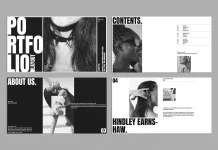
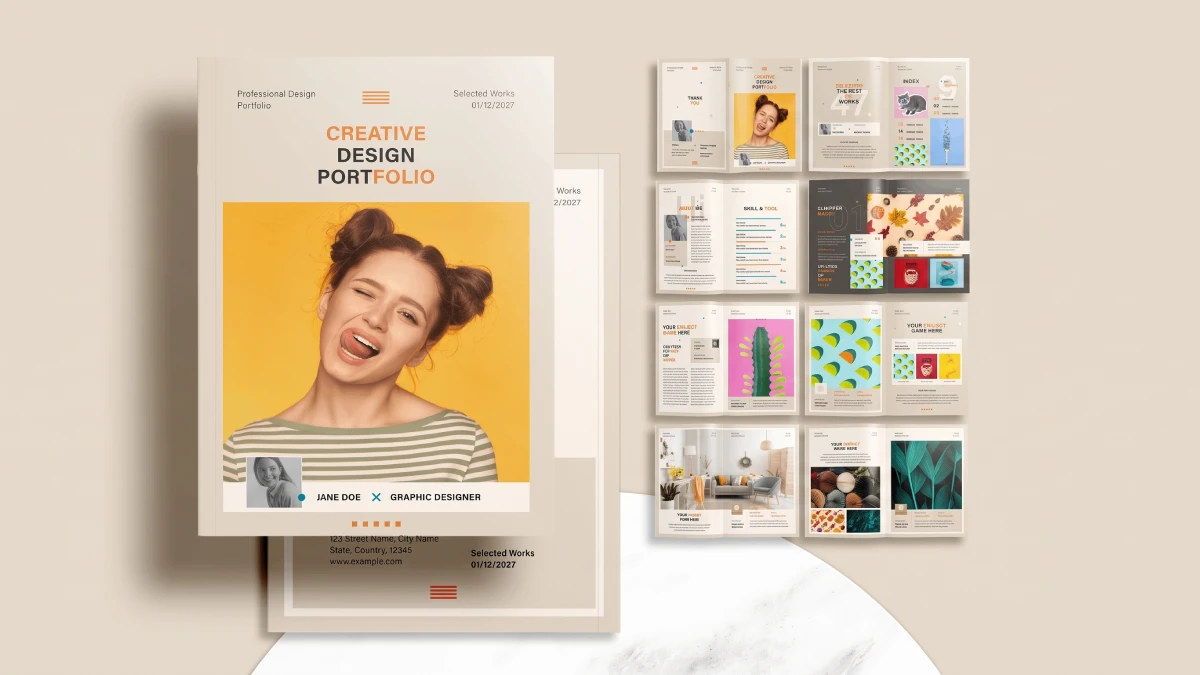
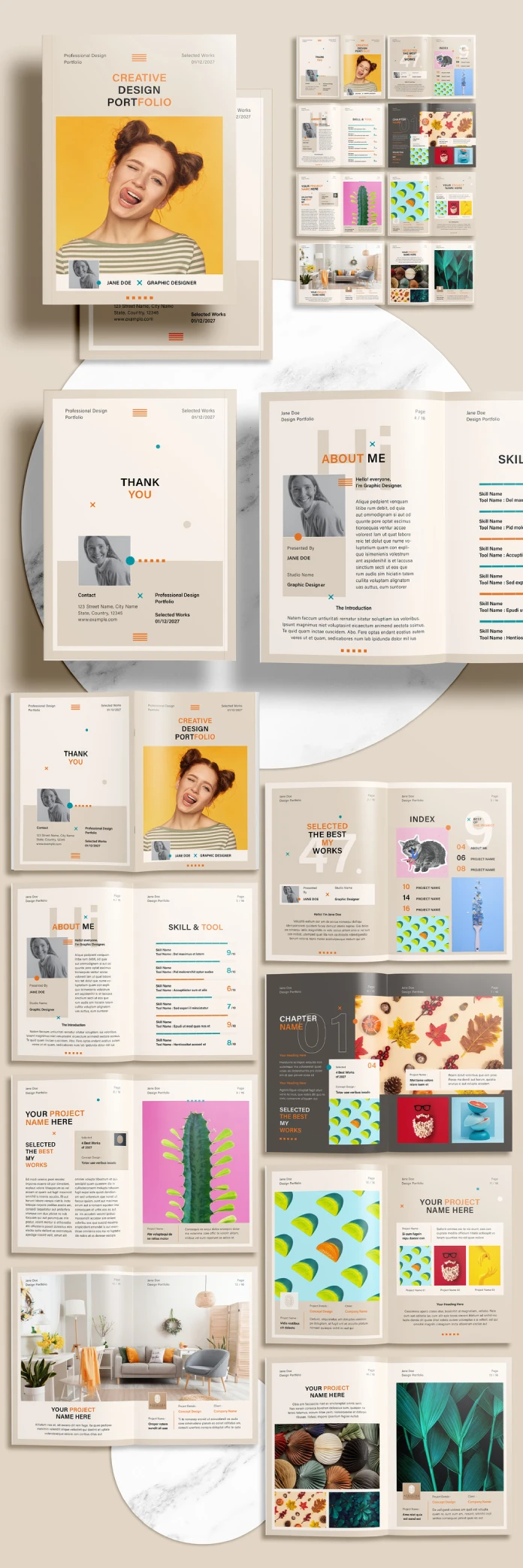
An InDesign portfolio brochure template only helps when its pages know how to pace themselves. Sirisako’s portfolio brochure layout on Adobe Stock tries to do exactly that. I opened it with one question. Does it help you show your work, or does it mostly show itself?
Here is my verdict up front. This InDesign portfolio brochure template suits designers who print. It also gives you sixteen CMYK pages in two paper sizes. Plus, the file stays small enough to email.
Please note that this template requires Adobe InDesign to be installed on your computer. Whether you use Mac or PC, the latest version is available on the Adobe Creative Cloud website—take a look here.
Is an InDesign Portfolio Brochure Template Worth Using for a Client Pitch?
Yes, if you hand the brochure over in person. A printed portfolio still beats a PDF link in a first meeting. For example, a client can hold it and flip it. Then it stays on a desk. Meanwhile, a link sits in an inbox with forty others.
No, if your work lives on screen only. Motion and UI designers should think twice. A static brochure flattens interaction work into screenshots. Instead, a website handles that better.

So here is my thesis. An InDesign portfolio brochure template earns its place when it removes layout decisions you would otherwise make badly under deadline. Yet it loses its value when it forces new decisions on you. Sirisako’s template aims for the right side of that line. One condition applies, and I cover it below.
What Does This InDesign Portfolio Brochure Template Include?
Start with the facts, because marketplace listings bury them. This InDesign portfolio brochure template arrives as one INDT file at 7.17 MB. It also holds 16 predesigned, customizable pages. It works with Adobe InDesign. The color mode is CMYK, and the license type is Plus.
File Format, Size, and Color Mode
INDT is InDesign’s template format. Double-clicking it opens an untitled copy by default. So your master file stays clean. That habit saves you from the classic mistake of saving over the original.
At 7.17 MB, this InDesign portfolio brochure template is light. Still, that tells you something. The download carries layout structure, not photography. The listing says so directly, because the preview photos are for display only.
CMYK matters here. First, your colors start in the ink model your printer uses. Second, RGB files often print duller than they look on screen. Because of this, starting in CMYK avoids that surprise.
Page Sizes: US Letter and A4
The listing names two formats. US Letter measures 8.5 by 11 inches. A4 measures 210 by 297 millimeters. For example, studios in the United States print Letter. Yet clients in Europe expect A4. An InDesign portfolio brochure template that covers both sizes saves you a rebuild when a pitch crosses the Atlantic.
What the Plus License Means
The listing marks the license type as Plus. Read Adobe’s license terms before you use the InDesign portfolio brochure template on a paid client project. Terms change, so I will not guess at them here.
What Is Spread Rhythm in a Portfolio Brochure?
Every good brochure has a pulse. I call it Spread Rhythm. Spread Rhythm is the planned alternation of loud spreads and quiet spreads across a document. A loud spread carries a hero image. A quiet spread carries text and white space.
Rhythm matters because sixteen loud pages numb the reader. Likewise, sixteen quiet pages bore them. A weak InDesign portfolio brochure template repeats one layout fourteen times. Instead, strong templates vary the density on purpose.
An InDesign portfolio brochure template with 16 pages leaves you little room to vary. So check the page thumbnails in the Pages panel first. Count how many spreads look the same. Two or three repeats are fine, but seven is a warning.
The Multiple-of-Four Rule
Here is my second term. The Multiple-of-Four Rule says a saddle-stitched brochure must run in multiples of four pages. First, printers fold sheets and staple the spine. Then each sheet adds four pages.
Sixteen pages equals four sheets. That count makes the InDesign portfolio brochure template friendly to saddle-stitch printing. Add one project, and you may jump to twenty pages. Plan your case studies around that limit before you open InDesign.
The cover and back cover stand alone. Then fourteen inside pages remain. That makes seven inside spreads, assuming the file uses facing pages. Seven spreads is a tight budget. Four case studies at one spread each leave three spreads for everything else.
How Do You Test an InDesign Portfolio Brochure Template Before a Deadline?
I judge every InDesign portfolio brochure template with one idea. Slot Discipline measures how gracefully a template’s image frames and text boxes handle content that does not match the preview. Previews always look perfect, since the preview photos fit perfectly. Yet your real work will not.
So I run four passes. Each pass takes minutes, and each one exposes a different weakness.
- Wrong ratio. Drop a tall portrait photo into a wide frame. Check the frame fitting options. Decide whether the crop looks deliberate.
- Long text. Paste a 200-word project description into a caption box. Watch for overset text. See whether the layout bends or breaks.
- Color swap. Change one swatch in the Swatches panel. Notice whether every related element updates.
- Print export. Export a PDF with your printer’s preset. Confirm the bleed and the color values.
Then add up the time. I call that total the Swap Cost. Swap Cost is the number of minutes needed to replace one placeholder spread with real project work. A low Swap Cost is the best feature a template can have.
Run these four passes on this InDesign portfolio brochure template before you commit a weekend to it. The passes cost little. Yet a bad template costs far more.
Why the Missing Photos Decide Everything
The listing states that the preview photos are for display only. So the download leaves them out. I like that honesty. Plenty of template previews oversell with photography you will never own.
Still, the omission has a consequence. Instead, your own photography becomes the visible variable. A template cannot rescue flat, grey project shots. Instead, it can only frame good ones. I think that makes this InDesign portfolio brochure template a better test of your portfolio than of itself.
So prepare images first. A full-bleed spread on US Letter measures 17 by 11 inches. If your printer asks for 0.125 inches of bleed, the target becomes 17.25 by 11.25 inches. At 300 ppi, that means 5,175 by 3,375 pixels.
On A4, a 420 by 297 millimeter spread with 3 millimeters of bleed measures 426 by 303 millimeters. At 300 ppi, you need roughly 5,031 by 3,579 pixels. Shoot or export to those numbers and the layout rewards you.
Here is a take you may dislike. Sixteen pages is the right length for a designer’s portfolio brochure. Besides, anything longer is vanity. Most portfolios I review lose me after the sixth project. The format forces the edit you resisted.
Who Should Use This InDesign Portfolio Brochure Template?
I would say that freelance designers get the most from this Adobe InDesign template. A freelancer needs a print leave-behind faster than a custom layout allows. So a portfolio brochure template for designers removes the blank-page stage. Small studios benefit the same way when a pitch deadline lands.
Design students also benefit from an InDesign portfolio brochure template. A print portfolio brochure in InDesign signals software skill, and it gives a reviewer something physical. Replace the placeholders with your best three projects first. Then build outward.
Who Should Skip It?
You can add as many pages as you want, but skip this template if you need more than sixteen pages or want photography included. Skip it too if you do not own Adobe InDesign, since INDT files open there. Interactive work also belongs elsewhere.
InDesign Portfolio Brochure Template Specs at a Glance
This table sums up all the listing details for quick reference. Every value comes from the Adobe Stock listing.
| Attribute | Detail |
|---|---|
| Template type | InDesign portfolio brochure template |
| Contributor | Sirisako |
| Marketplace | Adobe Stock |
| File type | INDT |
| File size | 7.17 MB |
| Software | Adobe InDesign |
| Color mode | CMYK |
| Pages | 16 predesigned, customizable pages |
| Page sizes | US Letter and A4 |
| Preview photos | Display only, not included in the download |
| License type | Plus |
| Best for | Freelance designers, small studios, design students |
| Skip if | You need more than 16 pages or included photography |
Where Will InDesign Portfolio Brochure Templates Go by 2028?
I make two predictions. First, every InDesign portfolio brochure template listing will publish page-level detail. Then buyers will see bleed settings, paragraph styles, and font requirements before they download. Meanwhile, marketplaces already field those questions.
Second, generative tools will fill placeholder frames automatically. So that makes Slot Discipline the main quality filter. By 2028, I expect the best listings to state a Swap Cost in minutes.
Frequently Asked Questions
What is an InDesign portfolio brochure template?
It is a prebuilt InDesign file that holds page structure, placeholders, and styles for a designer’s print portfolio. Then you replace the placeholders with your own work.
How many pages does this InDesign template have?
This file has 16 predesigned, customizable pages.
Which page sizes does this layout support?
The listing names US Letter and A4.
Do the preview photos come with this InDesign portfolio brochure template?
No. The preview photos are for display only, and the downloaded file leaves them out.
What file type and size is it?
This InDesign portfolio brochure template is an INDT file that weighs 7.17 MB.
Do I need Adobe InDesign to use it?
Yes. The listing says to use the template with Adobe InDesign.
Is this file set up for print?
It uses the CMYK color mode, which matches commercial print workflows. Confirm bleed and color settings with your printer before you export.
Where can I download this InDesign template?
You can find it on the Adobe Stock listing.
How large should images be for this InDesign portfolio brochure template?
On US Letter, export 5,175 by 3,375 pixels at 300 ppi. On A4, export about 5,031 by 3,579 pixels.
Check out WE AND THE COLOR’s Templates category for more, or take a look at our selection of the 86 best InDesign templates for 2027. Our detailed reviews will help you find exactly what you are looking for.
Subscribe to our newsletter!