
This post contains affiliate links. We may earn a commission if you click on them and make a purchase. It’s at no extra cost to you and helps us run this site. Thanks for your support!
Typography design rarely stops people mid-scroll. This one does. The water droplets text effect mockup by Grkic Creative is one of those rare Photoshop templates that genuinely earns its place in a serious designer’s toolkit. It looks like a photograph. It feels tactile. And you can customize it with your own text in under a minute.
That combination — studio-quality output with near-zero effort — is exactly why this template is circulating across design communities right now. Moreover, it speaks to a larger shift happening in visual communication: designers are moving away from flat, two-dimensional type treatments and gravitating toward texture, physicality, and surface realism. The water droplets text effect mockup sits squarely at the center of that movement.
So let’s talk about what makes this template exceptional, how it works, and why it belongs in your creative workflow — especially if you work in branding, advertising, editorial, or social media design.
Please note that these templates require Adobe Photoshop. The latest version can be downloaded from the Adobe Creative Cloud website; visit this link.
What Exactly Is a Water Droplets Text Effect Mockup — and Why Does It Work So Well?
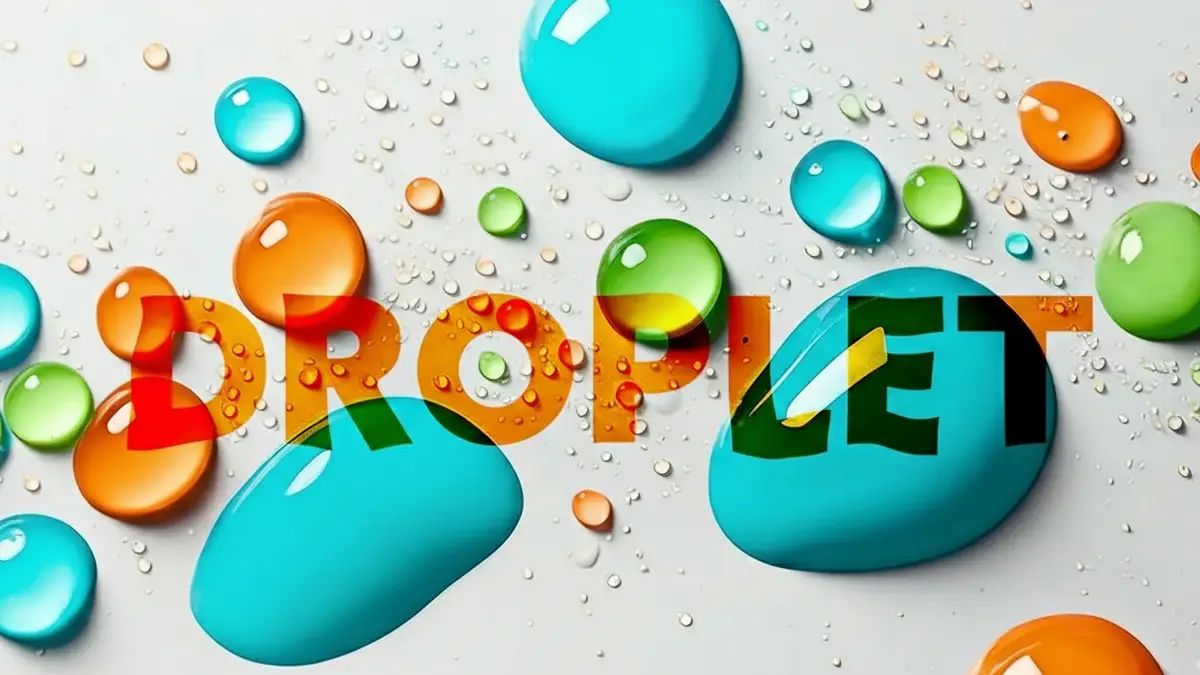
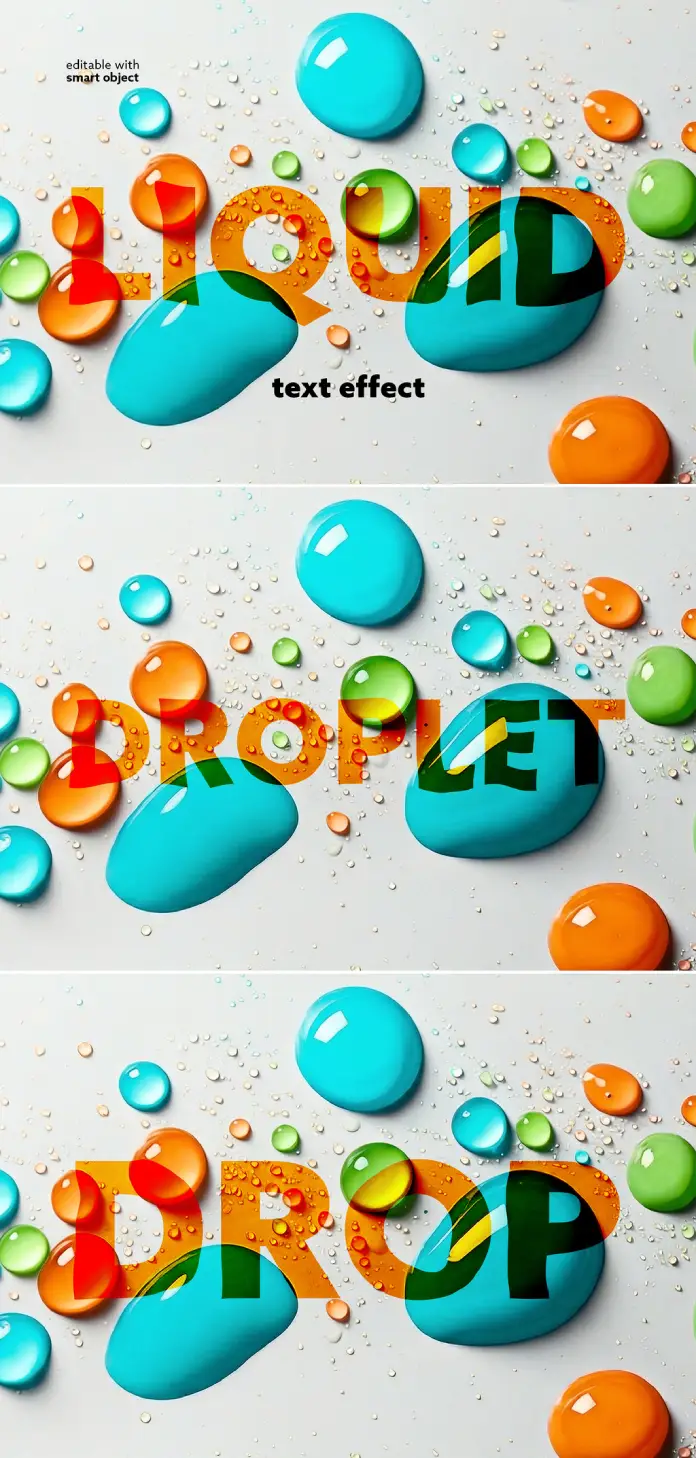
At its core, a water droplets text effect mockup is a layered Photoshop file that simulates the appearance of colorful liquid droplets scattered across typographic letterforms. However, what separates this one from countless similar assets is its photographic foundation. Grkic Creative built this template using real-world lighting logic, surface tension geometry, and high-resolution rendering — not digital painting or AI generation.

The result reads as genuinely physical. Each droplet carries its own specular highlight, shadow, and refraction pattern. Furthermore, the droplets interact with the text layer in a way that feels spatially coherent — some sit on top of letterforms, others seem to pool between them, and the smallest micro-droplets scatter across the negative space with convincing randomness.
The Surface Tension Illusion Principle
I want to introduce a term here that I think captures what makes this template tick: the Surface Tension Illusion Principle. This is the design concept describing how a mockup achieves photorealism not through complex shading alone, but through the accurate simulation of how liquids physically interact with a flat surface. The curved meniscus of each droplet, the way light refracts through the colored liquid, the micro-shadows cast on the background — together, these create an illusion so convincing that the brain processes it as a real photograph rather than a manipulated file.
Most digital water effects fail here. They look glossy rather than wet. This template nails the Surface Tension Illusion Principle because it was clearly built from photographic reference rather than assembled from generic layer styles.
How the Smart Object System Makes This Template So Fast
The technical backbone of this water droplets text effect mockup is Adobe Photoshop’s smart object system. Grkic Creative built the entire template around an editable smart object layer, which means you never touch the actual droplet composition. Instead, you open the smart object, type your text, save, and the template automatically integrates your typography into the liquid scene.
This workflow — what I call a Non-Destructive Typography Insertion Pipeline — preserves all the original lighting, shadow, and refraction data while swapping in your custom content. There is no manual masking, no layer blending guesswork, and no risk of accidentally destroying the effect’s realism.
Resolution That Actually Supports Print
The template renders at 5000 x 3475 pixels. That resolution matters more than most designers stop to consider. At 300 DPI — the standard for professional print — this file comfortably covers an A2 poster, a double-page editorial spread, or a large-format retail banner. Additionally, it handles digital output with equal confidence, from full-screen website headers to high-resolution social media visuals without any upscaling artifacts.
Therefore, this is not a web-only asset. It bridges both output channels cleanly, which is increasingly rare among mockup templates at this price point on Adobe Stock.
Chromatic Droplet Layering: Understanding the Color System
One of the most visually striking qualities of this water droplets text effect mockup is its color palette. The template features a saturated, high-contrast mix of turquoise blue, orange-red, and lime green droplets against a pale neutral background. This isn’t arbitrary.
I use the term Chromatic Droplet Layering to describe how multiple distinct hues of liquid elements are compositionally distributed across a type treatment to create visual rhythm and hierarchy. In this mockup, the largest droplets anchor the composition — they draw the eye first. The medium droplets then guide the gaze across the letterforms. Finally, the micro-droplets fill the field with texture and energy.
This three-tier system creates what I call a Liquid Typography Stack — a depth hierarchy built entirely through droplet scale variation rather than traditional typographic weight or size contrast. The result is a scene that feels three-dimensional even when flattened to a 2D format.
Why the Color Choices Are Intentionally Broad
The vibrant palette isn’t branding-specific — and that’s strategic. Because the template uses bold, saturated primaries and secondaries, it functions as a starting point rather than a finished brand asset. Consequently, designers can adapt the underlying text color and typeface to match their specific project identity while the liquid elements retain their visual punch.
For brands that work in food, beverage, cosmetics, or lifestyle categories, this palette is almost immediately usable as-is. For more restrained brand identities, the smart object flexibility allows designers to introduce their own typographic system without rebuilding the droplet layer from scratch.
The Droplet-to-Letterform Ratio and Why Composition Matters
Here’s a question worth sitting with: why do some liquid text effects look cluttered while others look editorial? The answer usually comes down to what I call the Droplet-to-Letterform Ratio — the balance between how much of the composition the liquid elements occupy versus how much is given to legible typography and negative space.
Grkic Creative clearly understood this balance. The large droplets, while visually dominant, never fully obscure the text. The letterforms remain readable even where droplets overlap them. This is a harder compositional challenge than it appears. Too many large droplets and the text disappears. Too few and the liquid effect loses its spectacle.
The template achieves the right equilibrium by distributing the largest elements toward the top and edges of the composition — away from the optical center of the letterforms. Meanwhile, the mid-size droplets cluster around the character bodies, reinforcing rather than competing with the type. This is intentional design, not random placement.
Spectral Refraction Mapping in the Droplet Details
Look closely at each droplet in this water droplets text effect mockup. Notice that the colors visible through each droplet shift depending on what sits beneath it in the composition. A blue droplet sitting over orange text picks up warm undertones in its base. A green droplet over a dark letterform reads deeper and more saturated. This is Spectral Refraction Mapping — the simulation of how transparent liquid objects bend and alter the spectral properties of light passing through them.
This level of optical accuracy is what separates a professional-grade Photoshop text effect template from a generic stock mockup. It signals that the creator worked with real photographic material or built the lighting logic from physics-based principles rather than applying a blanket layer effect.
Who Should Use This Water Droplets Text Effect Mockup
The short answer: anyone who communicates through typography and wants their visuals to stop people from scrolling past. The more specific answer, though, depends on your industry and output channel.
Social media art directors will find immediate value here. The template’s vibrancy reads exceptionally well on Instagram, Pinterest, and Behance — environments where saturated, textural visuals consistently outperform flat design in engagement metrics. Moreover, the mockup’s square-adaptable composition works across both feed and story formats with minimal cropping adjustment.
Brand designers working in product categories — beverages, skincare, sports nutrition, cleaning products — can use this water droplets text effect mockup as a hero visual for packaging presentations, pitch decks, or concept exploration. The liquid physicality immediately communicates freshness, cleanliness, and sensory appeal without requiring any product photography.
Editorial and Print Applications
Beyond digital output, editorial designers working in print have a genuinely high-resolution asset to work with. At 5000 x 3475 px, this template supports large-format applications without compromise. Furthermore, the neutral background integrates cleanly into both white-page editorial layouts and full-bleed print treatments.
Motion designers should also take note. The smart object structure means the base file ports cleanly into Adobe After Effects via Dynamic Link, opening the door to animated liquid typography sequences — a growing format in digital advertising and brand video content.
Where to Find This Template and How Adobe Stock Fits In
This water droplets text effect mockup is available through Adobe Stock, contributed by Grkic Creative. Adobe Stock’s licensing model makes this straightforward for professional use — a single standard license covers most commercial applications, including web, social media, print, and advertising output up to specified distribution thresholds.
For designers already on Adobe Creative Cloud, Adobe Stock integration directly inside Photoshop means you can license, download, and open the template without leaving your workflow. Additionally, Creative Cloud subscribers with an Adobe Stock plan can access assets like this without separate transactions, which further reduces the friction between discovering a useful template and actually deploying it in a project.
It’s worth noting that Grkic Creative is an active Adobe Stock contributor with a portfolio focused on high-quality Photoshop effects templates. Their work consistently demonstrates a preference for photorealistic rendering and practical smart-object architecture — qualities that distinguish professional-grade mockup design from disposable stock content.
Realistic vs. Stylized: Why Photorealism Is Winning in 2025 Typography Design
The broader context here matters. Digital design has spent years oscillating between flat minimalism and maximalist complexity. Currently, the pendulum is swinging toward texture, physicality, and dimensional realism — particularly in typography. Brands want their text to feel touchable. They want visuals that carry sensory weight.
The water droplets text effect mockup genre sits perfectly within this trend. However, I’d argue this particular template transcends trend entirely. Liquid and water imagery carries universal psychological associations — freshness, clarity, purity, energy — that remain effective across categories and cultural contexts. Unlike purely stylistic trends, those associations have staying power.
Consequently, a high-quality water droplets text effect mockup is not a trend investment. It’s a durable creative tool that remains relevant as long as designers need to communicate those core sensory qualities through typography.
The Case for Investing in Premium Mockup Quality
Here’s my honest take: the gap between a mediocre liquid text effect and a genuinely excellent one is enormous in terms of how it reads in a client presentation or portfolio. Average mockups signal average production values. Premium templates like this one signal that a designer has an eye for quality and understands how photorealistic craft elevates a concept.
That perception matters in competitive creative markets. Therefore, spending the time to identify and use best-in-class resources — whether from Adobe Stock, Creative Market, or other professional platforms — is not a shortcut. It’s a legitimate quality investment.
Practical Tips for Getting the Best Results From This Template
Using this water droplets text effect mockup effectively goes beyond simply typing your text into the smart object. A few deliberate choices will significantly improve your output.
First, choose a bold, heavy typeface. Because the droplets partially obscure the letterforms, thin or light-weight type will lose legibility quickly. Display fonts with strong geometric or slab character shapes tend to read best at this scale. Second, keep your word count short. Single words or two-word phrases work best — this is a headline treatment, not a body copy solution. Third, consider the color of your text layer relative to the droplet palette. High contrast between text fill and droplet color amplifies the Chromatic Droplet Layering effect described earlier.
Additionally, if you’re preparing this for print, always verify color mode — convert to CMYK at the output stage if your printer requires it. The template’s vivid RGB palette may shift slightly in CMYK conversion, so preview early in the process rather than at the last minute.
Frequently Asked Questions (FAQ)
What software do I need to use this water droplets text effect mockup?
You need Adobe Photoshop to open and edit this template. The file uses smart object layers, which are a native Photoshop feature. Any recent version of Photoshop — including those available through Adobe Creative Cloud — fully supports smart object editing.
How do I add my own text to the water droplets text effect mockup?
Open the Photoshop file and locate the smart object layer in the Layers panel. Double-click the smart object thumbnail to open it in a separate tab. Type your text inside that document, then save and close it. Photoshop automatically re-renders the water droplets effect with your custom text applied.
What resolution does this template support?
Grkic Creative rendered this water droplets text effect mockup at 5000 x 3475 pixels. At 300 DPI, that resolution supports large-format print output, including A2 posters, editorial spreads, and retail banners. It also handles all digital output formats without upscaling.
Can I use this template for commercial projects?
Yes. Adobe Stock licenses cover commercial use under standard licensing terms. Always review the specific license terms at the point of download to confirm your intended usage — particularly for very large print runs or broadcast applications, which may require an extended license.
Is this template suitable for beginners in Photoshop?
Yes. Because the effect runs through a smart object, you don’t need advanced Photoshop knowledge to achieve professional results. If you know how to type text and save a file, you can use this template effectively.
What types of projects work best with a water droplets text effect mockup?
This template works exceptionally well for social media visuals, beverage and food brand typography, cosmetics and skincare presentations, editorial headlines, event posters, and advertising concepts. Its photorealistic quality and vibrant palette translate strongly across both digital screens and print media.
Can I change the colors of the droplets in this mockup?
The droplet layer itself is a pre-rendered photographic element — you can adjust its overall tone using Photoshop’s adjustment layers (Hue/Saturation, Color Balance, Gradient Map), but the individual droplet colors aren’t independently editable without advanced masking work. The text color inside the smart object, however, is fully customizable.
Where can I download this water droplets text effect mockup?
This template is available on Adobe Stock under the contributor name Grkic Creative. You can search directly for the template using keywords like “water droplets text effect Photoshop” or browse Grkic Creative’s contributor portfolio on the Adobe Stock platform.
Does this template work for both print and web output?
Yes. At 5000 x 3475 px, the file supports professional print output at standard resolutions and all common digital formats. For print, verify your color profile and convert to CMYK if your workflow requires it. For digital output, the file’s native RGB mode is production-ready without conversion.
How is this different from a generic water effect layer style?
Generic water layer styles apply mathematical shading formulas to text — they look artificial on close inspection. This water droplets text effect mockup uses a photographic composition built on real lighting physics and surface tension geometry, governed by the Surface Tension Illusion Principle. The result is a photorealistic scene rather than a stylized effect, and that distinction is immediately visible to the human eye.
Hungry for more? If so, feel free to browse WE AND THE COLOR’s Graphic Design and Templates categories.