
This post contains affiliate links. We may earn a commission if you click on them and make a purchase. It’s at no extra cost to you and helps us run this site. Thanks for your support!
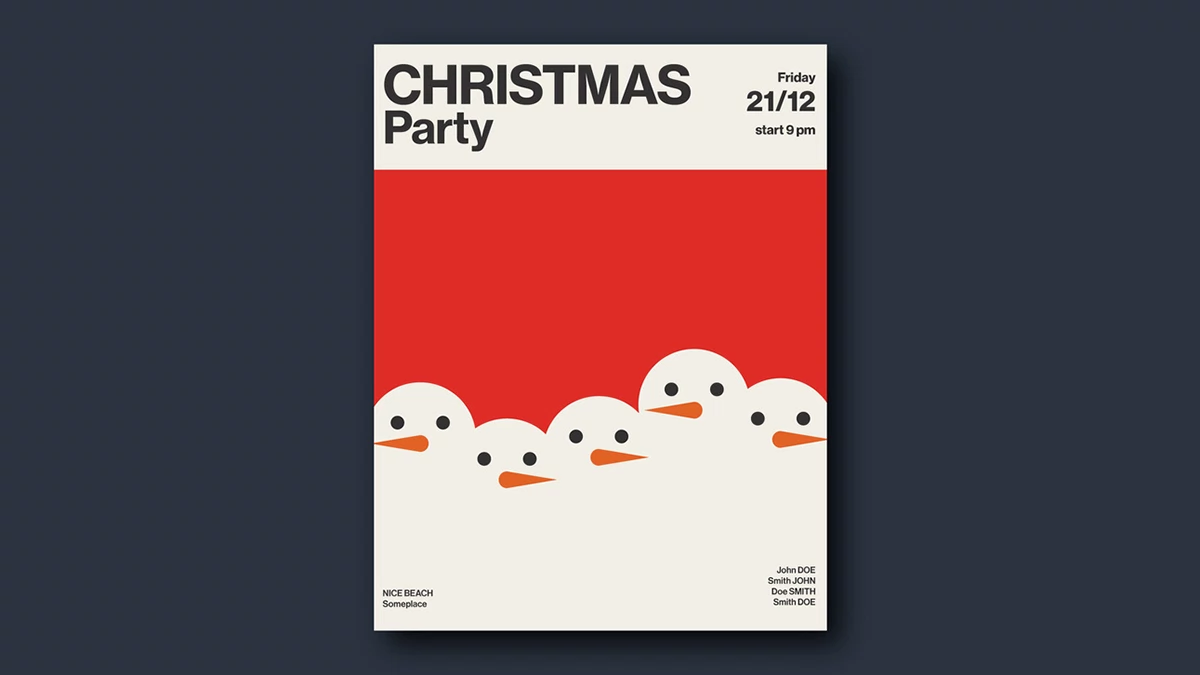
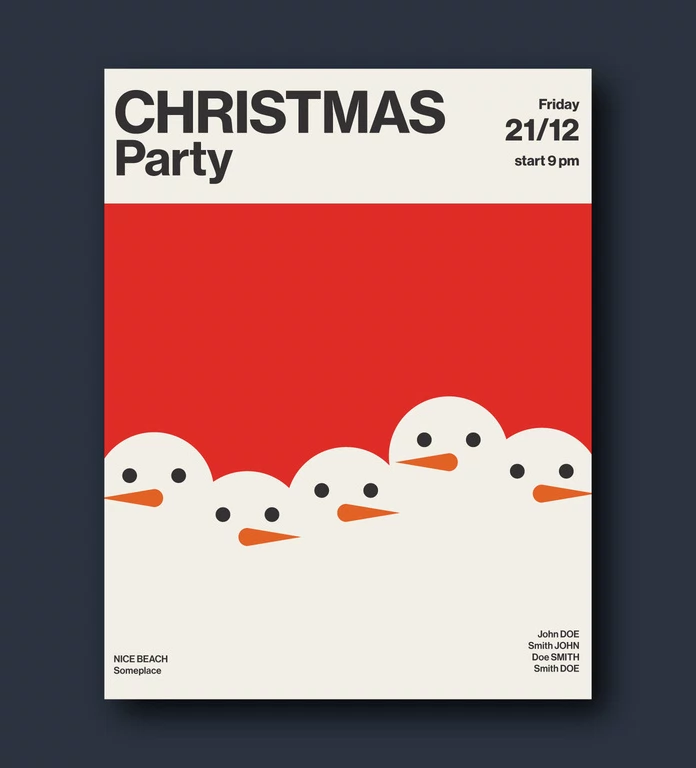
This Christmas party poster by Jozef Micic makes the best case for restraint I’ve seen in holiday design this year. It uses a single red block and five snowman heads. Nothing else. Most Christmas party poster templates shout, but this one whispers and still wins the room.
Here is what I think. A minimalist Christmas party poster is a one-sheet invitation that carries its mood through color and a repeated shape instead of decoration. Micic follows that definition to the letter. The result is a minimalist Christmas party invitation that reads from across a bar.
Please note that this vector template requires professional graphic design software like Adobe Illustrator to be installed on your computer. You can get the latest version from the Adobe Creative Cloud website. Just have a look here.
What Makes This Christmas Party Poster Different?
Look at the sheet for five seconds. You see red, cream, and a row of snowmen with orange noses. You don’t see a single snowflake, ribbon, or pine branch. That absence is the design.
Jozef Micic is a graphic designer and Adobe Stock contributor. He built the template as a vector file. Because every shape is a path, you can scale the poster to any size without losing a clean edge. A small card and a window poster use the same artwork.

The sheet comes in two standard sizes, US Letter and A4. Both open in Adobe Illustrator as an editable .AI file. The color mode is CMYK, so the file is ready for professional printing.
The Snowline Layout Explained
I call this composition the Snowline Layout. The illustration sits along the bottom edge, and its fill matches the paper. The snowmen have no bodies. The page itself is the snow.
That is a smart trick. It saves the designer from drawing torsos, scarves, and buttons. It also makes the poster feel larger than the sheet, because the snow seems to continue past the trim.
The Quiet Red Rule
Here is a second term worth borrowing. The Quiet Red Rule says that a large flat field of one saturated color needs a single small, repeated motif to carry the story. Micic’s red block fills roughly the middle third of the poster. Without the snowmen, it would look like a paint swatch.
The motif does the emotional work. Five round heads, two black dots each, one orange wedge each. That is all the poster needs to say “Christmas.”
Five Snowmen, Five Moods
The heads are not identical. Their sizes differ slightly, and the noses point in different directions. Two face left, three face right. The crowd feels like guests who just noticed the same stranger walking in.
I love this detail. It adds personality with zero extra shapes. Few holiday templates show that much discipline.
Would you have the nerve to leave the other two-thirds of the page this quiet?
Typography on a Christmas Party Poster This Spare
The type is a heavy grotesque sans serif in the spirit of the Swiss posters from the 1950s and 60s. “CHRISTMAS” sits in tight capitals at the top left. “Party” follows in a smaller size and sentence case. The pairing looks casual, yet it holds together.
The date block sits on the right. “Friday” and “start 9 pm” stay small, while “21/12” gets the larger size. Your eye finds the date first, then the time. So the poster answers “when” before it answers anything else, which is exactly what an invitation should do.
Venue and names sit in the bottom corners in a small, plain weight. They stay out of the way of the snowmen. That is a sensible call, although I would make them one step larger for a poster that hangs on a wall.
How to Customize This Christmas Party Poster Template
Open the .AI file in Illustrator, and every element is ready for editing. You can swap text, recolor shapes, and resize the artboard. A few moves matter more than the rest.
Fix the Date Format First
The sample reads 21/12, which is day first. American guests expect the month first, so they would read it as 12/21. Change it before anything else. A wrong date format costs you guests faster than a weak color choice does.
Change the Red Block
The red is bold, but it is not the only option. A deep forest green or a midnight blue would keep the Snowline Layout intact and suit a quieter office party. I would test the blue first. White heads on dark blue read as snowfall at night.
Add the Details a Guest Needs
The sample text says “NICE BEACH Someplace” in the lower left. The four names in the lower right are placeholders too. Replace them with your venue, address, and host or DJ names.
The red field also has plenty of empty room. I’d drop a short RSVP line there in cream type. It would stay quiet and still be easy to find.
Prepare the File for Print
The snowmen run off both side edges, and the red block runs edge to edge. That means bleed matters. Check that the artwork extends 0.125 in (3 mm) beyond the trim line. If it doesn’t, extend it yourself before you send the file to a printer.
The CMYK mode helps here. Saturated reds often look duller after an RGB file converts to CMYK, because many printers cannot reproduce the original screen color. This file starts in CMYK, so you see the printable red from the first minute. I’d also ask the printer about a cream stock, since the cream fill might then drop out entirely and save ink.
Where This Christmas Party Poster Template Falls Short
It is a poster, not a system. You get one layout and no matching story templates, no ticket, and no menu. If you want a full set for an event, you will build the rest yourself.
The template also assumes a small amount of text. Long guest lists and sponsor logos will crowd the corners fast. Treat that as a design limit, not a flaw. Minimalism only works when you let it say less.
Christmas Party Poster Template at a Glance
| Attribute | Detail |
|---|---|
| Designer | Jozef Micic, graphic designer and Adobe Stock contributor |
| Platform | Adobe Stock |
| File format | Adobe Illustrator (.AI), vector |
| Sizes | US Letter and A4 |
| Color mode | CMYK, suited for professional printing |
| Motif | Five minimalist snowman heads in cream, with dark eyes and orange noses |
| Composition | Snowline Layout with a Quiet Red Rule color field |
| Best for | Office parties, club nights, and holiday events with a small amount of text |
| Main weakness | Single layout, limited space for long details |
Who Should Use This Christmas Party Poster?
Small studios, bars, and agencies should. They need a fast, printable holiday poster that looks designed. It suits a team that owns Illustrator and has an afternoon to spare.
Event planners with strict brand rules may struggle. The red and cream palette is loud and specific. You can recolor it, but then you carry the design work yourself.
What Comes Next for Minimalist Holiday Posters
I expect more invitation design to follow this path. Guests see hundreds of glittery holiday graphics every December. A poster with one red block and five circles stands out because it asks for so little attention.
My prediction is simple. Within two seasons, single-motif posters will outnumber ornament-heavy ones in the stock libraries. Micic is early to a trend that will not stay small.
Common Questions About the File:
Who designed this Christmas party poster template?
Graphic designer and Adobe Stock contributor Jozef Micic designed it.
What file format does the template use?
It is an Adobe Illustrator file with the .AI extension. You download it from Adobe Stock.
Which sizes does it include?
It comes in US Letter and A4. Because the artwork is vector, you can scale it to any other size.
Is the template ready for professional printing?
Yes. The file uses the CMYK color mode. Still, confirm the bleed with your printer before you order a run.
Can I edit the snowmen?
Yes. The snowmen are editable vector shapes. You can recolor them, move them, or change how many you use.
Can I use it for a digital invitation?
Yes, you can export the artwork as a PNG or PDF. Check the Adobe Stock license terms first, since they govern how you may share the finished file.
Which date format should I use in the United States?
Use the month first, so 12/21 instead of 21/12. The sample file shows the day-first version, and Friday only matches one of them.
Browse WE AND THE COLOR’s Templates category for more.
Subscribe to our newsletter!