This post contains affiliate links. We may earn a commission if you click on them and make a purchase. It’s at no extra cost to you and helps us run this site. Thanks for your support!
An InDesign pitch deck can look calm and still carry hard facts. E-Type’s black-and-white template shows it on all 12 predesigned, fully customizable pages. I opened the preview and wanted to start editing at once. That reaction is rare. Many templates make you fight the layout first. This InDesign pitch deck gives you a clear grid and large type, so you can start with your story.
I’ve seen so many badly AI-generated decks lately with soft gradients, and many of them look alike. So, a plain black-and-white InDesign pitch deck stands out because it looks like a person made choices. That is my observation, not a survey result.
Please note that this template requires Adobe InDesign to be installed on your computer. Whether you use Mac or PC, the latest version is available on the Adobe Creative Cloud website—take a look here.
Why Does a Black-and-White InDesign Pitch Deck Work So Well?
Restriction focuses a designer. Remove color, and the eye reads size and contrast first. Therefore, the numbers on your slides do the talking.
E-Type uses that to full effect. Black circles and black bars carry the weight on the chart pages. Because every slide in this InDesign pitch deck shares the same header strip and the same bottom-left title position, a reader who has seen three pages already knows where to look on the fourth, and that predictability frees the eye to judge the data instead of hunting for the headline.

What You Get in the InDesign Pitch Deck Template
Adobe Stock contributor E-Type made this minimalist template for InDesign. The pages measure 1080 x 1920 px, which suits screen presentation. You get 12 predesigned, fully customizable pages. Add, remove, or duplicate as many as you like. The layout stays modern and well organized, and every chart page comes ready for your data.
This InDesign pitch deck template also saves you the dullest job in presentation design. You do not build charts from scratch. You replace the sample numbers and adjust the labels.
A Tour of the 12 Slides
Cover and agenda
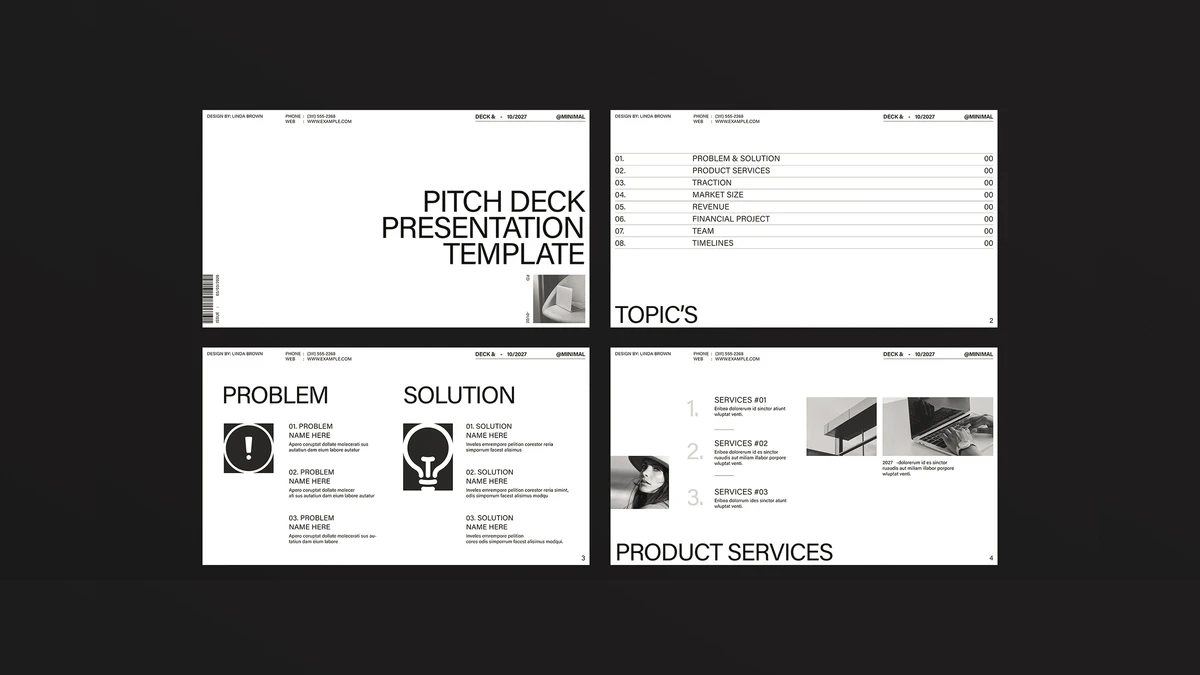
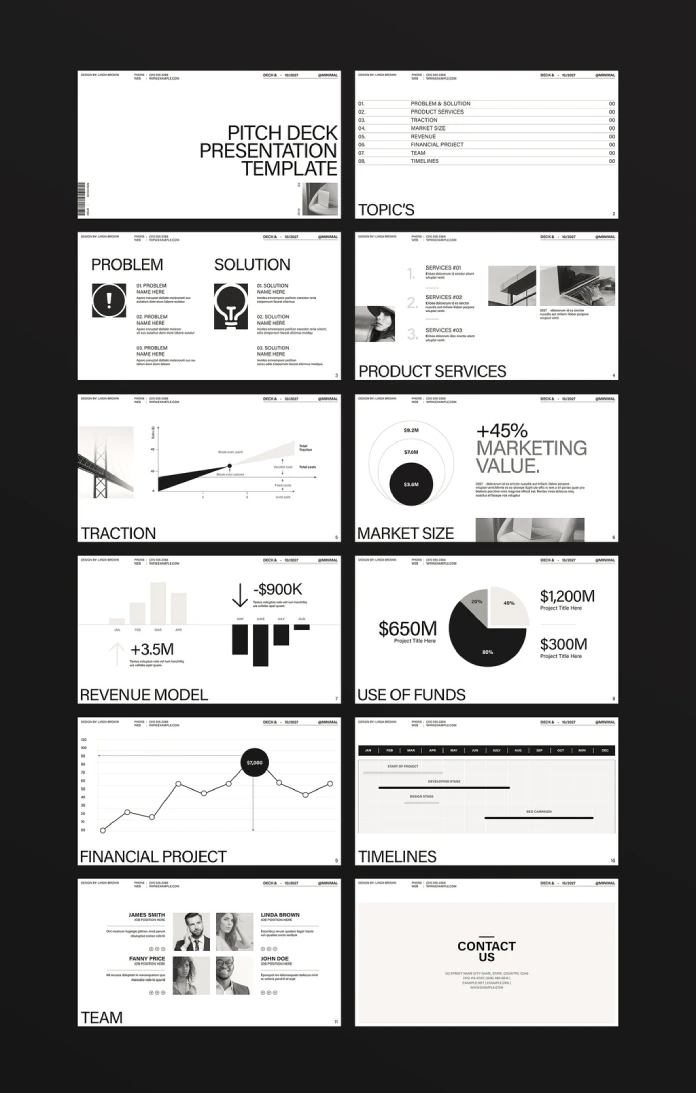
The cover sets the title in huge uppercase type on the right. A small grayscale photo sits in the bottom corner. Then the agenda follows with eight numbered lines and thin rules between them. It reads like a magazine contents page. I like that choice, because it shows investors that you edit your thoughts. Each slide in this InDesign pitch deck keeps the same discipline.
Problem and solution
Page three splits into two columns. A black exclamation mark marks the problem, and a black lightbulb marks the solution. Each side holds three numbered blocks. The symmetry makes your argument easy to follow. Swap the icons for your own pictograms, but keep the same weight. Consistent icons keep a monochrome InDesign pitch deck tidy.
Traction, market size, and revenue
The traction page draws a break-even chart with labeled fixed and variable costs. A bridge photo sits beside it. Replace the sample lines with your own growth curve, and the page becomes your proof.
Market size comes next. Three nested circles read $9.2M, $7.0M, and $3.6M, and a large +45% headline sits beside them. The solid black circle shows the slice you can win. It is a clean visual, and it explains itself in seconds.
The revenue model page shows pale bars above the axis for January through April. Black bars hang below it for May through August. Two callouts read +3.5M and -$900K. I enjoy how honestly it shows a dip. Few InDesign pitch deck layouts treat a negative number with such respect.
Use of funds and financial projection
The use-of-funds slide pairs a pie chart with three large amounts. All figures are placeholders, so type in your own and check that the slices add up to 100%. The sample labels read 20%, 40%, and 80%, which makes a handy reminder to do that.
The financial projection page draws one line chart with a single $7,000 callout on a black circle. Use that callout for the one month you want investors to remember. When you replace the sample figures with your own revenue and your funding ask, the black bars and thin rules start to look like they were drawn for your company, which is exactly the feeling a founder wants an investor to have.
Timelines, team, and contact
The timeline page uses a January-to-December Gantt grid with a black month bar. Four sample tasks run across it, including a developing stage and an SEO campaign. The team page shows four portraits with names and role lines. The contact page closes on a warm off-white panel with a centered block of details.
Move the team page forward if you pitch at pre-seed. Early investors back people first. In an InDesign pitch deck, that takes one drag in the Pages panel.
How to Customize Your InDesign Pitch Deck Step by Step
Follow this order for clean results.
- Write your one-sentence claim before you open your InDesign pitch deck file.
- Replace every placeholder number, then the copy.
- Edit the header strip on the master pages, so all 12 pages update together.
- Set headlines with paragraph styles, so sizes stay consistent after you duplicate pages.
- Check the fonts in the Adobe Stock file notes and install them before you start.
- Run File > Package before you send the files to anyone.
- Export your InDesign pitch deck as PDF (Interactive) for screen delivery.
Then delete what you do not need. A tight ten-slide deck with real data beats twelve slides of filler. Short decks also get read.
Who Should Try This InDesign Pitch Deck Template?
Founders who pitch angels will get the most from it. Early numbers are small, and this layout gives small numbers room. Consultants and design students will find plenty to use as well, from client proposals to grid and hierarchy practice.
If your product depends on color, add one accent shade of your own. The layout has room for it, and a single hue against black and white looks deliberate.
Which slide would you edit first? Open the file and rework one slide of your InDesign pitch deck today. Try it.
Where the Minimalist InDesign Pitch Deck Goes Next
I expect two shifts by 2028. These are my predictions, not reported facts.
First, AI assistants will read decks before partners do. Many people already paste PDFs into summarizers. A slide with live text and one clear claim survives that process. A flattened image does not. So the minimalist InDesign pitch deck, built from live text, will gain ground.
Second, monochrome decks will spread. Gradient decks look alike, and readers will notice. A black-and-white InDesign pitch deck signals a human decision. That signal will carry more weight each year.
InDesign Pitch Deck Template at a Glance
This first table sums up the specs of the template.
| Attribute | Detail |
|---|---|
| Creator | E-Type (Adobe Stock contributor) |
| Software | Adobe InDesign |
| Format | 1080 x 1920 px, for screen presentation |
| Pages | 12, fully customizable and duplicable |
| Palette | Black, white, and gray with one off-white panel |
| Best for | Startup pitches, investor updates, consulting proposals |
The second table walks through every page.
| Page | Slide | What it shows | Quick tip |
|---|---|---|---|
| 1 | Cover | Large uppercase title, small photo | Add a one-line claim |
| 2 | Topics | Eight-item agenda with page numbers | Trim it for a faster read |
| 3 | Problem and Solution | Two columns with black icons | Swap in your own icons |
| 4 | Product Services | Three numbered services, two photos | Drop in real product shots |
| 5 | Traction | Break-even chart | Use |
InDesign Pitch Deck Q&A
What is an InDesign pitch deck?
An InDesign pitch deck is a presentation built in Adobe InDesign instead of PowerPoint or Keynote. Designers pick it for exact typography and clean PDF export.
How many pages does this InDesign pitch deck template include?
It includes 12 predesigned pages. You can add, remove, or duplicate pages freely.
What size is the template?
E-Type made it at 1080 x 1920 px, which suits screen presentation.
Is a black-and-white pitch deck good for investors?
Yes. A grayscale layout puts the numbers first, which suits strong data.
Which export format works best for an InDesign pitch deck?
Adobe PDF (Interactive) works best for screens. It keeps hyperlinks and page transitions.
Can I add color to the template?
Yes. Every page is fully customizable, and one accent shade works well against the black-and-white base.
Does the template include real data?
No. Every figure is placeholder text. The sample use-of-funds pie chart, for example, labels its slices 20%, 40%, and 80%.
Browse WE AND THE COLOR’s Templates category for more. In addition, feel free to have a look at our selection of the 86 best InDesign templates for different creative needs.
Subscribe to our newsletter!