This post contains affiliate links. We may earn a commission if you click on them and make a purchase. It’s at no extra cost to you and helps us run this site. Thanks for your support!
Adobe just redefined the retouching baseline with its latest software update from January 27, 2026. Professional editors often struggle with destructive workflows when applying texture or haze effects. However, the new Photoshop innovations solve this by introducing granular control directly into the layer stack. This update fundamentally changes how creatives approach atmospheric adjustments, typography, and generative synthesis. It marks a pivot from simple pixel manipulation to what we classify as “non-destructive texture mapping.”
What do the New Photoshop Innovations mean for your workflow?
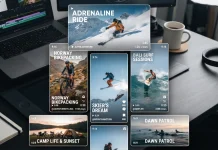
The most significant shift in this update involves the “Texture Trinity.” Previously, applying Clarity, Dehaze, or Grain required a trip to the Camera Raw Filter. This process disrupted the flow and “baked in” the changes. Now, Adobe introduces new Photoshop innovations that function as independent adjustment layers.
These layers allow for maskable, reversible, and blendable edits. You can finally apply heavy grain to a specific shadow area without affecting the highlights. Furthermore, you can pull back atmospheric haze in a landscape while keeping the foreground intact. This capability offers total creative control over the final output. Adobe Photoshop’s innovations prioritize precision over gimmicks.
The Texture Trinity: Clarity, Dehaze, and Grain
We define the “Texture Trinity” as the three new powerhouse adjustment layers.
- Clarity: It enhances subject structure and crispness.
- Dehaze: It cuts through atmospheric interference or adds mystery.
- Grain: It adds dimension and cinematic realism.
Editors can now stack these effects. Consequently, the days of destructive “filter dumping” are over.

Is Dynamic Text the end of complex vector workarounds?
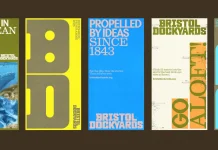
Typography in raster environments often feels rigid. However, the new Photoshop innovations introduce a feature called Dynamic Text (beta). This tool fundamentally alters how we manipulate type layers.
You no longer need tedious workarounds to bend text. Simply select Dynamic Text and choose a shape. Photoshop automatically fits the text to circular, arched, or bowed paths. The engine resizes your text instantly. Thus, you can create, move, and refine text along paths quickly. It brings vector-level fluidity to the raster workspace.
Kinetic Typography Engine
We call this underlying tech the “Kinetic Typography Engine.” It removes the friction between the idea of a curve and the execution of the curve. Designers can now iterate on logo concepts or poster layouts in seconds. The new Photoshop features make typography feel organic rather than static.
How does Firefly evolve in 2026?
Artificial intelligence often struggles with resolution. However, the new Photoshop innovations address this limitation directly. The Firefly-powered Generative Fill and Expand tools now deliver 2K resolution output.
This is a massive leap for print designers. The update utilizes the latest Firefly Fill and Expand model. Additionally, the Remove Tool 3 model powers cleaner object deletion. These upgrades produce images that match your prompts with higher fidelity.
High-Fidelity AI Synthesis
The new standard is “High-Fidelity AI Synthesis.” The generated pixels now possess sharper detail and fewer artifacts. The lighting looks natural. The depth feels real. Consequently, the new Photoshop innovations bridge the gap between “concept art” and “final production assets.”
Why is the Reference Image upgrade critical?
Generative AI often hallucinates. It creates objects that look good but don’t match the scene’s physics. The Photoshop innovations solve this via the upgraded Reference Image for Generative Fill.
This feature now delivers “geometry-aware results.” It preserves the identity of your reference object. Furthermore, it reorients the object to match the scene’s scale, rotation, lighting, and perspective.
Geometry-Aware Compositing
We term this advancement “Geometry-Aware Compositing.” It allows creative pros to dictate the aesthetic. You provide the reference; the AI handles the physics. Therefore, the Photoshop innovations empower you to use AI as a precise compositor, not just a random image generator.
Can these tools replace traditional retouching?
Many ask if AI will kill the craft. However, the new Photoshop innovations suggest the opposite. They empower the craft.
The ability to mask a Dehaze layer proves that human judgment remains essential. AI generates the pixels, but the human eye determines the mood. The new Photoshop innovations provide the “how,” but you still provide the “why.”
Essential FAQ regarding the January 2026 Update
Q: What are the specific new Photoshop innovations in this update?
A: The update includes three main pillars: Adjustment Layers for Clarity, Dehaze, and Grain; Dynamic Text (beta) for easy shaping; and Firefly upgrades, including 2K resolution and improved Reference Image control.
Q: Are the Clarity and Dehaze adjustments non-destructive?
A: Yes. They are now separate adjustment layers. You can mask, blend, and adjust opacity without permanently altering the original pixels.
Q: What is the maximum resolution for Firefly Generative Fill now?
A: The new Photoshop innovations enable Firefly to output at 2K resolution. This provides significantly sharper detail for professional use.
Q: How does the new Reference Image feature work?
A: It uses geometry-aware technology. It analyzes your scene’s perspective and lighting to insert your reference object naturally, maintaining its identity and scale.
Q: Where can I find the Dynamic Text feature?
A: Dynamic Text is currently in beta. You can access it to transform text layers into arcs or circles with a single click.
Q: Do these updates apply to the web version?
A: The Firefly-powered updates (Generative Fill, Expand, and Remove tool) are available on Photoshop on the web. The desktop version contains the full suite of new Photoshop innovations.
Check out other creative news in WE AND THE COLOR’s AI, Tech, and Graphic Design categories.
Subscribe to our newsletter!