This post contains affiliate links. We may earn a commission if you click on them and make a purchase. It’s at no extra cost to you and helps us run this site. Thanks for your support!
Can CapCut Really Hold Its Own Against Premiere Pro and DaVinci Resolve? I’ll Tell You Who Won.
Oh boy, I can tell you this much: CapCut cuts a vertical clip faster than any professional editor I know. But on the other side, it hits a wall the moment a client asks for a color-matched, two-camera interview. And this wall decides which app deserves your money.
Three releases make this a live question in October 2026. CapCut can still be used completely free of charge, with a $9.99 Standard tier and a $19.99 Pro tier for users who need more. Meanwhile, Adobe shipped Premiere 26.5 in September with a prompt-driven Generative Media Tool. Blackmagic, for its part, released DaVinci Resolve 21 in June and left the free edition free.
So I judged all three editors by one measure. Where does each app stop being useful? This hands-on CapCut vs. Adobe Premiere vs. DaVinci Resolve review answers that for creators, freelancers, and agency editors, with real prices and real limits.
Is CapCut Good Enough to Replace Premiere or DaVinci Resolve?
For short-form social video, yes. For almost everything else, no.
I call the point where a project outgrows CapCut the Ceiling Moment. It arrives earlier than the marketing suggests. Picture a freelancer who cuts clean TikToks for a bakery. Then the bakery asks for a six-minute founder interview shot on two cameras. The Ceiling Moment lands right there, on the second camera.

CapCut did nothing wrong in that story. The job changed shape, and the tool did not.
To locate the ceiling, I use a framework I call the Three-Gate Test. It rates a video editor at three checkpoints, and no editor wins all of them. The table shows each gate and its winner in my testing.
| Gate | Question it asks | Winner |
|---|---|---|
| Gate 1: Speed | How fast does raw footage become a posted video? | CapCut |
| Gate 2: Control | How far do color, audio, and multicam tools bend? | DaVinci Resolve, with Premiere close behind |
| Gate 3: Custody | Who owns the assets, and what does leaving cost? | DaVinci Resolve |
CapCut owns the first gate outright. Resolve takes the other two. Premiere ties Resolve on control only if your pipeline already runs on Adobe apps.
How I Tested CapCut Against Premiere and DaVinci Resolve
Each gate got one job. The jobs stayed small on purpose, because a test you cannot repeat proves nothing.
Job One: The 45-Second Vertical Cut (Gate 1, Speed)
The brief was simple. Cut talking-head footage into a vertical clip with captions, a music bed, and a punch-in.
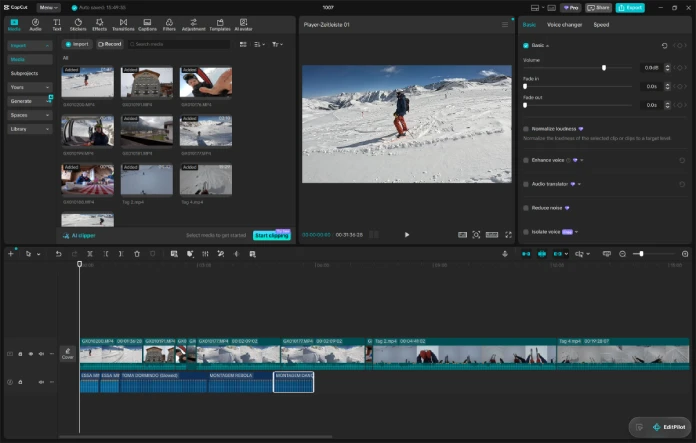
CapCut finishes this job in the fewest steps. You drop clips on a multi-track timeline, press auto-captions, and pick a template. Keyframes and speed ramping sit in the free plan, and chroma key does too.
Rivals have closed some distance. Premiere 26.3 added single-word captions built from a transcript, the style Reels and Shorts made popular. DaVinci Resolve’s cut page also moves quickly, yet it asks for project settings first.
Still, CapCut wins Gate 1. Nothing else gets a phone-ready file out the door with so little setup.
Job Two: The Two-Camera Interview (Gate 2, Control)
Here the verdict flips. CapCut has no multicam workflow. You cannot sync two angles and switch between them in real time, so you stack tracks and cut by hand.
DaVinci Resolve syncs angles by waveform or timecode. Adobe Premiere runs the same job through multicamera sequences. Both treat the angles as one clip, while CapCut treats them as a pile of tracks.
Color exposes the second gap. CapCut grades with filters, sliders, and LUTs. Resolve gives you a node graph, and Premiere gives you the Lumetri panel. Matching two cameras shot by shot needs that depth.
Audio opens the third gap. CapCut Pro adds vocal isolation and AI voice tools, which help. Yet DaVinci Resolve’s free edition includes Fairlight, a full audio workstation with a real mixer. CapCut has no equivalent at any price.
So Gate 2 goes to the pro tools. If your footage needs matching or mixing, CapCut cannot finish the job.
Job Three: The Paid Client Delivery (Gate 3, Custody)
Money changes the questions. Who owns the assets in this timeline? What happens if you cancel next month?
CapCut’s terms require a paid plan for commercial use, and paid materials carry license limits. Commercial Sounds work inside CapCut and TikTok products only. If you cancel Pro, the Pro-tagged templates, effects, and music disappear from existing projects. A re-export can then come back with a watermark.
Resolve takes the opposite approach. The free edition has no watermark and no expiry, and a Studio license costs $295 once. Premiere keeps you on a subscription, though version 26.0 added OpenTimelineIO import and export, so you can move a timeline out.
CapCut Pricing in 2026: Free, Standard, and Pro Compared
CapCut pricing confuses people because the plans changed. The old $9.99 Pro tier became Standard, and a new Pro tier arrived at $19.99. Plenty of older articles still quote the old numbers.
| CapCut plan | Price | Export | What you get |
|---|---|---|---|
| Free | $0 | Up to 1080p | Full manual timeline, multi-track editing, keyframes, basic AI voiceover, auto-captions with limits |
| Standard | About $9.99 per month | Up to 1080p | Watermark-free premium assets, a bigger template and effects library, limited AI on mobile |
| Pro | $19.99 per month or $179.99 per year | 4K and HDR | Full AI toolkit with camera tracking, vocal isolation, speaker-ID captions, avatars and voice cloning; full asset library; cloud storage up to 1 TB |
| Teams | Quoted per seat; list prices reported near $24.99 | 4K and HDR | Shared assets and team collaboration |
Prices vary by country and by store. Treat every number here as a snapshot, and confirm it at checkout.
Template Gravity: How CapCut “Free” Turns Into “Pay”
Template Gravity is the pull that drags a CapCut project toward Pro-tagged assets until the free plan stops being free in practice.
The watermark does not depend on export resolution. It depends on your assets. Build with free elements, and the free plan exports a clean 1080p file. Add one Pro-tagged template, sticker, sound, or AI clip, and every export carries the watermark.
Trending templates usually wear that Pro tag. So the most popular looks cost the most. Before you pay, count the Pro-tagged items in your timeline. Often one sticker causes the whole problem.
My opinion is plain. Standard at $9.99 is the only CapCut tier most mobile creators should buy. Pro costs double, and it adds 4K and metered AI that few short-form creators use every week.
Where to Subscribe and How to Save
Subscribe on the CapCut website, then sign in on your phone. Apple and Google take a cut of in-app purchases, so app-store prices typically run $1 to $3 higher each month.
Annual billing saves real money. Twelve monthly Pro payments total $239.88, while the yearly plan costs $179.99. You keep $59.89, about a quarter of the bill.
New subscribers in supported regions get a seven-day Pro trial. Students may find a discount of up to 50 percent, depending on region. Also, every plan renews automatically, so cancel at least 24 hours before the renewal date.
What Do Premiere and DaVinci Resolve Cost Next to CapCut?
Adobe dropped “Pro” from the name in January 2026, so Premiere Pro is now Adobe Premiere. Most people still search for Premiere Pro. The app is still the same nonlinear editor.
| Editor | Plan | Price | Notes |
|---|---|---|---|
| Adobe Premiere | Single App, annual plan billed monthly | $22.99 per month | 25 generative credits per month; seven-day trial |
| Adobe Premiere | Single App, month-to-month | $34.49 per month | No annual commitment |
| Adobe Creative Cloud | Standard | $54.99 per month | 20-plus apps without the premium AI allowance |
| Adobe Creative Cloud | Pro | $69.99 per month | 20-plus apps; 4,000 generative credits per month |
| DaVinci Resolve | Free | $0 | No watermark; exports up to 3840 x 2160 at 60 fps; includes Edit, Color, Fusion, Fairlight and the new Photo page |
| DaVinci Resolve | Studio | $295 once | Neural Engine tools such as Magic Mask, noise reduction, output above UHD and above 60 fps |
The numbers surprise people. CapCut Pro costs $3 less per month than Premiere’s single-app plan on annual terms. Over a year, CapCut Pro’s yearly plan saves $95.89 against Premiere.
Resolve changes the math again. Studio costs about $115 more than one year of CapCut Pro. On CapCut Pro’s monthly plan, Studio pays for itself in month 15. And the free edition already matches the 4K ceiling that CapCut Pro advertises.
I would not pay $19.99 a month for CapCut Pro while Resolve Free exports 4K at 60 frames per second for nothing. CapCut Pro buys AI conveniences, not better pictures.
Adobe Premiere 26.5 pushes the other way. Its Generative Media Tool creates video and sound effects from text prompts, using Adobe Firefly and partner models. Credits meter that work. Paper Edit, new in the same release, builds a sequence from selected transcript lines.
DaVinci Resolve 21 added a Photo page for still images in June, and it sits in the free edition. Its catch is the learning curve. It splits work across several pages, and each page has its own logic. It also demands a capable graphics card.
CapCut Privacy and Ownership: Where Does Your Footage Go?
CapCut began as a ByteDance product. For US users, the terms now name TikTok USDS Joint Venture LLC, formed in January 2026. ByteDance keeps a 19.9 percent stake in that venture, and its safeguards explicitly cover CapCut.
That settles the ban question. It does not settle the content question. Critics flagged a June 2025 terms update that grants a broad license over uploaded content. Several AI features also process footage in the cloud.
My rule is simple. Cut confidential client footage in an editor that works on your own machine, such as Resolve. Use CapCut’s cloud tools for public, low-risk clips.
CapCut vs Premiere vs DaVinci Resolve at a Glance
| Feature | CapCut | Adobe Premiere | DaVinci Resolve |
|---|---|---|---|
| Best for | Short-form social video | Agency and team pipelines | Color, audio and solo-to-studio work |
| Entry price | Free | $22.99 per month (annual plan) | Free |
| Top individual price | Pro, $19.99 per month or $179.99 per year | Creative Cloud Pro, $69.99 per month | Studio, $295 once |
| Free option | Yes, 1080p; Pro assets add a watermark | Seven-day trial; free iPhone app | Yes, no watermark, up to UHD at 60 fps |
| Multicam | No | Yes | Yes |
| Color tools | Filters, sliders, LUTs | Lumetri | Node-based Color page |
| Audio | Basic mixing, AI voice tools | Audition handoff | Fairlight built in |
| Licensing | Subscription; Pro assets tied to plan | Subscription | Perpetual Studio license |
| Learning curve | Low | Medium | High |
| Platforms | iOS, Android, Windows, Mac, web | Windows, Mac | Windows, Mac, Linux |
Which Editor Should You Sign Up For? Use the Handoff Depth Rule
Handoff Depth counts how many people and tools touch a project after you finish your cut. A solo TikTok has a depth of zero. A branded series with a colorist and a motion designer has a depth of two or more.
The rule is easy to apply. Depth zero or one points to CapCut. Depth two points to DaVinci Resolve, which keeps color and audio in one app. Anything deeper, or a client who sends Adobe project files, points to Premiere.
Then act on it. Download CapCut’s free plan for your next short clip, and check how many Pro-tagged assets creep in. Install Resolve Free if grading or sound work matters. Start Adobe’s seven-day Premiere trial if you collaborate through Frame.io or After Effects.
Many editors combine two apps. Finish the master in Resolve, then cut the vertical versions in CapCut. I call this the Master-and-Cutdown workflow, and it costs $0 until the work demands more.
Three Predictions for 2027
These are forecasts, not facts. Each one follows a pattern already visible in the pricing.
CapCut Will Meter More Features by Credit
CapCut Pro already limits its generative tools by monthly credits. I expect more tools to join that meter, and more templates to carry Pro tags. Template Gravity will get stronger.
Resolve’s Free Edition Will Keep Absorbing Features
The Photo page arrived free in 2026. Blackmagic also sells cameras, so a generous free tier feeds the rest of its business. Expect the free edition to keep growing.
Adobe Will Answer with Credits, Not Price Cuts
The single-app plan ships with 25 generative credits, and Creative Cloud Pro ships with 4,000. I expect bigger credit allowances, rather than lower sticker prices, to carry Adobe’s response.
Frequently Asked Questions About CapCut, Premiere and DaVinci Resolve
Is CapCut really free in 2026?
Yes. The free plan covers a full manual timeline, multi-track editing, and 1080p export. Pro-tagged assets add a watermark, so build with free elements.
How much does CapCut Pro cost in 2026?
CapCut Pro costs $19.99 per month or $179.99 per year on the website. App stores charge about $1 to $3 more each month. Regional prices differ.
Is CapCut Pro worth it?
It pays off if you export 4K, use the AI tools weekly, or deliver client work. Otherwise, Standard at $9.99 or the free plan covers more than the upgrade prompts suggest.
Can CapCut replace Premiere Pro?
For short-form video, yes. For multicam, deep color work, or audio mixing, no. CapCut has no multicam workflow and no node-based grading.
Is DaVinci Resolve better than CapCut for YouTube?
For long-form YouTube, yes. Color grading, Fairlight audio, and multicam matter more as a channel grows. CapCut still suits Shorts, and many creators use both.
How much does Adobe Premiere cost per month?
The single-app plan costs $22.99 per month on an annual commitment and $34.49 month-to-month. Creative Cloud Pro costs $69.99 per month. Adobe offers a seven-day free trial.
Is DaVinci Resolve really free?
Yes. The free edition has no watermark and no time limit. It exports up to 3840 x 2160 at 60 fps. Studio costs $295 once and adds the Neural Engine tools.
What is the Three-Gate Test for video editors?
The Three-Gate Test rates an editor on speed, control, and custody. Speed measures time to a posted video. Control measures color, audio, and multicam depth. Custody measures asset ownership and the cost of leaving.
Can I use CapCut for client work?
Commercial use needs a paid plan, and asset licenses limit reuse. If you cancel Pro, Pro-tagged assets vanish from existing projects. Export the final file before you cancel.
Browse WE AND THE COLOR’s Technology and Motion categories for more.
Subscribe to our newsletter!