This post contains affiliate links. We may earn a commission if you click on them and make a purchase. It’s at no extra cost to you and helps us run this site. Thanks for your support!
Most designers know the frustration: a great poster design stuck on a white canvas, with no real sense of how it actually lives in the world. That disconnect between screen and street is exactly where a professional poster mockup earns its place. And this urban poster mockup by The MuF Templates does not just solve that problem — it makes the solution look extraordinary.
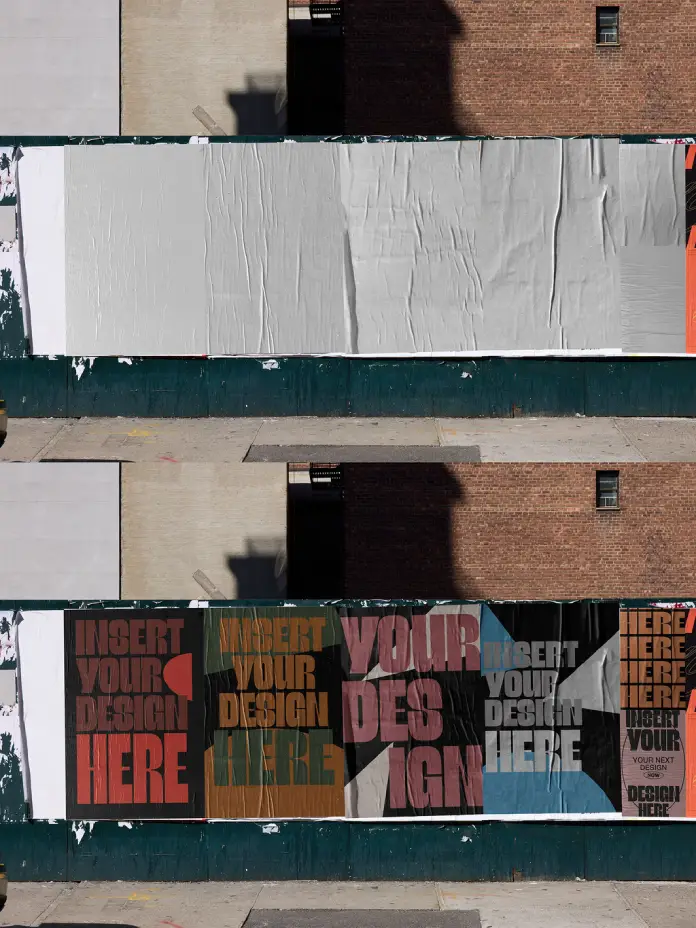
This is a Photoshop PSD file built for designers who care about presentation as much as they care about craft. It renders your work against a raw New York City street wall, complete with wheat-paste creases, natural folds, directional sunlight, and real architectural grit. Furthermore, it does all of this at a resolution of 6000 x 4000 px, which means your output works equally well for web presentations, client decks, and print.
So before you spend money on a photo shoot or wait weeks for physical samples, consider what this single mockup file can do for your workflow.
Please note that these templates require Adobe Photoshop. The latest version can be downloaded from the Adobe Creative Cloud website; visit this link.
Why Do Designers Still Underestimate the Power of a Street-Level Poster Mockup?
Context changes everything in design. A typeface that looks clinical on a white artboard suddenly feels alive on a crumbling brick wall. A color palette that seems too bold in isolation reads perfectly at street scale. This is what I call Contextual Street Staging — the practice of placing design work inside an environmental context before client presentation or public release.

Most designers skip this step. They export a flat JPEG, drop it onto a slide, and call it done. However, that approach costs them in two ways: clients struggle to visualize the final output, and the designer loses the persuasive edge that comes from showing real-world impact.
A quality urban poster mockup removes that friction entirely. Moreover, it gives your work a narrative — a place, a mood, a moment. That matters far more than designers typically admit.
What Makes Urban Context Different From Studio Mockups
Studio-style flat lay mockups have their place. But they communicate something fundamentally different. They say: here is the object. Urban environment mockups say: here is the object in the world. For poster design specifically, that distinction is critical.
Posters are street objects. They belong on walls, construction hoardings, scaffolding panels, and concrete blocks. Therefore, presenting a poster design in a New York street context is not just aesthetically stronger — it is the most honest representation of what the piece will actually become.
Inside This Urban Posters Mockup: What You Actually Get
The MuF Templates built this PSD poster mockup around a real New York City street wall featuring a construction hoarding running the full width of the scene. The wall accommodates multiple poster placements across two horizontal rows, which gives you enormous flexibility for showcasing single designs, campaign series, or typographic systems side by side.
Additionally, the scene captures a sharp, high-contrast daylight situation. Sunlight rakes across the surface from the upper left, casting long shadows from the surrounding architecture. That light behavior is not generic — it mimics the specific quality of direct midday sun on a Manhattan block, which gives the scene its unmistakable energy.
The Wheat-Paste Effect and Why It Matters
Every poster in this mockup features an authentic wheat-paste texture. Creases run vertically and horizontally across the paper surface. Edges curl slightly. Folds bunch at the seams. This detail is what separates this photorealistic poster mockup from flat compositing tools that simply overlay artwork onto a photograph.
The texture communicates material reality. It tells the viewer: this design exists in physical space. Consequently, presentations using this mockup land with significantly more conviction than clean, sterile alternatives. Clients respond differently when they see their brand occupying real square footage on a real wall.
Resolution That Works for Both Screen and Print
At 6000 x 4000 pixels, this high-resolution poster mockup sits well above the threshold for most professional applications. You can crop into the scene, zoom in on specific panels, or export full-frame — all without any visible quality loss. Furthermore, at that resolution, the file supports large-format print output, which makes it useful well beyond digital presentation contexts.
This matters especially for designers working with print clients, advertising agencies, or brand identity studios, where the final deliverable needs to perform across multiple media simultaneously.
How to Use This Photoshop Poster Mockup in Minutes
One of the strongest arguments for using a well-built Photoshop mockup template is the speed. Professional photo shoots for this kind of environmental presentation cost hundreds — sometimes thousands — of dollars. They also require scheduling, location permits, printing physical samples, and post-production time. This mockup eliminates every single one of those steps.
Here is the process, straight and simple:
Step-by-Step: Placing Your Design
Open the PSD file in Adobe Photoshop. You will find clearly labeled Smart Object layers inside the layer panel. Double-click any Smart Object thumbnail. Your design canvas opens as a separate document at the correct dimensions.
Place your artwork into that document, then save and close it. Photoshop automatically composites your design into the scene with all texture, shadow, and light effects applied. Repeat for each poster panel you want to populate.
The entire process takes between two and five minutes per design variation. Moreover, you can swap artwork instantly without rebuilding the scene, which makes this editable poster mockup ideal for presenting multiple design options to clients in a single session.
Non-Destructive Workflow and Smart Object Architecture
Smart Objects preserve your original artwork at full quality regardless of how many times you edit or resize it. That means your PSD poster mockup workflow stays clean, reversible, and presentation-ready at every stage. You never flatten layers. You never degrade source files. Additionally, you can maintain a version-controlled library of design explorations within a single organized file structure.
This is what I define as Modular Presentation Architecture — a workflow system where every design variable (artwork, color, typography, scale) can be adjusted independently without disrupting the environmental composition. It is the professional standard for high-volume design studios, and this mockup supports it fully out of the box.
Who Needs This Urban Posters Mockup the Most
Graphic designers presenting campaign work to clients benefit most directly. However, the use cases extend considerably further. Brand identity consultants use environmental mockups to show visual identity systems at scale. Motion designers use them as thumbnail and key art references. Illustrators use them to present limited-edition print work. Art directors use them to pitch outdoor advertising concepts without committing budget to physical production.
Furthermore, social media content creators and freelancers building portfolio pieces for platforms like Behance or Instagram gain an immediate professional credibility boost from using high-quality environmental mockups. Presentation quality signals craft quality. That connection is real, and clients feel it even when they cannot articulate why.
Saving Real Money on Design Presentations
Consider the alternative to a mockup like this. A professional location shoot in New York City runs from $500 to $2,000+, depending on crew, permits, and post-production. Physical large-format printing costs additional time and budget. For freelance designers or small studios operating on tight margins, those costs are prohibitive.
This free-to-use or affordable poster mockup compresses that entire process into a single file download. Therefore, designers redirect their budget toward billable work, client relationships, and creative development rather than logistical overhead. Over the course of a year, the time and cost savings are genuinely significant.
The Street Realism Framework: A New Standard for Poster Presentations
I want to introduce a concept I call the Street Realism Framework — a set of criteria for evaluating whether a poster mockup actually serves the design rather than just decorating it. The criteria are: environmental authenticity, surface texture fidelity, light behavior accuracy, compositional neutrality, and output resolution sufficiency.
This mockup passes all five criteria. The NYC street environment is authentic. The wheat-paste surface texture is faithful to the real material. The sunlight’s behavior follows accurate directional logic. The composition does not compete visually with the design being presented. And the 6000 x 4000 px resolution exceeds minimum professional thresholds for both digital and print output.
Most free poster mockup PSD files fail two or three of these criteria. They place designs on walls that feel synthetic, under lighting that has no directional logic, at resolutions that degrade on large screens. The MuF Templates avoided all of those failures here.
Why New York City is the Environmental Stage
New York City carries specific cultural and visual weight in design culture. Its streets communicate urgency, scale, and cultural relevance. A poster placed on a Manhattan wall reads differently from the same poster on a generic suburban wall. The city itself functions as a design context — it implies audience, energy, and ambition.
Consequently, using this New York City street poster mockup does more than demonstrate how a design looks on a wall. It positions that design within one of the most design-literate urban environments on earth. That is a presentational advantage that no studio background can replicate.
Getting the Most From Your Posters Mockup: Practical Tips
Use the multiple poster panels to present campaign systems rather than single designs. A brand identity, for example, lands far stronger when four or five touchpoints appear together in the same urban scene. The eye reads them as a system. That system coherence is exactly what sophisticated clients want to see before approving a direction.
Additionally, crop the mockup scene to focus on specific panels for social media content. A tight crop of a single wheat-paste panel with strong typography becomes immediately shareable — it looks editorial, textured, and real. Furthermore, consider presenting the mockup alongside the flat design in a two-slide sequence. Show the concept clean, then show it in the street. That sequence builds a narrative that static flat files simply cannot deliver alone.
Pairing This Mockup With Other Presentation Assets
For maximum presentation impact, pair this outdoor poster mockup with a brand board showing colors, typography, and logo usage. Then use this NYC street scene as the closing visual — the moment where everything comes together at an environmental scale. That structure consistently produces stronger client reactions than leading with the environmental scene.
Sequence matters in design presentations. Use this mockup as the payoff, not the opener.
Frequently Asked Questions About This Urban Poster Mockup
What software do I need to use this poster mockup?
You need Adobe Photoshop to open and edit this PSD file. The Smart Object layers are fully compatible with Photoshop CS6 and all later versions, including the current Creative Cloud releases.
Can I use this poster mockup for commercial projects?
Always check the licensing terms provided by The MuF Templates directly. Most professional mockup templates on Adobe Stock include a standard commercial license, but verify the specific terms before using the file in client-facing work or paid campaigns.
How do I place my artwork into the Smart Object layers?
Double-click the Smart Object thumbnail in the Photoshop Layers panel. A new document opens at the correct artboard size. Place your artwork, then save and close the document. Photoshop automatically updates the mockup scene with your design applied.
Does this poster mockup work for both vertical and horizontal poster formats?
This specific mockup features horizontal street banner formats across two rows. It works best for wide-format posters and panoramic print layouts. For vertical poster formats, pair it with a complementary vertical street mockup from the same creator series for a consistent visual language across your presentation.
What resolution is this urban poster mockup?
The file renders at 6000 x 4000 pixels at high DPI, making it suitable for large-screen presentations, print design, and social media exports at full quality. You will not encounter resolution degradation at any standard output size.
Can I customize the background or environment in the scene?
The environmental background is a photographic layer embedded in the PSD structure. Advanced Photoshop users can mask, recolor, or adjust it using standard non-destructive techniques. However, the scene is intentionally designed as a finished environment — most users will find the default composition more than sufficient for professional presentation needs.
Where can I find more mockups by The MuF Templates?
The MuF Templates publishes their full mockup library through Adobe Stock. You can browse their complete collection directly on the Adobe Stock platform, where you will find additional urban, indoor, and format-specific mockup options to expand your presentation toolkit.
Hunfry for more? Check out more professional mockups and design templates here at WE AND THE COLOR.