This post contains affiliate links. We may earn a commission if you click on them and make a purchase. It’s at no extra cost to you and helps us run this site. Thanks for your support!
I guess that I printed more calendar templates than most people print in a decade. That’s just what happens when you review design files for a living. So when I discovered this new 2027 desk calendar layout on Adobe Stock, I downloaded it right away.
It’s an A5 InDesign calendar template with twelve fully editable monthly pages. With CMYK color mode, it’s print-ready out of the box. The mockup shows it as a tent-fold desk calendar, the kind that sits propped open next to your keyboard. I tested it the way I test everything: I opened it in InDesign, placed my own sample photography, broke a few things on purpose, and tried to answer one question. Would I actually give this to a client?
Please note that this template requires Adobe InDesign to be installed on your computer. Whether you use Mac or PC, the latest version is available on the Adobe Creative Cloud website—take a look here.
What Makes This InDesign Calendar Template Worth Your Time?
Most calendar templates fall into two camps. There’s the minimalist grid, all white space and thin type, and there’s the photo-heavy tourist brochure look, dates crammed into a corner like an afterthought. This 2027 desk calendar layout doesn’t pick a side. It splits the page in half and lets both ideas breathe.
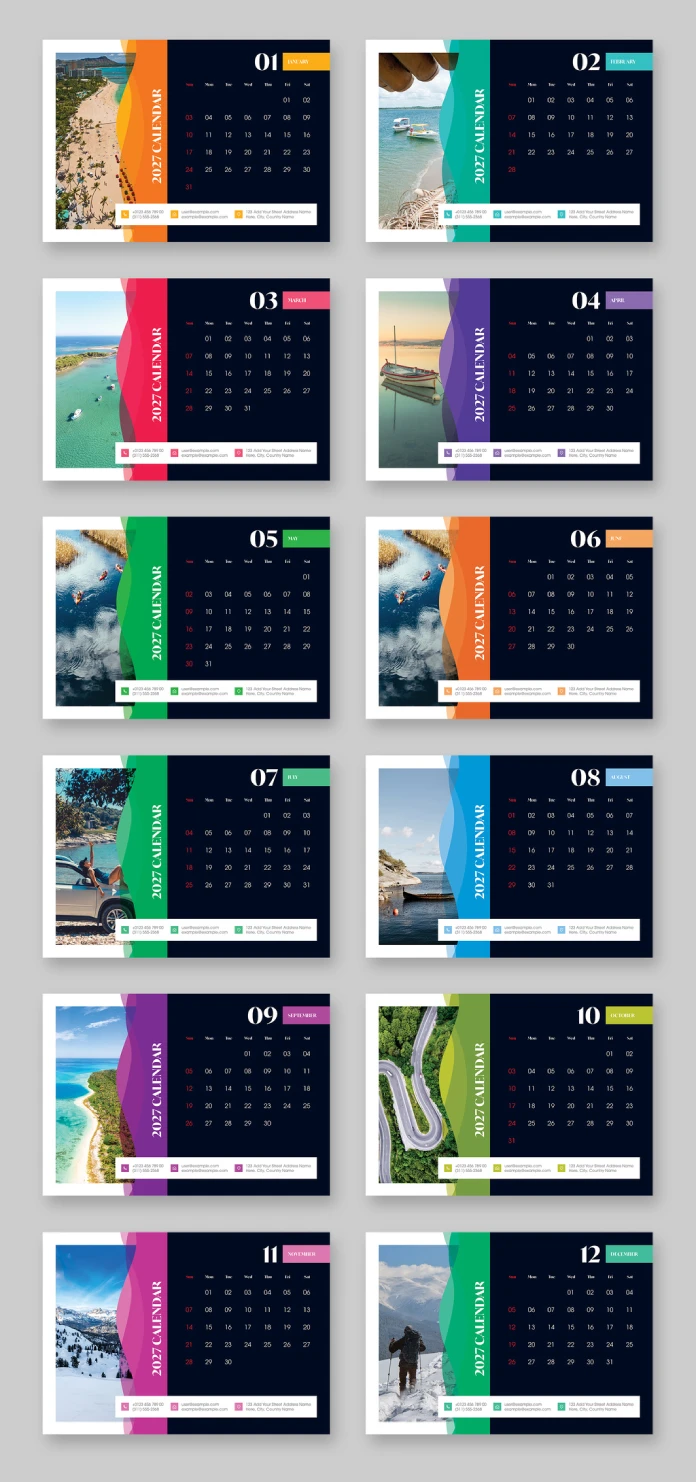
I call this the Split-Panel Calendar Grid, or SPCG if you want a term to search for later. One half of every page holds a full-bleed photograph. The other half holds a dark navy calendar block with the day grid, the month name in a color-coded tab, and a thin white contact bar at the bottom. A wavy divider line separates the two, and it shifts shape slightly from month to month so the layout never feels stamped out by a machine.

Twelve Months, Twelve Colors
Each month gets its own accent color. January runs orange, February teal, March a hot pink-red, April purple, and so on through a full spectrum by December. That’s not decoration for its own sake. It’s a navigation system. Flip through a printed stack of these pages and your eye finds the current month by color before it even reads the label. Designers call this kind of visual shorthand a color key. I’d argue a desk calendar needs one more than almost any other print product, because you’re scanning it in half a second while you’re on a phone call.
The Vertical Type Trick
The words “2027 Calendar” run vertically along the divider, rotated ninety degrees. It’s a small choice, but it does real work. It keeps the horizontal space free for the photo and the grid, and it gives the eye a visual anchor when the page is viewed from an angle, which is exactly how a tent-fold desk calendar gets viewed most of the time.
How I Actually Tested This 2027 Desk Calendar Layout
Talk is cheap with template reviews. So I ran three checks I use on every layout before I trust it: a routine I’ve started calling the Fold Test, the Fill Test, and the Read Test.
The Fold Test asks whether the design still works once it’s printed, cut, and folded into the tent shape shown in the mockup. I checked the bleed settings and the margins around the spine area, since a tent-fold calendar needs extra clearance so the wire binding doesn’t chew into the artwork. The template held up. Nothing important sat too close to the fold line.
The Fill Test asks what happens once you remove the placeholder photography. The preview images, the beaches, boats, and mountain shots, are for display only. They don’t ship with the file, which trips up a lot of buyers who assume otherwise. I swapped in five different photo types: a portrait shot, a wide landscape shot, a busy image, a flat color background, and a low-resolution phone photo. The frames are built with proper fitting options, so most images snap into place without distortion. The busy image needed manual cropping to avoid clashing with the calendar grid, which brings me to my one real complaint later on.
The Read Test asks the obvious question nobody asks enough: can you actually read the dates from across a desk? Sundays and certain highlighted dates print in red against the dark navy background, which gives enough contrast to read at a glance. Regular weekdays sit in white on navy, clean and legible even at A5 size.
The Anatomy of This Editable 2027 Calendar Template
Buyers researching an InDesign calendar template usually want the specs before anything else, so here’s what’s actually in the file.
- Format: A5, twelve individual monthly pages
- Software: Adobe InDesign, fully editable text and image frames
- Color mode: CMYK, built for commercial print
- Layout style: Split-Panel Calendar Grid with a color-coded month tab
- Included elements: full day-of-week grid, editable contact info bar, month-by-month accent colors
- Not included: the stock photography shown in the preview, which is for display purposes only
Who Should Actually Buy This Calendar Template
This isn’t a personal-use fridge calendar dressed up in InDesign. The contact info bar at the bottom of every page, with phone number, email, and address, tells you exactly who it’s built for. Real estate agents. Photographers. Consultants who hand out a physical calendar every December as a small, useful reminder that they exist. If you’re a small studio or a freelancer building end-of-year client gifts, this A5 desk calendar layout does most of the heavy lifting for you.
It also works for anyone printing a branded 2027 desk calendar layout for an office, a shop counter, or a trade show giveaway. The design reads as polished without looking like every other template on the shelf, mostly because of that split-panel photo treatment.
Where the Template Struggles
No template earns a perfect score, and I’d rather tell you the truth than sell you something. The dominant photo panel is unforgiving. It wants a strong, high-resolution image with a clear subject, and weak or busy photography makes the whole page feel cluttered fast. If your photo library is thin, budget extra time to source or shoot better images before you touch this file.
The contact bar also assumes a business context by default. Personal users will want to delete or restyle that element, which is simple enough in InDesign but still an extra step you should plan for before deadline day.
Practical Tips Before You Customize It
Swap photography first, before you touch any type. Seeing real images in the frames tells you instantly whether the color palette for that month still works, because a cool blue ocean shot reads very differently against orange than it does against teal.
Keep the color-coded month tabs consistent if you’re replacing the whole scheme. That color key is doing navigation work, not just decoration, and breaking it removes one of the layout’s smartest features.
Check your printer’s bleed requirements before export. CMYK and print-ready mean the file is built correctly, but every print shop has its own tolerances, so confirm before you commit to a full run of 500 copies.
Quick Reference Table
| Feature | Details |
|---|---|
| Product type | 2027 desk calendar layout, A5 tent-fold format |
| Software required | Adobe InDesign (fully editable InDesign calendar template) |
| Pages included | 12 monthly pages, one per month, fully customizable |
| Color mode | CMYK, print-ready |
| Photography | Preview images shown for display only, not included in the download |
| Design signature | Split-Panel Calendar Grid with color-coded monthly accents |
| Best suited for | Freelancers, studios, agencies, and small businesses building client or office gifts |
Frequently Asked Questions
Is this 2027 desk calendar layout beginner-friendly in InDesign?
Yes, as long as you understand basic frame editing. Swapping photos and text needs no advanced InDesign knowledge. Restyling the vertically rotated text or the wavy divider shapes takes a bit more comfort with paths and anchors.
Does the InDesign calendar template include the stock photos shown in the previews?
No. The travel photography in the preview images is for display only. You’ll need to source your own images or license the ones shown separately if you want that exact look.
Can I use this template for personal, non-business use?
Yes. Just remove or restyle the contact info bar at the bottom of each page, since it’s built with a business audience in mind.
Is the file genuinely print-ready?
The file uses CMYK color mode, which is the standard for commercial print. Always confirm bleed and margin requirements with your specific print shop before sending the final files.
Who designed this 2027 desk calendar layout?
The template was created by Adobe Stock contributor ContestDesign.
Browse WE AND THE COLOR’s Templates category for more.
Subscribe to our newsletter!