This post contains affiliate links. We may earn a commission if you click on them and make a purchase. It’s at no extra cost to you and helps us run this site. Thanks for your support!
An ugly sweater Christmas party flyer has one job. It must look terrible on purpose and still tell guests when to show up. Vynetta’s Illustrator template manages both, and I found one flaw within a minute.
The flaw sits in the date line. The layout reads “Friday, December 25,” which is Christmas Day itself. Nobody hosts a party that night. So your first edit is the date, and your last edit is probably the colors.
Office and neighborhood invitations usually go out in November, so a good ugly sweater Christmas party flyer needs to exist before the first group chat asks about plans. This template saves that afternoon.
Please note that this vector template requires Adobe Illustrator to be installed on your computer. You can get the latest version from the Adobe Creative Cloud website. Just have a look here.
What Is an Ugly Sweater Christmas Party Flyer Template?
An ugly sweater Christmas party flyer template is a pre-built, editable layout that imitates a knitted holiday sweater, so the invitation itself becomes part of the joke. You change the text and print it or post it.

Adobe Stock contributor Vynetta designed this one as a vector layout for Adobe Illustrator. It comes in two standard sizes, US Letter and A4. The color mode is CMYK, which suits desktop printers and print shops.
Everything is editable. You can change the size, the colors, the shapes, and the text. Because the artwork is vector, nothing blurs when you scale it up for a poster.
How Is the Layout Built? The Sweater Stack
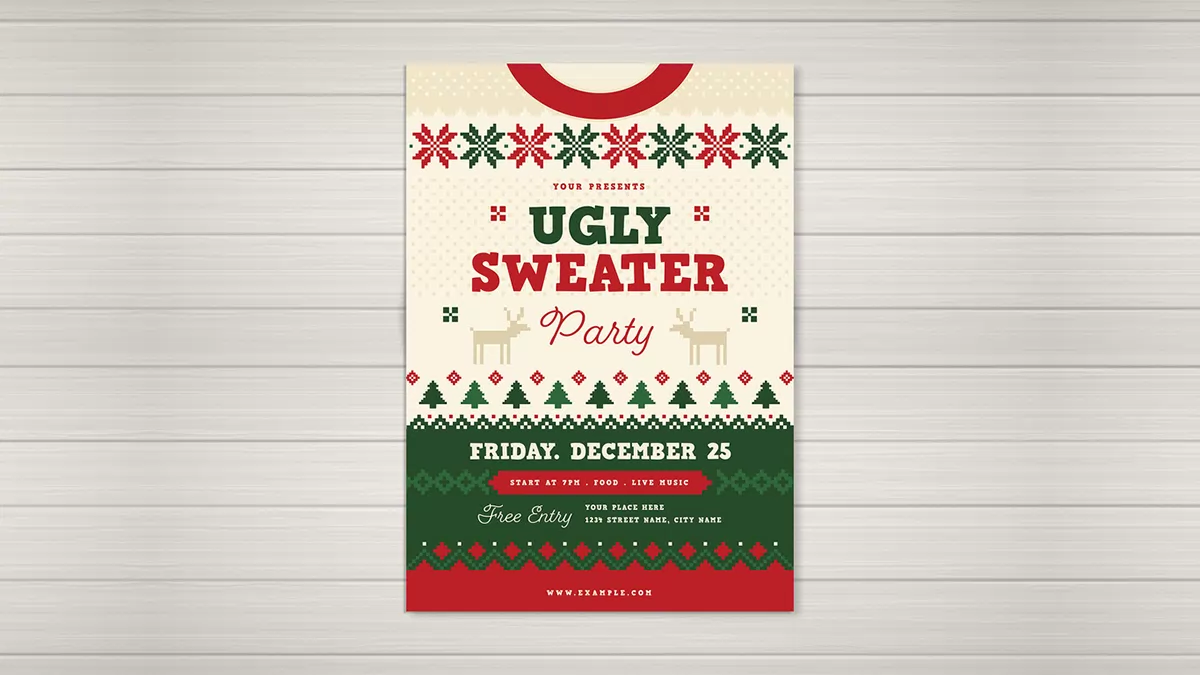
I call the structure the Sweater Stack. It is a flyer layout that sorts content into horizontal bands, the way a knitted garment runs from collar to hem. Each band holds one kind of information.
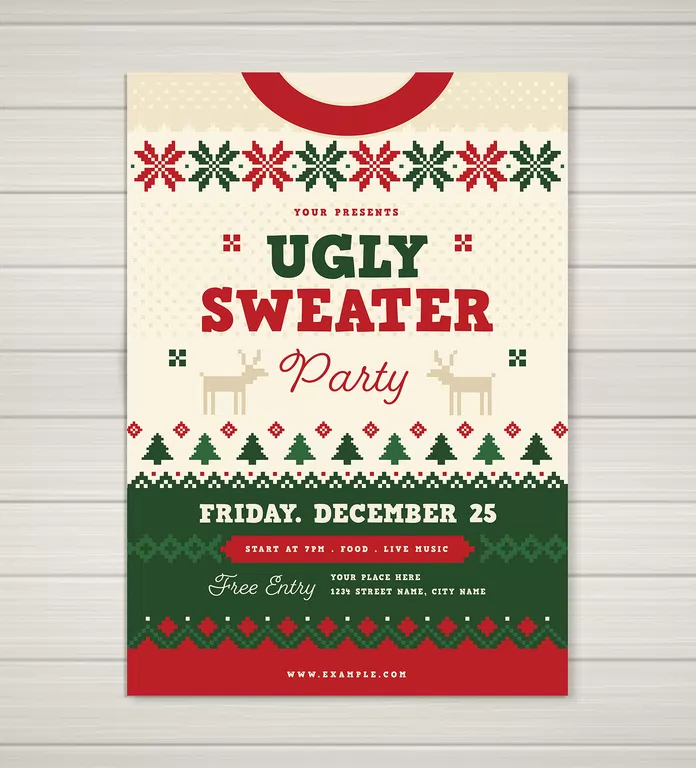
The red collar cutout opens the top edge. Below it, a cream band carries eight alternating red and green snowflakes. The title sits in the cream middle, flanked by two pixel reindeer. A row of pine trees closes that section.
Then the green block starts. It holds the date, the time ribbon, “Free Entry” and the address. A red hem with the web address ends the piece at the bottom.
The Knit Grid
Every motif sits on a square pixel grid. I call this the Knit Grid. It mimics the charts that knitters follow for Fair Isle patterns, where one square equals one stitch.
This is the template’s best idea. The snowflakes, reindeer, and trees look hand-knitted, yet they stay crisp vector shapes. A typical Christmas flyer template fakes the sweater with a texture photo. This one builds the sweater from geometry instead.
Type and Color
The headline uses a heavy slab-style display face, green for “UGLY” and red for “SWEATER.” A looping script handles “Party” and “Free Entry.” Two typefaces keep the hierarchy clear.
Check which fonts the file calls for before you edit. In Illustrator, open Type, then Find Font. Missing fonts will swap silently otherwise, and your headline will lose its weight.
The palette uses red, dark green, cream, and a sandy tan for the reindeer. Four colors keep the print job cheap and the look consistent.
How Do You Customize an Ugly Sweater Party Flyer in Illustrator?
The edit order matters. I changed the facts first and the styling last. That sequence keeps you from polishing a flyer that still carries the wrong date.
- Replace the date. Pick a real weekend before December 25, and keep the day of the week correct.
- Swap “Your Presents” for the host name. The placeholder reads like a pun, but a guest needs to know who is inviting them.
- Rewrite the time ribbon. Keep it to three short items, for example, start time, food, and music.
- Enter the venue address in the small line beside “Free Entry.”
- Replace the placeholder web address with an RSVP link or a short URL.
- Recolor the artwork. Select the motifs and use Edit, then Edit Colors, then Recolor Artwork.
For social posts, convert the document first. Go to File, then Document Color Mode, then RGB Color. Screens show brighter colors than CMYK, so check the greens again after the switch.
Is This Ugly Sweater Christmas Party Flyer Actually Ugly?
No. That is my main criticism. Real ugly sweaters clash, bulge, and overreach. This one coordinates beautifully, and the polish works against the joke.
You can fix that in about two minutes. Recolor the snowflakes in neon orange and teal, and push the tan reindeer to purple. Suddenly the flyer looks like something a relative would knit without asking you.
I would also resize the info band. The time ribbon and the address line run small, and on a phone screen they shrink further. Raise both to roughly the size of the date line. Guests read the logistics first, and they forgive the decoration.
The script “Free Entry” is the weakest element. Cream script on dark green reads fine on paper, but it thins out on small screens.
Ugly Sweater Christmas Party Flyer at a Glance
| Feature | Detail |
|---|---|
| Designer | Vynetta (Adobe Stock contributor) |
| Format | Vector layout for Adobe Illustrator |
| Sizes | US Letter and A4 |
| Color mode | CMYK |
| Editable elements | Size, colors, shapes, text |
| Core structure | Sweater Stack (horizontal bands, collar to hem) |
| Motif style | Knit Grid (square-pixel Fair Isle patterns) |
| Palette | Red, dark green, cream, tan |
| Placeholder date | Friday, December 25 (change it) |
| Best use | Office parties, bar nights, family gatherings |
Where Are Ugly Sweater Invitations Heading?
I expect three shifts, and these are predictions, not measurements. First, editable vector layouts will keep beating one-off generated images for party invitations. A host must fix a date or an address, and a flattened picture makes that painful.
Second, hosts will ask for vertical story-sized versions of every flyer. Next season’s templates will probably ship with a 9:16 artboard beside the print sizes.
Third, the pixel-knit look will spread beyond sweaters. Expect it on holiday menus, place cards, and event tickets, because the Knit Grid scales down to tiny sizes without losing its shape.
Frequently Asked Questions About the Ugly Sweater Christmas Party Flyer
What software do I need?
You need Adobe Illustrator. The template is a vector layout built for that program.
Which sizes are included?
The template comes in US Letter and A4. Pick Letter for North America and A4 for most other regions.
Can I change the colors?
Yes. Every color is editable, so you can recolor the artwork to match a team, a venue, or a deliberately clashing theme.
Is CMYK a problem for sharing online?
It can be. CMYK targets print, so convert the file to RGB before you post it on social media. Then check the colors again.
Can I edit the text?
Yes. You can change every line, including the date, host name, time, address, and web address.
Where do I get the template?
Vynetta publishes it on Adobe Stock. Read the license terms there before you use it for a public or commercial event.
Which date should I use?
Choose a date before December 25. The placeholder falls on Christmas Day, and few guests will come.
Don’t hesitate to take a look at our Templates category.
Subscribe to our newsletter!