This post contains affiliate links. We may earn a commission if you click on them and make a purchase. It’s at no extra cost to you and helps us run this site. Thanks for your support!
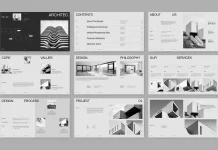
Design often suffers from noise, yet this Adobe InDesign catalog template by BrandPacks proves that silence captures attention. Curators and designers frequently search for layouts that balance functionality with aesthetic restraint. This specific template does not merely hold content; it elevates the subject matter through a framework we can call “Silent Grid Architecture.” BrandPacks has crafted a tool that prioritizes the user’s visual journey over decorative excess. The layout serves professionals who require a printable portfolio design that speaks with authority. We must analyze why this specific Adobe InDesign catalog template succeeds where others fail.
Please note that this professional branding template requires Adobe InDesign installed on your computer. Whether you use Mac or PC, the latest version is available on the Adobe Creative Cloud website—take a look here.

How does Silent Grid Architecture define this layout?
You might wonder what separates a chaotic brochure from a high-end publication. The answer lies in the invisible structure. This Adobe InDesign catalog template utilizes a rigid, albeit flexible, underlying grid. We define “Silent Grid Architecture” as a layout system that guides the eye without revealing its mechanics. BrandPacks employs this technique across all 20 distinct pages. Consequently, the viewer focuses entirely on the product, whether it is ceramic art or architectural hardware.
The design relies heavily on negative space. This is not empty space; it is active “breathing room.” By isolating images against stark backgrounds, the template forces the viewer to engage with the texture of the product. Furthermore, the typography acts as a navigational beacon rather than a distraction. Bold headers contrast sharply with delicate serif body text. This creates a visual rhythm. Readers scan the page effortlessly. Therefore, the Adobe InDesign catalog template functions as a museum wall rather than a grocery flyer.
Technical Precision in Adobe InDesign
Adobe InDesign remains the industry standard for a reason. This software handles multi-page documents with a precision that Illustrator or Photoshop cannot match. BrandPacks delivers this Adobe InDesign catalog template in two critical formats: A4 and US Letter. This ensures global compatibility for printing. Moreover, the file operates in CMYK color mode. This guarantees that physical prints match the digital preview.

Designers appreciate the inclusion of master pages. These allow for rapid, global changes to headers, footers, and page numbers. Additionally, the template uses a layer-based organization system. You can separate text, images, and background elements easily. This speeds up the workflow significantly. For a professional catalog layout, efficiency is as vital as beauty. The template provides fully editable placeholders. You simply drag and drop your imagery. InDesign automatically scales the content to fit the pre-defined frames.
Why is “Tactile Digitalism” crucial for modern catalogs?
We live in a screen-first era, yet we crave physical texture. This layout champions a concept I call “Tactile Digitalism.” The design aesthetic mimics the feeling of matte paper, stone, and raw material, even on a screen. The Adobe InDesign catalog template achieves this through careful image masking and muted color palettes. Although the download features placeholders, the styling suggests a clear direction. It favors organic, high-contrast photography.
Consider the typography choices. The fonts suggest a blend of classical editorial design and modern brutalism. This juxtaposition creates tension. Tension keeps the reader interested. Consequently, a furniture designer or a ceramicist will find this product brochure layout ideal. It complements organic shapes. The text does not fight the image; it supports it. This is the essence of a successful Adobe InDesign catalog template. It provides a stage, not a show.
The Strategic Advantage of Pre-Designed Assets
Some purists argue that custom design is the only path. However, a high-quality, customizable InDesign file offers a strategic advantage. It saves time. Designing a 20-page grid from scratch takes days. Using this Adobe InDesign catalog template reduces that time to hours. You focus on content creation rather than margin alignment.
BrandPacks has already solved the difficult problems. They determined the optimal font sizes. But not just that. They calculated the margins and balanced the image-to-text ratios. You are acquiring a design system, not just a file. For small agencies or freelancers, this is vital. It allows you to deliver a corporate brochure template quality at a fraction of the cost. The template acts as a sophisticated container. You pour your brand identity into it.
Is this Adobe InDesign Catalog Template right for your brand?
You must evaluate your content before choosing a layout. This Adobe InDesign catalog template favors high-quality imagery. If your photos are low-resolution, this design will expose them. The minimalism leaves no place to hide. Therefore, this layout suits brands with strong visual assets.
Think about your narrative. The flow of the 20 pages allows for storytelling. You can alternate between full-page mood shots and detailed product specifications. This versatility makes it a powerful creative agency portfolio. It also works as a minimalist lookbook. The adaptability is the key feature. Furthermore, the neutral style absorbs any brand color. You can change the black and grey accents to match your corporate identity.
A Critical Perspective on Layout Pacing
A good catalog has a heartbeat. We call this “Layout Pacing.” It is the speed at which a user flips the pages. This Adobe InDesign catalog template manages pacing exceptionally well. It alternates between dense information pages and open visual spreads. This prevents reader fatigue.
When you open the file, notice the sequence. It starts with an introduction, moves to highlight features, and ends with a contact section. This is a classic narrative arc. BrandPacks understands that a catalog is a sales tool. It must convince the buyer. The structure leads the viewer to a conclusion. Thus, the Adobe InDesign catalog template becomes an active participant in the sales process.
Frequently Asked Questions
What software do I need to edit this template?
You need Adobe InDesign. The file is compatible with CS4 and higher versions. It uses the .INDD and .IDML formats.
Does the Adobe InDesign catalog template include the photos?
No. The images in the preview are for display purposes only. The file contains grey placeholders where you place your own images.
Can I print this design on a home printer?
Yes, but professional printing yields better results. The file uses CMYK color mode, which standard home printers might not replicate perfectly.
Is it difficult to change the fonts?
No. You can use the “Find/Replace Font” feature in InDesign. This allows you to swap the template fonts for your brand fonts instantly.
Can I add more pages to the Adobe InDesign catalog template?
Absolutely. You can duplicate existing spreads using the Pages panel. The master pages ensure the layout remains consistent.
What is the difference between A4 and US Letter?
A4 is the standard paper size in Europe and Asia. US Letter is the standard in North America. This download includes both.
Is this template suitable for a fashion lookbook?
Yes. The minimalist brochure template style works perfectly for fashion. It places the focus entirely on the clothing and photography.
Check out other recommended graphic design templates here at WE AND THE COLOR. Our professional reviews will help you to find exactly what you are looking for.
Subscribe to our newsletter!