This post contains affiliate links. We may earn a commission if you click on them and make a purchase. It’s at no extra cost to you and helps us run this site. Thanks for your support!
The design industry moves fast. Clients expect polished visuals before a single garment gets printed. Freelancers need presentation tools that keep up with creative ambition. And merchandisers live or die by how convincingly their concepts look on-screen. That pressure is real — and it shapes how designers choose their tools.
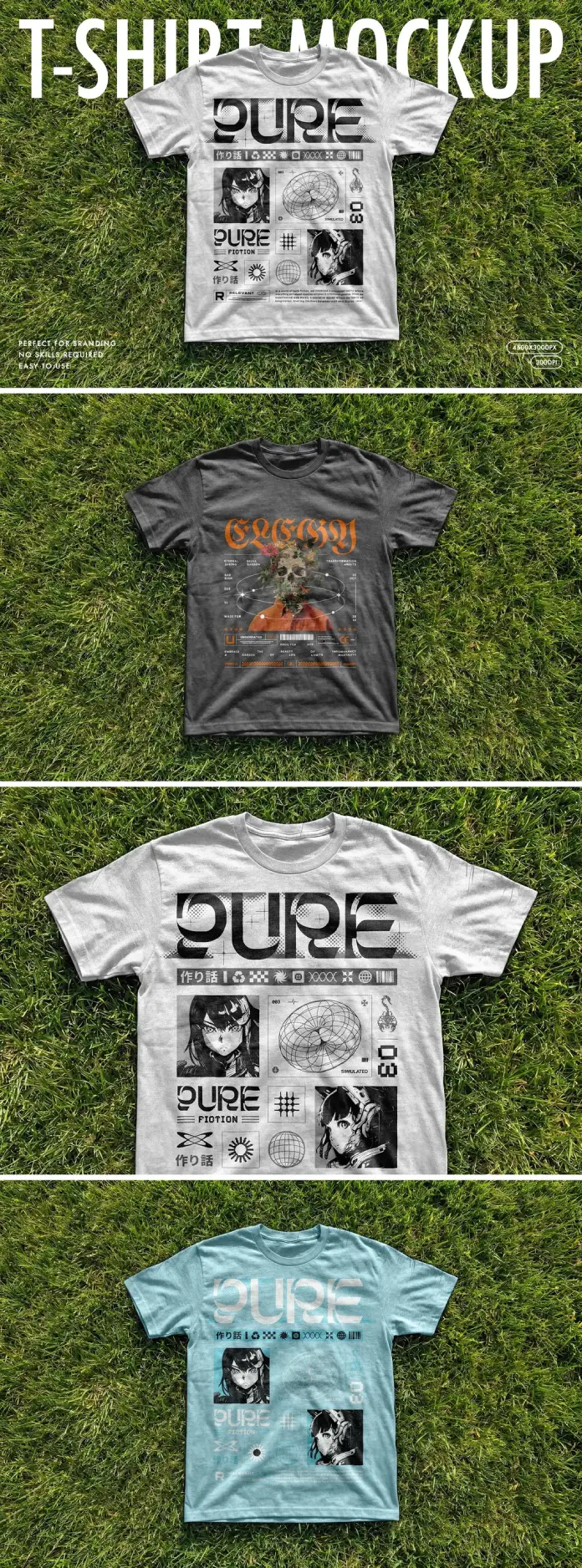
This t-shirt Photoshop mockup by Pixelbuddha Studio answers that pressure directly. It places a classic crew-neck tee flat on lush green grass, shoots it at 4500 × 3000 pixels, and layers smart object technology on top. The result is a t-shirt PSD mockup that feels editorial, versatile, and honestly — beautiful. It does not try to be everything. It focuses on doing one thing exceptionally well.
So why does this particular t-shirt mockup matter right now? Because the market is flooded with generic flat-lays and sterile studio setups. Designers are tired of mockups that look templated. This one, however, feels alive. The grass background gives it texture, natural light, and energy. Moreover, it challenges the assumption that a good t-shirt mockup needs to be shot indoors on a hanger.
Please note that this retro template requires Adobe Photoshop. The latest version can be downloaded from the Adobe Creative Cloud website; visit this link.
What Makes a Great T-Shirt Mockup?
Ask ten designers what makes the perfect t-shirt Photoshop mockup, and most will say: resolution, realism, and ease of use. But those answers only scratch the surface. The real differentiator is contextual authenticity — the degree to which a mockup makes the viewer believe the product exists.

Pixelbuddha Studio understands this concept deeply. Their grass flat-lay t-shirt PSD mockup does not just show a shirt. It places the shirt inside a visual world. That world has texture, depth, and natural shadow. Therefore, any graphic placed on this t-shirt mockup gains instant credibility.
The Three Pillars of Contextual Authenticity
First pillar: Surface texture. The grass background introduces organic complexity. Consequently, the shirt looks like it belongs to a real environment, not a digital stage.
Second pillar: Natural lighting. Soft daylight casts accurate shadows and highlights. As a result, even bold graphic designs read as physically printed rather than digitally overlaid.
Third pillar: Fabric realism. The cotton texture is visible and consistent. Furthermore, it scales beautifully at 4500 × 3000 pixels without losing detail.
These three pillars form what this article calls the CAT Framework — Contextual Authenticity Triangle. Every strong t-shirt mockup either satisfies all three or compromises on one. This Pixelbuddha mockup satisfies all three without effort.
How the Smart Layer System Changes Everything
What Is a Smart Layer in a T-Shirt PSD Mockup?
A smart layer — also called a smart object in Photoshop — is a non-destructive container. It holds your artwork and maps it onto the shirt automatically. You double-click, paste your design, save, and the mockup updates instantly. No manual warping, no distortion guesswork.
This t-shirt Photoshop mockup uses that system precisely. The smart layer wraps your graphic to the shirt’s surface with accurate perspective and natural folds. Consequently, a streetwear graphic, a minimalist logo, or a full-chest illustration all drop in effortlessly.
The practical benefit is speed. A designer can test five colorway variations in under ten minutes. A small brand can present an entire collection to a client before the weekend. Additionally, non-designers on the client side understand the final product immediately — no imagination required.
Why Smart Layers Matter for Client Presentations
Clients rarely trust wireframes. They need to see the thing. A smart-layer t-shirt PSD mockup bridges that trust gap instantly. It transforms abstract concepts into convincing product visuals that clients can react to, approve, or redirect.
This is particularly important for e-commerce brands, print-on-demand shops, and independent merchandise creators. For them, the t-shirt mockup is not just a design tool. It is a sales asset.
The Grass Flat-Lay Aesthetic: Why It Works Editorially
Breaking Away from the Invisible Background
Most t-shirt mockups default to white backgrounds or ghost mannequins. Those formats serve a purpose — particularly for e-commerce thumbnails. However, they communicate nothing emotionally. They answer the question “what does this shirt look like?” but not “why should I want this shirt?”
The grass setting of this Pixelbuddha t-shirt mockup tells a different story. It suggests outdoor culture, summer drops, festival merch, and lifestyle brands. Therefore, it aligns naturally with streetwear, athleisure, independent labels, and artist merchandise.
Think about the preview images included with this t-shirt Photoshop mockup. One features an anime-influenced graphic design system on a white tee. Another places gothic streetwear typography on a dark charcoal shirt. A third shows a pastel blue colorway with the same graphic scaled down. Each variation works because the grass backdrop is contextually neutral enough to serve multiple aesthetics.
The Concept of Aesthetic Neutrality in Mockup Design
This article introduces a specific concept here: aesthetic neutrality. A mockup achieves aesthetic neutrality when its environment complements any design category without dominating it. White studio setups are sterile — they force minimalism. Heavily styled lifestyle shots are too specific — they clash with unrelated aesthetics.
Green grass sits in the middle. It is natural, universal, and warm. Furthermore, it does not anchor the viewer to a specific brand identity. The designer’s artwork becomes the statement, not the backdrop.
Resolution, Print Readiness, and the 4500 × 3000 Standard
Why Resolution Matters More Than Most Designers Admit
Resolution is the silent separator between professional mockups and amateur ones. A t-shirt PSD mockup at 4500 × 3000 pixels delivers 300 DPI output at 15 × 10 inches — well above print-standard requirements. Consequently, this file works equally well for digital presentations, print catalogs, social media, and large-format displays.
Compare that to lower-resolution alternatives. A mockup at 1500 × 1000 pixels degrades visibly on a retina screen. It pixelates when scaled for a product page header. It simply does not hold up under professional scrutiny.
Additionally, high-resolution t-shirt mockups carry a subtler benefit: they signal quality. When a client sees a crisp, detailed mockup, they associate that quality with the brand itself. The mockup becomes part of the brand experience.
Print-Ready Workflow with This T-Shirt Mockup
Designers working in print-on-demand or contract manufacturing will appreciate the workflow compatibility. The smart layer accepts artwork at any resolution, but outputs cleanly at the file’s native 300 DPI. Therefore, the same mockup file serves both a client PDF proposal and a social media campaign without format switching.
Who Benefits Most from This T-Shirt Photoshop Mockup?
Freelance Graphic Designers
Freelancers need portfolio assets that elevate their work. A flat, isolated design on a white artboard does not sell services. A beautifully rendered t-shirt mockup, however, shows design thinking in context. Furthermore, it demonstrates professionalism that clients recognize immediately.
This Pixelbuddha t-shirt Photoshop mockup makes portfolio pieces feel like published products. That shift in perception directly influences project rates and client confidence.
Streetwear and Independent Clothing Brands
Small brands rarely have budgets for professional photography before their first drop. A high-quality t-shirt PSD mockup closes that gap completely. They can launch product pages, run social campaigns, and pitch retail buyers — all before touching physical inventory.
Moreover, the grass aesthetic aligns naturally with outdoor and lifestyle brand positioning. It does not require rebranding or photoshopping out an inappropriate background.
Print-on-Demand Sellers
Platforms like Printful, Printify, Redbubble, and Merch by Amazon reward visual consistency. Sellers who present their designs in clean, attractive t-shirt mockups consistently outperform those using basic platform mockups. This PSD template gives sellers a competitive visual edge.
Art Directors and Creative Agencies
Even experienced art directors reach for flat-lay mockups during early concepting phases. Speed matters in agency environments. A smart-layer t-shirt mockup reduces rounds of feedback by making concepts immediately legible to stakeholders.
The Pixelbuddha Studio Design Philosophy
Precision Over Volume
Pixelbuddha Studio occupies a specific corner of the design resource market. They prioritize craft over quantity. Their mockups are not mass-produced templates — they are considered art-directed assets. Consequently, each release carries a visual standard that most marketplaces do not consistently deliver.
This t-shirt mockup reflects that philosophy clearly. The shot angle is deliberate. The grass selection is intentional. The resolution ceiling is set high. Nothing about this file feels accidental.
The Role of Display-Only Preview Graphics
The sample graphics shown in the mockup previews — including the anime grid-system design and the gothic typography — are display-only. They are not included in the downloaded file. This is standard and expected. However, it is worth noting how carefully these preview designs were selected.
They are not random placeholders. They represent a genuine aesthetic direction: maximalist streetwear that reads clearly at large print sizes. Consequently, they make the mockup itself feel like editorial content rather than a product listing.
Practical Tips for Getting the Most from This T-Shirt PSD Mockup
Optimizing Your Artwork for Smart Layer Placement
Use high-contrast designs. The grass background is mid-tone green. Consequently, designs with strong contrast — especially those mixing black, white, and accent colors — read most clearly.
Respect the shirt’s natural folds. The smart layer handles warping automatically, but overly small details may lose clarity in fold areas. Therefore, test your artwork at the actual scale before finalizing.
Try multiple colorways. The mockup supports color adjustment for the shirt itself. Testing white, charcoal, and pastel blue — as shown in the preview — reveals how dramatically color context changes the perception of a single graphic.
Building a Cohesive Mockup Set
One t-shirt mockup is a starting point. A cohesive set is a presentation system. Pair this flat-lay mockup with a hanging mockup and a lifestyle shot for a complete product story. Clients and buyers respond to visual variety paired with consistent styling.
Furthermore, consider creating a brand-specific mockup library. Store adjusted versions of this PSD with your recurring brand colors pre-applied to the shirt. Consequently, each new design drops directly into a branded presentation without setup time.
Forward-Looking: Where T-Shirt Mockup Design Is Heading
AI Integration and the Future of Smart Layers
Smart layers are already intelligent. But the next evolution is coming. AI-assisted mockup tools will soon analyze uploaded artwork and auto-suggest placement, scaling, and color correction. This Pixelbuddha t-shirt PSD mockup, built on Photoshop’s established smart object architecture, will integrate seamlessly with those AI layers as they develop.
Designers who invest in high-quality PSD mockup systems now are positioning themselves for that future. The files will evolve with the tools. That is a meaningful long-term value proposition.
The Contextual Authenticity Revolution
The design community is shifting away from sterile product representation toward contextual storytelling. Consequently, mockups that embed products in real environments — grass, concrete, fabric, wood — will dominate both creative portfolios and e-commerce presentations.
This article predicts that by 2027, platform-standard product photography will heavily favor lifestyle-contextual flat-lay formats over isolated backgrounds. Brands that adopt this visual language early — using tools like this t-shirt mockup from Pixelbuddha — will build visual equity that compounds over time.
A Personal Note on Why This Mockup Stands Out
Speaking as a design critic, most mockup marketplaces feel like scrolling through a catalog. Everything is competent. Nothing is memorable. This Pixelbuddha t-shirt flat-lay PSD is the exception. The grass is not a gimmick. It is a statement. It says that apparel exists in the world — worn by people, touched by the sun, surrounded by texture.
That decision makes the difference. And it is the reason this mockup is worth both the download and the discussion.
FAQ: T-Shirt Photoshop Mockup by Pixelbuddha Studio
Q: What file format does this t-shirt mockup come in?
This is a PSD file — a native Photoshop document. It opens directly in Adobe Photoshop without additional conversion.
Q: What resolution does this t-shirt PSD mockup offer?
The file delivers a resolution of 4500 × 3000 pixels. This is print-ready at 300 DPI and suitable for high-resolution digital displays.
Q: Do the graphic designs shown in the previews come with the file?
No. The preview graphics are for display purposes only. They demonstrate how artwork looks when placed inside the smart layer. They are not included in the download.
Q: How do I add my design to this t-shirt Photoshop mockup?
Open the PSD file in Photoshop, locate the smart object layer, double-click to open it, paste or place your artwork, save, and close. The mockup updates automatically.
Q: What skill level do I need to use this t-shirt mockup?
Basic Photoshop knowledge is sufficient. The smart layer system eliminates the need for manual warping or transformation. Even beginners can use it confidently.
Q: Can I change the shirt color in this t-shirt PSD mockup?
Yes. Photoshop’s Hue/Saturation or Color Overlay adjustment layers let you change the shirt’s color non-destructively. The preview images demonstrate white, charcoal, and blue colorways.
Q: Is this t-shirt mockup suitable for print-on-demand platform listings?
Absolutely. The high resolution and natural lighting make it ideal for product pages on platforms like Merch by Amazon, Printful, Redbubble, and similar services.
Q: Who created this t-shirt mockup?
Pixelbuddha Studio created this mockup. They are a design resource studio known for high-quality, art-directed PSD assets for designers and creative professionals.
Q: Can I use this t-shirt Photoshop mockup for commercial projects?
Usage rights depend on the license selected at purchase. Pixelbuddha typically offers standard and extended licenses. Check the product listing for specific terms for commercial use.
Q: What makes this t-shirt mockup different from others on the market?
The combination of a grass flat-lay setting, 4500 × 3000-pixel resolution, and smart layer technology sets it apart. Most competing mockups offer one or two of these qualities. This file delivers all three.
Check out other highly professional graphic design templates here at WE AND THE COLOR.