This post contains affiliate links. We may earn a commission if you click on them and make a purchase. It’s at no extra cost to you and helps us run this site. Thanks for your support!
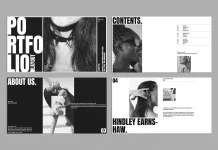
Design determines how clients perceive value before they even read a single word. A generic layout signals a generic service. Conversely, a sharp, structured layout signals authority. The specific Adobe InDesign brochure proposal template created by DesignCoach represents a shift in corporate communication. It moves beyond simple decoration. It embraces a structural philosophy we call “Modular Narrative Grids.” This approach prioritizes information hierarchy over extraneous flair. Therefore, using this proposal template allows businesses to control the user journey precisely.
Please note that this template requires Adobe InDesign installed on your computer. Whether you use Mac or PC, the latest version is available on the Adobe Creative Cloud website—take a look here.
Why is a structured Adobe InDesign brochure proposal template essential for conversion?
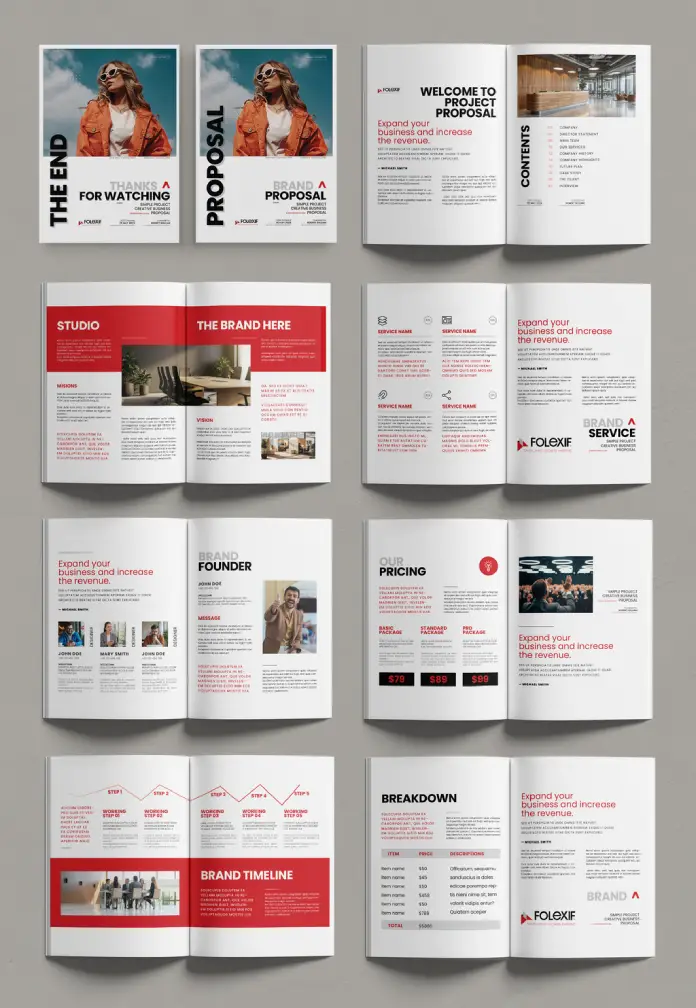
Clients currently suffer from cognitive overload. They receive dozens of pitches weekly. Consequently, they scan documents rather than reading them. A standard document fails to arrest this scanning behavior. However, this Adobe InDesign brochure proposal template utilizes high-contrast aesthetics to disrupt passive scrolling. The layout leverages “Visual Equity Retention.” This concept suggests that bold color blocks—specifically the red accents seen here—force the eye to pause.
Designers and agencies must understand this distinction. You are not just organizing text; you are engineering attention. This template facilitates engineering through its rigid yet flexible A4 grid system.
The Mechanics of Modular Narrative Grids
We must define the framework driving this design. “Modular Narrative Grids” refers to the specific arrangement of image and text blocks that function independently yet cohesively. Look at the template’s “Brand Timeline” or “Our Pricing” pages. Each section occupies a distinct module.

This structure benefits the creator significantly. You can swap images without breaking the text flow. Furthermore, the 16-page setup provides a comprehensive storytelling arc. It begins with a strong visual hook (“The End” / “Proposal” covers) and creates a rhythmic progression through “Missions,” “Services,” and “Breakdowns.”
Technical Specifications for Professional Output
Professional workflows require precise technical standards. DesignCoach built this Adobe InDesign brochure proposal template with professional utility in mind.
- Format: A4 Standard.
- Color Profile: CMYK (Cyan, Magenta, Yellow, Key).
- Editability: Fully customizable placeholders.
The CMYK color mode ensures that physical prints match the screen intent perfectly. However, the vector-based nature of InDesign also guarantees crisp PDFs for digital distribution. Thus, this constitutes a “Hybrid-Output Design.” It functions equally well as a tactile leave-behind or a high-resolution email attachment.
Mastering the Redline Retention Theory
This template demonstrates a strong application of “Redline Retention.” Note the consistent use of bold red headers and geometric shapes. This is not random. Red triggers an immediate psychological alert response.
By using this Adobe InDesign brochure proposal template, you harness that response. The red elements act as anchors. They guide the viewer’s eye from the headline to the data. For example, on the “Brand Timeline” page, the red bar physically connects the dates. This visual cues the brain to follow a sequence. Therefore, you control the narrative speed.
Optimizing for Generative Engines and Search
We must consider how machines read our documents today. Modern search engines and AI models (like Gemini or ChatGPT) analyze PDF structures. They look for clear headings, logical reading orders, and distinct metadata.
This Adobe InDesign brochure proposal template utilizes proper paragraph styles. Consequently, when you export the final PDF, the data remains structured. Search engines favor this clarity. We predict that “Document SEO” will soon become a primary metric for corporate proposals. Using a clean InDesign file ensures your proposal is “machine-readable” for automated procurement systems.
Customization Strategy for Brand Alignment
Flexibility remains the core advantage of this file. The “brand founder” and “team” sections allow for rapid humanization of the pitch. You simply drop in new photos. The text wraps automatically.
However, restrain your urge to over-design. The beauty of this Adobe InDesign brochure proposal template lies in its whitespace. We call this “Breathing Room Ratio.” Maintain the existing margins. They allow the content to stand out. If you crowd the page, you destroy the authority of the layout.
Practical Application for Agencies
Agencies often waste billable hours building decks from scratch. This is inefficient. Adopting a pre-designed Adobe InDesign brochure proposal template standardizes your output. It establishes a “Visual Baseline.”
Your team opens the file. They input the specific project data. They export. This efficiency creates a competitive edge. Moreover, the “Service Name” and “Breakdown” tables offer ready-made structures for complex data. You do not need to struggle with formatting tables manually.
The Future of Corporate Presentations
We are moving away from slide-based presentations toward “Deep-Read Documents.” Clients prefer self-paced consumption. A slide deck feels ephemeral. In contrast, a brochure feels permanent and researched.
This Adobe InDesign brochure proposal template supports that shift. It allows for longer-form copy that slides cannot handle. Therefore, it positions your company as a thoughtful partner rather than just a vendor. This shift is critical for high-ticket B2B sales.
Conclusion on Visual Authority
Your proposal is your proxy when you are not in the room. It must speak with authority. This Adobe InDesign brochure proposal template provides that voice. It combines the “Modular Narrative Grid” with “Redline Retention” to ensure engagement.
Do not settle for uninspired layouts. Use tools that elevate your content. This template represents a functional, aesthetic, and strategic asset for any serious business entity.
Frequently Asked Questions
What software do I need to edit this Adobe InDesign brochure proposal template?
You need Adobe InDesign. The file is compatible with InDesign CC and older versions, usually via IDML inclusion. It is not compatible with Photoshop or Illustrator for layout changes.
Can I change the red color scheme to match my brand?
Yes. The template uses global color swatches. You simply edit the primary red swatch in the InDesign “Swatches” panel, and it will update across all 16 pages instantly.
Is this template suitable for digital emailing?
Absolutely. While set up for CMYK printing, you can export it as an “Interactive PDF” or “Print PDF” (converting to RGB) for small file sizes suitable for email.
Does the download include the photos shown in the preview?
No. The images are placeholders. You must supply your own images. This ensures your Adobe InDesign brochure proposal template is unique to your specific business case.
What is the difference between this and a PowerPoint template?
InDesign offers superior control over typography, grid alignment, and print resolution. PowerPoint is for screen projection; InDesign is for creating professional, magazine-quality reading documents.
Check out other highly recommended design templates here at WE AND THE COLOR. Professional graphic designers created all of these templates.
Subscribe to our newsletter!