This post contains affiliate links. We may earn a commission if you click on them and make a purchase. It’s at no extra cost to you and helps us run this site. Thanks for your support!
Blank pages terrify even the most seasoned designers. You sit there, the cursor blinks, and the deadline looms. This Adobe InDesign magazine layout eliminates that fear immediately. Tom Sarraipo, a renowned contributor to Adobe Stock, crafted this tool to shatter the barrier between concept and publication. We often mistake complexity for quality in editorial design. However, true sophistication lies in structural clarity. This A4 template does not just offer placeholders; it offers a masterclass in spatial relationships. It transforms the chaotic creative process into a streamlined assembly line. Consequently, you save hours of frustration. This article analyzes why this specific Adobe InDesign magazine layout represents a paradigm shift in affordable, professional publishing.
Please note that this template requires Adobe InDesign installed on your computer. Whether you use Mac or PC, the latest version is available on the Adobe Creative Cloud website—take a look here.
How Does This Template Redefine the Editorial Design Workflow?
We need to discuss the “Sarraipo Efficiency Model.” This framework defines how modern designers should approach print media. Traditionally, you build a grid, select fonts, and obsess over margins before placing a single image. That method burns the budget. Conversely, this template provides a pre-validated “Modular Narrative Architecture.” You encounter 38 pages of fully customizable layouts that already respect the Golden Ratio. Therefore, the workflow shifts from construction to curation.
You simply drag your content into the frame. The design creates the authority; you provide the substance. This approach drastically reduces the cognitive load on the creator. You stop worrying about alignment and start focusing on storytelling. For freelancers and agencies, this Adobe InDesign magazine layout functions as a force multiplier. One designer can now output the volume of a three-person team. Speed does not require a sacrifice in quality here.

The Power of Modular Narrative Architecture
Let’s define “Modular Narrative Architecture.” This term describes a layout system where individual pages function as interchangeable blocks without breaking visual continuity. Tom Sarraipo’s design excels here. You can swap page 4 with page 20, and the magazine still feels cohesive. This flexibility is rare. Most templates crumble when you disrupt their intended order.

However, this template maintains its integrity. The grid systems anchor the visual weight regardless of the content. You can place a heavy image on the left or a text-dense column on the right. The balance remains. This modularity allows for “Rapid Iterative Prototyping.” You can test five different story flows in ten minutes. Consequently, you reach the final approval stage faster. This is the essence of a modern Adobe InDesign magazine layout.
Visual Hierarchy and The “Active Whitespace” Theory
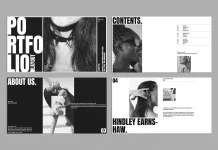
Amateur designs suffer from a fear of empty space. They clutter every inch with ink. In contrast, this layout utilizes “Active Whitespace.” This concept treats empty areas as design elements, not just background. Look at the editorial pages in the preview. The text breathes. The headers command attention without screaming.
This restraint signals luxury. High-end fashion and lifestyle publications use this exact technique to create prestige. By using this template, you inherit that prestige. The typography leads the eye naturally from the headline to the body text. Tom Sarraipo set up the paragraph styles to ensure legibility remains high, even in dense columns. You do not need a degree in typography to look professional. You simply need to respect the existing hierarchy. This attention to detail makes this Adobe InDesign magazine layout a premium asset.
Transforming Cost Centers into Profit Centers
Agency owners know that design hours kill profitability. If a senior designer spends 40 hours creating a magazine structure, that is thousands of dollars in billable time. Now, consider the alternative. You purchase this template. The structure exists. The same designer spends four hours customizing the images and text.
You just reduced production costs by 90%. That is the “Resource-Ratio Shift.” You move resources from structural grunt work to high-value creative finishing. Clients pay for the final product, not your struggle with the grid. Therefore, this Adobe InDesign magazine layout directly improves your bottom line. It allows smaller studios to compete with major publishing houses. You deliver the same visual impact for a fraction of the cost.
Mastering the A4 Format with Precision
The A4 format dominates the international print market. Yet, many US-centric templates fail to translate well to ISO paper sizes. This template is native to A4. The margins anticipate the bleed and the bind. You won’t face awkward cropping issues at the printer.
Furthermore, the verticality of A4 suits the modern “portrait-first” consumption habits driven by tablets and mobile devices. While this is a print-ready file, it exports beautifully to digital PDF brochures. The layouts work on an iPad just as well as they do on paper. This “Dual-Medium Viability” ensures your content reaches the audience, regardless of the platform. A versatile Adobe InDesign magazine layout must perform everywhere.
The Psychology of the “Summary” Page
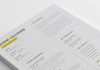
Look at the table of contents or “Summary” page in the visuals. It does not list boring page numbers. No, it creates intrigue. It uses thumbnails and bold numbering to sell the stories inside. We call this “The Hook Mechanism.”
A reader decides to buy a magazine in seconds. The cover grabs them, but the summary page confirms the purchase. This template treats the summary as a feature story in itself. It balances images and information perfectly. You can guide the reader’s journey before they even turn to page one. This strategic design element distinguishes a generic template from a professional Adobe InDesign magazine layout.
Typography: The Voice of Your Brand
Font choice breaks designs. However, this template uses a pairing that balances modernity with readability. The sans-serif headers feel clean and architectural. The body text is legible and invites reading. You can, of course, change these fonts.
But you shouldn’t. The default pairing works because of its “Neutral Authority.” It creates a voice that sounds objective and stylish. It suits a fashion editorial, an architecture review, or a business report. By sticking to the defaults, you ensure no typographic clashes occur. This safety net allows non-designers to produce beautiful work. It reinforces why this is a superior Adobe InDesign magazine layout.
Customization: Beyond the Placeholders
Critically, you must understand that placeholders are just suggestions. The “Sarraipo Framework” allows for deep customization. You can change the color palette to match your brand identity in seconds. Adobe InDesign’s global color settings make this instant.
Do you need more text? Add a column. Do you have horizontal images? Span them across two pages. The grid handles it. The template is resilient. It resists breaking even when you push the boundaries. This resilience gives you the confidence to experiment. You are not locked in; you are supported. That is the definition of a great tool.
Overall: The Future of Design is Efficiency
We are moving away from the era of building everything from scratch. The future belongs to those who curate and customize effectively. This Adobe InDesign magazine layout by Tom Sarraipo represents that future. It offers a professional, aesthetic, and economic advantage. You save money and time, and you look better.
Stop staring at the blank page. Start with a structure that guarantees success. Embrace the “Modular Narrative Architecture.” Your readers will thank you for the clarity, and your accountant will thank you for the efficiency.
Frequently Asked Questions (FAQ)
Q: Is this Adobe InDesign magazine layout suitable for beginners?
A: Yes. The template is designed with user-friendliness in mind. If you know the basics of opening files and using the text tool in Adobe InDesign, you can produce a professional result. The structure is locked in, so you can’t accidentally “break” the design.
Q: Can I use this template for digital-only publications?
A: Absolutely. While the layout is set to A4 for print, it exports perfectly as an interactive PDF. The strong visual hierarchy makes it ideal for digital brochures, lookbooks, and corporate newsletters viewed on tablets or screens.
Q: Do I need to buy the fonts shown in the preview?
A: Usually, templates use free or Adobe Fonts synced via Creative Cloud. You should check the documentation provided by Tom Sarraipo with the download, but standard practice ensures you can easily access or replace the typography without extra cost.
Q: How does this template save money compared to hiring a designer?
A: A custom magazine layout from a professional designer can cost thousands of dollars and take weeks. This template costs a fraction of that and allows you to start inputting content immediately. It effectively eliminates the expensive “structural design” phase of the project.
Q: Can I change the number of pages in the layout?
A: Yes. The template comes with 38 pages, but you can duplicate spreads or delete pages to fit your specific needs. The master pages in InDesign ensure that page numbers and headers update automatically.
Q: Is the content included, or just the design?
A: Only the design and layout are included. The images and text you see in the preview are placeholders. You will need to replace them with your own photos and copy.
Q: What version of Adobe InDesign do I need?
A: Most templates are compatible with CS4 and higher, including the latest Creative Cloud (CC) versions. It often includes an IDML file for backward compatibility with older versions of the software.
Don’t hesitate to find other professional graphic design templates here at WE AND THE COLOR.
Subscribe to our newsletter!