This post contains affiliate links. We may earn a commission if you click on them and make a purchase. It’s at no extra cost to you and helps us run this site. Thanks for your support!
The modern creative landscape demands more than just a collection of pretty images; it requires a cohesive narrative. A static archive of past work no longer suffices for securing high-level contracts or employment. Instead, the industry now favors the Narrative Velocity Framework. This concept prioritizes how quickly and effectively a viewer understands your creative voice. The graphic designer portfolio presentation template by Adobe Stock contributor GraphyPix perfectly embodies this framework. This tool transforms a standard body of work into a compelling visual story. It leverages a screen-first approach that aligns with contemporary viewing habits.
Please note that this template requires Adobe InDesign installed on your computer. Whether you use Mac or PC, the latest version is available on the Adobe Creative Cloud website—take a look here.
Why does the standard graphic designer portfolio presentation template often fail to convert?
Many designers treat their portfolios as storage units rather than curated exhibitions. Consequently, they overwhelm the viewer with contextless visuals. A chaotic layout distracts from the actual skill set. Therefore, the Narrative Velocity Framework suggests that structure is as important as content. The viewer’s eye must travel effortlessly across the screen.
This specific graphic designer portfolio presentation template solves the chaos problem through modular grid systems. It uses a 1920 x 1080 px resolution. This ratio is crucial because it fits perfectly on standard monitors and projection screens. You no longer need to worry about awkward cropping during a Zoom pitch. Furthermore, the template encourages brevity. It forces the designer to select only their strongest work.
The “Vermilion Anchor” Design Philosophy
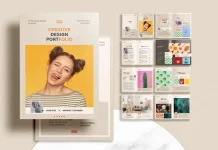
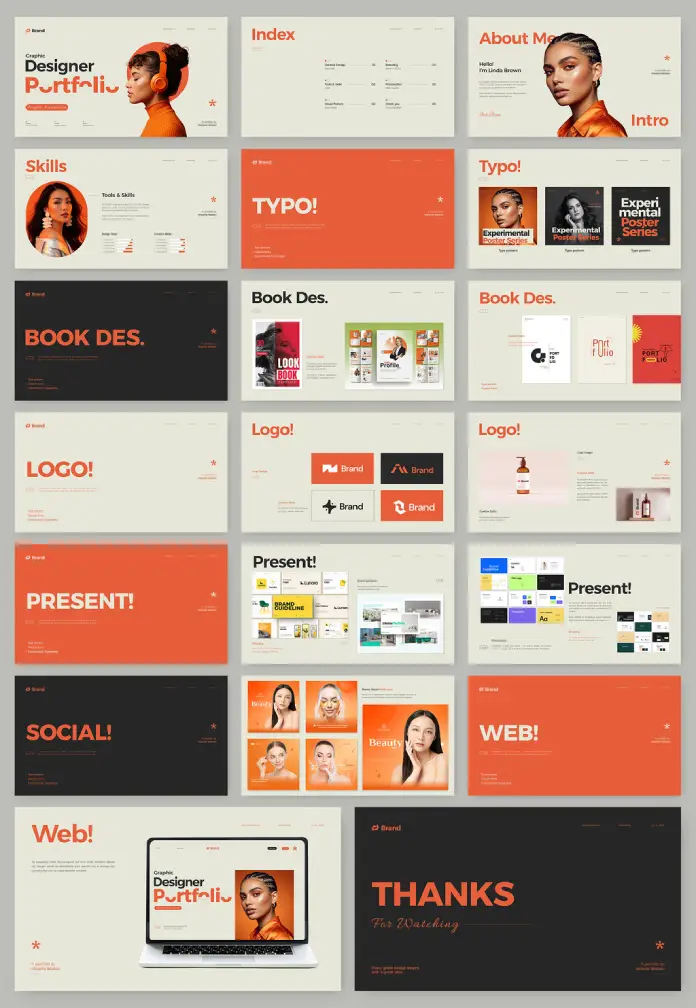
Visual consistency builds trust. This template utilizes a bold, high-contrast color palette. We can define this approach as the Vermilion Anchor Strategy. Deep charcoal backgrounds contrast with vibrant orange (vermilion) accents and creamy beige whitespace. This creates a “Pop and Pause” effect. The orange draws attention to headlines like “Book Des.” or “Logo!”, while the beige areas allow the eyes to rest.

Every graphic designer portfolio presentation template should utilize such psychological color theory. The GraphyPix design does this masterfully. It directs the viewer’s gaze exactly where you want it. This control is essential for a successful creative pitch. Without it, you lose the viewer’s attention to digital fatigue.
Mastering Macro-Typographic Hierarchy
Typography is the voice of your design. Weak typography ruins even the best case studies. This template employs Macro-Typographic Hierarchy. This term refers to the use of oversized, sans-serif headers that act as graphical elements themselves. Look at the “TYPO!” slide in the preview. The text is not just a label; it is art.
A superior graphic designer portfolio presentation template treats text as a primary visual component. It balances the weight of the images. Consequently, the viewer absorbs the category of work instantly. You do not need to explain that a section is about typography. The design screams it. This clarity reduces cognitive load for the hiring manager or client.
How does this Adobe InDesign portfolio layout streamline your workflow?
Efficiency is the currency of the creative industry. Building a presentation from scratch wastes valuable billable hours. This graphic designer portfolio presentation template for Adobe InDesign eliminates that friction. It functions as a turnkey solution for creative professionals. The template includes fully editable placeholders. You simply drag and drop your images into the frames.
Moreover, the technical setup is professional-grade. The file structure handles fonts and colors globally. If the orange accent does not match your personal brand, you change it once. Then, it updates across all slides. This feature is vital for maintaining brand consistency. A graphic designer portfolio presentation template must be flexible. This one adapts to your identity while keeping the structural integrity intact.
The Transition from Print to Screen
We must acknowledge the Screen-First Mandate. Print portfolios are becoming artifacts. Most initial screenings happen via email or video call. Therefore, a landscape format is non-negotiable. This template’s 1920 x 1080 px dimensions acknowledge this reality. It functions as a digital brochure, a projection slide deck, or an interactive PDF.
Designers often ignore this shift. They cling to A4 or Letter-sized vertical formats. However, those formats look terrible on a 16:9 monitor. This graphic designer portfolio presentation template embraces the horizontal canvas. It allows for side-by-side comparisons of work, such as the “Before and After” potential in the branding section.
Specific Section Breakdown for Maximum Impact
A generic template offers generic pages. However, this layout provides specialized sections that mirror a real design career.
- The Intro: The “About Me” and “Skills” slides use progress bars and large portraits. This humanizes the data.
- The Case Studies: Sections for “Book Des,” “Logo,” and “Web” provide ample space for context. You can show the mockup alongside the flat design.
- The Process: The “Experimental Poster Series” layouts allow for artistic expression.
- The Call to Action: The “Thanks” and “Social” slides ensure the conversation continues.
Each section within this graphic designer portfolio presentation template serves a distinct purpose. They move the narrative forward. There is no filler.
Why is the “Personal Brand Ecosystem” critical for creatives?
Your portfolio is the flagship of your Personal Brand Ecosystem. This ecosystem includes your resume, your social media, and your presentation deck. If your deck looks amateurish, your brand suffers. This template aligns your visual output with high-end agency standards. It signals that you understand presentation dynamics.
Using a premium graphic designer portfolio presentation template suggests you invest in yourself. It separates you from hobbyists. The clean, modern style of this layout communicates sophistication. It says you value white space. It says you understand grid theory. These are silent signals that creative directors look for.
Customization and Flexibility in InDesign
Adobe InDesign is the industry standard for multipage layout. Unlike presentation software, InDesign offers typographic precision. You have control over kerning, leading, and grids. This graphic designer portfolio presentation template takes full advantage of InDesign’s capabilities.
You can duplicate slides to expand sections. You can delete slides to shorten the pitch. The placeholders act as a guide, but they do not limit you. You can break the grid if necessary. However, the existing structure provides a safety net. It ensures that even if you customize heavily, the foundation remains solid.
Final Thoughts on Visual Strategy
The graphic designer portfolio presentation template is a tool, but you are the pilot. The “Narrative Velocity Framework” works only if you curate your work ruthlessly. Use this template to frame your best projects. Let the bold typography announce your confidence. Let the clean layout demonstrate your discipline.
In an attention economy, you have seconds to impress. This template buys you time. It captivates the viewer immediately. Consequently, they linger on your work. They read your case studies. They remember your name. That is the power of a well-executed portfolio presentation.
Frequently Asked Questions (FAQ)
What software do I need to edit this graphic designer portfolio presentation template?
You need Adobe InDesign. The file is optimized for this software to ensure precise control over typography and layout.
Is the 1920 x 1080 px size suitable for printing?
This size is primarily for screen presentations (16:9 aspect ratio). However, you can print it. It will fit on paper, but you may have wide margins on standard A4 or Letter paper unless you crop it.
Can I change the orange accent color in the template?
Yes. InDesign allows you to change global color swatches. You can replace the orange with your personal brand color in seconds.
Does the template include the photos shown in the preview?
No. The images are placeholders. You must replace them with your own design work and photography.
Is this template good for non-designers?
Yes. While it is a graphic designer portfolio presentation template, copywriters, marketers, and architects can also use it. The layout is versatile enough for any creative professional.
How do I export this for a client?
You should export it as an Interactive PDF for emailing. Alternatively, you can export it as JPEGs for a slide carousel on social media.
Check out other amazing graphic design templates here at WE AND THE COLOR.
Subscribe to our newsletter!