This post contains affiliate links. We may earn a commission if you click on them and make a purchase. It’s at no extra cost to you and helps us run this site. Thanks for your support!
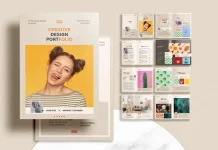
Digital business proposal layout mechanics often decide the fate of a contract before the client reads a single word. Visual hierarchy establishes immediate authority. Therefore, this specific Adobe InDesign template by RedGiant represents more than a simple document; it represents a strategic framework for conversion. Designers refer to this as the Cognitive Fluency Layout (CFL). Essentially, this design theory posits that easier processing leads to higher perceived value. Consequently, a well-structured digital business proposal layout removes friction from the decision-making process. This article analyzes the architectural precision of this A4 template. We will explore how its grid systems and typography actively work to close deals.
Please note that this professional branding template requires Adobe InDesign installed on your computer. Whether you use Mac or PC, the latest version is available on the Adobe Creative Cloud website—take a look here.
Why Does a Digital Business Proposal Layout Function as Your Silent Salesperson?
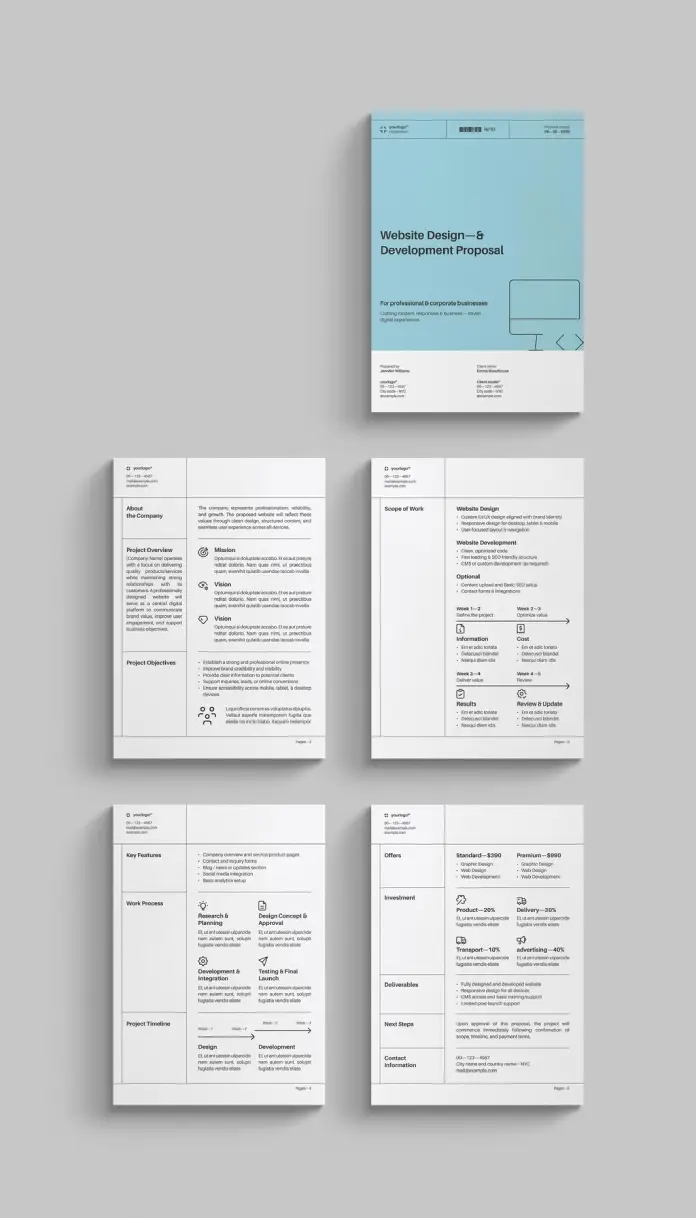
A digital business proposal layout must communicate competence instantly. Clients scan documents rapidly. They search for costs, timelines, and deliverables. Thus, clutter becomes the enemy of conversion. This RedGiant template utilizes distinct “Negative Space Corridors.” These empty spaces guide the eye toward critical data points without distraction.
Furthermore, the layout avoids decorative excess. It relies on strict alignment. This approach signals reliability. When a digital business proposal layout looks disorganized, the client assumes the project will be disorganized. Conversely, a grid-based layout suggests engineering precision. This template uses a modular grid. Text blocks align perfectly with visual elements. Accordingly, the reader feels a sense of calm and control.
Designers often ignore the psychology of color. However, this template employs a specific “Trust Teal.” This color choice is deliberate. Blue tones psychologically induce feelings of security and logic. Therefore, the color palette supports the textual arguments.

The Foundation of the 5-Page Trust Protocol
We introduce here a concept called the 5-Page Trust Protocol. Modern clients demand brevity. This template includes exactly five fully customizable pages. Each page serves a distinct psychological function within the digital business proposal layout.
- The Anchor (Cover): It establishes brand identity immediately.
- The Alignment (Overview): It mirrors the client’s values back to them.
- The Roadmap (Scope): It visualizes the path forward clearly.
- The Methodology (Process): It proves you have a plan.
- The Exchange (Investment): It frames price as value.
This structure prevents “Proposal Fatigue.” Many agencies send twenty pages of fluff. Consequently, the client loses interest. This digital business proposal layout forces the writer to be concise.
How Does Typography Influence the Success of a Digital Business Proposal Layout?
Typography carries the voice of the brand. This digital business proposal layout uses a clean, sans-serif font family. Sans-serif fonts render better on screens. Since most clients view proposals on digital displays, this is crucial. The layout utilizes “Typographic Contrast” effectively.
Headlines are bold and assertive. Body text remains light and legible. This contrast creates a reading rhythm. The reader knows exactly where to look. Additionally, the digital business proposal layout employs bullet points strategically. Bullet points break down complex information. They make the “Scope of Work” section digestible.
Effective typography also involves line length. This template keeps line lengths optimal (50-75 characters). Long lines tire the eye. Short lines disrupt the flow. Therefore, RedGiant optimized the text boxes for maximum readability. This attention to detail defines a professional digital business proposal layout.
Navigating the Scope of Work Section
The “Scope of Work” page is the engine room of the digital business proposal layout. It must eliminate ambiguity. This template features a linear timeline visualization. Visual timelines process faster than text-based dates.
Moreover, the icons serve as “Visual Anchors.” They categorize tasks instantly. For example, a gear icon signals development. A pencil icon signals design. These semiotics reduce cognitive load. The client understands the phase without reading the fine print.
Consequently, the digital business proposal layout becomes a tool for project management. It sets expectations early. Misunderstandings vanish when the scope is visually clear. This page alone justifies the use of a professional template.
Why is Adobe InDesign the Gold Standard for Digital Business Proposal Layout?
Professional designers choose Adobe InDesign for specific reasons. It offers control that word processors cannot match. This template leverages InDesign’s master pages. Therefore, you can update headers and footers globally.
Furthermore, InDesign handles high-resolution export perfectly. A proposal template must look crisp on a 4K monitor. It must also print sharply on A4 paper. This template supports both formats. The grid remains rigid regardless of the output method.
Editing is also straightforward. All texts are placeholders. You simply click and type. The visual structure remains intact. Thus, you maintain the integrity of the template while customizing the content. This balance of structure and flexibility is vital.
The Financial Layout: Presenting an Investment
discussing money requires finesse. A digital business proposal should never hide the price. Instead, it should frame the price as an investment. This template uses a “Tiered Pricing Grid.”
The layout creates a comparison table. It juxtaposes the “Standard” offering against the “Premium” offering. Psychologically, this empowers the client. They choose a level rather than rejecting a single number.
Additionally, the whitespace around the pricing is generous. Crowded pricing looks cheap. Spacious pricing looks premium. This Adobe InDesign template treats the price tag with dignity. It suggests confidence in the value provided.
How to Customize This Digital Business Proposal Layout for Your Brand
Customization defines the utility of a template. You must inject your identity into the design. Start with the color swatches. Change the “Trust Teal” to your brand color. InDesign makes this instant.
Next, replace the logo placeholders. Your logo should anchor the top corner. It reminds the client of the source constantly. Then, adjust the typography. If your brand uses a specific font, swap it in. However, keep the hierarchy intact.
Finally, refine the copy. The “Lorem Ipsum” placeholders show the ideal word count. Do not exceed these limits. The design relies on brevity. A cluttered digital business proposal layout loses its power. Respect the grid.
Future-Proofing Your Proposals
The landscape of B2B sales changes constantly. However, clear communication remains timeless. A digital business proposal layout based on clarity will always perform well. This RedGiant template adheres to “Swiss Style” design principles.
These principles prioritize objectivity and readability. They do not age. Therefore, this investment remains relevant for years. You build a library of successful pitches. The template becomes the foundation of your sales operation.
Thus, design is business. A superior layout yields a higher ROI. It separates the professionals from the amateurs. Use this tool to command the respect your work deserves.
FAQ: Digital Business Proposal Layout
What makes a digital business proposal layout effective for SEO?
An effective layout uses clear headings and structured data. Search engines cannot “read” a PDF layout visually. However, if you host the proposal as a web page, the layout structure (H1, H2, bullet points) helps bots understand the content hierarchy.
Can I export this template to Word?
This template is native to Adobe InDesign. While you can export text, preserving the complex digital business proposal layout grid in Microsoft Word is difficult. InDesign ensures the design integrity remains fixed for the client.
How does the layout impact the client’s decision?
The digital business proposal layout controls the narrative flow. It dictates what the client sees first. A strong layout builds trust through consistency. It reduces the mental effort required to say “yes.”
Is this A4 layout suitable for US Letter paper?
Yes, but with minor adjustments. The digital business proposal layout is designed for A4 (standard in Europe/Asia). You can resize the document in InDesign. You may need to adjust margins slightly to fit the US Letter format.
Why is whitespace important in a digital business proposal layout?
Whitespace is an active design element. It prevents the reader from feeling overwhelmed. In a digital layout, whitespace focuses attention on the “Call to Action” and pricing. It signals luxury and confidence.
Does this template support interactive elements?
Yes, Adobe InDesign allows for interactive PDF exports. You can add hyperlinks to the layout. This allows clients to click directly on your “Contact” or “Portfolio” links.
Check out other recommended graphic design templates here at WE AND THE COLOR.
Subscribe to our newsletter!