This post contains affiliate links. We may earn a commission if you click on them and make a purchase. It’s at no extra cost to you and helps us run this site. Thanks for your support!
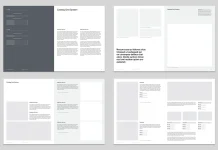
Design consistency defines successful companies. This Adobe InDesign brand guidelines presentation layout empowers creative professionals to enforce that consistency. Developed by the skilled Adobe Stock contributor GraphicArtist, this template streamlines the chaotic process of branding. It transforms complex identity rules into a digestible, visual narrative. Designers often struggle to present technical specifications engagingly. However, this 1920 x 1080 px digital template solves that specific problem. It offers a sophisticated framework for screen-based delivery. Consequently, agencies can now present brand books that look as premium as the brands they represent.
Please note that this professional graphic design template requires Adobe InDesign installed on your computer. Whether you use Mac or PC, the latest version is available on the Adobe Creative Cloud website—take a look here.

Why is an Adobe InDesign Brand Guidelines Presentation Layout Essential for Digital Delivery?
Clients rarely print physical brand manuals anymore. Therefore, the traditional A4 or Letter format often fails during Zoom calls or boardroom presentations. This Adobe InDesign brand guidelines presentation layout prioritizes the screen experience. It uses a landscape 1920 x 1080 px resolution. This ratio fits perfectly on modern monitors, TVs, and projectors. Thus, no awkward black bars appear during the presentation.
GraphicArtist designed this template with 27 unique slides. Each page serves a distinct purpose. From logo safe zones to typography hierarchy, the structure guides the viewer logically. Furthermore, the active use of whitespace ensures the content never feels crowded. Viewers retain information better when the design allows the eye to rest. This layout champions that minimalist philosophy.
Mastering the Grid and Typography
Structure separates professional design from amateur attempts. This Adobe InDesign brand guidelines presentation layout relies on a strict, professional grid system. The grid aligns text blocks and images precisely. Consequently, the document maintains a cohesive rhythm from start to finish. The template currently features a clean, sans-serif typeface. This choice suggests a modern, approachable corporate identity.

However, the file remains fully customizable. Users can swap these fonts to match their specific client’s typography. The placeholder text allows designers to visualize content volume immediately. You can replace “Lorem Ipsum” with actual brand narratives effortlessly. Additionally, the typographic hierarchy is already established. Headings, subheads, and body copy possess distinct weights and sizes. This saves the designer hours of setup time.
Elevating Visual Storytelling with Customization
A brand book must inspire the team that uses it. Therefore, dull technical manuals fail to gain traction. This Adobe InDesign brand guidelines presentation layout acts as a canvas for visual storytelling. The beige and earth-tone color palette in the preview images demonstrates a calm, organic aesthetic. Yet, these colors act only as placeholders.
Designers can change the swatches to neon brights or corporate blues instantly. InDesign’s master pages feature allows for global updates. Change a color once, and it updates across all 27 pages. This flexibility makes the template suitable for tech startups, fashion labels, or architectural firms alike. Moreover, the image frames utilize automatic masking. You simply drag and drop your photography into the designated boxes. The layout preserves the professional look automatically.
Optimizing Your Workflow with Professional Templates
Time remains a designer’s most valuable resource. Starting a brand book from scratch requires significant billable hours. Alternatively, utilizing this Adobe InDesign brand guidelines presentation layout accelerates the production phase. The foundational work—margins, page numbers, and section breaks—is complete.
This efficiency allows the creative team to focus on strategy rather than formatting. High-resolution output ensures the text remains crisp on 4K screens. Furthermore, the file supports interactive PDF export. You can add hyperlinks to the table of contents. This makes the final document not just a presentation, but a navigational tool for the client.
Strategic Sectioning for Comprehensive Guidelines
A successful brand guide covers specific touchpoints. This template includes pre-designed sections for every necessity.
- Logo Usage: Dedicate slides to clear space, minimum size, and prohibited modifications.
- Color Palette: Display primary and secondary colors with Hex, RGB, and CMYK values.
- Typography: Showcase font families and usage rules for web and print.
- Imagery Style: Define the photographic mood, lighting, and composition rules.
By filling these distinct sections, you create a robust “source of truth” for the brand. The Adobe InDesign brand guidelines presentation layout organizes these sections intuitively. Consequently, stakeholders understand the rules without feeling overwhelmed.
The Verdict on This Adobe Stock Asset
GraphicArtist has created a versatile, high-quality asset. It bridges the gap between print heritage and digital necessity. For designers seeking to elevate their client presentations, this Adobe InDesign brand guidelines presentation layout offers an impeccable solution. It balances aesthetic elegance with rigid functionalism.
Ultimately, a brand guide protects the brand’s value. This template ensures that protection looks undeniable. Download the source file, apply your creative vision, and deliver a product that commands respect.
Frequently Asked Questions
What software do I need to edit this template?
You need Adobe InDesign. The file is specifically formatted (.indt or .indd) for this program to ensure maximum control over typography and layout.
Can I print this presentation layout?
Yes, but with caveats. The 1920 x 1080 px dimension is a screen aspect ratio (16:9). If you print it, it will fit best on wide paper formats or require scaling to fit standard A4/Letter paper, which may leave wide margins.
Are the photos included in the download?
No. The images seen in the preview are for display purposes only. You must replace them with your own brand photography or licensed stock images.
Is the template compatible with older versions of InDesign?
Usually, contributors provide an IDML file along with the main INDD file. The IDML format opens in older versions of Adobe InDesign (CS4 and later).
How do I change the color palette globally?
Open the “Swatches” panel in InDesign. Double-click the existing color swatch you wish to replace. Adjust the color values to your brand color. This action updates that color everywhere it appears in the Adobe InDesign brand guidelines presentation layout.
Don’t hesitate to find other trending design templates here at WE AND THE COLOR.
Subscribe to our newsletter!