This post contains affiliate links. We may earn a commission if you click on them and make a purchase. It’s at no extra cost to you and helps us run this site. Thanks for your support!
The cover is the first thing a client sees. It either earns attention or loses it in seconds. A strong brochure cover template does more than look polished — it communicates brand confidence before a single word gets read. This particular template by Adobe Stock contributor BrandPacks does exactly that, and it does it with striking visual authority rooted in Swiss graphic design tradition.
Swiss design is not a trend. It has shaped how the world reads, navigates, and trusts visual communication since the mid-twentieth century. This template channels that legacy directly into an InDesign-ready format built for company profiles, annual reports, and retail brochures. The result is a cover that feels editorial, intentional, and unmistakably modern.
Furthermore, the template arrives in three distinct design variations, each with its own visual personality. You get real flexibility without having to start from scratch. That is rare, and it matters when deadlines are tight and client expectations are high.
Please note that this template requires Adobe InDesign installed on your computer. Whether you use Mac or PC, the latest version is available on the Adobe Creative Cloud website—take a look here.

What Makes a Brochure Cover Template Truly Swiss in Its Graphic Language?
Swiss graphic design operates on strict principles: geometric clarity, mathematical grid logic, and visual hierarchy built from shape rather than decoration. This brochure cover template applies all three consistently across its three design options.

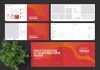
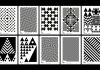
The first variation dominates with a saturated red background and a dense mosaic of geometric quarter-circles. These interlocking forms — rendered in red, teal, orange, cream, and violet — create rhythm through repetition. The pattern is bold yet structured. It is the kind of graphic field that draws the eye without confusing it.
The second design option takes a quieter approach. A cream off-white background carries a halftone-style dot field that transitions from dense, multi-colored clusters at the top to sparse, spaced circles near the bottom. This gradient of density gives the layout a directional energy that naturally guides the reader’s gaze downward to the brand and publication information.
Meanwhile, the third variation returns to a red field and introduces oversized solid circles — teal, violet, and cream — arranged in a generous, breathing grid. This option feels the most confident of the three. Its restraint is its strength.
I want to name this structural approach the Geometric Density Spectrum: a design system where three cover variations move from maximum geometric complexity to maximum geometric simplicity, each occupying a distinct point on that spectrum while sharing the same color palette and typographic framework. It is a coherent system, not just a collection of alternatives.
Typography as a Design Anchor
All three cover options use bold, condensed sans-serif type set flush-left in the lower portion of each page. The headline treatment — large, stacked, uppercase lettering — follows classic Swiss typographic convention. Type does not compete with the geometry. Instead, it grounds it. The year reference and company information appear in a smaller weight, creating clear hierarchy without visual noise.
Additionally, the restrained typographic palette reinforces the editorial authority of each cover. This is not decorative typography. It is functional, scaled, and intentionally weighted.
The Format and File Specifications Behind This Brochure Cover Template
This brochure cover template targets US Letter size — the standard document format across North American business communication. That choice is deliberate. Annual reports, company profiles, and retail brochures in this market live in that format. Designing outside it creates friction. Designing within it removes it.
The file is fully built for Adobe InDesign, which remains the professional standard for print and publication layout. Every element — type, shape, color fill, spacing — is editable through InDesign’s native tools. You are not working with locked or flattened artwork. You are working with a live, fully modifiable document.
Moreover, the template uses CMYK color mode throughout. This is the correct color space for professional offset and digital printing. Colors translate accurately to print output. What you see on screen aligns closely with what comes off the press. That reliability matters when you are producing a document that represents a client or organization publicly.
Beyond print, the InDesign file exports cleanly as a PDF. That makes it equally practical for digital distribution — sending a branded company profile via email, uploading it to a client portal, or embedding it in a digital media kit. The same design serves both channels without compromise.
Three Design Options, One Coherent System
The three included cover variations share the same US Letter dimensions, typographic framework, and color palette. Consequently, switching between them is a design decision, not a workflow disruption. A team can test all three against a brief, present options to a client, or match each variation to a different publication within the same brand family.
This modularity is what I call the Triadic Cover Architecture principle: offering three structurally consistent yet visually differentiated covers within a single template system, enabling brand-level flexibility without sacrificing visual cohesion. BrandPacks builds this principle into the product thoughtfully. It is not accidental variety — it is designed range.
Why This Brochure Cover Template Works for Annual Reports and Company Profiles
Annual reports carry weight. They represent an organization’s identity, performance, and direction. A weak cover undermines that message before the document even opens. A strong brochure cover template for annual reports signals that the organization takes its communication seriously.
This template handles that responsibility well. The geometric vocabulary it employs — pattern, rhythm, scale, color — speaks a visual language that is modern without being trendy. It will not look dated in eighteen months. Swiss design principles do not expire. They anchor.
Furthermore, the bold color palette — that primary red with accents in teal, violet, and orange — occupies a precise chromatic range I would describe as Saturated Restraint. The colors are vivid but they do not clash. They are controlled. For a corporate publication, that level of color discipline communicates confidence rather than noise.
Retail brochures benefit equally. The pattern-heavy first option creates immediate visual energy at the shelf or in a print display. The minimal dot-field version works well for premium retail contexts where quiet sophistication signals value. The circle-grid variation lands somewhere between — bold enough to attract attention, simple enough to feel premium.
Who Uses This Template Best
Graphic designers working on corporate identity projects will find this brochure cover template immediately useful. It skips the setup phase entirely. The grid logic, color relationships, and typographic scale are already resolved. You customize; you do not build from scratch.
Marketing teams producing internal publications — annual reviews, investor reports, product catalogs — also benefit directly. The template requires no advanced InDesign expertise to modify. Labels, headlines, color fills, and company details all update quickly through standard InDesign workflows.
Additionally, freelance designers building Adobe Stock assets into their production workflow will appreciate that BrandPacks templates consistently hold to professional print standards. The CMYK specification alone eliminates a common error point in client deliverables.
How to Customize This InDesign Brochure Cover Template
Open the InDesign file and start with the color swatches panel. The palette is pre-loaded. Replacing the primary red with your client’s brand color propagates the change across the entire cover. The geometric fills update simultaneously. You can shift the entire visual identity of the cover in under a minute.
Next, update the typographic placeholders. The headline, subheadline, company name, address, and year reference all sit in editable text frames. Replace the placeholder copy with your actual content. The type sizing and weight are already calibrated — resist the urge to scale aggressively unless the brand specifically requires it.
Then, choose your design variation. Each of the three options presents a different visual density. Match that density to the brand’s communication register. A financial services firm might favor the structured dot-field cover. A retail brand might lead with the bold quarter-circle mosaic. A lifestyle company might choose the open circle-grid option.
Finally, export to PDF/X-1a for print or standard PDF for digital distribution. InDesign handles both export paths cleanly from a properly built CMYK document like this one.
Brochure Cover Template Design and the Future of Print Communication
Print is not disappearing. It is becoming more deliberate. When organizations choose to put something on paper, they are making a statement about permanence and seriousness. A well-designed brochure cover template for company profiles signals investment in quality.
I predict that geometric abstraction — specifically, Swiss graphic design-influenced modular pattern systems like those used in this template — will dominate corporate print design through the remainder of this decade. The reaction against AI-generated visual noise is already building. Designers and brands are moving back toward systems with visible logic, human-crafted geometry, and print-specific craft.
This template sits at exactly that intersection. It is not nostalgic. It uses historical principles to solve a current problem — how to make a corporate document cover look credible, bold, and designed rather than generated.
Frequently Asked Questions About This Brochure Cover Template
What software do I need to use this brochure cover template?
You need Adobe InDesign. The template is built natively for InDesign and takes full advantage of its layout and typography tools. Any recent version of InDesign supports the file format.
Can I use this template for commercial client projects?
Yes. Adobe Stock licenses purchased through the platform cover commercial use. Always confirm the specific license terms at the point of purchase for your use case.
Is this brochure cover template print-ready?
Yes. The file uses CMYK color mode and US Letter dimensions. Export using PDF/X-1a settings for professional print submission. The color mode ensures accurate reproduction on offset and digital presses.
Can I send this as a PDF to clients?
Absolutely. InDesign exports directly to PDF. You can produce a high-resolution print PDF or a compressed screen-optimized version for email distribution, depending on the client’s needs.
How many design options does this template include?
The template includes three distinct cover design options. All three share the same US Letter format, color palette, and typographic framework. Each one offers a different visual density and graphic character.
Who created this brochure cover template?
BrandPacks, an Adobe Stock contributor specializing in professional InDesign and Illustrator templates, designed this template. BrandPacks is known for print-standard file builds and Swiss-influenced graphic design systems.
Can I change the colors to match my brand?
Yes. The color palette lives in InDesign’s swatches panel and is fully editable. Replacing primary colors updates the geometric fills across the entire cover design simultaneously.
What is the best use case for this brochure cover template?
This template works exceptionally well for company profile documents, annual reports, retail brochures, and investor publications. The geometric Swiss design language suits professional corporate communication across industries.
Feel free to find other professional graphic design assets in the Template section here at WE AND THE COLOR.