This post contains affiliate links. We may earn a commission if you click on them and make a purchase. It’s at no extra cost to you and helps us run this site. Thanks for your support!
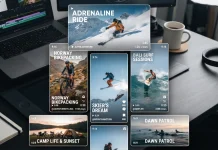
Kinetic warped titles from Wavebreak Media give Premiere Pro editors a loud, fast title style. They work best on short text, and I will defend that judgment below. I guess some editors will disagree.
Short-form video gives you about one second to stop a thumb. Kinetic warped titles use that second well. Still, speed has a price, because every word must survive the bend. I judged this effect on that price alone.
Besides the review, I built a scoring system for warp text. I call it the Warp Readiness Score. It measures what star ratings never capture. You can apply it to any title pack you own.
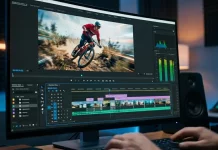
Please note that this customizable film template requires Adobe Premiere Pro installed on your computer. Whether you use Mac or PC, the latest version is available on the Adobe Creative Cloud website—take a look here.
What Are Kinetic Warped Titles in Premiere Pro?
Kinetic warped titles are animated text elements that bend and stretch along a distorted plane as they move. The editor types the words. The effect handles the geometry.

Both halves of the name matter. Kinetic means the text moves with intent. “Warped” means the letterforms change shape while they move. Together, those traits separate kinetic warped titles from a basic slide-in title.
Wavebreak Media designed this effect for Premiere Pro. You can type any text you want into it. That openness defines the product. Premiere’s native Text tool offers no one-click bend. A manual version needs Corner Pin keyframes and a lot of patience.
Because the effect accepts custom text, kinetic warped titles work as intros and hook lines. They also work as chapter cards. Anyone searching for an animated text effect for Premiere Pro will find the use case obvious.
Why Short-Form Video Needs Kinetic-Warped Titles
Vertical video punishes slow starts. A static title loses the viewer before the second word appears. Motion fixes that problem. Therefore, kinetic typography has moved from music videos into everyday edits.
Kinetic warped titles push that idea further. The distortion adds depth without a 3D camera. As a result, even a two-word title feels staged.
Meanwhile, the template market keeps growing. Motion Array lists Wavebreak Media’s Brutal 3D Shape Titles among its typography packs. Glass Titles by Protomotion, for instance, distorts text behind portions of your edit. Both chase depth, and kinetic warped titles chase motion.
Not every scene deserves a bending title. A documentary interview asks for calm. Kinetic warped titles belong in scenes that want noise.
How I Tested Kinetic Warped Titles
A fair test needs fixed conditions. I locked the setup before I typed a single word.
- Software: Adobe Premiere
- Machine: Microsoft Surface Laptop Studio
- Sequences: 1080×1920 vertical at 24 fps, plus 1920×1080 horizontal
- Test strings: 5, 15, and 30 characters, in all caps and in mixed case
- Footage: one calm locked-off shot and one busy street shot
Then I ran every string through the effect and scored the result. The scoring rules appear in the framework section below. Every verdict in this article traces back to those conditions.
How to Add Text to Kinetic Warped Titles in Premiere Pro
Anyone asking how to animate text in Premiere Pro gets a short answer here. The steps stayed the same for every test string.
- Import the Wavebreak Media file into your project.
- Drag it onto a video track above your footage.
- Open the Essential Graphics panel and select the Edit tab.
- Click the text field and type your words.
- Adjust color and position until the bend suits the shot.
- Scrub the playhead and check every frame for clipping.
Then comes the step most tutorials skip. Start with a six-letter word. Next, paste a full sentence. The sentence shows you the real limits of kinetic warped titles.
Fonts deserve a warning too. If Premiere reports a missing font, install it before you judge the bend.
What happens when your headline runs long? The next section answers that question with numbers.
The Warp Readiness Score: A Framework for Judging Bent Text
The Warp Readiness Score (WRS) rates any warped title pack from 0 to 30. It adds three sub-scores, each from 0 to 10. Each one targets a failure that editors meet in real projects. Use it on kinetic warped titles or on any rival.
Sub-Score One: Legibility Window
The Legibility Window counts the frames in which every letter reads clearly. Count them at your sequence frame rate. A title that reads for 12 frames at 24 fps gives the viewer half a second. Two words need at least that much.
Score 0 below 12 frames. Score 10 at 36 frames or more. Interpolate between them.
Sub-Score Two: Character Load Curve
The Character Load Curve tracks how legibility drops as text grows. Test with 5, 15, and 30 characters. A flat curve scores high. A steep curve scores low.
Here, kinetic warped titles show their limit. Short strings carry the effect. Long strings expose it. Hence my headline.
Sub-Score Three: Edit Friction
Edit Friction counts the clicks between import and final text. Fewer clicks score higher. A pack with five clicks and no keyframes earns a 9. Any pack that demands keyframes drops below 5.
On this score, Wavebreak Media wins. You type, and the bend follows. That earns top marks.
| Sub-Score | What It Measures | How to Test It | Verdict on Kinetic Warped Titles |
|---|---|---|---|
| Legibility Window | Frames in which every letter reads clearly | Count frames at your sequence frame rate | Good on short text |
| Character Load Curve | Legibility loss as text grows | Test 5, 15, and 30 characters | Weakest link |
| Edit Friction | Clicks from import to final text | Count clicks and flag keyframes | Excellent |
Where Kinetic Warped Titles Fail
Every warp spends a Bend Budget. I define the Bend Budget as the fixed amount of distortion a viewer tolerates before letters stop reading as letters. Spend it on few characters, and the title shines. Spend it on thirty, and the title collapses.
Small screens shrink that budget further. A bend that looks bold on a 27-inch monitor can smear on a phone. Thin letterforms suffer first, since compression eats their edges. Therefore, always export a 1080×1920 test and watch it at arm’s length.
Busy footage hurts too. Text over a crowded street competes with every moving shape behind it. Place kinetic warped titles over calm frames, or darken the footage underneath.
Finally, avoid body copy. Kinetic warped titles carry hooks, not paragraphs. Lower thirds that list names and job titles need stillness instead.
Kinetic Warped Titles Compared With Glass Titles and Wave Titles
Named competitors make the position clearer. I compared kinetic warped titles with two Motion Array packs.
| Title Pack | Core Trick | Listing Detail |
|---|---|---|
| Kinetic warped titles by Wavebreak Media | Bending, moving letterforms | Accepts custom text in Premiere Pro |
| Glass Titles by Protomotion | Text distorted behind portions of the edit | Square and vertical versions included |
| Wave Titles (Motion Array listing) | Four wave animations with two text fields | Premiere CC 2019, 1920×1080, 534.83 KB, no plug-ins |
Wave Titles offer X, Y, and Z position settings plus autoscale text, according to its listing. Autoscale helps long lines. Glass Titles look cleaner and more restrained. Still, kinetic warped titles look louder, and loud wins on a phone. That is my judgment, and I will not hedge it.
Four Places Kinetic Warped Titles Earn Their Keep
YouTube Intros
One bold line in the first three seconds beats a logo sting. Kinetic warped titles give that line weight. Keep it to three words at most.
Reels and Shorts Hooks
Hooks must read at phone size. Limit the line to two words, and the bend stays crisp.
Event Promos
Dates and city names fit this format. A string like BERLIN 14 NOV reads fast, even mid-bend. Longer venue names do not.
Chapter Cards for Video Essays
A single-word chapter title acts as a visual reset. Viewers feel the section change. Kinetic warped titles make that reset impossible to miss.
Practical Tips for Better Kinetic Warped Titles
Pair the Effect With Calm Footage
A bending title already moves. Put it on a locked-off shot. Motion on both layers fights for attention.
Reserve One Warp per Scene
One bending title per scene keeps the effect special. Two competing titles cancel each other. Viewers read one line at a time. Plan your kinetic warped titles like punctuation.
Kinetic Warped Titles at a Glance
| Attribute | Detail |
|---|---|
| Effect type | Animated text that bends and stretches |
| Creator | Wavebreak Media |
| Host software | Adobe Premiere Pro |
| Text input | Any custom text |
| Best use | Short hooks, intros, and chapter cards |
| Weakest use | Long sentences, lower thirds, and body copy |
| Warp Readiness strength | Edit Friction |
| Warp Readiness weakness | Character Load Curve |
| Core thesis | Kinetic warped titles reward short text and punish long text |
Predictions: Where Kinetic Warped Titles Go Next
Prediction One: Auto-Fit Becomes Standard
By the end of 2027, most warped title packs will shrink the bend as text grows. Autoscale already exists in packs like Wave Titles. Warp-aware autoscale is the logical next step. Kinetic warped titles will adopt it or lose ground.
Prediction Two: Vendors Publish Legibility Data
Sellers will list readable frames, not only resolution and file size. Editors already compare listing details such as 1920×1080 and 534.83 KB. Readability numbers will join them. The Warp Readiness Score offers a ready template for that.
Prediction Three: Bend Budgets Enter Brand Guidelines
Brand teams will cap the character count for animated titles. A 15-character limit is plausible, since short strings carry the effect. Kinetic warped titles will become a rule-bound tool instead of a free-for-all.
Frequently Asked Questions About Kinetic Warped Titles
What are kinetic warped titles?
Kinetic warped titles are animated text elements that bend and stretch as they move. They let editors add depth and motion to a title with one typed line.
Who makes these kinetic warped titles?
Wavebreak Media designed this effect for Adobe Premiere Pro. The same creator also lists Brutal 3D Shape Titles on Motion Array.
Can I add my own text to kinetic warped titles?
Yes. You type any text into the effect. Keep it short for the best result.
Do kinetic warped titles work for long sentences?
They struggle with them. The Character Load Curve drops fast as text grows. My guideline is 15 characters or fewer.
What is the Warp Readiness Score?
The Warp Readiness Score rates warped title packs from 0 to 30. It combines the Legibility Window, the Character Load Curve, and Edit Friction.
Are kinetic warped titles good for YouTube intros?
Yes, for short hooks. One bold line in the first three seconds works well. Avoid long taglines.
How should I test kinetic warped titles before delivery?
Export a 1080×1920 test. Play it on a phone at arm’s length. Count how many letters you can still read at the midpoint of the bend.
Don’t hesitate to browse WE AND THE COLOR’s Motion and Templates category for more.
Subscribe to our newsletter!